10About this guide
This manual covers Cost Slasher. The 0.4.2 paid beta was uploaded to production as Forge 3.0.0 from the verified v0.4.2 source. Upload does not qualify a new native installation or establish a customer release. The retained publisher native test baseline is 0.3.2, executing Forge 2.0.0 with app billing disabled; current storage bootstrap and ordinary-user checks still need their own evidence. Cost Slasher is Paid via Atlassian, billed against the required Jira installation's users; Confluence is optional and your Atlassian subscriptions and seats remain separate. The starting tariff of USD13.20 per month or USD132 per year for up to ten Jira users was saved and reloaded in Marketplace. Progressive prices are intended to fund AWS/Forge running costs, the Marketplace fee and an operating buffer under the launch workload estimates; see the pricing decision and actual saved pricing. App review ECOHELP-170877 was automatically rejected with Not enough details on listing; listing completion and review remain open. Customer admission remains closed. This guide does not announce public availability. Use the current quality state and implementation ledger to distinguish uploaded source, installed build and actual acceptance.
11Marketplace licence and existing commitments
In the uploaded paid build, fresh access checks, allocations, configuration and automation require the server's trusted Marketplace context to report an active Cost Slasher licence. A trial or other no-charge entitlement is valid only when Atlassian reports license.active: true; a missing or unknown value is refused. Opening a page, an OAuth identity grant or a Cost Slasher REST token does not purchase a subscription or confer licence authority. Current account, scope, permissions, eligibility, storage and provider safeguards still apply.
Recorded-result reads remain subject to current permissions. Narrow safety handling preserves an exact proven prior-release recovery or fully held return commitment, issued-effect readback and genuine security compensation after licence lapse; it is not a general unlicensed grant. Read the original operation's result rather than assuming a restore. The retained historical 0.3.2 native baseline did not execute these paid checks and does not qualify the uploaded build.
12Open the application
Open Apps → Cost Slasher in Jira or in the connected Confluence site. My access is the default view for every authenticated member. Jira Service Management agent access appears separately through the Jira entry; this manages an agent seat, not customer portal access or a guest recovery space. The Forge installation requires Jira and can connect Confluence on the same site. A second site requires its own installation and registered controller.
Navigation follows current app capabilities. Members see My access, Time away and What's New. Operators can inspect Operations, People, Policies and Consumption in their assigned scope. Routing managers see Routing. Auditors can inspect their assigned operational, people, policy, audit, management-report and consumption records. Administrators receive configuration, permission and API-token controls. A visible button never overrides the server's account, site, app or object checks.
The native app follows the surrounding Jira or Confluence theme automatically. Change it through that app's Profile → Theme control; Cost Slasher has no separate native theme button or saved override. The standalone recovery website has its own theme control because it has no Atlassian app frame.
What's New and the App release footer show the installed build's authored release metadata. The uploaded build's authored release is 0.4.2 Beta; the retained native test evidence is for 0.3.2 Free beta. Confirm the actual installed build separately. The latest notes are shown first; expand Earlier releases for the retained history. The same notes are available in the release notes. This is separate from Forge's deployment numbering. The publisher's development-only Storage evidence → Executing app version inspector, when enabled by the server, is also separate from the installation's Storage safety check. Neither authored notes nor a version number proves a released production version.
An account without a paid app seat may be unable to open that app's Apps menu. Its route back is the configured native access-denial message and the linked recovery website. Arrival and sign-in do not grant access automatically.
Site labels use the hostname from the configured HTTPS site origin. The stored site title may come from Jira's server information and read simply “Jira”, even beside Confluence; it is not a separate app choice or a verified human site name. If no valid site origin is available, the interface uses only the supplied name or reports the site identity unavailable. Access, recovery, time-away, routing setup and administration use the same display rule; it does not alter the bound site identifier.
13Member access and restoration
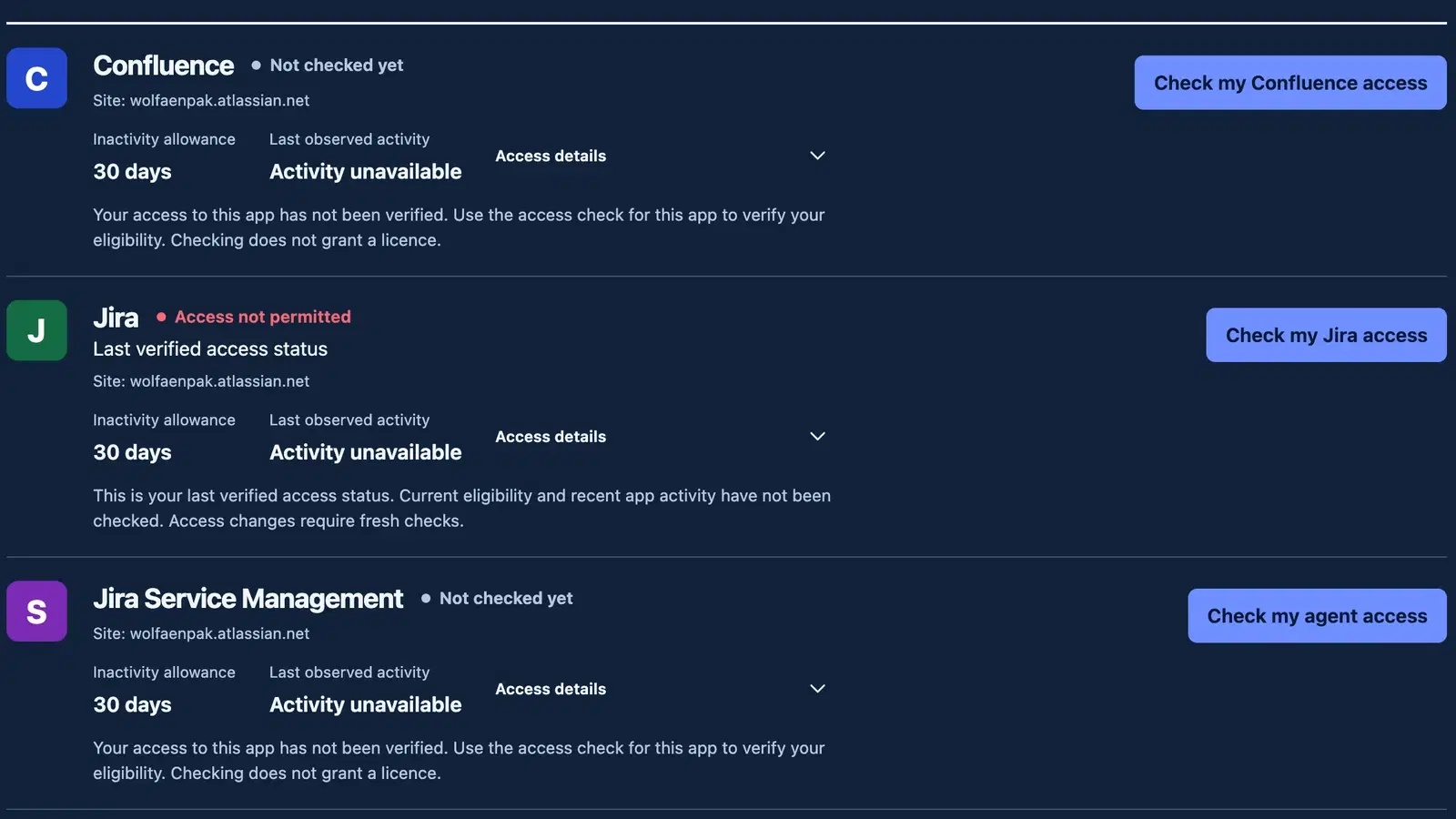
My access keeps each configured Confluence, Jira and Jira Service Management app's status, inactivity allowance, last observed activity and permitted action visible. Jira Service Management refers to agent access. Warning deadlines, protection, planned returns, blocking reasons and current operations remain beside the relevant app. Expand Access details for the recorded verification time and seat-pool state; closing it does not hide those primary obligations.
My access shows the last recorded access information without making a fresh organisation-directory call or creating access. Last verified access status and Last verified identify an earlier membership observation, not current eligibility or recent app activity. The page retains the configured inactivity allowance, recorded warning and managed seat state; a return seat reservation is shown only when its matching evidence verifies it. Missing or unverified details do not establish current eligibility, available access or absence. When the current setup and permissions permit it, an unverified access entry offers the explicit check described below. Earlier unfinished requests block new restoration and booking actions. No per-account activity snapshot is currently published, so activity remains Activity unavailable; it is not proof of inactivity or a never-used account. A policy can exist while automatic release is disabled.
For a new or unverified safe target, choose Check my Confluence access, Check my Jira access or Check my agent access in the Jira Service Management row. The agent button's accessible name is Check my Jira Service Management agent access. An unknown target with no original verification time and an authorised explicit check displays Not checked yet. This describes the missing verification; it does not establish eligibility or available access. A completed check can record Access status unknown while another explicit Check remains permitted; for example, observed paid access outside the managed target requires reconciliation. Its original checked time is retained. That status does not establish absence, a free seat or eligibility for restoration. If the check is unavailable, the original disabled state and explanation remain visible. Last observed activity → Activity unavailable is separate: the access check does not produce an app-activity observation, so that field can remain unavailable after eligibility is positively checked. A recorded activity date is shown only with known activity; No use recorded requires explicit never-used evidence, not an absent date. The explicit access check verifies current account status, source membership, destination writability and paid-access mapping under your current permission and the shared provider budget. It grants nothing and reserves no seat. Incomplete evidence remains unknown. A positively refused expired observation or changed-binding publication offers Start a fresh access check; an uncertain delivery keeps the original check reference. A successful eligible check records a Ready to request access target and shows Restore Confluence, Restore Jira or Restore agent access; press it separately to request the licence. Current paid access outside the managed target is not silently adopted.
For a verified recorded Ready to request access or released state, use the app's Check and restore action when the server returns canRestore: true and a real access identifier. Current eligibility remains unknown until that explicit request performs the fresh complete account, membership, role and capacity checks. The application records an explicit request and shows its real operation state. A provider acknowledgement or a processing state is not successful re-entry. Wait for verified access, then use the app-home link or reload the original page or work item tab. Existing space, project and work item permissions still apply.
If the pool is full, the request remains waiting with its recorded expiry. Waiting allowance comes from the app policy (24 hours by default); inspect the actual request expiry rather than assuming the default. A member can cancel a cancellable waiting restore or request a permitted fresh check. Cancellation never revokes access that has already been granted. Cancellation cleanup pending or Expiry cleanup pending retains the original terminal request while its allocation/waiting cleanup settles; it does not reopen another request. A cancelled time-away booking likewise blocks a new booking while its original cleanup is pending. If a provider write is uncertain, the app reconciles it before deciding the outcome; submitting a different reference is not a safe way to force another grant.
The recovery URL is https://cost-slasher.leanzero.net/recover/<organisationLink>. Use Sign in with Atlassian, inspect the account and available site/app choices, then explicitly check a safe missing target or restore the selected recorded app. An uncertain access check keeps its original request reference: choose Retry original access check. It is not a restoration operation and is not polled as one. A successful eligible check still needs the separate Restore click. Account switching clears the previous account's records before starting a new OAuth journey. Normal recovery sign-in requests User Identity read:me only, has no offline refresh grant, and does not use an organisation API key. Recovery is visually consistent with the native app but is hosted outside Atlassian.
View access history beside the Your access heading reveals the history section and moves keyboard focus there without checking or changing access. Your access history starts with the latest recorded events and returns at most five visible events per page. Known actions and stages use the same vocabulary as Audit; the richer access and cancellation explanations remain. Request accepted, Result recorded and Processing finished do not prove a licence change. Ordering uses recordedAt, the time the app recorded the fact. The displayed timestamp uses occurredAt, when the action happened; a delayed event can therefore appear near the top with an older action time. When the times differ, hovering over the timestamp shows its Recorded time. Next page follows the server's continuation to earlier recorded events; Previous page returns to an earlier visited page. The page number is not a total. A sparse or empty page with Next page does not establish that the remaining history is empty; continue through the available pages. Loading and failed reads do not present the previous page's rows as the requested page.
Your requests and Your data and privacy start collapsed. Your requests loads its history only on first opening, showing up to five durable requests per page with Inspect request, current results and available chunks. Its history is not fetched for the initial collapsed My access view. Closing either panel preserves its selected or in-flight processing result while you stay on My access. It does not cancel the server request, save drafts permanently or promise that a reload will retain the open panel.
14Check a lost native response
Saved requests appears in the native workspace when this browser has a retained request reference. Those references survive navigation and reload in the same browser storage. They are bound to the current account, site, installation, app and Forge environment. Switching account or installation does not make another scope's saved work available. The browser retains the command, original request key, an input digest and safe work references; it stores no form values, credentials or one-time secrets for replay.
Choose Check saved request before submitting another change. This reads the original acceptance/result using freshly checked scope and your current permissions; it does not rerun the action. View recorded operation, View recorded request or View recorded storage check, when offered, opens the actual retained work. Use Refresh recorded work for a fresh read. A recorded request means the server retained it, not that the access change, delivery or other work succeeded.
If no acceptance record is found, that is not proof that nothing happened. Use Return to action and the accompanying guidance. Where a retry is permitted, enter the exact original input and reviewed version so the app can retain the same request reference; changed input is blocked while that intent remains unresolved. Only an explicit server-confirmed no-effect result establishes that this request had no effect. Keep in recorded work removes the browser's saved entry after a fresh accepted-work check; it neither cancels nor completes server work. Your requests remains the durable request history, distinct from this browser list. A lost token-creation response cannot recover its one-time secret here: inspect the credential and explicitly rotate or revoke it if needed.
15Time away
From My access choose Plan time away, or open Time away. The shortcut opens planning after this page's access records load and at least one app permits a booking. Select Apps whose stored records permit an explicit booking check, set Departure, Return and Time zone, then choose Preview return before confirming. canPlanAbsence permits that preview; it is not a forecast of eligibility or a seat reservation. The preview checks current eligibility, and confirmation makes the capacity decision. Ambiguous daylight-saving times require the selected occurrence; a nonexistent local time is refused.
If a successful access read finds no app that permits planning, Plan time away stays disabled. The page shows any recorded app reasons and offers Review my access, or asks you to contact your administrator if that navigation is unavailable. It does not open a booking form or run an access check automatically. While access is loading or could not be checked, the empty booking hint asks you to wait or retry rather than treating the result as known ineligibility. If an empty visible booking page still offers Next page, use it to continue; that page does not establish that no bookings exist. An unblocked preview has not reserved a return seat. Confirm time away, or Confirm changes when editing, requests the booking separately. Blocked previews retain their exact returned reasons. Preview results and errors are brought into view and focused inside the dialog, including on a narrow screen.
Confirmation requests a separate booking and return seat for every selected app. Inspect every returned booking: a pending result or unconfirmed seat reservation is not a guaranteed return. A confirmed return seat remains reserved while away; it does not become a free seat available to another person. Restoration is scheduled to start 30 minutes before the recorded return time, subject to current eligibility, account status, controller authority and provider availability.
Editing keeps the existing booking's app and requires its current version and a fresh preview. Make another booking to add another app. For an away booking, cancellation offers an explicit choice to request restoration now or keep access released. I'm back early requests restoration using the reserved return seat. Proven loss of eligibility invalidates future return commitments; incomplete directory reads cannot establish that loss. Check the booking and actual operation result after an edit, cancel or early return.
An unconfirmed access result is neither a verified change nor proof that the request made no change. Keep the original reference and use its offered check or retry. Cancelling time away does not undo access work already started, and any access already restored is kept. Check the booking and actual operation result afterwards: a recorded cancellation may still need verification and does not prove that its return seat reservation was released.
16First administrator and storage preparation
A freshly verified native Jira site administrator can bootstrap a genuinely empty permission roster. An unreadable roster is not treated as empty, and an existing roster cannot be replaced by bootstrap. Keep at least one directly assigned Administrator covering Confluence, Jira and Jira Service Management on this bound site; narrower administrators can coexist.
At first installation the app may show Preparing Cost Slasher with completed and total storage steps. Use Check setup progress to read the current migration result. Native checks retry while the tab is visible, with bounded attempts. A failed migration requires investigation; refreshing does not prove it has recovered.
Administrators see a compact setup guide on arrival with the next required step and one action. Choosing it opens the correct Administration section and focuses the relevant field or button; an app-specific policy action opens that app's editor. Members and scoped operators do not receive this guide or request administration/key metadata. Setup reads do not call Atlassian's organisation API or change licences.
After a setup change is acknowledged and a fresh matching read confirms that step, the existing next action is brought into view and receives focus. It does not open or submit the next task. Setup review dialogs preserve the field you have chosen and keep submitted controls and dismissal locked while processing; changing page, choosing another section or moving focus to the surrounding Atlassian page cancels an older handoff. Failed or superseded refreshes, unavailable health and queued adoption do not advance the guide. Capacity adoption needs its exact completed result and freshly verified pool readiness before it can qualify.
Administration retains four tabs: Setup, Permissions, API tokens and Support and privacy. On Setup, Setup status shows the next step, current storage qualification, bound organisation/site, controller authority, API-key health and selected-app readiness. View setup checklist expands the complete ordered journey. Finish storage safety before configuring the organisation. Unselected Confluence, Jira and Jira Service Management apps read Not managed; they are optional. A manual-access policy can keep automatic release off. Activity verification is required in the guide only for apps whose automatic-release policy is enabled. Current storage qualification is one specific check; it does not establish complete returning-user acceptance, provider throughput or production capacity.
The six sections, in order, are Storage safety, Organisation connection, Licence groups, Activity checks, Returning-user recovery and Controller shutdown. Initially they are closed; a guided action opens its exact section. Otherwise open one at a time by clicking its heading or using Enter or Space. Closed sections appear in two columns on a wide screen; an expanded section uses the full width. Narrow screens use one column.
Use Left or Right while an Administration tab has focus to select the adjacent tab, wrapping at either end. Home selects Setup; End selects Support and privacy. Tab leaves the strip for the selected panel. These keys do not change sections while you type in a field or use a review dialog.
Closing a Setup section preserves its unsaved fields, previews and in-flight results while you remain on Setup; it does not save configuration. The submitted credential clears after its save attempt while a newer unsent replacement draft is preserved; pairing secrets clear after an import attempt or dialog close. A new section error opens the relevant section and unresolved errors keep a visible problem indicator even after you close it. If another review dialog is open, the error section opens after that dialog closes. Permission checks, version checks and review dialogs still apply to every action.
Open Administration → Setup → Storage safety → Storage safety check and choose Start storage safety check. A freshly verified Jira site administrator with current Cost Slasher administration permission starts this check in the native app. No organisation API key or recovery pairing is needed for it. The server independently binds it to this exact installation, site, app, environment, executing source and storage schema. The uploaded 0.4.2 build's compiled recipe runs the full 18 safety cases in 88 units against actual Forge SQL and related storage, using disposable records and verified cleanup. This recipe needs its own installed qualification; the retained 0.3.2 report does not approve the changed source. Partial progress, a passing individual case or acceptance alone does not enable configuration or access writes.
The original server job continues after navigation or reload; reopening Storage safety retrieves it without a manually retained browser key. Refresh storage check reads its progress and complete case/cleanup result. Refresh storage readiness reads the current server approval. Storage approval published describes the report's publication; continue only when the fresh readiness check above says Storage is ready for this installation. An earlier report cannot replace current approval after a relevant source or schema change.
Storage check will retry means the server scheduled another attempt for that same job. Its original administrator's current Jira and Cost Slasher authority is rechecked before further work and publication. Storage needs attention without a scheduled retry requires investigation: retain the original diagnostic reference and contact support. A failed safety race or unresolved cleanup cannot be reset with a new request key or bypassed with a manually supplied certificate. Do not configure access while storage remains unqualified. This approval establishes the installation's storage safety contract only; app activity, recovery, notification delivery and capacity require their own checks.
The separate Storage evidence inspector is enabled only for the publisher's sanctioned Wolfaenpak development installation. It starts a read when that panel first opens; Refresh storage evidence makes a new observation. Closing and reopening retains that observation while you remain on Setup, and leaving Administration unloads it. It does not run the installation safety job, approve storage, verify an API key or substitute for current setup readiness. Customer storage qualification does not require this developer inspector.
17Connect the organisation and save its API key
Open Administration → Setup → Organisation connection. Under Organisation and directory, save the exact Organisation ID and Directory ID with Save connection details. After apps are mapped, rebinding to another organisation or directory is blocked and requires a safe controller handover.
Under Organisation Admin API key, enter the key in Admin API key and choose Save API key. It is stored in Forge secret storage, scoped to this installation; neither the recovery browser nor AWS identity service receives it. The consumed submitted key is cleared from its field; a newer unsent replacement draft is preserved. Use Replace API key to store a replacement key that you created in Atlassian Administration; Cost Slasher does not create or rotate the key there. Remove API key removes the stored key from Cost Slasher, blocks new Atlassian changes and retains accepted work for reconciliation; it does not revoke that key in Atlassian Administration. Cost Slasher API-token rotation and revocation are separate controls under API tokens.
If pairing and its controller lease are already current, saving the key also checks the connection against the exact saved revision while that save remains the current action. Starting another action, editing a newer draft or navigating away cancels this automatic follow-up. Otherwise the next guided action is Review Recovery pairing. The pairing is required for the shared organisation API budget; saving a key alone cannot bootstrap a provider check.
Use Check API key to make one bounded read of the exact configured directory. Healthy means Atlassian accepted that key and positively returned that directory; it does not prove group write permissions or successful restoration. Health is valid for 24 hours and is bound to the current installation, site, organisation, directory and saved key. Replacing the stored key or rebinding clears it. Not checked, Check again, Needs attention and Could not check describe distinct states. A 401 rejection or 403 permission refusal differs from a rate limit, provider outage or unverifiable response; those temporary/unknown results do not mark the key invalid or leave an old green status visible. The timestamp is the Last check attempt. Key expiry is not inferred or independently established by this directory check. Setup has no continuous automatic monitoring; read the in-app status and explicitly recheck when required.
For a separate group capability check, expand Advanced group permission check, set Test group ID and choose Check group permissions. It reads exact group metadata and role assignments without adding or removing a person. Negative provider results are recorded and replace earlier health evidence. An uncertain durable acknowledgement keeps the original request identity; it is not proof that the check did nothing.
An open visible workspace refreshes the stored setup projection once when recorded key health or the current controller lease expires; a hidden tab waits until it becomes visible. That read does not call the provider health-check command. A failed refresh removes current green indicators and offers retry; it does not repeat an uncertain provider check.
Policy editors explain Inactivity allowance (days) (days before a warning may become due), Warning period (hours) (minimum time after confirmed warning delivery before fresh checks may release access) and Restore protection (hours) (hours protected against inactivity release after a verified restore). Protected vacation returns are separate. The front-facing policy cards retain their concise facts. Returning-user recovery coverage and evidence choices show only the currently selected app mappings; optional unmapped apps do not request tests.
18Pair the publisher recovery service
Use Request pairing from LeanZero in the pairing section to open LeanZero support, even before a customer support URL is configured. The link sends no installation details or credentials. Pairing is a publisher/IAM operation, not an organisation administrator's email invitation and not a public registration endpoint. The actual provisioning CLI and private-file procedure are in OPERATIONS.md. Enrollment must identify the exact Forge installation, organisation, site, apps, recovery webtrigger and managed destination IDs. Existing ownership conflicts block enrollment.
The CLI writes separate recovery and notification keys to a mode-600 private export. Open Administration → Setup → Returning-user recovery → Recovery service pairing → Import private pairing. In Import recovery pairing, paste the complete export into the masked Private pairing export field, then choose Import and verify pairing. The server requires freshly verified native site-administrator authority and checks targetInstallationId and organisation against this exact installation. The field clears after every attempt and on close. After a lost acknowledgement, inspect controller status; while the dialog remains open, pasting the same export retries the same intent key. The command stores keys in Forge secret storage and verifies a controller lease. Pairing revocation is an implemented REST lifecycle command. Do not paste keys into audit reasons, screenshots, URLs, filenames or repository files.
19Connect each managed app
In Administration → Setup → Licence groups → Managed apps, choose Review app mapping to open Connect app access groups. In App, select Confluence, Jira or Jira Service Management. Enter Eligibility source group IDs, Licence group ID, Managed seat limit and Approval reference. Choose Preview mapping, review the current impact, then use Apply approved mapping only when it is unblocked.
Source groups establish eligibility. A SCIM-managed source stays a read-only source. The separate destination must be explicitly writable, in the exact directory, and grant exactly the selected paid app on the bound site. Mapping does not convert a SCIM group into a writable group or provision an account into another directory. A destination shared by multiple managed apps, an unregistered owner or unverifiable roles blocks setup.
Once mapped, replacing its paid destination, pool, resource or paid roles is blocked with HANDOVER_REQUIRED, even when the pool is currently free. Released-entitlement history and protected return commitments still belong to the original binding; this build does not migrate them to a replacement. Source eligibility, capacity and display/activity bookkeeping can change on the same paid binding. Capacity changes freeze the exact physical pool before publishing configuration, preserve occupied allocations and resume only a matching saved checkpoint. A changed or unverifiable target remains unavailable for operator review. Repeated unchanged discovery observations preserve the visible setup version and existing reviews.
Applying the mapping records app configuration, creates its disabled automatic-release policy, and queues a complete read-only discovery/adoption reconciliation. It does not grant every source member a seat. Capacity activation depends on the complete actual destination/effective-access snapshot. Existing paid access must be accounted for; an alternative grant is a conflict, not a reclaimed seat. Inspect Operations → Background work, its recorded reason and the relevant request result. Never certify adoption from a selected-person sample or an empty query without proving the exact target is visible. In Administration → Setup → Licence groups → Reconcile existing seats, choose Review existing seats to open Review complete licence group. Select an enabled mapped App, then Preview seat reconciliation. The scope must match its configured destination and pool. An incomplete preview shows observed members and “Not established” for the total; Queue seat reconciliation reconciles every remaining page without granting access. Inspect the returned request, its seat-reconciliation result and recorded reasons. Changing app or configuration requires a fresh preview.
21Policies and activity gates
Open Policies → Edit policy. Set Inactivity allowance (days), Warning period (hours) and Restore protection (hours), then preview before saving. New mappings default to 30 days inactivity, a 48-hour warning period, 48 hours restore protection, a 24-hour waiting allowance and automatic release off. App policies are separate.
For this beta, keep automatic inactivity release off for each app until returning-user recovery, confirmed warning delivery, activity coverage and seat capacity have been verified in that environment. A storage pass does not establish these outcomes. Jira Service Management agent inactivity release remains disabled without reliable agent-activity evidence.
The warning period must be a whole number from 24 to 720 hours. The minimum accounts for Atlassian's activity reporting delay and applies even when automatic release is off, so a saved policy remains valid for explicit restore and release. Native validation, REST previews/saves and the licence engine enforce the same minimum. Restore protection is a separate setting. The waiting allowance is the request's expiry window, not a promised time to receive a seat.
Unknown or unparseable activity is not a never-used account and is not a release candidate. Activation requires complete adoption, verified app-specific activity coverage and tested native-message recovery. Jira Service Management also requires agent-activity evidence; ordinary Jira activity or customer portal activity is insufficient. In Administration → Setup → Activity checks → Verify activity checks, choose Verify app activity for a mapped Confluence or Jira app. In Verify recorded app activity, enter the exact Test account ID in its managed group, a recent controlled UTC activity window of at most 72 hours, and a Test evidence reference, then choose Check actual activity. The server reads every activity page and requires the exact mapped resource ID and product key plus an actual timestamp inside that window. Inspect the returned account, resource, product key, observation, checked time and reference. A delayed, empty, malformed or partial source does not pass. Jira Service Management is deliberately unavailable in this control; automatic agent reclamation remains disabled. Do not edit stored readiness booleans as an alternative.
Atlassian defines this activity as a product-page view of at least two seconds and can report it up to 24 hours later. Plan the controlled ordinary-account exercise accordingly, then repeat the check when the actual observation is available. Atlassian last-active documentation.
Automatic inactivity work warns first and rechecks the current policy, sources, account status, protection and activity before removal. Warning transport acceptance is not confirmed delivery. A removal counts as reclaimed only after effective access is verified absent. Manual restore/release and scheduled return use the same capacity, ownership and evidence engine.
Open Inactivity exclusions inside the policy editor to add or remove specific accounts for this app. Find people searches only your permitted app scope, with ten results per page; no roster is loaded while the section is closed. Add by Atlassian account ID accepts an exact known identifier when search is unavailable. Saved IDs remain selected even when the person is absent from the search. Five selected accounts are shown per page. Adding or removing an account invalidates the earlier preview; use Preview impact → Apply reviewed policy to save the reviewed set and current version. A fresh readback compares the actual account identities, not their count. Use Refresh policies after a conflict or an unconfirmed readback.
Exclusions apply only to automatic inactivity release for this app. They neither grant eligibility nor prevent security, eligibility-loss or separately reviewed changes. Removing one restarts the current policy warning checks; a previous warning cannot bypass the new revision or its full warning period. The final inactivity-release dispatch rereads eligibility, activity, entitlement and policy after recording its intent. A last read is not an atomic transaction with Atlassian; uncertain provider results remain occupied until verified.
22Permissions, API tokens and routing
In Administration → Permissions → Cost Slasher permissions, use Add permission to open Add Cost Slasher permission. Choose Person or group, Role, the exact account or group ID, Site IDs and Apps. Blank scope grants nothing. Routing manager grants also require approved source and destination boundaries. Edit permission and Remove permission use the roster's current version, not the individual grant row version. Unknown group membership does not confer authority. Cost Slasher roles do not change the person's Atlassian administrator role or space/project permissions.
Group authority requires a fresh, unambiguous response for exactly the acting account in the configured directory, with active account and organisation membership and an explicit matching group. Foreign or duplicate accounts, missing status, malformed groups, incomplete pagination, partial HTTP responses or a changed organisation binding leave membership unknown and deny that group grant. An absent embedded group is not proof of non-membership. Direct app grants remain separate; REST credentials also require their owner's current active organisation status and current app roles. Queued fresh writes recheck the original actor and token revision. This source repair does not by itself verify a deployed tenant; see the permission evidence contract.
| Role | Additional authority in assigned scope |
|---|
| Member | Own access, explicit eligible restore, bookings, history and own data requests. |
| Operator | Licence operations, People, policy reads, scheduled cases and Consumption; no permission, credential or cap changes. |
| Routing manager | Routing authoring and management within approved source/destination boundaries. |
| Auditor | Operation, People, policy, audit/export, management reports and Consumption; no licence or configuration writes. |
| Administrator | Policies, pools, setup, permissions, API credentials, audit/export, management reports/rates and retention. |
Paid group routing, including moving out of a paid source, also needs current scoped Operator/licence authority on every affected app. A Routing manager grant alone cannot change paid access. Runtime rechecks preserve the original publisher identity and do not invent a privileged service actor.
In Routing, save a draft, preview its current impact and publish. Add contributes matching membership; Mirror maintains only its owned contribution; Move verifies the destination before removing explicitly approved writable source memberships. Manual and other-rule contributions are preserved. Pause an active rule before editing its boundaries. Current previews are bounded account slices and must report continuation/partial coverage; they are not invented directory totals. Choose Remove rule, then explicitly choose Keep existing memberships or Remove only this rule's owned contributions. Review the preview before confirming. The selected handling is fixed once removal is recorded. Retain stops the rule and preserves its memberships. Cleanup runs in bounded, restartable pages and preserves manual access, other owners, uncertain receipts and protected returns. A partial preview is not a whole-directory count, and a recorded cleanup is not completed removal; follow the rule and background status until verification finishes.
In Administration → API tokens → Cost Slasher API tokens, choose Create token. In Create API token, enter Token name, Token expiry, Allowed apps and Allowed capabilities, review the bound Site, then choose Create scoped token. The secret is displayed once. Store it before I have stored it. A token lasts at most one year and never exceeds the owner's current authority; revocation, suspension, unknown issuer status or loss of issuing authority prevents new use. Rotate invalidates the old secret and its captured issuance for queued fresh writes; Revoke refuses subsequent calls and unissued work from that token. Already-issued changes still receive readback and genuine compensation, and an exact protected held return remains an existing commitment. Read the REST guide for object IDs, previews, expected versions and operation/request tracking.
23Operations, exports and notification results
Operations displays recorded exceptions, Managed seats, scoped returns, recent operations and background work. A blank page with Next page is not a global empty result. Follow server continuations. Free capacity is unavailable when the pool is not verified; held returns and unknown writes remain occupied. Existing waiting restores are queued again when that same pool is fully verified or an owned seat is actually freed. The app resumes the original request in FIFO order; do not submit another restore to make it move. Queue delivery or permission checks can still defer processing, and the five-minute scheduled sweep remains the recovery fallback.
Work titles describe the returned action and app: Restore Confluence, Release Confluence, Reconcile Confluence or Check scheduled returns. A verified restore displays Access restored; a verified release displays Access released. Waiting, refused, cancelled and reconciliation states remain separate from a completed change. Expand the shortened Operation reference, Job reference or Request reference to inspect its full value and use Copy reference when reporting an issue. A pending request without a returned app keeps a general title; the interface does not invent its scope.
People searches within assigned scope and preserves every visible app entry for each whole account. Choose the exact app in App to manage before selecting people for a bulk restore/release. Add a reason, preview the exact selected accounts, then Apply reviewed changes. Processing acceptance does not mean every account's access changed; inspect the request's chunks and each operation reference.
Background pause/resume reviews the exact public job ID, app and version. Reconcile an app starts a new app request through jobs.start; choose a managed app in Review app reconciliation. A row's Reconcile app uses jobs.reconcile with that existing job's public ID and matching app. Both record requests and do not immediately settle provider effects. A state conflict requires refreshing the current job. Exception Retry check queues verification and must not blindly repeat an unknown membership write.
Reconciliation and adoption handoffs currently checkpoint with a five-minute retry before the five-minute scheduled sweep. Recorded can therefore remain visible between processing steps, even when a pool has already been verified. Refresh the same request reference and inspect its actual completion/results. Submitting another request does not prove the first completed or make an uncertain provider change safe to repeat.
Audit supports case-insensitive Search, occurrence dates through Period, Event category, Outcome, App and More filters for entry point, exact actor/subject, reference search and exact action/outcome codes. Inspect shows original occurred/recorded times, action/outcome, actor/subject, site/product/object/version/operation, reason and allowlisted structured details. New routing evidence records intent, provider acknowledgement/unknown/rejection, pending readback and final observed membership. Warning acceptance/unavailability differs from confirmed delivery; only first confirmed delivery starts the complete warning window. Missing older details are not reconstructed as historical facts.
The Event and Outcome columns use readable labels for known codes. Check API key directory access, Save app mapping and Record administrator-attested recovery journey describe different actions. Request accepted, Result recorded and Processing finished describe recorded stages; none confirms an access change or notification delivery. Inspect → Exact action and Exact outcome, the exact-code filters and exported CSV/JSON retain the original codes. Unknown codes appear unchanged.
Access present (verified) and Access absent (verified) describe the achieved access state. The state may already have existed, so these labels alone do not establish that Cost Slasher performed a membership write. Available recorded details, including appWriteVerified, retain that distinction; absent historical provenance remains unverified. Management access-change counts still require their separate matching original write evidence.
Editing a filter changes its draft. Apply filters updates the query and the displayed Applied scope. The App choices follow a separate accepted audit-permission descriptor; policy-management permission does not imply audit authority. All assigned apps reads only current permitted records. Missing metadata does not infer scope from visible navigation or a flat capability. A saved app filter outside newly assigned scope remains visible with guidance to choose a permitted app or reset; it is not silently rewritten. Unapplied edits do not change a prepared export. Rows return at most twenty events per page. On a narrow screen, the event table scrolls horizontally to its actor, outcome and Inspect columns.
Choose Download matching events, review Export app and the readable Export filters summary, then choose Prepare export to freeze those exact filters and the recording cutoff. An explicit applied app stays fixed. A productless read can be visibly narrowed to one authorised export app without changing the live view; a single permitted app is selected for you, while multiple separate app grants require a choice. A combined all-app export requires one covering current grant; separate app grants cannot be unioned to invent that authority. REST issuance also limits the accepted descriptor. The server independently rechecks current permissions when preparing and retrieving each export. Exact filter details optionally reveals the final machine filters. New audit exports include all matching retained hot/archive events and publish a v2 manifest with row, byte, part and digest totals. Download complete CSV and Download JSON validate the whole traversal and recheck current authority. Download manifest is beside the whole-file downloads. Saved filters and numbered parts reveals the saved filters and individually validated parts when a whole file exceeds 32 MiB. During a download, only the selected action shows progress; other download actions wait until it finishes. CSV quotes Unicode and multiline fields and protects spreadsheet formulas; import reference columns as text. JSON preserves exact safe machine values. Retrieval cannot recover expired or unpublished source evidence. New v2 audit/report parts are read one bounded part per page; older request families retain their ten-part page contract.
The selected report and audit export remain available when moving between Reports and Audit in the current workspace session. Their original scope, reference and expiry remain unchanged; returning to them does not prepare another artifact. To reopen an earlier own request, use Operations → Your requests → Open management report or Open audit export. Inspect request remains available for recorded outcomes and older request chunks. Every artifact read still checks current permission and expiry; a completed historical request is not a promise that its download is still available.
Your requests on My access and Operations shows the current member's durable requests. An export/deletion/delivery test reports every recorded result and reason. Processing finished is a processing state, not a guarantee of delivery, deletion or successful licence changes.
For older request families, use View available chunks to retrieve at most ten published chunks per page. Inspect each chunk and Download chunk N as JSON. Every download re-reads the bounded page so current permission and expiry checks apply. Request chunks expire after 30 days; an empty chunk page does not prove that source records are absent. Downloads contain returned section, index, expiry and rows; there is no public pre-signed export URL in this build.
Under Administration → Support and privacy → Notification delivery, Send delivery test targets the signed-in account. Inspect its request status. Accepted is not Delivered. Customer delivery readiness also depends on SES sandbox/verified-recipient restrictions; a configured domain or successful send request is not mailbox proof.
A complete eligible inactivity scan is scheduled again one day after it finishes. Partial scans interrupted by an Atlassian request limit or a short worker deadline keep their original progress and resume after the recorded retry time. Discovery also preserves those unfinished reads; a request limit alone does not establish unknown membership. Event polling remains every five minutes. An unverified event response retains an unknown status and uses a daily source-reconciliation fallback; verified new event IDs can request an earlier refresh. These timings do not establish that a large directory completes within one day. Scheduled returns and existing operations keep their separate prompt checks.
Background work separates the recorded control state from timing evidence. Fresh at check means this one recorded job was complete, paused, deferred, leased or within its expected scheduler window at the dated check; it does not establish whole-engine health. Progress overdue means no recorded progress after its due/retry/lease boundary and one five-minute scheduler opportunity. Missing or inconsistent timing is Freshness unknown. Checks expire after at most five minutes without automatic network polling; use Refresh background work for current records. Existing Pause, Resume and Reconcile controls keep their current permissions and revision checks. Sparse, empty or paged results do not prove that all jobs are healthy.
24Share a management report
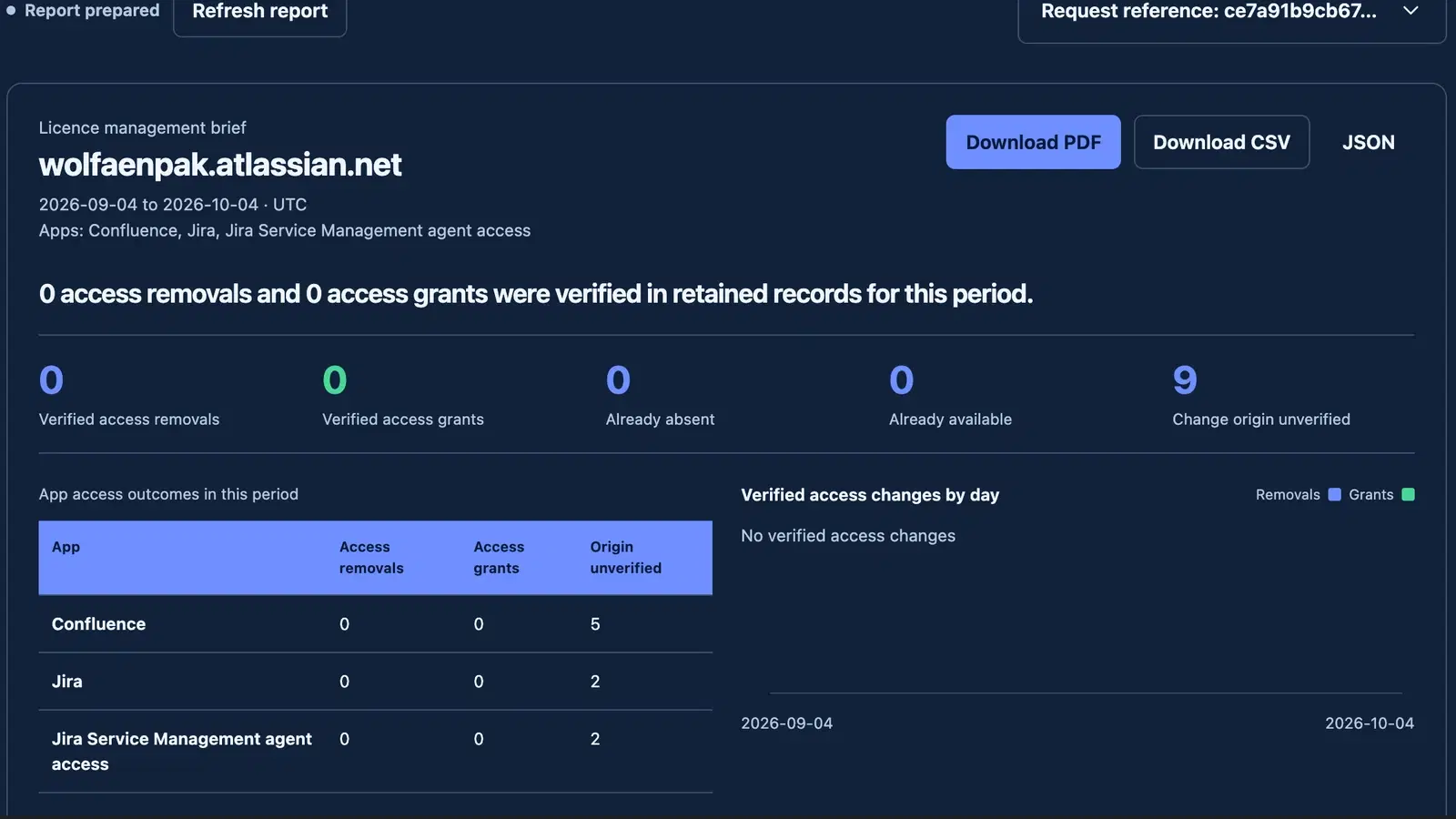
Open Reports, choose Last 30 days, Last 90 days, Previous calendar month or Custom dates in Period, and select your assigned scope in App. For Custom dates, enter From date and the inclusive Through date before choosing Generate report. Dates use UTC; a current day ends at the displayed server cutoff. The maximum window is 366 days. Generate report records a resumable request and changes no licence. Once prepared, its management brief and PDF, CSV and JSON downloads appear first. During a download, only the selected action shows progress; other download actions wait until it finishes. New report settings and Prepare another report reveal the controls without generating anything; use the separate Generate report action for a new request. Reports require reports.read/reports.export, granted to scoped Auditors and Administrators. A complete REST generation/download workflow needs explicit reports.export, reports.read and me.read in the API token, within its site/products and the issuer's current authority. Native roles already include me.read; tokens do not inherit omitted capabilities. Narrow scopes cannot silently become all products. REST GET with requestId returns owned status/results/chunk-count metadata; the full report is the validated management-report artifact from requests.parts. See the REST guide for the exact routes.
The management brief contains Verified access removals, Verified access grants, already-absent/present outcomes, Change origin unverified, per-app/day/channel/cause aggregates and separately dated capacity. An access-change count requires the matching original acknowledged write journal and verified effective-access outcome; missing retired journals remain unknown. Capacity requires the exact completely adopted and verified current mapping/pool and coherent physical allocation totals, with fresh binding/pool checks. Unknown or unconfigured capacity is not zero. Held returns, pending writes, unknown and external allocations remain distinct from free seats.
The chart's Highest daily removals or grants is the largest count of either outcome on one UTC day, rather than the period total or the sum of removals and grants. One removal and one grant on the same day gives a scale of 1 while the period summary retains both outcomes.
Expand Optional capacity value estimate to supply monthly seat-price assumptions and a three-letter currency. This needs current site-level app administration.manage throughout generation and every status/artifact read; assumptions are frozen for the report. A REST token also needs that capability explicitly and issuance for all three apps to pass the site-level administration check, even for a single-app report. App-limited tokens have canSetRates:false. Losing administrator authority blocks later retrieval of a report containing these assumptions even if ordinary report access remains granted. The estimate uses verified free capacity only, is labelled as a planning estimate and does not represent invoice savings, billing totals or historical seat-days. The sharing PDF has no individual account identities; its source section includes the report/site references, period, cutoff, scan/observation dates and definitions. A completed scan covers available retained records only and explicitly does not establish complete historical coverage. Published reports expire after 30 days and every download rereads current permission and the frozen report.
Publisher deployment must configure a dedicated encrypted COST_SLASHER_AUDIT_CURSOR_KEY (32 random bytes encoded as 64 hexadecimal characters) in each Forge environment and redeploy. Public audit continuations are authenticated to this installation/site and normalized filters; changing filters resets the continuation. An absent/invalid key fails closed. Rotation invalidates existing public audit continuations; it does not rewrite original audit facts, encrypted archives, internal keysets or prior export formats. See reporting implementation and acceptance.
25Read consumption measurements
Consumption shows the selected app's observation window and recorded source coverage. Background work → Records handled counts records handled during application background processing, not the provider's invocation total. App network payloads → Observed payload bytes covers only explicitly observed payloads; unavailable bytes remain Unavailable, not zero. Partial coverage, Complete coverage, Unavailable and Not used describe the returned collection evidence. Complete coverage for one source does not establish an organisation-wide total. Unknown source, metric and coverage codes appear unchanged. Read each source's explanation alongside its figure.
Consumption reports retain applicable warning reasons after background archiving, including a warning observed before the day it was recorded. If older evidence cannot be verified, coverage remains partial. Missing evidence is never presented as a verified zero.
26Privacy and support
Business records are stored in Forge for the required Jira installation. Recovery identity, registry and minimal notification processing use AWS Ireland, with CloudFront global transit. Normal users have no refresh-token grant. A separate publisher-only read:me/offline_access grant supports Atlassian personal-data reporting and is encrypted in Secrets Manager.
Defaults are 365 days business audit and 90 days usage retention. In Administration → Support and privacy → Privacy and retention, enter reviewed audit and/or usage days from 1 to 3650 and choose Save retention. Leaving one field empty preserves its current setting. A changed retention setting applies to newly recorded events. Existing events keep their recorded expiry, including idempotent replay; changing the setting does not rewrite history. Minute usage aggregates keep the latest expiry of their contributing measurements. Consumption shows the current setting and the actual app-scoped collection window; an unverifiable setting stops new recording and report metadata rather than substituting a default. Recovery sessions expire after eight hours, OAuth attempts after ten minutes, nonces after two minutes and proxy/minimal notification receipts after 30 days. Account inventories use a 48-hour fallback erasure-index margin and a scheduled 17-minute cleanup; revocation/write-fence hashes expire after eight hours plus five minutes. TTL deletion and encrypted backup removal are not immediate deletion guarantees.
Members can open Your data and privacy to request their records or deletion. Cost Slasher processes deletion requests to remove cached names and email addresses and expire personal exports; access safety and audit records are retained. Inspect the resulting request: the worker reports retained/scrubbed records and verifies recovery-session revocation separately, which can need attention or remain unverified. It leaves the Atlassian account and app access unchanged. See the actual public privacy disclosure, beta terms, security policy and incident runbook. Support is the Cost Slasher support portal.
Ordinary-account zero-seat recovery, deployed provider throughput, verified activity and routing journeys, and physical storage headroom at 20,000 users remain acceptance gates. The compact UI, local journeys and this manual do not establish those outcomes. Check the implementation ledger for the latest exact deployed evidence before enabling customer-facing automatic release.
27Stop a controller before removal or handover
In Administration → Setup → Controller shutdown, inspect the current generation, revision and unresolved-record count. Review controller shutdown → Stop and verify pending work freezes new work at the reviewed revision. Only operations proven never to have started can be cancelled; existing paid access is preserved and unknown provider effects remain counted. A lost acknowledgement retries the same intent and reviewed revision. Refresh shutdown status reads the current result; an unavailable count remains “Not verified”. Inspect the recorded reason and separate operation, membership, capacity and unfinished-cancellation counts. These are unresolved journal records, not distinct people or HTTP writes. Handover proof recorded appears only after the controller is locally frozen, every unresolved count is verified zero and the registry confirms its stop. There is no automatic controller resume or unattended uninstall handover. The publisher follows the exact replacement procedure in OPERATIONS.md.