Part of Goose Swarm, Private mesh for your Macs
LeanZero Link
A feature of Goose Swarm: join the Macs you run it on into one private mesh, so one can see the others and hand an agent prompt to another. For now LeanZero Link works only inside the Goose Swarm desktop app for Apple Silicon Macs; it is not a separate download.
No key to copy Remote runs off by default Separate from your Tailscale Self-hostable
How it works
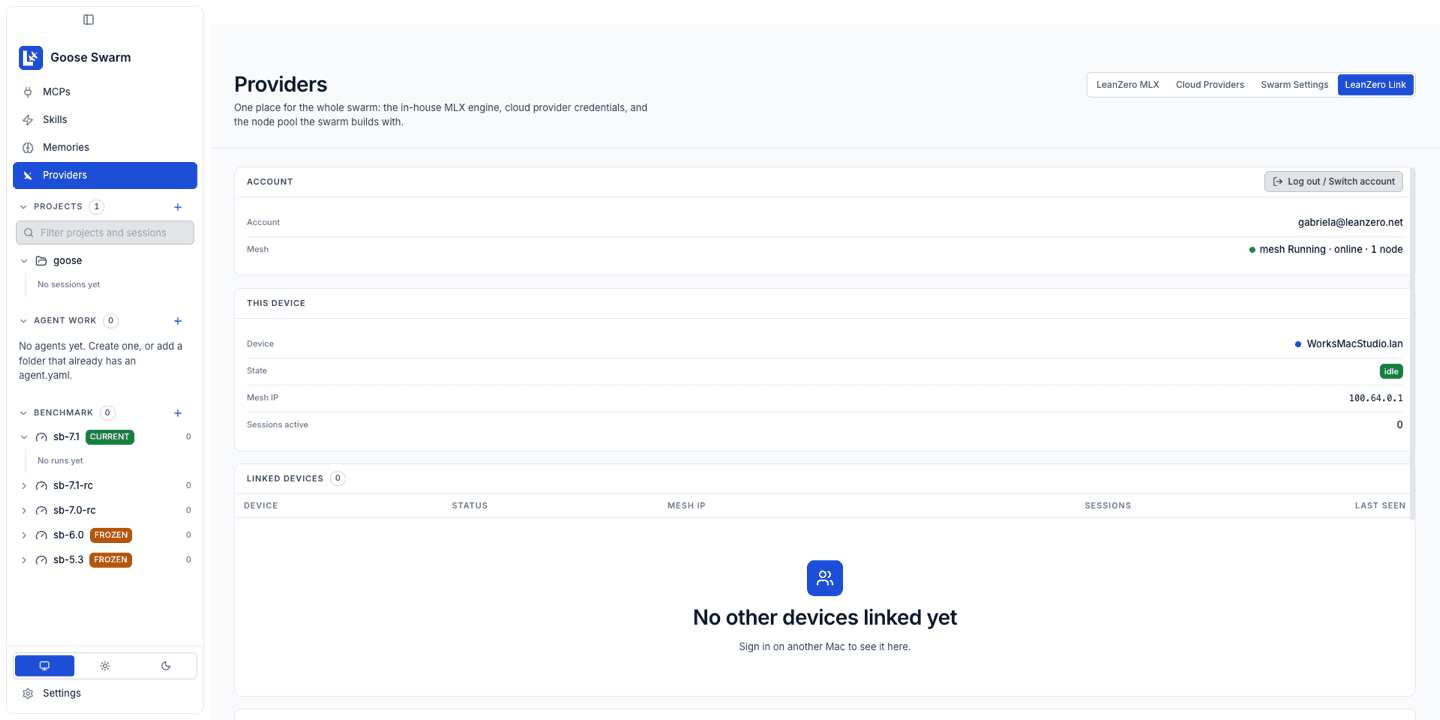
Once your Macs share a mesh, each one sees the others: the device list, who is available, their sessions and a live stream. You can dispatch an agent prompt to another Mac from the Link screen.
Your Mac
Goose Swarm, signed in with your email.
Link sign-in service
Checks the emailed code and mints your keys.
Your private mesh
One Headscale user per account, isolated from every other account.
Your other Mac
Same email, same mesh. Visible, and runnable if its owner allows it.
Separate from your own Tailscale
Goose Swarm runs its own tailscaled in userspace-networking mode, with its own state directory (~/.leanzero/tailscale/) and its own socket. No TUN device, no root. It is kept separate from /var/run/tailscale* and from a personal or company Tailscale.Accounts are isolated
Devices on the same account see each other; other accounts cannot. The sign-in service puts the isolation policy in place on the mesh server if it is missing or not isolating, and refuses to mint a join key if it cannot read or apply it.Get your Link key
There is no key to copy or paste. You sign in with your email, and the app asks the sign-in service for what it needs at each step. Repeat on every Mac with the same email.
- 1
Install Goose Swarm
Download the latest release and open it. Link has shipped in Goose Swarm since 2.0.3.
- 2
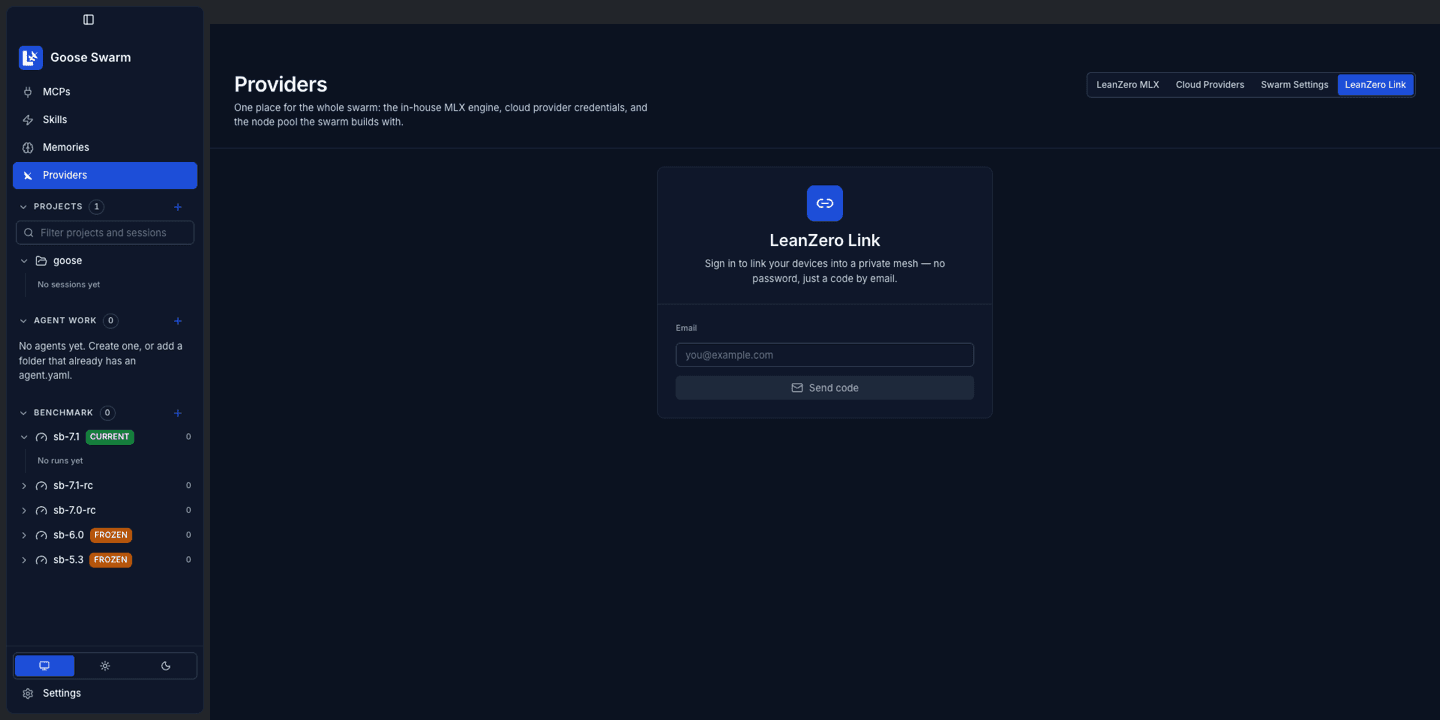
Open Providers → LeanZero Link
The Link tab sits next to LeanZero MLX, Cloud Providers and Swarm Settings.
- 3
Enter your email
Send the code. A 6-digit code is emailed to you.
Minted: A 6-digit code. Only its SHA-256 hash is stored.
- 4
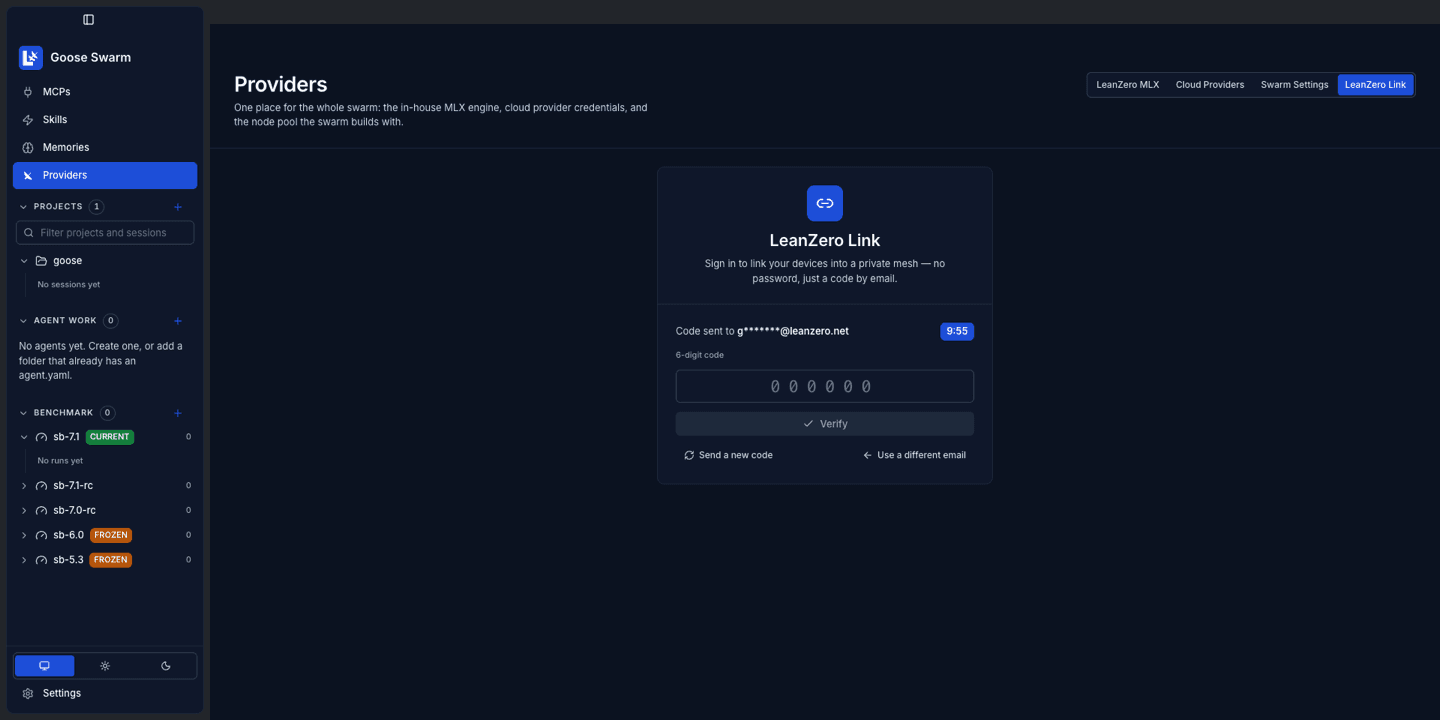
Enter the code within 10 minutes
The code works once, allows 5 attempts, and expires after 10 minutes. Asking for a new one cancels the old one. A wrong, expired or used code all get the same answer.
- 5
Verify
The sign-in service checks the code and hands the app two things.
Minted: An identity token valid for 180 days, plus your account's node secret: minted once on your first verify, the same on every Mac on your account, never derived from your email.
- 6
Connect to mesh
The app asks for a join key with your identity token, and its own tailscaled joins with it. The key is written to a private file, never put on the command line, and deleted after the join.
Minted: A single-use, ephemeral mesh join key for your account.
Limits on the sign-in service
10 code requests per client address per hour, then 3 per email per hour. At most 20 verify calls per email per hour.Why we need your email
Plainly: what the address is used for, what is stored, and what is not.
Your email is the account
There is no password. Every Mac you sign in with the same email joins the same private mesh. A different email is a different, isolated mesh.
Your account name on the mesh is a hash
Each account is one Headscale user named acct- plus the first 16 hex characters of the SHA-256 of your email, not the address. The mesh server also keeps a record for each Mac you connect: its device name, mesh address and last-seen time.
What the sign-in service keeps
The code’s hash for up to 10 minutes. Rate-limit counters keyed by your email and the requesting IP address, deleted within about three hours of expiring. Your node secret keyed by your email, with no expiry. An operations log that records your email on sign-in events and the client IP on code requests; on our deployment it is rotated daily and archives are deleted after 30 days.
How the code reaches you
By email through Resend, the same provider the leanzero.net newsletter uses. Resend processes your address and keeps the sent email, which contains the code.
From a real sign-in on Goose Swarm 3.0.11
sign-in service log, and the hash check
{"event":"auth_verified",...,"audienceSync":"skipped"}
{"event":"headscale_join_key_minted","username":"acct-d0afafb47308cf6e","expirySeconds":600}

$ echo -n gabriela@leanzero.net | shasum -a 256 | cut -c1-16
d0afafb47308cf6e
audienceSync: skipped means no mailing-list sync happened. The mesh user name is the first 16 hex characters of the email’s SHA-256, not the address.
Signing in does not subscribe you to anything
The code can add an address to a Resend contact list when whoever runs the sign-in service switches that on, and the app shows a note if that sync fails. On the LeanZero-run service it is off today. If that ever changes, this page and the privacy policy change first.
Allow remote runs
A Mac is observe-only until its owner opts in. Set the switch on the Mac that should accept work, not on the one sending it.
~/.config/goose/config.yaml
# On the Mac that should accept remote runs
LEANZERO_LINK_ALLOW_REMOTE_EXECUTION: true
An environment variable with the same name, LEANZERO_LINK_ALLOW_REMOTE_EXECUTION, works too. There is no toggle for it in the Link screen, so use the config key. A change applies at the Mac’s next mesh connect, so reconnect Link (or restart Goose Swarm) after editing it.
Not set
Off. The Mac answers 403 to remote runs and to every remote model-management operation.
403
Remote execution is not allowed on this Mac.
409
The Mac is busy. It refuses the run instead of queueing it.
Runs
A run lands in the target's working directory, which defaults to $HOME.
What it does not do
- Link does not sync project files.
- The target Mac must be awake and running Goose Swarm.
- Choosing a cloud provider still sends inference to that provider.
- It is not an LM Studio product or integration. LM Studio's own "LM Link" is a separate product and network.
- Only link machines you trust.
Run the sign-in service yourself
The sign-in service is one worker, on Cloudflare Workers or a Node adapter, plus Headscale. Point the app at yours with the LEANZERO_LINK_WORKER_URL environment variable. It is read from the environment only; config.yaml does not set it.
environment
# Point Goose Swarm at your own sign-in service
export LEANZERO_LINK_WORKER_URL=https://link.example.com

# Worker settings (see leanzero-link/worker/README.md)
LINK_JWT_SECRET=...        # at least 32 bytes
RESEND_API_KEY=...
LEANZERO_MAIL_FROM=...
HEADSCALE_API_URL=...
HEADSCALE_API_KEY=...
HEADSCALE_LOGIN_SERVER=...
Where to start
The full environment matrix is in the worker README, and the Node adapter is described in NODE-SELFHOST.md. A Tailscale-hosted fallback is available with TS_API_TOKEN and TS_TAILNET.
Questions
Can I use LeanZero Link without Goose Swarm?
Not today. LeanZero Link is part of Goose Swarm, the goose desktop app for Apple Silicon Macs, and only works inside it. There is no separate LeanZero Link download or app. You sign in from Goose Swarm under Providers, LeanZero Link.
Is there a LeanZero Link API key I need to copy?
No. There is nothing to copy or paste. You sign in with your email and a 6-digit code, and the app fetches what it needs from the sign-in service: an identity token, your account's node secret, and a single-use key to join the mesh.
Why does LeanZero Link need my email address?
Your email is the account. There is no password. Every Mac you sign in with the same email joins the same private mesh, and a different email is a different, isolated mesh. The mesh server names your account from a hash of the email, not the address, and keeps a record per connected Mac (device name, mesh address, last seen).
Will signing in add me to a mailing list?
No. The code can add an address to a Resend contact list if the operator switches that on, but the LeanZero-run sign-in service has it off today. If that ever changes, this page and the privacy policy change first.
Can another Mac run agents on mine without my permission?
No. A Mac is observe-only until its owner sets LEANZERO_LINK_ALLOW_REMOTE_EXECUTION to true in ~/.config/goose/config.yaml, or as an environment variable of the same name. It applies at the Mac's next mesh connect. Without it the Mac answers 403 to remote runs and to remote model-management operations.
Does LeanZero Link interfere with my own Tailscale?
No. Goose Swarm runs its own tailscaled in userspace-networking mode with its own state directory (~/.leanzero/tailscale/) and its own socket. It uses no TUN device, needs no root, and is kept separate from /var/run/tailscale* and from a personal or company Tailscale.
Can people on other accounts see my Macs?
No. Each account is one Headscale user, and the mesh policy only lets devices on the same account see each other. The sign-in service puts the isolation policy in place on the mesh server if it is missing or not isolating, and refuses to mint a join key if it cannot read or apply it.
Does LeanZero Link sync my project files?
No. Link does not sync project files. A remote run lands in the target Mac's working directory, which defaults to $HOME, and the target must be awake and running Goose Swarm.
Can I run the sign-in service myself?
Yes. The sign-in service is one worker (Cloudflare Workers or a Node adapter) plus Headscale. Point Goose Swarm at yours with the LEANZERO_LINK_WORKER_URL environment variable. It is an environment variable only; setting it in config.yaml does nothing. The source is in leanzero-link/worker in the goose-local-edition repository.