
Is Claude Opus 5.6 out? How to check which model Claude Code is using

9 min readNovember 28, 2026
Key takeaways
- As of 27 November 2026 Anthropic has announced no Claude Opus 5.6: its newsroom, the models overview and the Claude Code changelog (up to 2.1.332) do not mention it.
- Each assistant line in a Claude Code transcript carries two model fields: requestedModel (what Claude Code asked for) and message.model (what the API response says answered).
- In 2,673 assistant lines from our own sessions the two fields matched 2,672 times; the other line was a usage-limit notice Claude Code wrote itself, with zero tokens.
- Anthropic's Help Center calls the xhigh effort level "Extra high", and nothing official ties an "Opus 5.5 Extra" label to Opus 5.6.
On 25 November 2026 TestingCatalog reported that testers were posting SVG animations and a Three.js scene they believe came from an unreleased Claude Opus 5.6. One tipster said a run went through an "Opus 5.5 Extra" route, which testers read as requests sent as Opus 5.5 and answered by something newer. The story reached Hacker News a day later and picked up 41 points. Anthropic has said nothing. Its newest Opus is still Opus 5.5, launched on 22 September.
You can check which model your own Claude Code session is using without waiting for Anthropic. Claude Code writes two fields into each session's log: the model it asked for and the model the API response names. We read them on 27 November across 2,673 assistant lines from our own sessions, and they matched on every line a model answered.

I'd go with TestingCatalog's own caveat: "These are early, cherry-picked outputs, with no official confirmation that it is Opus 5.6." A label in a model picker can't settle the rumour. Two fields can settle what your session asked for and what came back. Below you build a status line and run one jq command to read them.
We did the same kind of check once for a third-party router, in our Jev Router benchmark, where 117 of 118 calls went to one model. Here nothing like OpenRouter sits between you and Anthropic. The fields are already on your disk.
Prerequisites: Claude Code installed and signed in to a Claude plan or the Anthropic API. On Amazon Bedrock, Google's Agent Platform and Microsoft Foundry, sonnet maps to an older version, and on Foundry opus does too, so your IDs may differ. jq, a command-line JSON tool (macOS had it at /usr/bin/jq for us: jq-1.7.1-apple; on Linux install it from your package manager). We ran Claude Code 2.1.332, released 25 November 2026, on macOS 27.2.1. About 10 minutes. When you're done you'll have a status line that shows the model ID, and one command that prints requested and answered model for any session.
Is Claude Opus 5.6 out? What Anthropic has and has not said
No. We searched four Anthropic pages on 27 November: the newsroom, the models overview, the Claude Code changelog and the Claude Code model configuration page. Opus 5.6 is on none of them. Neither is a Sonnet 5.6.
That model configuration page still maps the opus alias to Opus 5.5 on the Anthropic API. An alias is the short name, like opus or sonnet, that Claude Code turns into a full model ID such as claude-opus-5-5. On the models overview, claude-opus-5-5 costs $4 per million input tokens and $20 per million output tokens.
Anthropic's model ID page has the rule that matters most for this rumour: "Anthropic does not update the weights or configuration of an existing model ID. When an updated version is available, it ships under a new model ID." It also says the serving setup around a model, including "the request router", can change over time. Whether that router could send a request to a different model, the page doesn't say.
Claude Opus 5.6 release date: the rumours and their sources
Every one of these reports traces back to a few posts on X. We didn't open those, and nothing below quotes them. Each line is the outlet's claim, with its date.
Outlet | Date | What it claims |
|---|---|---|
TestingCatalog | 25 Nov | Testers attribute shared outputs to Opus 5.6; one run "routed from Opus 5.5 Extra", seen in Claude Code |
Crypto Briefing | 25 Nov | Routing to select Claude Code users from 24 Nov; a Sonnet 5.6 in the same rollout; no price or model ID |
ClaudeFolio | 25 Nov | The "Opus 5.5 Extra" label came from a Claude desktop model picker |
Pasquale Pillitteri | 25 Nov | A rumoured 20% price cut traced to one X account; the $3.20 / $16 per million he cites is a Sumus calculation of that cut on $4 / $20 |
Insertfuture | 26 Nov | The screenshot's label shows the model the user picked, not necessarily the one that answered |
TestingCatalog and ClaudeFolio disagree on where the screenshot came from: Claude Code or the desktop app. I can't tell which is right, and I wouldn't lean on a picker screenshot either way.
Anthropic hasn't given a release date, and no outlet has one from Anthropic. I'd treat every date below as a guess. The outlets' guesses point to early December. Crypto Briefing says "potentially in early December", GPTunneL says "late November - early December", and Pillitteri cites one person who expects the first week of December. Emergent calls a launch in the coming weeks plausible and labels that its own read.
What does "Opus 5.5 Extra" mean?
No outlet defines it. It isn't on the four Anthropic pages above either. One Anthropic page does use the word. The Help Center article Change the model, effort, and thinking settings names an effort level "Extra high (xhigh)": "designed for long-running coding and agentic tasks, offering deeper reasoning than high without the full token cost of max. Available on Opus 4.7 and newer models."
Effort is how much reasoning the model spends on a request. Claude Code's status line docs list the session's level as low, medium, high, xhigh or max; the --effort flag also takes ultracode, which requests xhigh with ultracode, a separate Claude Code mode, turned on. So I think "Opus 5.5 Extra" may simply be Opus 5.5 at Extra high effort. I can't confirm it. Nothing from Anthropic links the label to Opus 5.6 either.
Seen that label in Claude Code? The commands below tell you the model ID that was asked for (requestedModel, Step 5) and the effort level (effort.level, Step 4).
How to check which model Claude Code is using
Anthropic's docs name two places to look: the status line, if you've set one up, and /status, which opens the Status tab with the model and your account on it. The support article on models adds /model, which opens the model picker. Ctrl+O opens the transcript viewer, which shows "the model used on each assistant message".
We checked the two you can script. A status line is a line at the bottom of the Claude Code screen that a script of yours fills in. The transcript is the session's log on disk. We started our sessions with the question passed at launch and didn't type into them, so we didn't capture /status, /model or Ctrl+O.
- 1
Check your Claude Code version
claude --version. Result: a version number; ours was 2.1.332.
- 2
Make a project with a status line that keeps its input
two small files under .claude/. Result: ls .claude shows both.
- 3
Start Claude Code and ask one question
any question. Result: an answer, and the status line under it.
- 4
Read what the status line received
one jq command. Result: model.id and effort.level.
- 5
Read requested and answered model from the transcript
one jq command. Result: one line per model pair.
- 6
Switch model and compare
start again with --model sonnet. Result: both checks now say claude-sonnet-5-5.
Step 1: Check your Claude Code version
- In a terminal, run:
1claude --version- You should see a version number. Ours:
12.1.332 (Claude Code)It was the newest release that day. The status line fields used below are in the docs for this version. If yours is much older, update Claude Code first.
Step 2: Make a project with a status line that keeps its input
Claude Code runs the status line script you choose, hands it the session's data as JSON on standard input, and shows whatever the script prints. Ours also saves that JSON to a file. I like that, because you can still read it after the session ends.
- In a terminal, make an empty folder and go into it. The prompt now ends in
model-check.
1mkdir -p model-check/.claude && cd model-check- Open
.claude/statusline.shin an editor (for examplenano .claude/statusline.sh), paste this, and save:
1#!/bin/bash
2input=$(cat)
3echo "$input" > .claude/last-status.json
4echo "$(echo "$input" | jq -r .model.display_name) ($(echo "$input" | jq -r .model.id))"- Make it runnable. The command prints nothing when it works.
1chmod +x .claude/statusline.sh- Open
.claude/settings.jsonin the editor, paste this, and save:
1{
2  "statusLine": {
3    "type": "command",
4    "command": ".claude/statusline.sh"
5  }
6}- Run
ls .claude. You should seesettings.jsonandstatusline.sh.
Settings in a project's .claude/settings.json apply only to that project. If you already have a status line in ~/.claude/settings.json, this one replaces it here and nowhere else.
Step 3: Start Claude Code and ask one question
- From the
model-checkfolder, runclaude. If Claude Code asks whether you trust the folder, accept. The prompt box opens. - Type
Reply in one short sentence: which Claude model are you? Do not use any tools.and press Enter. An answer appears, and the status line at the bottom of the screen shows the script's output, for exampleOpus 5.5 (claude-opus-5-5). - Type
/exitand press Enter. You're back in the terminal.
It shows the model your account or settings start on. Yours may differ. For our session's data the script printed Opus 5.5 (claude-opus-5-5).
Our session answered "I'm Claude Opus 5.5, model ID claude-opus-5-5." That sentence is text the model wrote about itself. It matched the IDs in both our runs. I still wouldn't use it as the check. The next two steps read the fields Claude Code records.
We started our sessions with --setting-sources project,local, which loads only this project's settings, so our own user settings stayed out. With a plain claude, your user settings apply too, including any model you set there.
Step 4: Read what the status line received
- In the same folder, run:
1jq -c '{model, effort}' .claude/last-status.json- You should see the model ID and display name, plus the effort level if your model supports one. Ours:
1{"model":{"id":"claude-opus-5-5","display_name":"Opus 5.5"},"effort":{"level":"medium"}}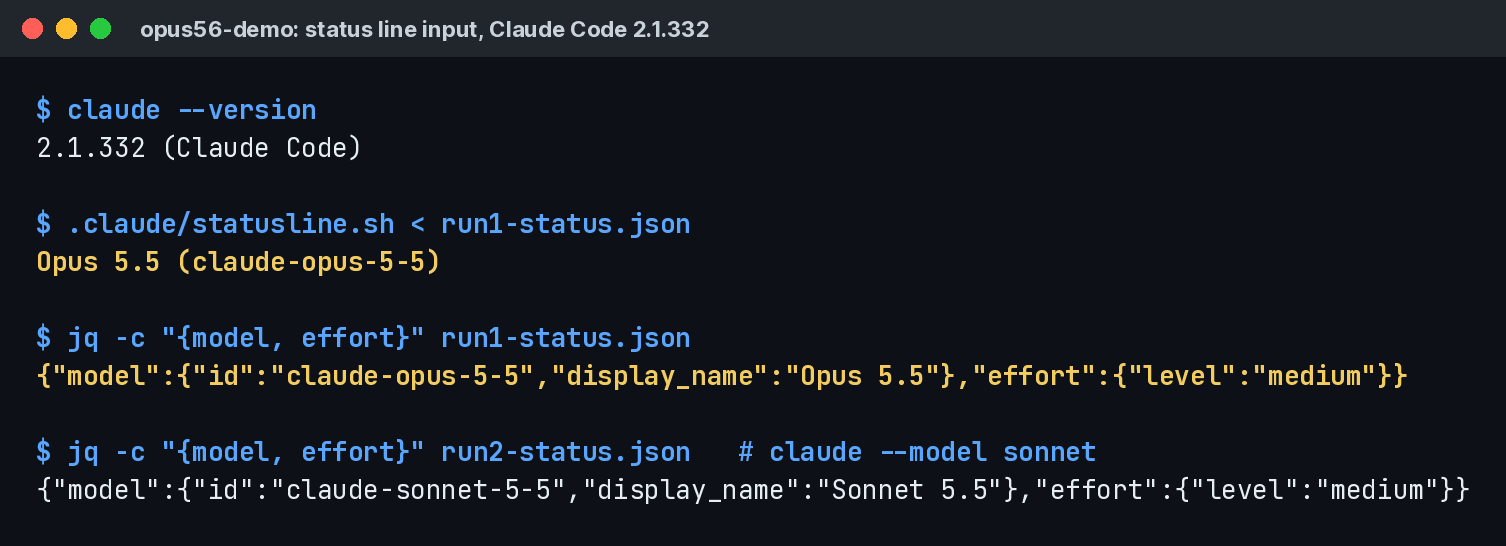
In the docs' example the display name is Opus, and ours printed Opus 5.5. I'd compare the ID, which is the stable part. Your script reruns when a new assistant message arrives, per the status line docs, so the saved file holds the latest update. Those docs call model.id the "Current model identifier" and don't say whether it shows the model you picked or the one that answered. Step 5 reads both.
If the status line is blank
- A status line stays blank until you accept the folder's trust dialog. Per the docs,
claude --debugthen logsStatus line command skipped: workspace trust not accepted. Restartclaudein the folder and accept. - If the status line shows only
(), jq isn't installed (the script ran, butjqdidn't). Runningjq --versionin a terminal printscommand not found. Install jq and start Claude Code again.
Step 5: Read requested and answered model from the transcript
Your saved status line data holds the transcript's path, in transcript_path. The transcript is a .jsonl file under ~/.claude/projects/, one JSON object per line.
- Run:
1T=$(jq -r .transcript_path .claude/last-status.json)
2jq -r 'select(.type=="assistant") | "\(.requestedModel) -> \(.message.model)"' "$T" | sort | uniq -c- You should see a count and a pair. Left of the arrow is the model Claude Code asked for; right of it is the model the API response names. Ours:
1 1 claude-opus-5-5 -> claude-opus-5-5message.model is the model field of the Messages API response, described in the API reference as "The model that will complete your prompt." requestedModel sits next to it on each line. We didn't find it in the docs pages we read. Its name may change between versions. Both fields were there on 2.1.330 and 2.1.332.
To check all sessions in this project folder at once, point jq at the transcript's folder:
1jq -r 'select(.type=="assistant") | "\(.requestedModel) -> \(.message.model)"' "$(dirname "$T")"/*.jsonl | sort | uniq -cOn 27 November we ran the same command over two of our working projects: 2,673 assistant lines, and 2,672 read claude-opus-5-5 -> claude-opus-5-5. The other one read null -> <synthetic>. It was a weekly usage-limit notice that Claude Code wrote itself (isApiErrorMessage: true, zero tokens), so no model answered it.
Step 6: Switch model and compare
- In the
model-checkfolder, start a new session on Sonnet. The prompt box opens.
1claude --model sonnet- Type the same question as in Step 3 and press Enter. An answer appears.
- Type
/exitand press Enter. - Run the Step 4 and Step 5 commands again. The status line file was rewritten by the new session, so
Tnow points to the new transcript:
1jq -c '{model, effort}' .claude/last-status.json
2T=$(jq -r .transcript_path .claude/last-status.json)
3jq -r 'select(.type=="assistant") | "\(.requestedModel) -> \(.message.model)"' "$T" | sort | uniq -c- You should see
claude-sonnet-5-5in both places. Ours:
1{"model":{"id":"claude-sonnet-5-5","display_name":"Sonnet 5.5"},"effort":{"level":"medium"}}
2   1 claude-sonnet-5-5 -> claude-sonnet-5-5
Both IDs changed together. Effort stayed at medium. A --model flag lasts for that session only. The CLI reference says it "Overrides the model setting and ANTHROPIC_MODEL". Running /model sonnet inside a session, by contrast, saves Sonnet as your default for new sessions.
What this check can't catch
If Anthropic served a different model under the claude-opus-5-5 ID, both fields would still read claude-opus-5-5. Nothing on disk would look different. The check confirms which ID was asked for and which ID came back, and goes no deeper. I think that is enough, because of Anthropic's own rule from its model ID page: a new version "ships under a new model ID". A quiet test of a new model under an old ID would break that rule, and no outlet has shown evidence that it happened.
When the model that answered differs from your setting
Claude Code can run a turn on a model other than the one you picked in four documented ways. The first two show a notice when they happen; the other two are by design.
On Opus 5.5, per the model configuration page, "biology-flagged requests re-run on Opus 5, and cybersecurity-flagged requests re-run on Opus 4.8." The session then stays on the fallback model until you run /model. Claude Code 2.1.332 added a footer line that stays on screen while this is in effect.

A fallback chain works per turn. If you set --fallback-model or fallbackModel, an overloaded or unavailable model hands the turn to the next one. "The switch lasts for the current turn only", and /status doesn't show the chain.
An opusplan session uses Opus while you plan and switches to Sonnet for the coding. And a custom subagent with its own model setting runs on that model whatever the main session uses.
Have we seen a fallback? Not in our sessions yet. I'd like to. So what requestedModel and message.model say during one is still open. If you get one, run the Step 5 command first and compare the two sides of the arrow on that line.
What I'd do while Opus 5.6 is a rumour
I'd keep using the IDs Anthropic publishes. To pin a session to one model, put the full ID, claude-opus-5-5, in --model or in your settings. The opus alias is documented as pointing to "the recommended version for your provider", and it updates over time. When Anthropic ships a new Opus, the alias will move and the new ID will show up in Step 4 and Step 5.
If you test models for a living, I'd add a status line with model.id. It costs nothing: the docs say it "runs locally and does not consume API tokens". Our other Claude Code tutorials cover the PreToolUse hook error and SKILL.md frontmatter, and the Sonnet 5.5 against Opus 5.5 comparison has the prices and benchmark runs for the two models you'll see in these checks.
Clean up
1cd .. && rm -r model-checkCheck it: ls model-check should print ls: model-check: No such file or directory on macOS. The transcripts stay under ~/.claude/projects/ with your other sessions.
Key takeaways
- You have a status line that prints the model ID, and a jq command that prints requested and answered model for any Claude Code session.
- Anthropic has not announced Claude Opus 5.6; on 27 November 2026 the opus alias still meant Opus 5.5 (claude-opus-5-5).
- "Extra high" is Anthropic's name for the xhigh effort level; nothing official connects an "Opus 5.5 Extra" label to Opus 5.6.
- Not covered here: what the two transcript fields show during a safety fallback, which we have not seen happen.
Comments
0Add a comment