
Atlassian MCP server permissions: what ChatGPT, Claude and Cursor can read and write

12 min readOctober 29, 2026
Key takeaways
- The Permissions tab sits under Atlassian Administration > Connectors > Atlassian MCP server. Toolsets are grouped by permission type, and on 29 October 2026 our org had 38 of them, 16 under Read and 16 under Write.
- Switching off the write_jira toolset blocked Jira writes for OAuth and API-token connections alike, 18 seconds after Save. The error was Access denied: Your organization admin has not authorized the write_jira permission. Jira reads kept working, and allowing it again took about 54 seconds.
- API token access has its own switch on the Authentication tab. It was off on our org, and with it off the connection opened but our tool calls were refused.
- With the data security policy set to Blocked, OAuth Confluence searches on the V2 endpoint came back with 0 results for an admin and for a normal user, and the admin's Jira search came back empty. On the V1 endpoint, which Atlassian sunsets on 1 March 2027, our admin kept reading the blocked pages through 27 minutes of polling, and the normal user through 18.
- The policy needs Atlassian Guard Standard at $4.35 per user per month, so $870 a month for 200 users, or $1,710 for Guard Premium. Atlassian's doc says it is enforced only for OAuth, never for API tokens.
Someone on the Atlassian Community asked a simple question this month. How do you let people use Claude with Jira and Confluence, but keep it read-only, without touching anybody's project permissions? That thread had 205 views on 29 October, and the older Read-only scopes in MCP server has 6,346. MCP (Model Context Protocol) is how AI tools like Claude plug into other apps. Atlassian runs its own MCP server for Jira and Confluence. You do it with Atlassian MCP server permissions, on the Permissions tab. It was the Rovo MCP server until this autumn, so you'll still see that name around. We switched off the Jira write toolset on our test org on 29 October 2026. Eighteen seconds later, an OAuth connection and an API-token connection both got Access denied: Your organization admin has not authorized the write_jira permission.
There's a second control too, and this one costs money. Since 29 September there's an Atlassian MCP server rule in data security policies. It needs Atlassian Guard and blocks whole spaces, apps or classification levels, so it sounds like the stronger lock. We blocked one space, then the whole org. For 27 minutes our AI connections kept reading the "blocked" pages, and we nearly wrote that the policy does nothing. Then we pointed the same users at Atlassian's newer V2 endpoint, and the same searches came back empty.
My take, from what we saw on our org: the Permissions tab decides what an AI tool can do, it comes with your org, and it held on both kinds of connection we tried. A data security policy decides what it can read, only for OAuth users, only on V2, and it costs Guard on top.
Toolset blocks held on both connection types, the policy only on V2
- Permissions aren't a per-app grid any more. It groups toolsets by permission type, and ours had 38 of them in five groups.
- Blocking
write_jirastopped Jira writes over OAuth and API token within 18 seconds. Reads and Confluence writes carried on, and the write tools stayed in the tool list. - API tokens have their own switch, and it was off. With it off, the connection opens and then the tool calls are refused.
- A classic API token without scopes only reaches four Teamwork Graph tools, and they fail. A scoped service-account key reached 31 tools.
- A Blocked data security policy hid content from OAuth searches on V2 (0 results) and didn't touch V1, which is deprecated but still answers.
- Guard Standard for 200 users lists at $870 a month. Guard Premium, which you only need for classification levels, is $1,710.
Atlassian MCP server permissions live under Connectors, grouped by toolset
In admin.atlassian.com, pick your organization, open Connectors in the sidebar, then Atlassian MCP server. You'll get three tabs: Domains, Permissions and Authentication. A lot of Community answers still say Rovo > Rovo MCP server. That path redirects to Connectors now.
Atlassian's permissions doc has one sentence that matters if you used to manage this in Connected apps. Settings on this tab "will take precedence over settings in Connected Apps or individual app permissions in Marketplace."
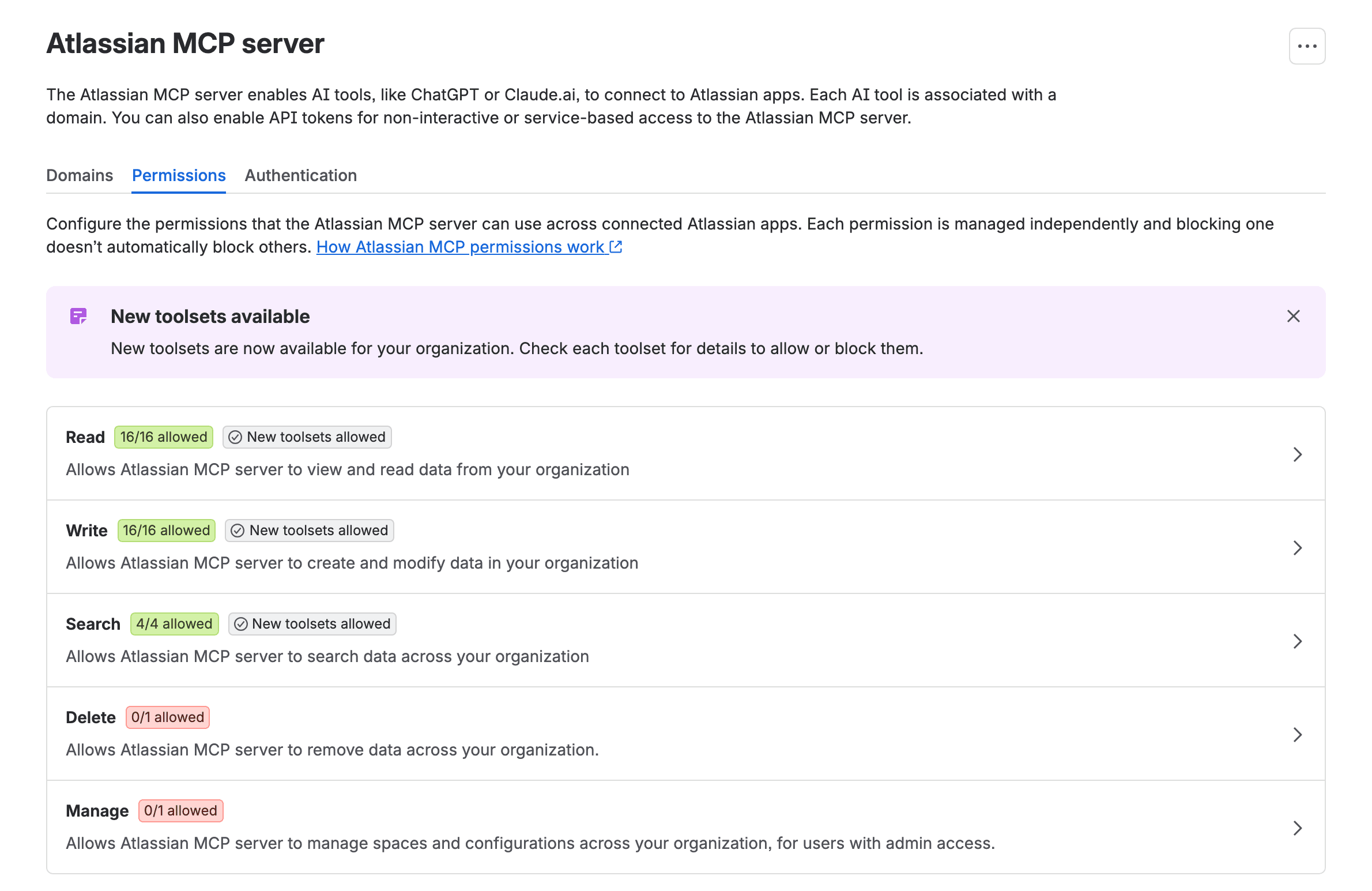
Each row opens a side panel with its toolsets. Write had 16 on our org, from write_confluence and write_jira to newer ones tagged New, such as write_goals. Delete holds one. Atlassian's supported tools page says delete_jira "is disabled by default", and describes its deleteJiraIssue tool as "Permanently delete an issue. Cannot be undone." Manage holds manage_jira, also off by default.
"Partially allowed" in the docs reads "15/16 allowed" on the screen
Atlassian's doc describes a state called Partially allowed, "The setting is on for some permissions but not all". I repeated that wording on the Community in August, when I warned that a Jira-only block leaves the Write row reading Partially allowed. On our org there's no such label today. Block one toolset and the row says "Write 15/16 allowed", and the New toolsets allowed badge disappears. My warning still stands, because a row that's mostly green can hide the one toolset you blocked (or forgot). But the words on screen are a count now, so look for the number.
Watch the New toolsets setting, too. When you allow a permission type, new toolsets in it are granted automatically and "won't require manual review by admins". When we counted for our Team '26 Europe write-up on 8 October there were 36 toolsets. On 29 October we counted 38.
Make the Atlassian MCP server read only: block Write toolsets, keep Read and Search
If you want Claude, ChatGPT or Cursor to read and search but never change anything, do this:
- On the Permissions tab, click the Write row.
- Change Write toolsets from Allow all toolsets to Block all toolsets, or to Allow some toolsets if you want to pick.
- Untick Allow new write toolsets, so a write toolset Atlassian adds next month doesn't arrive switched on, and click Save changes.
There's no confirmation dialog. Save applies it.
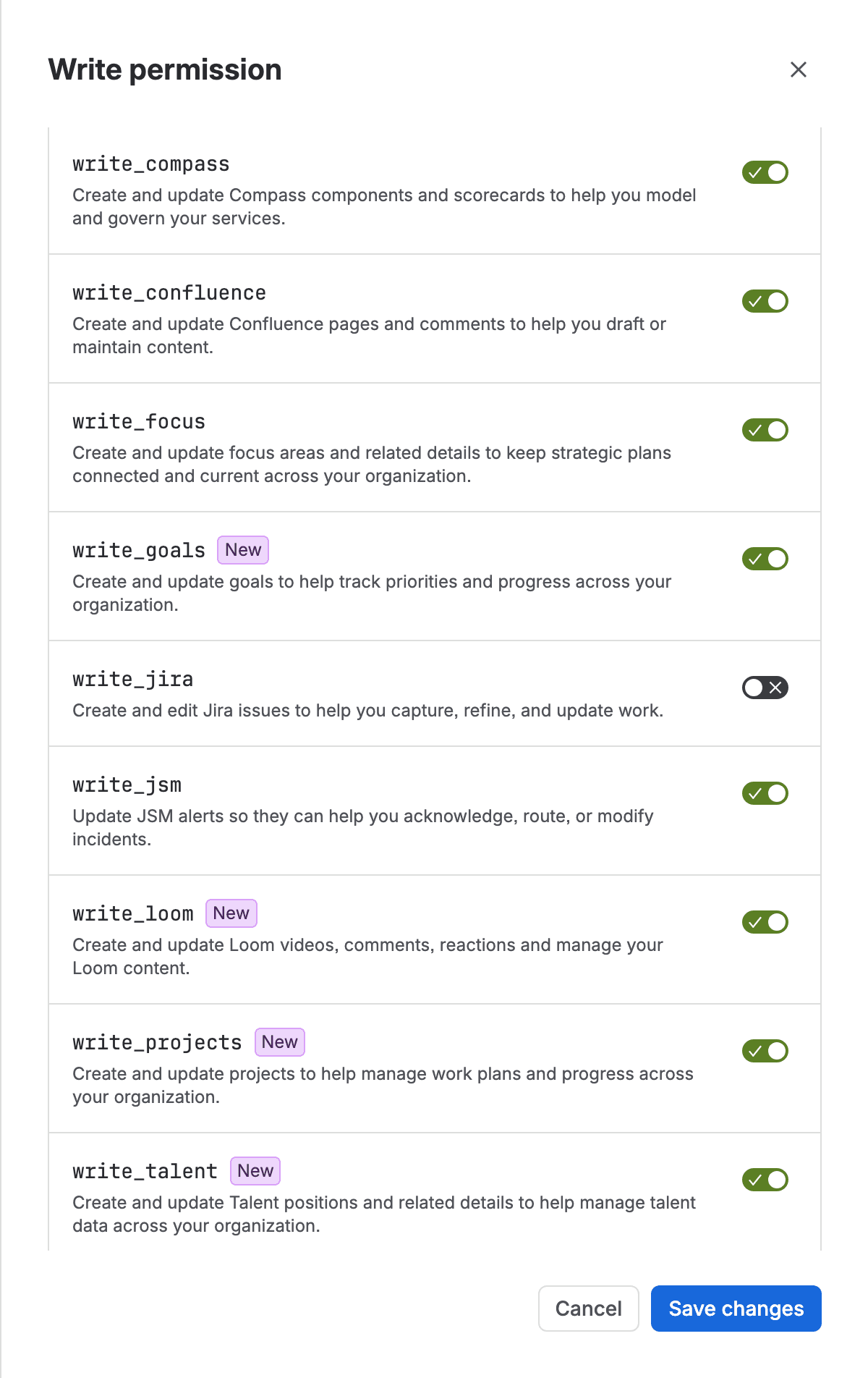
We tested the partial version because it's the one people get wrong: write_jira off, everything else on.
Access denied: Your organization admin has not authorized the write_jira permission
We saved at 02:33:45 UTC. At 02:34:03 an addCommentToJiraIssue call from a scoped API token came back with this:
1{"error":true,"message":"Access denied: Your organization admin has not authorized the write_jira permission."}createJiraIssue got the same text eight seconds later. Then we ran an OAuth connection (the way ChatGPT and Claude.ai connect) and the API token side by side, and both got identical errors. Atlassian's doc gives the general form, "Access denied: Your organization admin has not authorized the [permission name] permission", and its FAQ quotes "Access denied: Your organization admin has not authorized the write permission." If a user pastes you either version, this tab is where to look.
Jira reads still worked (getJiraIssue), which is what you want. A Confluence footer comment still went through, because write_confluence is a separate toolset. And the write tools were still in the list the AI client sees, so your users will watch their assistant try and fail. Atlassian says changes "take effect immediately". Our first call after blocking, 13 to 18 seconds after Save, was already refused. After we allowed it again, a call at 18 seconds still failed and one at 54 seconds worked.
Atlassian MCP API token connections have their own switch
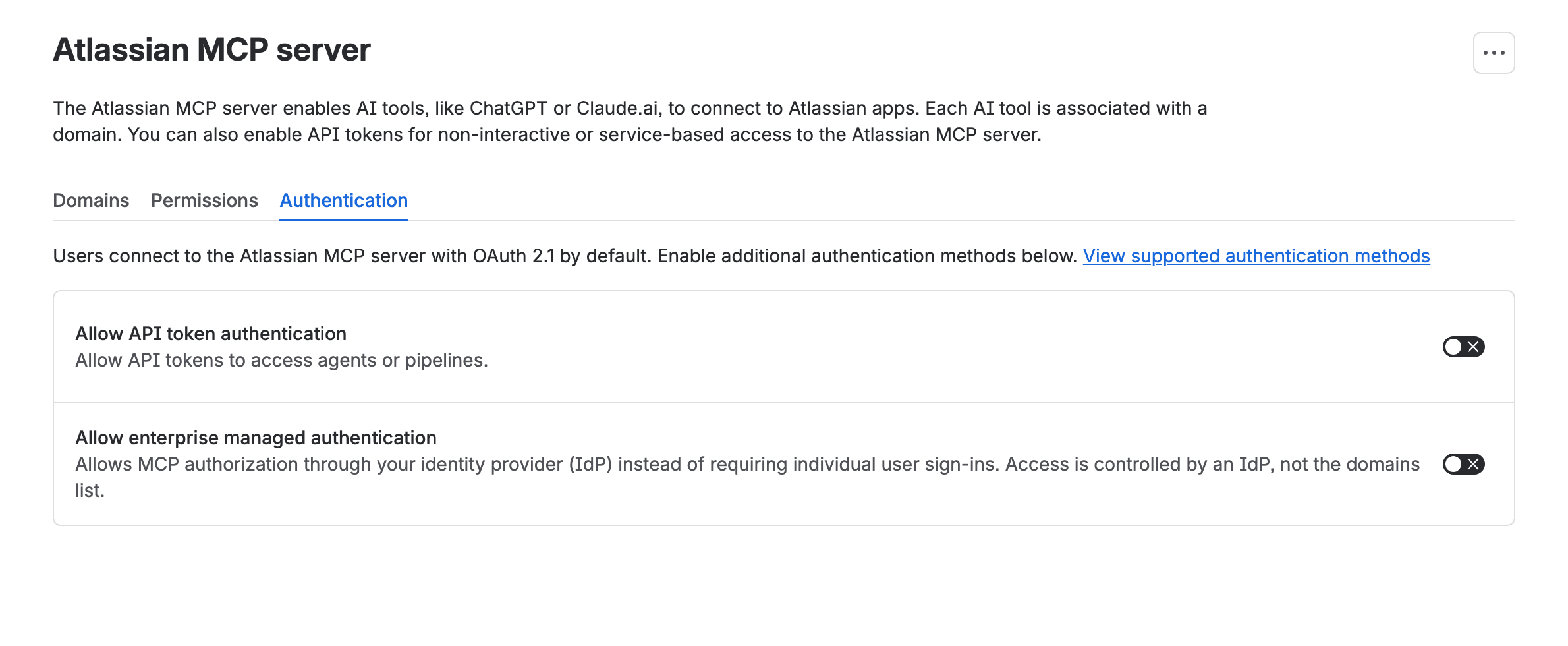
The Authentication tab starts with "Users connect to the Atlassian MCP server with OAuth 2.1 by default." Below it, Allow API token authentication was off on our org, and so was Allow enterprise managed authentication. We couldn't find an Atlassian page that says API tokens are off by default. Atlassian only says the method "is only available if enabled by your organization admin". Off is what we found, and a Community member reported the same on their Standard org.
You don't have permission to connect via API token
With the switch off, the MCP handshake still worked and the tool list still came back. But each tool call returned You don't have permission to connect via API token. Please ask your organization admin for access. So a developer who says it connects fine but nothing works has probably hit this switch.
Once we switched it on, the kind of token mattered a lot. A classic personal API token, one without scopes, saw only four Teamwork Graph tools. Calling one failed with Teamwork Graph tools require a modern API token (API token with scopes). Legacy API tokens without scopes are not supported. A scoped personal token wanted an emailed verification code first, so we made a service account instead. Its scoped key listed 31 tools either way, but the calls only worked with Authorization: Bearer. Sent as Basic auth, our calls failed with Failed to fetch accessible products: 401.
It's an all-or-nothing switch. You can't allow tokens for one pipeline and not for everyone else, and ECO-1445 asks for that ("if API tokens are allowed for MCP, any user can create a token and use it"). It had 2 votes. Token connections also skip the Domains allowlist. The settings doc says they "are instead governed by your IP allowlist configuration and the scopes granted to their tokens or API keys."
Prevent Atlassian MCP server access to sensitive spaces: the data security policy needs Guard
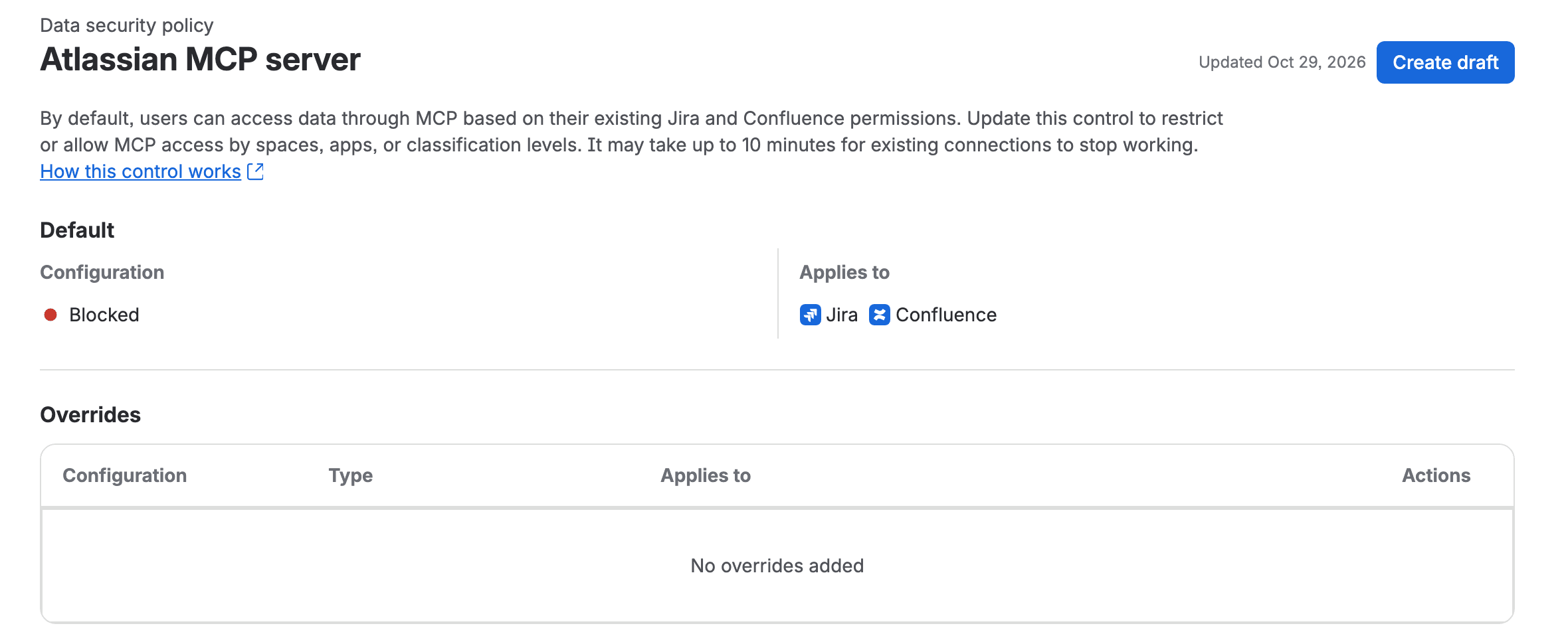
The second control lives somewhere else: Atlassian Administration > Security > Data protection > Data security policy. In that list you'll find the Atlassian MCP server next to Export data, Public links, Anonymous access and app access. The 29 September changelog entry says admins "can govern how external AI tools read and write Jira and Confluence data using MCP, with org-wide defaults and overrides scoped by Atlassian apps, spaces, and classification levels."
The support doc for the rule is narrower than that announcement. It only talks about reading: "It only prevents covered content from being read through the Atlassian MCP server." And its second paragraph says "Data security policies are enforced only for OAuth authentication methods, not API token authentication methods." The rule needs Guard Standard, and blocking by classification level needs Guard Premium. Our piece on what an Atlassian data security policy blocks, and what needs Guard has the plan matrix for the other rules.
Atlassian MCP V1 vs V2: the policy held only on V2, and we tested V1 first
Our first try went like this. We blocked one Confluence space, HELP, at 02:40 UTC and kept a second space, PEOPLE, as the control. Then we polled a page in HELP every minute, as the admin over OAuth and with the service account's API token. It came back for 17 minutes straight, including on a fresh OAuth token issued 14 minutes after we activated the rule. So we set the whole org to Blocked at 03:00 and polled again for 10 minutes. Still nothing was blocked.
We didn't want to write "the policy does nothing" off one admin account, so we set the org back to Blocked at 03:22 and ran it again as Elzi, a test user on our org with no admin rights. Same result on V1, for 18 minutes. Then we noticed the replies carried a deprecation notice. Our V1 endpoint, mcp.atlassian.com/v1/mcp, says "status": "deprecated" with "sunsetAt": "2027-03-01T00:00:00Z" and points to mcp.atlassian.com/v2/mcp. V2 is a separate OAuth resource, so you need a new login for it.
At 03:39 and 03:40 UTC, 17 to 18 minutes after that activation, we logged Elzi and the admin in against V2. Fetching the PEOPLE home page came back with getConfluenceContent failed: 404 and a NOT_FOUND code. The admin's getJiraIssue for a Jira issue in our test project said Issue "LZPT-186" not found. A Confluence search for space = PEOPLE returned "totalSize":0, and a JQL search for the project returned an empty list. Seconds later, on V1, the admin's old token still read both pages.
At 03:42, after we set the policy back to Allowed, the same PEOPLE fetch and search returned the page for both users, and the admin's JQL search listed the project's issues. So V2 does block. Your users just won't see the word blocked. The doc warns that an agent "receives a "does not exist or you don't have permission" response", and what we got reads like a missing page, so your users will think the content isn't there.
Atlassian's V1 to V2 upgrade doc says "On March 1 2027 any existing utilization of v1 will automatically start to expose and utilize v2 tools." Until then, anyone whose client still talks to V1 reads straight past the policy. The Permissions tab, which we tested on V1, held there. We didn't re-test it on V2, so check it there after your clients move. We didn't see a way to turn V1 off for an org, and we didn't find one in the docs either.
Our API-token calls all went to V1 as well, so they don't tell you much about the policy, because OAuth wasn't blocked on V1 either. The exemption for API tokens is Atlassian's own statement, and we didn't test tokens on V2. To see which endpoint a tool uses, look at the server URL in its connector settings. Anything with /v1/ in the path (/v1/mcp, /v1/sse, /v1/mcp/authv2) is V1, and /v2/mcp is V2. The upgrade doc says existing Claude installs of V1 "will become "Custom Web" connectors".

What ChatGPT, Claude and Cursor can read and write through the Atlassian MCP server
Under all of this, the user's own permissions still decide what an AI tool sees. Atlassian's policy doc puts it plainly for the Allowed setting: "The user's existing permissions control what the AI agent can access." An assistant connected as Elzi reads what Elzi's account can read, and with Write allowed it can change what that account can change.
Over OAuth, the Domains tab decides which tools may connect. "Allow Atlassian supported domains" was on for us, and Atlassian's domain list had 45 entries on 29 October, including chatgpt.com, claude.ai, vscode.dev, cursor://cursor.mcp, localhost and 127.0.0.1. You can't pick from that list ("You can only allow or block the entire domain list"). You either keep it or switch it off and add your own domains. A client we registered ourselves, with a localhost redirect, went straight through consent, which fits with localhost being on the list. If you switch the list off, re-test the tools your developers run locally.
Your users will see two consent screens. The first says the client "is requesting to be authorized on Atlassian Rovo MCP server" and lists the apps it wants, Compass included. Then a second screen asks them to choose a site and lists scopes such as View and Update jira-work. Our access token lasted about 7.9 hours. A refresh token came with it.
For evidence afterwards, Atlassian's monitoring doc says each tool call goes to the organization audit log with "the tool name, action, and user who performed it", on all tiers. For API tokens it warns that calls "may run under a service account or technical user". That's one more reason to keep tokens off unless a pipeline needs them.
What Guard costs a 200-person company for the second control
On 29 October the Guard pricing page listed Guard Standard at $4.35 per user per month and Guard Premium at $8.55, monthly billing, in US dollars. For 200 users:
Plan | Per user / month | 200 users / month | 200 users / year (annual tier) |
|---|---|---|---|
Guard Standard (policies, app and space overrides) | $4.35 | $870 | $8,700 |
Guard Premium (adds classification levels) | $8.55 | $1,710 | $17,100 |
The yearly figures are the 101-200 user tier in the page's own price data. Matching each tier to its plan is my reading of that data, so check your quote. Guard Standard comes with Atlassian Cloud Enterprise "at no additional cost". Guard also bills everyone with an account in your org, free accounts too, unless you put them in a non-billable policy. Our earlier Guard article quoted $4.20 and $8.18. The Standard price list on the page now is dated 13 October 2026.
If you'd buy Guard mainly to keep AI tools out of a few spaces, weigh $870 a month against what the free Permissions tab already does. On our org the policy didn't cover V1, and Atlassian's own doc says it never covers API tokens.
A default for a 200-person company: Read on, Write off, sensitive spaces blocked
If it were my org, I'd start here:
- Leave Read and Search on, but untick the allow-new-toolsets box in the Read and Search panels. In the Write panel it's labelled Allow new write toolsets. Your people will use ChatGPT and Claude with Jira anyway, and this way it's logged and runs on their own permissions.
- Block Write, then allow back what a team asks for. When the developers want Jira comments from Cursor, turn on
write_jiraand leave the rest off. Delete and Manage stay blocked, as they start, becausedeleteJiraIssuecan't be undone. - Keep API tokens off unless a named pipeline needs one. Then give it a service account with a scoped key and put your IP allowlist in front of it.
- If you already have Guard, add the MCP rule for your HR and finance spaces. Test it from a normal user's seat over OAuth on V2, and wait the full 10 minutes before you trust it.
- Check the audit log a week later for "Atlassian MCP User Actions", to see which tools people really call.
Where the native controls stop
You can't block a single tool. You can switch off write_jira, but not just the worklog tool inside it, and ROVO-1143 asking for that had 3 votes. You can't limit API tokens per user either (ECO-1445 above). And the data security policy covers only Atlassian's own server: the doc lists "Access through custom MCP servers" among the things it doesn't affect. If you're connecting other sources to Rovo as well, our piece on the Rovo SharePoint connector's permissions covers what that one reads.
We ran all of this on our own test org, with Guard Premium on a trial, and put the settings back afterwards. If your org shows something different, I'd love to know, especially which endpoint your users' tools are on. Have you blocked writes for AI tools yet, or are you waiting until someone asks?
Comments
0Add a comment