
Can Rovo access SharePoint? What the Rovo SharePoint connector reads and how to limit it

10 min readOctober 26, 2026
Key takeaways
- The connector setup sends two Microsoft requests. Admin consent goes to Atlassian's verified app 0c8611af-925f-491b-86f4-32fad2901689 and names 6 scopes, including Files.Read.All and Sites.Read.All. Authorize goes to a different app, 20ddde29-f84a-4a98-a8c2-b3b698d4ace2, with scope .default, so its permission list isn't on the setup page or in any Atlassian doc we read. Microsoft's consent screen shows that list to whoever approves it, the first time only, and Entra shows it afterwards under Enterprise applications > Permissions.
- A Microsoft 365 admin has to consent to the first app by 15 November 2026 to keep SharePoint and OneDrive Smart Links and Rovo results working. That consent doesn't require setting up the indexing connector. The old setup was a customer-built Entra app with 8 Graph application permissions plus Azure ACS, which Microsoft retired on 2 April 2026.
- You can limit what gets indexed by site allow list or block list (up to 50 entries each, no file or folder level), by date, by Microsoft sensitivity label GUID, and by Microsoft 365 group for personal sites. Indexed content that isn't access-restricted in SharePoint itself is searchable by every Rovo user on the site.
- The index takes Word, Excel, PowerPoint, PDF up to 10 MB and .html/.aspx pages, plus people data. Encrypted documents are skipped. Atlassian's tracker lists ROVO-529 (41 votes, open), filed because Chat could read SharePoint file names but not contents. A customer said in September 2026 it's still not resolved.
- Indexing doesn't spend Rovo credits; it counts against an indexed-objects allowance of 100 to 6,250 per user depending on plan. On our org's usage export (8 Sep to 20 Oct 2026, no connectors), the Teamwork Graph line was 1 event and 0 credits, and Rovo Chat was 19 events and 1,435 credits.
Yes, Rovo can access SharePoint. The Rovo SharePoint connector copies SharePoint and OneDrive files into the Teamwork Graph, the index Atlassian keeps for search and AI, and Rovo answers from there. A Microsoft 365 admin has until 15 November 2026 to consent to Atlassian's new app, and one of the two permission requests the setup sends Microsoft names no permissions at all, only .default.
I think the design is fine. The problem is the setup page never shows you the permission list you're approving. Microsoft's consent screen shows it once, to whoever clicks Accept, and Entra shows it after the fact.
I walked the setup on our test org this week, right up to Microsoft's sign-in page, and recorded where each button sends you. We don't have a real Microsoft tenant, so nothing got connected. Anything past the sign-in page comes from documentation, and I say so where it counts.
My recommendation for a 50 to 2,000 seat company: grant the admin consent now, because that's the one with the deadline. For the Authorize step, do it first in a pilot or test Microsoft tenant and read the granted list in Entra. Without one, have the approving admin screenshot Microsoft's consent screen and click Cancel, then decide for production. When you do switch indexing on, use an allow list of sites, never a block list.
What we found
- Two Microsoft apps, two requests. Grant consent asks for six named, read-only scopes. Authorize goes to a different app and asks for
.default. Its list isn't on the setup page or in any Atlassian doc we read; you see it on Microsoft's consent screen and, afterwards, in Entra. - The deadline is for the first app only. Atlassian says you don't need to finish the connector setup to grant it.
- Allow and block lists cap at 50 entries each and can't target individual files or folders.
- The docs and the tracker disagree twice, on SharePoint pages and on whether agents read file contents.
Connect SharePoint to Rovo: two apps, up to three admins
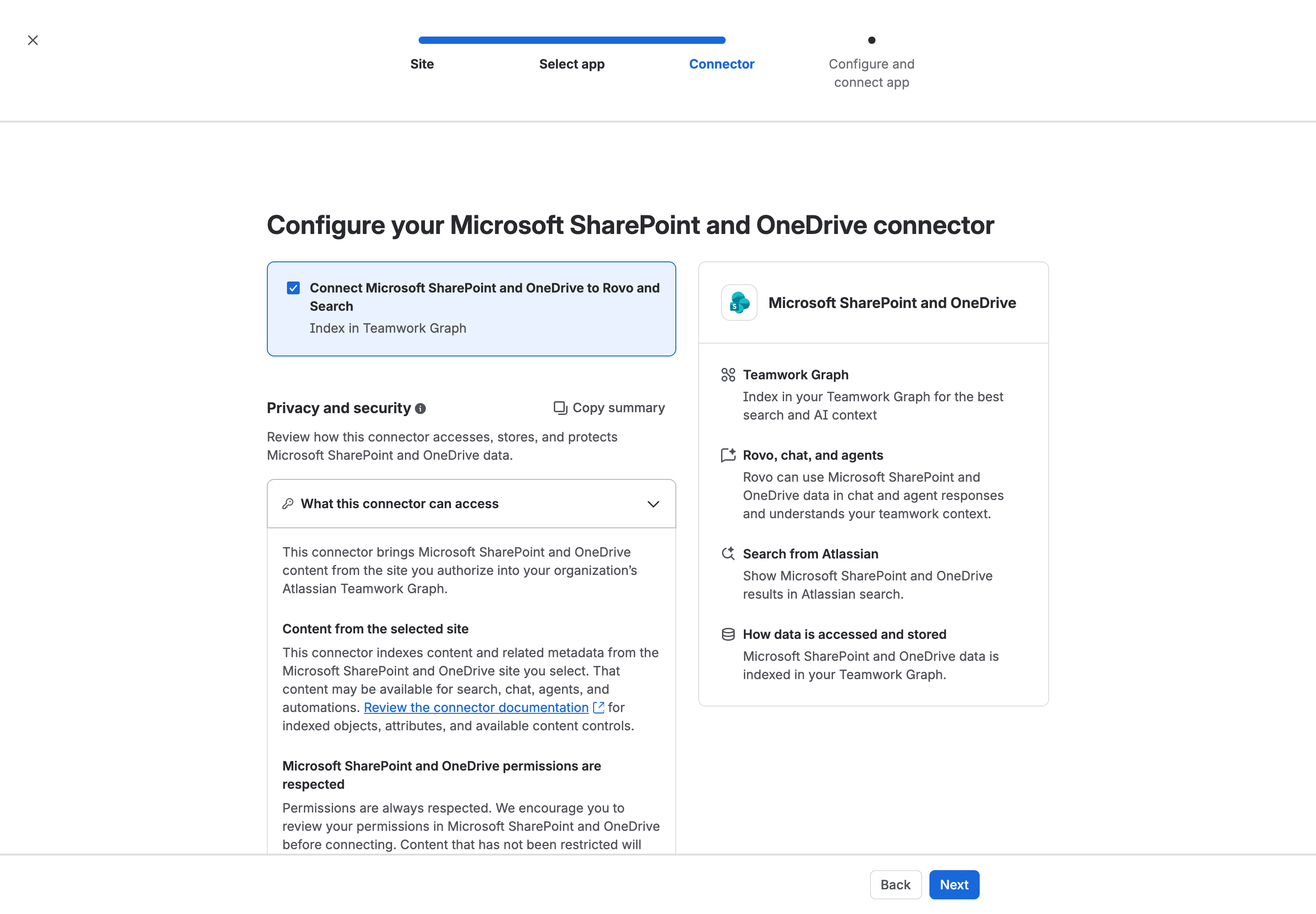
I found the connector under Atlassian Administration > Connectors > All connectors. Rovo needs a Standard plan or higher, and Atlassian Government organizations don't get it.
The setup talks to two Microsoft apps. I'll call them the consent app and the indexing app from here on.
Consent app | Indexing app | |
|---|---|---|
Button in the wizard | Grant consent | Authorize |
Entra app (client ID) | 0c8611af-925f-491b-86f4-32fad2901689, named "Atlassian" | 20ddde29-f84a-4a98-a8c2-b3b698d4ace2 |
Microsoft endpoint | /organizations/v2.0/adminconsent | /organizations/oauth2/v2.0/authorize |
Scopes in the URL | email, openid, Files.Read.All, Sites.Read.All, User.Read, offline_access | https://graph.microsoft.com/.default, offline_access |
Who approves | Entra Global Administrator, Application Administrator or Cloud Application Administrator | "SharePoint global admin" per Atlassian's connect page |
What Atlassian documents | Each scope, read-only | "the permissions here are broad" |
That's what the browser sent on 25 October 2026. No consent was granted and we saved nothing. The page creates an unsaved draft when it loads, and the connector list still showed 0 items afterwards.
So up to three admins sign something: the Atlassian organization admin who runs the wizard, the Entra admin who grants consent, and whoever authorizes indexing. Then each user connects their own Microsoft account once.
The wizard asks that last admin for "Microsoft Entra admin permissions". Connect SharePoint to Teamwork Graph, which I'll call the connect page, says "SharePoint global admin permissions". Plan for whoever holds both.
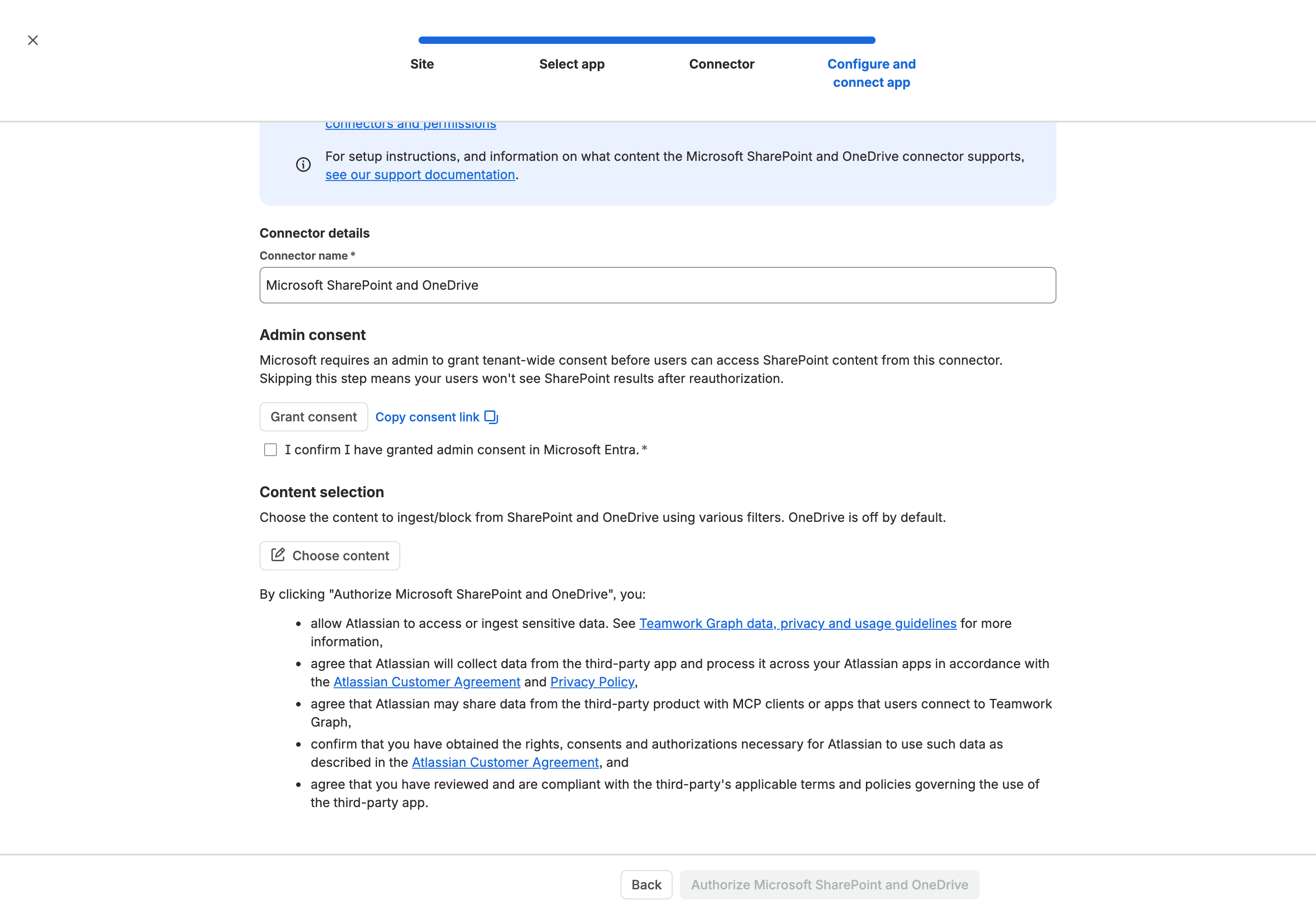
Read the terms under the Authorize button. You "allow Atlassian to access or ingest sensitive data". You also agree "that Atlassian may share data from the third-party product with MCP clients or apps that users connect to Teamwork Graph".
That second term reaches MCP clients and other connected apps as well as Rovo. I'd flag it separately. If you've already locked MCP down with Atlassian Guard, our piece on what the Atlassian data security policy covers lists the "Prevent Atlassian MCP server access" control.
Admin consent for the SharePoint and OneDrive connection is due 15 November 2026
Upgrade your SharePoint and OneDrive connection names the app: "a Microsoft 365 administrator must grant consent to Atlassian's new Microsoft publisher-verified application by November 15, 2026", application ID 0c8611af. Without it, "users may no longer be able to resolve SharePoint and OneDrive Smart Links, display link previews, or find SharePoint and OneDrive content through Rovo."
You can do that without switching indexing on. Same page: "You don't need to complete the connector setup or add the connector. Opening the setup page is only necessary to obtain the admin consent URL." Indexing only happens "If your organization separately configures a synced Teamwork Graph connector for Rovo".
So I'd split the two decisions. The consent app's scopes are documented and read-only. Sites.Read.All is "Read items in SharePoint sites that the signed-in user can access", and "If a user cannot access it in Microsoft, granting consent does not give them access through Atlassian." Revoking it later "will disable SharePoint and OneDrive features in Atlassian for all users in your organization".
The indexing app asks for .default, and the list behind it is in Entra
Authorize is the step that switches indexing on. The connect page calls it "granting Atlassian Teamwork Graph access to your SharePoint/OneDrive accounts" and adds: "Although the permissions here are broad, Atlassian Teamwork Graph will only ingest assets that comply with the admin policy controls".
Microsoft's scopes page says .default "signals that consent should be prompted for all required permissions listed in the application registration". So the request carries no list. The list is whatever permissions Atlassian set on its own app in Microsoft's directory.
Microsoft shows that consent screen when nothing has been granted yet, or when the request forces it. That screen is where the list appears, once, for the admin who approves it. If someone in your tenant already clicked through, you probably won't see it again. After consent, Entra shows the same list: Enterprise applications > the app > Permissions, with delegated and application grants kept apart.
That split is what to look for. Delegated permissions act as the signed-in user, so they can't reach anything that person can't open. Application permissions run with no signed-in user at all. Microsoft's reference says Sites.Read.All as an application permission "Allows the app to read documents and list items in all site collections without a signed in user".
What we captured is a sign-in request with offline_access. In Microsoft's model that gets a token acting for the admin who signs in, which fits Atlassian's line that synced connectors index "using a service or admin account". Nothing we saw rules out the same app registration also holding application permissions used another way. Only the consent screen or the Permissions list in Entra would show that.
The old setup asked for more, and you built it yourself
Until spring 2026 you created the Entra app. The archived connect page (12 March 2026) said "Select Application permissions" and listed eight Graph ones, from Directory.Read.All and Sites.Read.All to AuditLogsQuery-SharePoint.Read.All, plus ActivityFeed.Read and a tenant-scoped SharePoint read.
That list was read-only, which isn't greedy by comparison. Glean's SharePoint connector asks for Sites.FullControl.All in its standard setup, and "All permissions must be granted as Application permissions." Glean does document Microsoft's Sites.Selected, which limits an app to chosen site collections, as an alternative it doesn't recommend, and Google documents it too. No Atlassian page we read mentions it. I'd ask Atlassian before assuming either way.
It ran on Azure Access Control Service (ACS), Microsoft's old SharePoint add-in authentication, retired for existing tenants on 2 April 2026. Atlassian announced the move to "an Atlassian-managed Microsoft Entra app" on 31 March. Connectors left on legacy auth "may stop syncing", leaving Rovo "reasoning over stale data".
Synced means Atlassian keeps a copy of your SharePoint
If I were the CISO, I'd read this part first. SharePoint is a synced connector, and Atlassian's privacy page says those store "the content for each file" and "permissions settings about the file". Your content sits in the Teamwork Graph, and the permission check runs against Atlassian's synced copy of your SharePoint permissions.
Microsoft 365 Copilot works differently. Its data is "processed and stored in alignment with contractual commitments with your organization's other content in Microsoft 365". This connector moves a copy out of Microsoft 365 into Atlassian, which you can at least pin with Atlassian's data residency.
Per the connect page it copies Word (.doc, .docx), Excel (.xls, .xlsx), PowerPoint (.ppt, .pptx), PDFs up to 10 MB, and web pages (.html, .aspx). It stores each file's body along with its name, URL, dates, creator and collaborators. "Encrypted documents do not get ingested." SharePoint lists aren't mentioned, and neither is what happens to a 12 MB PDF.
People come along too. The People data tab always indexes display name and email address. A toggle, on by default, adds job title, manager and department. The doc's own list has hire date and no manager, so check the screen you actually get.
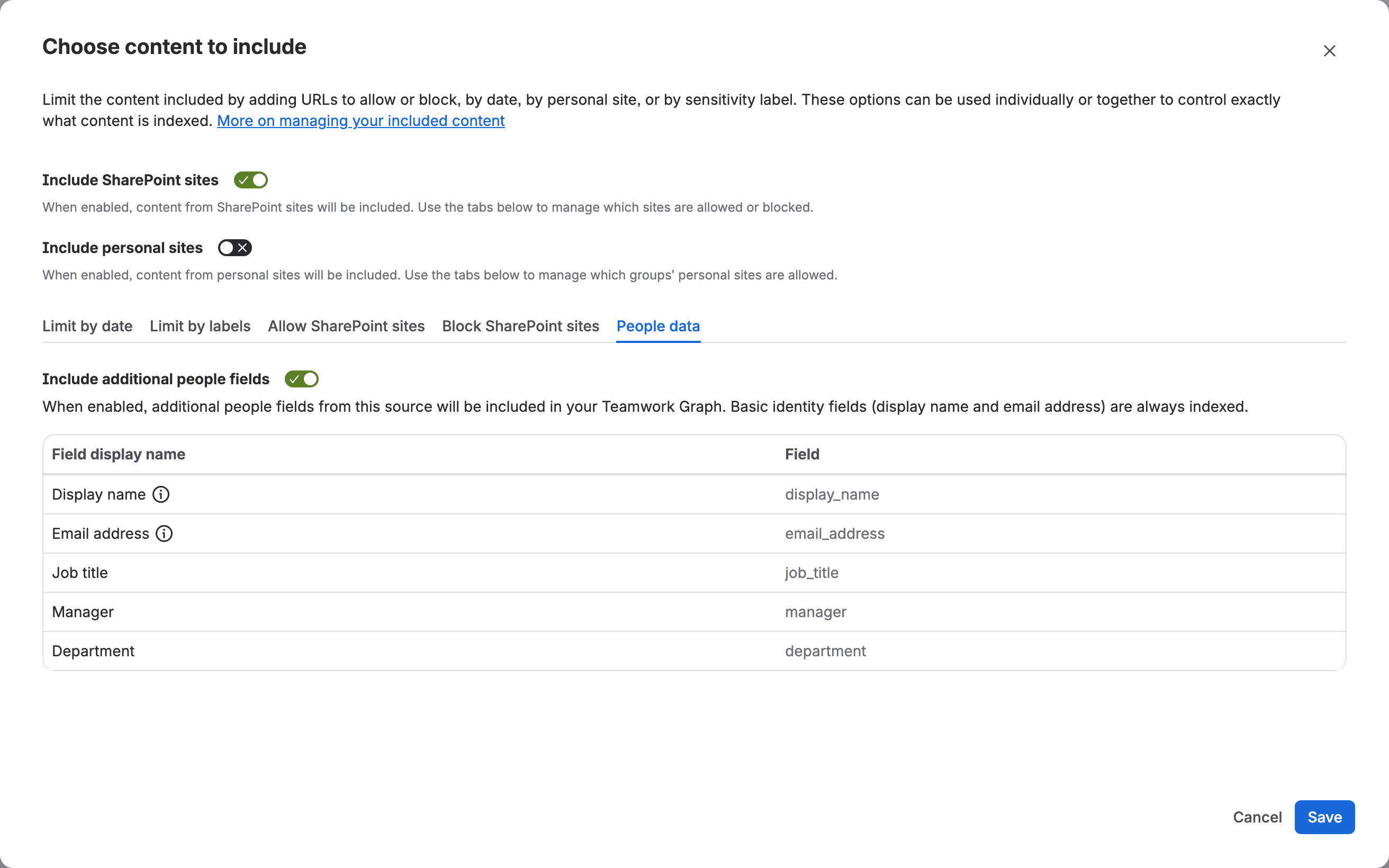
OneDrive arrives through Include personal sites. One Atlassian page says it comes "automatically"; the setup screen says "OneDrive is off by default", and the toggle was off. Trust the screen.
What happens when a file's access changes
Atlassian's permission-sync page covers changes to a document, not to a person. Restrict a file at the source and it "Only shows up in search results for those with permissions". Remove the restriction and it's "Visible in Search for everyone using Rovo on your site". Delete it and it's "Removed from Rovo, including Search, Chat, and Agents".
It has no row for someone who leaves or is taken out of a SharePoint group. How long a change takes to land isn't on any Atlassian page we read either.
So I'd treat the connector as exactly as tight as your SharePoint sharing. The setup page puts it this way: "Permissions are always respected. We encourage you to review your permissions in Microsoft SharePoint and OneDrive before connecting. Content that has not been restricted will appear in search results for all users." A site the whole company can open in SharePoint is just as open in Rovo.
Limit the Rovo SharePoint connector with an allow list
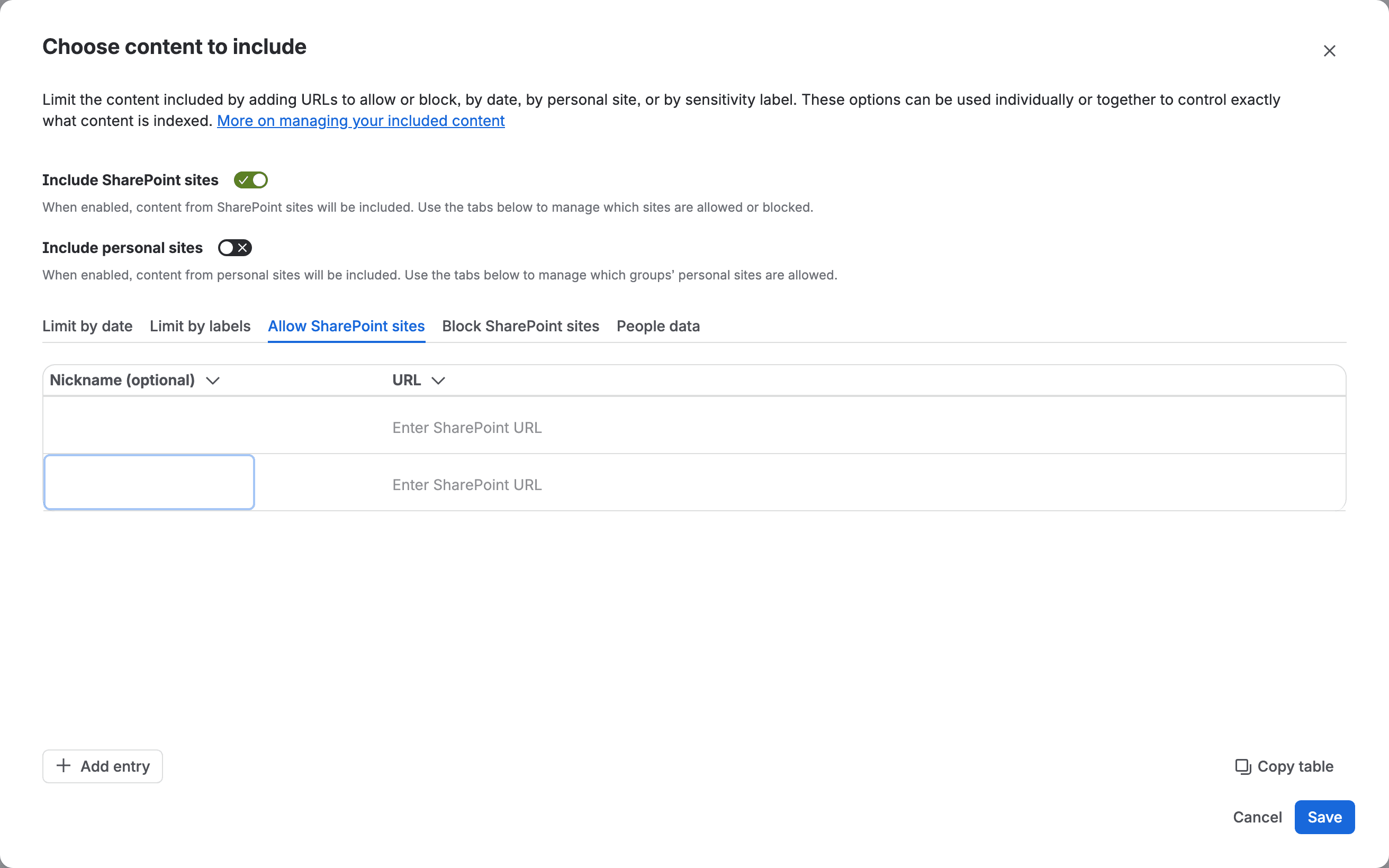
In the Choose content modal, Include SharePoint sites starts on and Include personal sites starts off. "At least one must be on. If both are off, nothing is indexed."
Control | What it does | Limits |
|---|---|---|
Allow SharePoint sites | Only listed sites are indexed | Up to 50 URLs; URLs aren't checked |
Block SharePoint sites | Everything except listed sites is indexed | Up to 50 URLs; a blocked URL wins over the allow list |
Limit by date | Only content created or modified after a date | One date for the whole connector |
Limit by labels | Blocks files with listed sensitivity label GUIDs | GUIDs read in Microsoft Graph Explorer by an admin with SensitivityLabels.Read.All |
Allow / Block personal sites | Personal sites (OneDrive) by Microsoft 365 Group ID | See below |
Fifty entries is plenty for "the IT wiki and the HR policy site", and a site created next month stays out until you add it. A block list works the other way round: every new site is indexed by default, and anything on it that isn't access-restricted in SharePoint shows up for every Rovo user.
I'd watch the personal sites allow list. A blank one means all users, so turning Include personal sites on with an empty list puts every OneDrive in the tenant in scope.
"Blocking or allowing individual files or folders is not supported." A sensitive folder inside an allowed site goes in unless something else stops it.
Sensitivity label blocking keeps a file out
Atlassian added label blocking on 3 June 2026, and for a blocked label "None of its content, metadata, or embeddings reach Rovo's index." Label a file after it was indexed and "it stops appearing in Rovo search immediately and is purged from the index on the next full scan." I couldn't find how often the full scan runs.
Encrypted files are skipped anyway, so it's the labels you use without encryption that need listing. You read their GUIDs in Graph Explorer, Microsoft's web console for calling the Graph API.
Rovo agents and SharePoint as a knowledge source: the tracker says file names only
The connector step says "Rovo can use Microsoft SharePoint and OneDrive data in chat and agent responses". Atlassian's own bug tracker says that doesn't fully work yet.
ROVO-529, "Rovo Chat/Agent cannot read or search content from SharePoint resources", is a bug in Short Term Backlog with 41 votes. Its description: "The SearchTool is able to read SharePoint file metadata (e.g. filename), but not file contents." It was filed in December 2025, before the new connector. On 4 September 2026 Chait Donthini, the Atlassian who wrote the March connector announcement, asked in the ticket whether it was fixed, saying users should be able to reach SharePoint from chat and agents. A customer answered three days later: "No, it's not resolved."
Pages are the other gap. The connect page lists .aspx. Suggestion AI-1233 (22 votes, still Gathering Interest) was filed in September 2025 saying pages created in SharePoint "can't be ingested as of now", and Atlassian hasn't closed it since .aspx appeared in the doc. I haven't tested either on a live tenant, so pilot with one known file and one known page.
The same screen says "External AI models don't process this data." Rovo's data handling page says its hosted LLM partners run under zero data retention. How those fit when Chat answers from a SharePoint file, neither page explains. I'd ask Atlassian in writing.
One more. A Bugcrowd disclosure Varonis named RovoBlast, reported on 4 November 2025 and fixed on 8 July 2026, says the technique "was also demonstrated against data reachable through connected surfaces (Jira, and third-party connectors such as SharePoint and Outlook)." So a bug in Rovo can reach what you index, whoever is allowed to search it.
Indexing costs no credits; disconnecting takes 48 hours, deletion up to 30 days
"Connecting Teamwork Graph connectors and indexing data does not consume your Rovo credit allowance." It counts against indexed objects instead: 100 per user on Standard Jira or Confluence, 250 on Premium, 625 on Enterprise, and 1,000 to 6,250 on Teamwork Collection (Service Collection gets the same as Jira). Nothing on that page covers going over.
I pulled our own usage export (8 Sep to 20 Oct 2026, no connectors). The Teamwork Graph line was 1 event and 0 credits. Rovo Chat was 19 events and 1,435 credits (how to pull that export).
To get out, hide the app from Search or disconnect it. "It will take 48 hours to completely disconnect most apps." Cached data "may persist for up to 5 minutes". After uninstalling, stored content is deleted "within 30 days". Turning Rovo off doesn't switch Search connectors off, as we found when we looked at what stays on when you disable Rovo.
Before you connect: the security review checklist
What I'd do, in this order:
- Grant admin consent to the consent app, 0c8611af-925f-491b-86f4-32fad2901689, before 15 November 2026, and log it. You don't need the connector for this.
- Check two Entra settings the connect page needs. "Let Microsoft manage your consent settings" must be on, or "end-user authorization may fail". Everyone must be able to view site group membership, or group-based permissions "will not sync correctly". If your security team tightened either on purpose, write down why.
- In a pilot or test Microsoft tenant, click Authorize and screenshot Microsoft's consent screen before you accept. Then open Entra > Enterprise applications > app 20ddde29-f84a-4a98-a8c2-b3b698d4ace2 > Permissions and screenshot the Admin consent tab. Delegated and application permissions are listed separately. Send it to Atlassian if anything surprises you, and only then decide on Authorize in production.
- Review SharePoint sharing on each site you plan to allow.
- Pick the sites with an allow list (50 max). Leave Include personal sites off unless you've named the Microsoft 365 groups.
- Pull the sensitivity label GUIDs you never want indexed and add them to Limit by labels.
- Turn off Include additional people fields if those shouldn't sit in the Teamwork Graph.
- Decide whether the MCP sharing term is acceptable, and check your Guard data security policy if it isn't.
- Pilot with one known file and one known page, and check whether Chat can quote the file's contents (ROVO-529).
- Write down the exit: hide from Search, disconnect (48 hours), uninstall (30 days).
What we could not verify
The exact Graph permissions on the indexing app, and whether any are application permissions.
Which "service or admin account" the indexer runs as, and whether it supports Sites.Selected.
What happens in Rovo when a user leaves or loses a SharePoint group, and how fast.
How often permission sync and the full scan run. No Atlassian page we read gives a number.
What happens to PDFs over 10 MB, to SharePoint lists, and when you exceed the indexed-objects allowance.
Whether connector content counts as the "customer data" in Rovo's no-training sentence. Atlassian's connector privacy page promises no training only for Google Workspace data, and says nothing similar for SharePoint.
The setup page's own "Learn how permissions are kept in sync" link returns a 404 today. The page lives at a slightly different URL.
If you've clicked Authorize on a real tenant, what did Microsoft's consent screen and then Entra list under the indexing app's permissions, delegated or application? And did your security team sign it off as it was, or send you back with questions? Tell me in the comments. Even just the permission names would help everyone reading.
Comments
0Add a comment