
Forge app not loading when an IP allowlist is enabled: what gets blocked and what to allow

12 min readNovember 17, 2026
Key takeaways
- Since 26 June 2024 Forge apps on a site with an IP allowlist can call Jira and Confluence by default, and Atlassian closed the last bug ticket, ACCESS-1442, on 13 December 2024.
- On 17 November 2026 our test site showed an allowlist as Active for 3 minutes 22 seconds, and a Forge app opened from an allowed address answered 19 of 19 calls to its own backend with no Forge address added.
- When Jira opens but the app's panel stays empty, check the company firewall or web filter for the domain *.atlassian-dev.net, which Atlassian lists as used by Marketplace and custom apps.
- The 8 Forge addresses Atlassian published in September 2023 are gone from its address file, which today holds 85 Forge outgoing ranges, each also tagged for Jira, Confluence or another Atlassian product.
- Atlassian's allowlist wizard has 3 steps and no setting for Forge, Connect or Marketplace apps, so there is nothing to switch on for Forge in Atlassian Administration.
On 23 June 2022 someone asked the Atlassian developer community why a Forge app wasn't loading on a Jira site with an IP allowlist, and which addresses to add. Atlassian staff answered the same day: "That's a known limitation at the moment and there isn't an option to add the IPs to an allow list." That thread, "Forge app not loading when IP allowlists enabled", has 898 views. Nobody has posted in it since, and it was still the first result when we searched "forge app not loading ip allowlist" on 17 November 2026.
It was true then. It stopped being true on 26 June 2024, when Atlassian shipped "Forge support for IP allowlisting". Atlassian closed the last bug ticket about it on 13 December 2024. So if a Marketplace app is blank for your users today, an old answer may be sending you to the wrong place. The newer reports point at your own network, and the thing to allow there is the domain *.atlassian-dev.net.
The app can be blocked by two different lists. (Forge is Atlassian's platform for Marketplace and custom apps, and it runs them on Atlassian's own infrastructure. An IP allowlist is a list of network addresses that are allowed in, with everyone else refused.) One is the IP allowlist an organization admin sets in Atlassian Administration, and the other is your company network's own list of allowed domains and addresses, in a firewall or web filter.
I'd look at the network first. The newest reports I found, from October and November 2025, are about one address that company firewalls and web filters block: *.cdn.prod.atlassian-dev.net. Atlassian's domain list covers it with the row *.atlassian-dev.net. That's probably also why an app is blank for some people and fine for others. The people on the office network or the company VPN go through the filter, and the people at home don't.
Four things we found
- Atlassian's support page now says it doesn't apply IP allowlist restrictions to "Forge apps with 2LO and 3LO" (two kinds of app calls, explained further down).
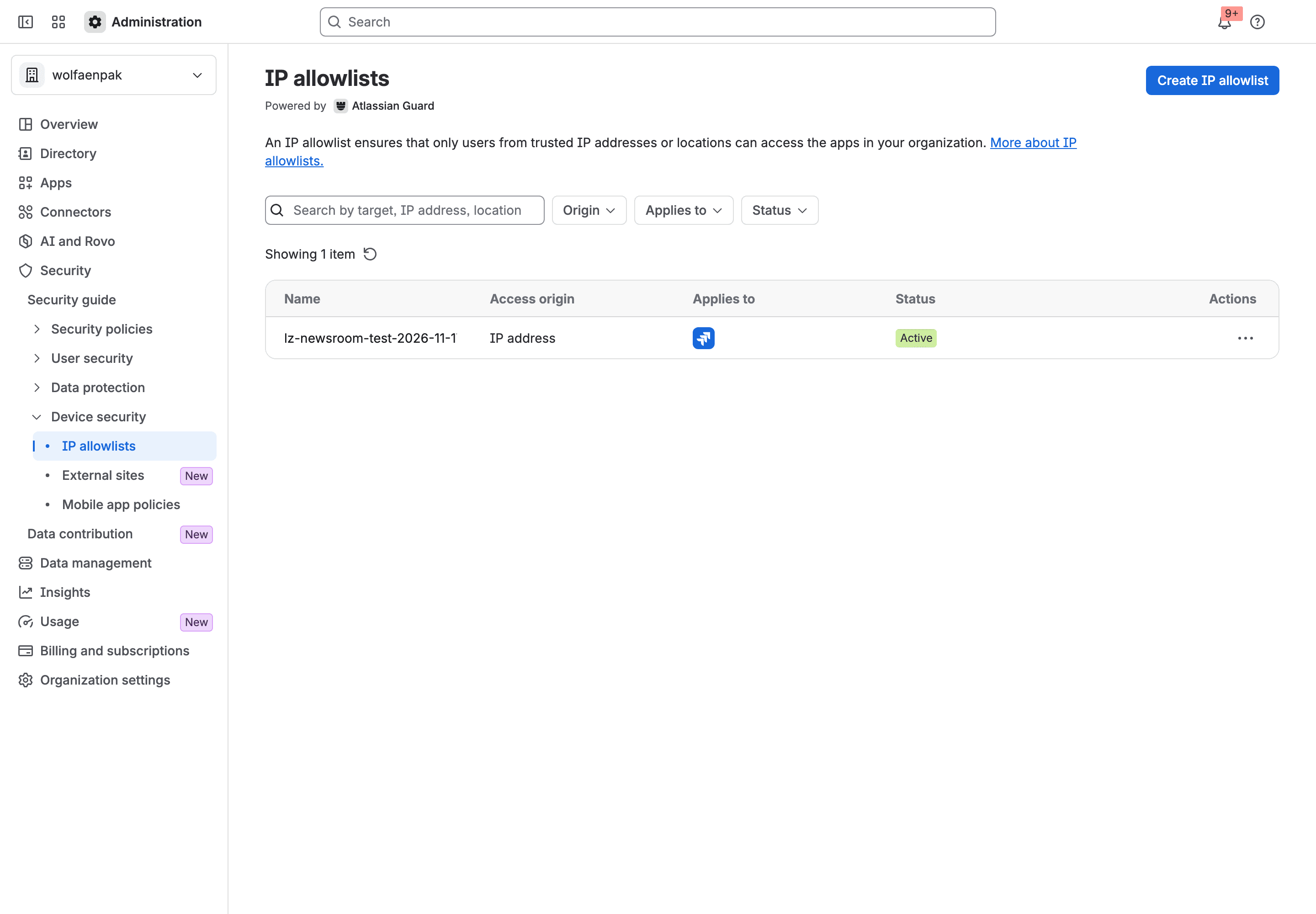
- On 17 November 2026 we activated an allowlist on our own test site. A Forge app kept loading with no Forge address in the list.
- The allowlist wizard has 3 steps and no setting for Forge apps, Connect apps (Connect is Atlassian's older app framework) or Marketplace apps.
- The old workaround is still printed on Atlassian's closed bug ticket. The 8 addresses listed there aren't in Atlassian's address file any more.
Which allowlist is blocking the Forge app: Atlassian's IP allowlist or your network
These two get mixed up all the time, and I get why. They're both called allowlists. They both make an app "not load".
Atlassian's IP allowlist | Your network's allowlist | |
|---|---|---|
Who sets it | An organization admin | Your network or security team |
Where | Atlassian Administration, under Security, Device security, IP allowlists | The company firewall, proxy or web filter |
What it checks | The address a person or script comes from when they open Jira, Jira Service Management or Confluence | Which domains and addresses your people's browsers may reach |
Needs | A Premium or Enterprise plan on Atlassian Cloud | Nothing from Atlassian |
What a blocked person sees | Per Atlassian's knowledge base: "There was a problem accessing this content" for the site | Jira opens, and the app's panel is empty or shows a browser error |
Atlassian describes its own in "Specify IP addresses for app access". (Atlassian now calls Jira and Confluence "apps" too. In this article "app" means a Marketplace or custom app.) You can enter up to 500 addresses for a given product across your active policies. They can be single addresses, countries, or ranges in CIDR notation. (CIDR writes a whole block of addresses as one address plus a slash and a number, like 131.162.88.0/21.)
"There was a problem accessing this content": what a person outside the IP allowlist sees
Atlassian's allowlist decides whether a person gets into the site at all. Atlassian has a knowledge base article on the error, updated on 21 August 2026. A user coming from an address outside the list sees "There was a problem accessing this content". Under it: "Check your network connection and try again, or contact your administrator for help." We didn't see that screen ourselves, because our own address was on our list.
So if Jira opens fine for someone and only the app's panel is empty, Atlassian's allowlist has already let that person in. That's my reading of the two pages, and it has two exceptions. In 2022 Jira opened and the allowlist still broke the app, which is the bug that's now closed. And an app with its own remote backend may still be affected (the Forge Remote section near the end has what's known).
*.cdn.prod.atlassian-dev.net blocked on the network: the domain Forge apps load from
The newest reports I found of a blank app all name one domain. On 24 October 2025 David Benson from draw.io opened a thread called "*.cdn.prod.atlassian-dev.net domain network blocks". His words: "We're seeing widespread problems amongst larger users not knowing that *.cdn.prod.atlassian-dev.net is required to allow forge apps to run." The "cdn" in that name stands for content delivery network (CDN), the set of servers that hands an app's screens to your browser.
Sean Bourke from Atlassian answered on 25 November 2025. Some customers, he wrote, "may have applied it before this was required, or have missed this", and the requirement "isn't well communicated in our Connect to Forge and Forge documentation". That thread has 670 views, and I think it deserves more.
This comes up now because so many apps moved from Connect to Forge. An app that used to load from its vendor's own servers now loads from Atlassian's. Our article "This app might stop working soon" covers that move. A network rule that allowed the vendor's domain doesn't help any more. Nobody told the firewall.
You can sometimes spot it on screen. Tempo's help article shows the browser's own error inside the app's panel: the page "might be temporarily down or it may have moved permanently to a new web address", for a host name ending in cdn.prod.atlassian-dev.net. It puts the cause on "OpenDNS, Zscaler, Cisco Umbrella, or another filter". Vendors are still writing these pages. Asset Management for Jira updated its own on 3 November 2026.
What should your network team allow? Atlassian's page "IP addresses and domains for Atlassian cloud apps" has a table of 9 Atlassian domain rows. Apps need these two:
*.atlassian-dev.net, described as "Marketplace and custom apps use this"*.atlassian-3p.com, "Used to host third-party assets for Forge apps, user-generated content transforms, and sandbox development environments"
You won't find the exact string cdn.prod.atlassian-dev.net on that page (I checked on 17 November 2026). It's covered by the wider *.atlassian-dev.net row, but only if your rule allows several levels of subdomain. It's easy to miss. Atlassian's page asks for exactly that: the rule has to permit "the top-level domain and multiple levels of subdomains".
Checklist for admins: what to allow so the app loads
You'll need two people for this. One is an organization admin for the Atlassian side, on Jira or Confluence Cloud with a Premium or Enterprise plan. The other manages the company firewall or web filter. When you're done, the app loads from the network where it failed.
- From the network where the app fails, open Jira or Confluence itself. If the site opens, skip to item 6. If you get "There was a problem accessing this content", the person's address is probably outside your IP allowlist.
- On that same network, find its public address. Your network team knows it, or any "what is my IP" page shows it.
- In Atlassian Administration, select your organization, then Security, then Device security, then IP allowlists. The list shows each allowlist with its Status.
- On an Active row, open the row menu and select Edit. The allowlist opens for editing. (On an Active row the menu reads Edit, Deactivate and Delete. We didn't open Edit in our own test, so I can't show you that screen.)
- If the address from item 2 should be allowed and isn't there, add it and save. Do items 4 and 5 for every Active row. Then open the site again from that network. If it's still refused, wait and retry before you change anything else, because we saw changes stay in progress for a long while.
- If the site opens and only the app's panel is empty, open
https://test.cdn.prod.atlassian-dev.net/in a new tab on that network. A short "Invalid URL" answer means the network can reach the app domain, so go to the vendor with the exact error text. A timeout or "this page cannot be reached" points at your network. (Asset Management for Jira's help page describes this test with its own address on the same domain. We ran it with this one on 17 November 2026 and got "Invalid URL".) - Ask your network team to allow
*.atlassian-dev.netand*.atlassian-3p.com, with all levels of subdomain, along with the rest of Atlassian's domain table. The test in item 6 now answers "Invalid URL". - Optional: if someone added Forge addresses to the Atlassian IP allowlist in 2023 or 2024, Forge doesn't need them there any more. Before you remove them, check that nothing else relies on them, such as Automation calling back into your own site.
- Reload the app from the same network. The app's panel fills in.
If it still doesn't load, send the vendor the exact error text and tell them which of the two cases you're in. And if a Forge app is blocked for one person while Jira and the network are fine, look at app access rules, which are a different admin control. Our tutorial on the Forge app access rule shows what that one looks like.
"The IP address has been rejected because it is not on the allowed list": what the error means
Scripts and integrations get this message. Atlassian explains it in "Scope of IP allowlists in Atlassian Cloud", updated on 26 September 2025. The REST API is the set of web addresses programs use to read and change data in Jira or Confluence. Call it from outside the allowed addresses and you get this back:
1{ "errorMessages": [ "The IP address has been rejected because it is not on the allowed list. See your admin for more information." ], "errors": {} }It doesn't name an HTTP status code, so I won't either.
In 2022 Forge apps got this exact message. A developer posted it on 7 October 2022, spelled "allowedlist" back then, from a Forge app calling REST on a site with an allowlist. Adam Moore from Atlassian replied two days later: "Sorry, but there are no current workarounds. We are currently working on the problem and expect to have a solution by the end of the year." The first part of that fix did arrive in December 2022, and the bug has since been closed.
Today you're most likely to meet the message from your own script or server. The Community question with this title has 2,230 views, and it was a company server calling Confluence's content API. That Atlassian article also says the allowlist doesn't cover admin.atlassian.com or the organization-level APIs, such as user management and user provisioning.
What Atlassian's IP allowlist does not apply to: Forge apps with 2LO and 3LO
Atlassian's support page has a list of exceptions. It reads: "We also don't apply your IP allowlist restrictions to the following: Application links that use TwoLeggedOAuth, Connect applications, Forge apps with 2LO and 3LO, OAuth 2.0 (3LO) apps".
OAuth is the standard an app uses to get permission to call a service such as Jira. 2LO and 3LO are short for two-legged and three-legged OAuth. The page doesn't define them and it never uses Forge's own words. My reading is that 2LO covers the calls an app makes as itself, which Forge developers write as asApp(). 3LO would then cover the calls it makes on behalf of the person using it, written as asUser(). The history in the next section supports that reading, because those are the two kinds of calls Atlassian fixed, one after the other.
There is no switch for any of this. When we created our allowlist the wizard had three steps: name it, select targets, select the access origin. The targets on offer were Rovo, Confluence per site, "Jira Apps" per site and service accounts. Forge, Connect and Marketplace apps weren't in it anywhere. At least one Marketplace vendor now tells customers the same thing. Starware's page on IP allowlists, dated 5 June 2026, says "there are no app IP ranges for you to add to your allowlist".

You might not love this exemption if you're on the security side. It means an app's calls reach your site from outside your listed addresses. Someone has asked Atlassian to change that for the last item on the list, OAuth 2.0 (3LO) apps, in ACCESS-2439, opened in September 2025. It had 1 vote when I looked.
Forge asApp requests fail when the IP allowlist is enabled: the bug Atlassian closed in December 2024
Atlassian tracked this as ACCESS-1442. It collected 44 votes and 54 watchers, and it is Closed as Fixed. The fix came in stages.
Date | What happened |
|---|---|
21 March 2022 | ACCESS-1427 is opened: Forge apps "may not work as expected" with an allowlist on. The next day a vendor comments, "We received a 1-Star review because of this bug." |
23 May 2022 | A comment on the ticket confirms that requests from an app's backend functions are blocked, and suggests sending them through the browser side of the app where possible. |
22 December 2022 | Atlassian's IP allowlisting team: apps invoking api.asUser() "should not be impacted by IP allowlists". |
5 February 2023 | ACCESS-1427 is closed and ACCESS-1442 is opened for the asApp() calls that still fail. |
19 September 2023 | Atlassian publishes 8 Forge outgoing addresses, with the note "Per-app IP allow listing is not supported". ACCESS-1442 points to them as the workaround. |
15 March 2024 | The published list grows to 88 addresses. |
26 June 2024 | "Forge support for IP allowlisting" ships (changelog entry CHANGE-1778). |
13 December 2024 | ACCESS-1442 is closed as Fixed. |
The June 2024 entry in the Forge changelog settles it. Forge apps on sites with IP allowlisting enabled, it says, "can now make Jira API requests and Confluence API requests by default". It adds that customers "no longer need to manually add" Atlassian's outgoing addresses to their allowlist.
The old advice is still around, though, and I think it trips a lot of people up. The description on ACCESS-1442 was never updated, so it still says "Any asApp() requests will be blocked" and still shows the command for collecting Forge addresses. I also read two vendor help pages that still tell admins to add Forge addresses to the allowlist. One was last edited in May 2024, a month before the change, and one in May 2025. If you followed that advice in 2023 you did the right thing for 2023. Back in February 2023, before Atlassian had published any Forge addresses, one customer on the ticket had Atlassian support raise their limit so they could enter "the 400+ IP ranges for the region we are in".
Our test: 19 of 19 app calls answered with an allowlist Active
We ran this on our own test organization on 17 November 2026. The app was LeanZero Management, a planning app for Jira that my colleague Mihai builds, in its development install.
Before the allowlist existed, the app's page loaded and its 6 backend calls succeeded. We then created one allowlist for Jira on that site with a single address in it (our own) and activated it.
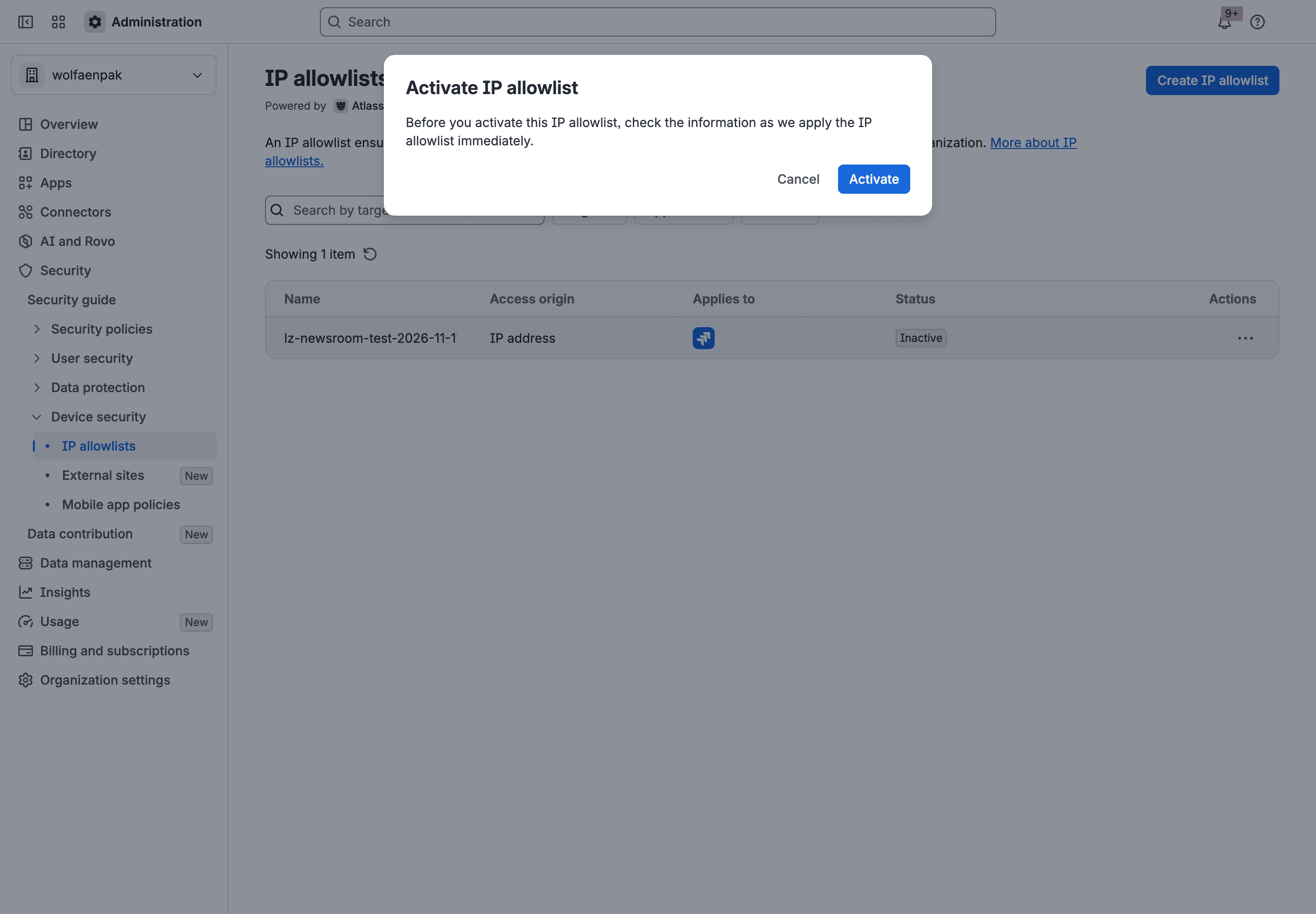
With the status showing Active, we reloaded the app and opened a plan. The page made 19 calls to the app's backend, and all 19 succeeded. There was no error on screen. After we deleted the allowlist, 5 of 5 calls succeeded again.
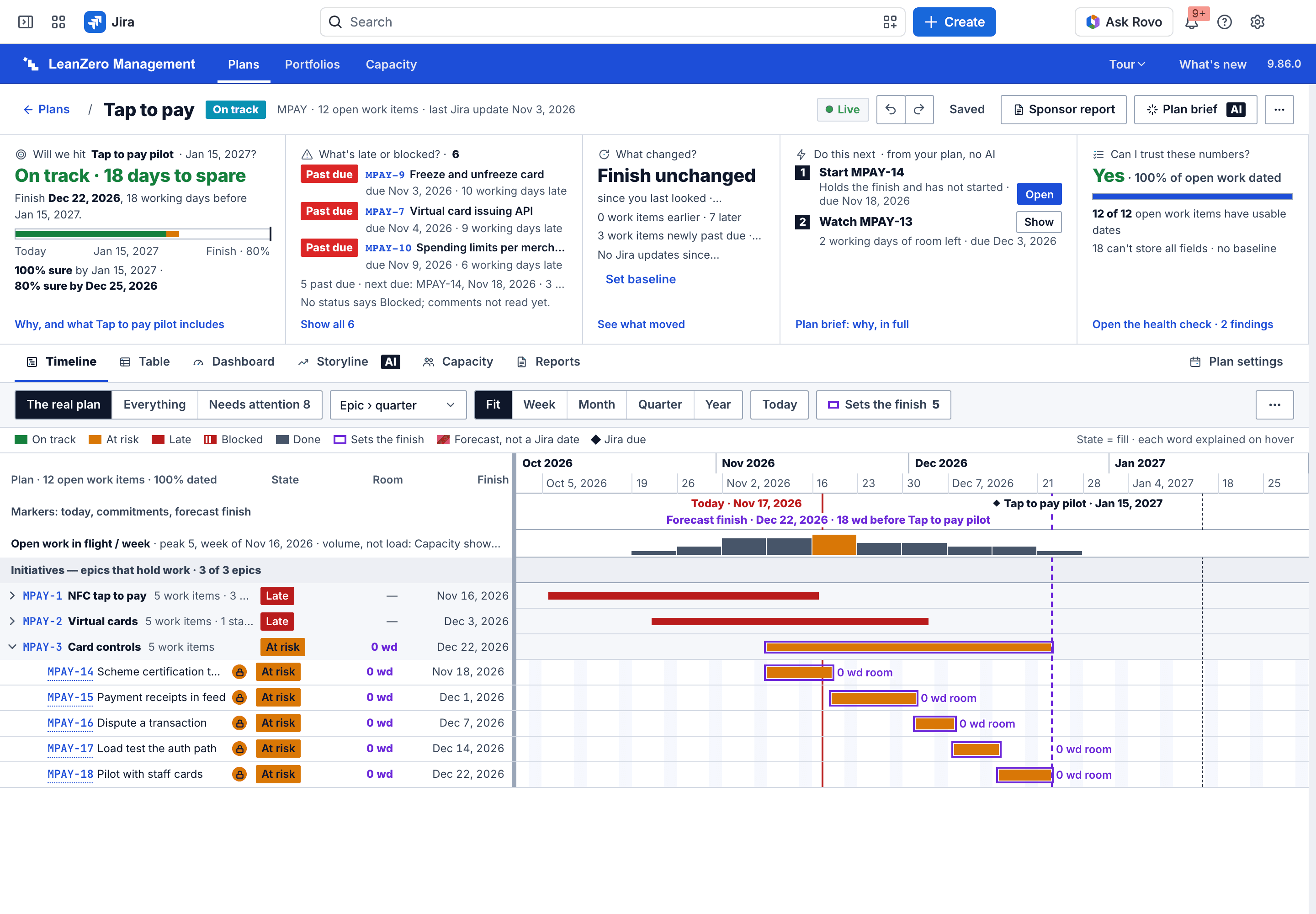
Now the limits, because this test is smaller than it sounds. Our browser came from the one address on the list and we had no second network. So this shows the allowlist didn't break the app. It doesn't show the allowlist turning anyone away. Every time we read it in those 3 minutes 22 seconds, the data behind the admin screen (Atlassian's admin API) reported the allowlist's Jira target as "applying", while the screen itself said Active. We couldn't read the app's backend logs that day, so I don't know whether any of the 19 calls went on to Jira, as the app or as the user. At least one of them reads the app's own stored copy. And it was one app, on one page, on Jira only. So take it as one data point. Still, an active allowlist with no Forge addresses in it didn't stop a Forge app from loading, and Atlassian's changelog says it shouldn't.
One small thing we noticed on the way. After we deleted the allowlist, the same admin data showed its Jira target as "removing" for more than 40 minutes while the screen already said "No IP allowlist created". So give a change a little time before you decide it didn't work.
Forge IP ranges: read them from ip-ranges.atlassian.com, not from a vendor page
You don't need Forge addresses for Atlassian's IP allowlist any more. You may still need them for the opposite direction, when a Forge app calls into something behind your own firewall.
Atlassian publishes its addresses as a file at ip-ranges.atlassian.com. The copy I read was created on 2 November 2026 and holds 175 entries. Of those, 95 are tagged for Forge and 85 of them are outgoing ranges, 29 in the older IPv4 format and 56 in IPv6. This command prints the 85:
1curl -s https://ip-ranges.atlassian.com/ | jq -r '.items[] | select((.product|index("forge")) and (.direction|index("egress"))) | .cidr'Wait before anyone pastes that list into a firewall. Not one of those ranges belongs to Forge alone, and every Forge app shares them. Atlassian's note from when it first published them: "Allowing connections from this IP address range will permit connections from any Forge app." Its support page calls this traffic "untrusted and user-configurable".
And the addresses move. The 8 single addresses from September 2023, which are still printed in the ACCESS-1442 description, are all absent from the file today. A list copied into a help page goes stale, so read the file. Our earlier piece on Atlassian cloud IP ranges for 2027 walks through the newest block and how to keep a firewall list in step with the file.
What a Forge Remote backend still needs
With Forge Remote, a vendor runs part of a Forge app on servers the vendor hosts. Atlassian's Forge Remote essentials page, last updated on 29 October 2026, covers one direction: when Forge calls the vendor's backend, it comes from the outgoing ranges in the file above.
Nobody has answered for the other direction yet, as far as I can find. On 31 August 2025 a customer commented on ACCESS-1442 that the fix "works only on Forge plateforms but not for Forge Remote". I found no Atlassian page that says how a remote backend's calls into Jira are treated by the allowlist, and we didn't test it. If your app has a remote part and fails only on sites with an allowlist, ask the vendor, and expect that they may need to ask Atlassian.
If you build Forge apps: say this on your support page
Your customers' admins are reading 2022 threads. A short page that says "nothing to add to the Atlassian IP allowlist, ask your network team to allow *.atlassian-dev.net" saves them a support ticket. AppLiger's page does it in one sentence and links the draw.io thread.
We don't have that page for our own three apps yet either. I checked our repositories on 17 November 2026 and found no page explaining IP allowlists to customers, so that's a job for us too.
Has a Forge app failed for you on a site with an allowlist since 2024, and it wasn't the network? I'd really like to see the error text. Tell me on the Atlassian Community or at gabriela@leanzero.net.
Comments
0Add a comment