
Jira Coder: Build a Forge App and Deploy It Through CI/CD in Bitbucket Pipelines

Key takeaways
- END STATE: a private Bitbucket repository holding a 6-file UI Kit Forge app (a jira:issuePanel called Issue age, scope read:jira-work only), a bitbucket-pipelines.yml that stops before forge deploy when the manifest's scope lines change, and the panel live on a Jira issue in the development environment.
- We re-ran the video's steps on 17 October 2026 on a development build of CogniRunner 1.34.0, the version the Marketplace now lists as 7.17.0. Bitbucket's run page put the deploy-and-install run at 3 min 29 s (209 s); the push run on the same commit just before it took 225 s, so plan on three to four minutes.
- The work is split between three identities: the repository access token commits and runs the pipeline, your own Bitbucket sign-in creates the repository, and a Forge deploy account's API token sits in two secured Bitbucket variables. Ours went wrong twice: a 403 on create, and a 404 on commit because the sign-in took over.
- The pipeline compares the manifest with a lock file before forge deploy. A changed scope list stops the job with Nothing was deployed, and CogniRunner has no way to re-approve a wider list. The install runs with --non-interactive --confirm-scopes and falls back to forge install --upgrade.
- Every run with no stored Forge app id registers a new app. Our development build's setup commit started a run by itself, so our Trigger deploy registered a second app and Jira listed Issue age twice. Copy the id from the first run's Registered app id line before anything else runs.
This tutorial sets up Forge app CI/CD in Bitbucket Pipelines from one prompt in CogniRunner's Jira Coder: the Coder creates a private Bitbucket repository and writes a UI Kit issue panel called Issue age, and a Bitbucket pipeline deploys and installs it. At the end you have the repository, a bitbucket-pipelines.yml that stops before forge deploy when the manifest's scopes change, and the panel on a Jira issue. CogniRunner is our app, and I think the scope lock is the part worth copying even if you never use the Coder.
We shot the video below on 10 October. On 17 October we repeated the steps on our test site, and the screenshots here are from that second run. Bitbucket's run page put the deploy at 3 min 29 s (209 s). The rest went less smoothly than the video: Bitbucket refused to create the repository with the sign-in we had connected, and the first commit came back 404 because it went out under the wrong identity. Both are below, with what fixed them.
The video shows CogniRunner 1.33.0. Since 1.33.1 the Coder asks which Bitbucket project to use, stops when a repository has no token yet, and the Open the run link works.
Prerequisites
- A Jira Cloud site where you are a Jira admin, with CogniRunner installed and an AI provider saved in its Settings. My Coder ran deepseek/deepseek-v4.1-flash through OpenRouter.
- A Bitbucket Cloud workspace connected under CogniRunner's Agents, Setup, Git connections, using repository access tokens (Free and Standard). On Premium one workspace access token does instead.
- Two-step verification set up in your Bitbucket settings, not only on your Atlassian account. On a Free workspace Bitbucket may not let you turn Pipelines on without it.
- A Forge developer space id (from the Forge developer console) and a deploy account that belongs to that space and is an admin on the Jira site: the pipeline runs the first forge install under it, and Atlassian's CI/CD guide expects admin rights on the site you install to. Ours was the site owner's account, which I wouldn't use outside a test site. Give the deploy account an Atlassian API token with scopes (id.atlassian.com, Security, API tokens, "Create API token with scopes", app Forge).
- The Forge CLI on your own machine, logged in as the deploy account, for the clean-up commands at the end. I had 14.1.0.
- Build minutes. Bitbucket Free has 50 a month, one run of this pipeline takes about three and a half, and every push to master runs it.
Who does what
- The repository access token (one per repository, named CogniRunner) does the commits (unless a personal sign-in is connected, see 2), sets the pipeline variables and starts and reads the runs. The Coder's header calls this "as the site token".
- Your personal Bitbucket sign-in creates the repository. Once it's connected, the Coder commits through it instead of the token, so that account has to see the workspace, or you disconnect it after step 2.
- A Bitbucket user with two-step verification turns Pipelines on, once per repository.
- A Jira admin presses Set up pipeline and Store app id in CogniRunner. No agent can.
- The deploy account's email and API token run
forge register,forge deployandforge installinside Bitbucket, from two secured variables.
- 1
Ask the Coder for the repository and the app
- 2
Name the Bitbucket project and confirm the repository
- 3
Create the repository access token and turn Pipelines on
- 4
Paste the token into CogniRunner
- 5
Read the manifest and confirm the commit
- 6
Set up the pipeline
- 7
Add FORGE_EMAIL and FORGE_API_TOKEN as secured Bitbucket repository variables
- 8
Trigger the deploy and follow the run
- 9
Store the Forge app id so forge register runs only once
- 10
Ask the Coder whether it worked
- 11
Open the Forge issue panel on a Jira issue
Why put an AI-written Forge app behind a pipeline at all
Atlassian's own guide, Set up continuous delivery for Forge apps, already shows a Bitbucket pipeline. It sets FORGE_EMAIL and FORGE_API_TOKEN as repository variables and runs forge install --upgrade ... --non-interactive against an app that is already installed. That covers the second deploy. The first one is where I'd expect people to get stuck. In Non-interactive forge install in CI env, Atlassian's suggestion was a script that reads the --upgrade error and installs without --upgrade when the app isn't there yet, and the thread ends with the developer asking whether he really has to write that himself. The most-read thread, How to use Forge CLI in a CI environment? (8,511 views), is mostly about logging the CLI in on a runner, which the two secured variables in step 7 take care of.
The other reason is the manifest. It's where an app says what it may touch, and when an AI writes the code, a scope can appear in a two-line diff nobody reads closely. So the pipeline CogniRunner commits, when a Jira admin presses Set up pipeline, pins the exact scope list you approved and stops the deploy when the list changes. A February 2026 thread, Forge manifest scope not applied when installing app via Bitbucket Pipelines, had no replies on 17 October.
For the Coder itself, see the GitHub ticket-to-pull-request tutorial. The license management post puts this video next to two other agent videos.
Step 1. Ask the Coder for the repository and the app
Open a Jira project's CogniRunner Coder page (from the project's Apps entry) and press "Start coding without an issue". Nothing is written to a Jira issue until you attach one. Send this prompt with your own workspace and a repository name that has never existed, because an old pipeline row can outlive a deleted repository:
1Create a private Bitbucket repository wp-global/lz-issue-age-20261017a, then wait until I have added its access token. After that, build a small Forge app for Jira in it: an issue panel called Issue age, built with UI Kit, that shows how many days the issue has been open, how long since it was last updated, and its status. Runtime nodejs22.x, scope read:jira-work only. Commit it to master.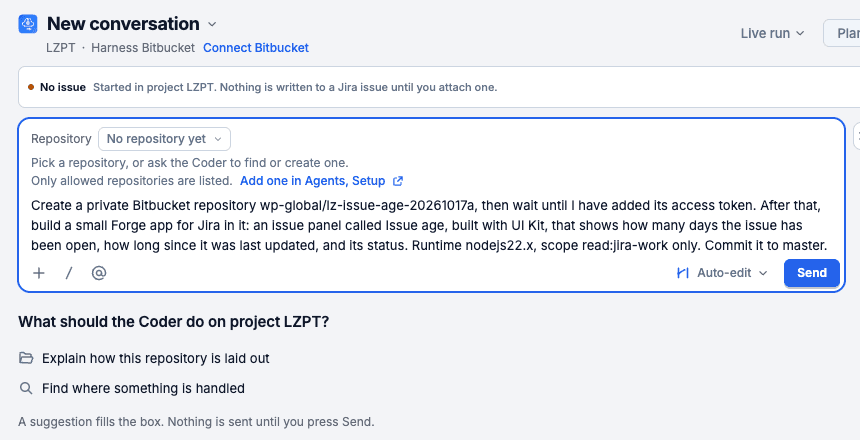
I liked that the Coder read the prompt closely. In that first turn it also said: "Note the template CogniRunner serves is Custom UI (React); you asked for UI Kit, so I'll write the app files against the UI Kit manifest shape instead of adapting that template."
I'd keep the "wait until I have added its access token" clause anyway. Since 1.33.1 the Coder stops by itself when the token is missing, but the clause puts the order in writing.
Check: you should see the turn end on a card or on a question from the Coder.
Step 2. Name the Bitbucket project and confirm the repository
Our first turn (38 s) ended with a question:
1Which Bitbucket project key should the new repository lz-issue-age-20261017a be created in?Without a project, Bitbucket's API puts a new repository in the workspace's oldest project, with that project's permissions. In our workspace that's a project named after a client, and a rehearsal repository went there the day before the video without anyone choosing it. So the Coder now asks. Answer with the key (Use the project key TRAIN.) and the card appears. Next time I'd put the project in the first prompt and skip the question.
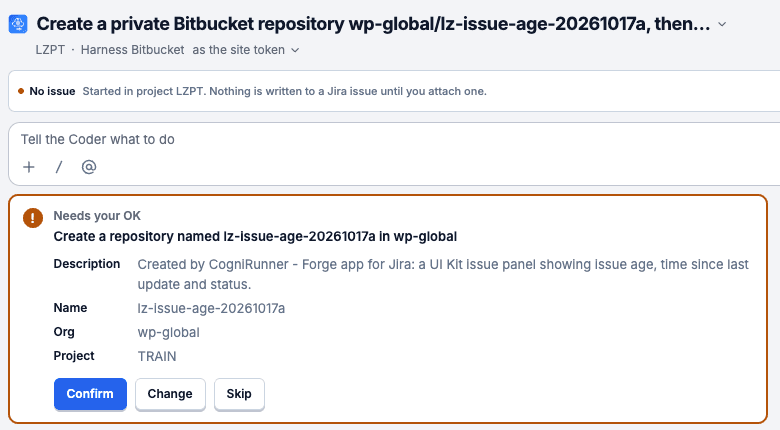
Press Confirm. On Free and Standard no access token can create a repository, so CogniRunner creates it through your personal Bitbucket sign-in. CogniRunner's 1.33.0 release note says "the Coder creates a new repository as the person who confirms it, through their own Bitbucket sign-in". If your account may create repositories in the workspace, the repository appears and you go on to step 3. I'd check that before step 1: open Bitbucket as yourself and try creating a repository in that project. A listener or a scheduled job can't do this part.
In our run both Confirms failed. The first said no personal sign-in was connected. We connected one from the Coder's header, and the second Confirm said:
1It failed: Bitbucket refused to create the repository in wp-global with your Bitbucket sign-in (HTTP 403), so nothing was created. Create the repository in Bitbucket, add a repository access token for it here (Agents, Setup, on the connection's repository row), then ask again.That sign-in was our company account, LeanZero SRL, and it isn't a member of that workspace. It stopped there and didn't retry. We created the repository in Bitbucket by hand, private and in project TRAIN, then in CogniRunner pressed "+ Add repository" under Agents, Setup, typed wp-global/lz-issue-age-20261017a and pressed Allow.
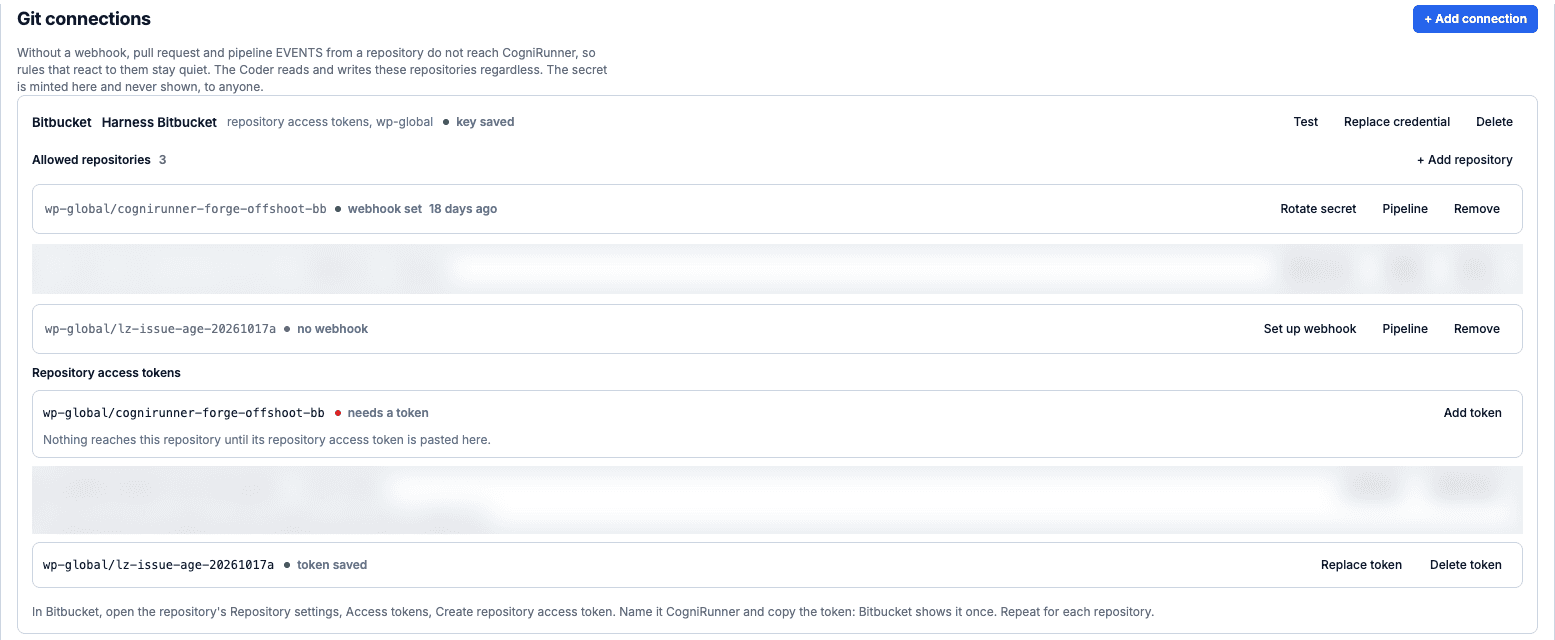
Check: you should see the repository in Bitbucket, and under Agents, Setup it should be listed with "needs a token".
Step 3. Create the repository access token and turn Pipelines on
In Bitbucket open the repository, Repository settings, Access tokens, Create access token. Name it CogniRunner (commits and pull requests show that name) and tick these:
1Repositories: Read, Write, Admin
2Pull requests: Read, Write
3Webhooks: Read and write
4Pipelines: Read, Write, Edit variables
Leave Delete, Runners and Tests off. Bitbucket now has a required Expiry field (ours defaulted to 7 days; the workspace policy caps it at 365). I'd pick something that outlives your testing, or the deploys stop with a refused token next week.
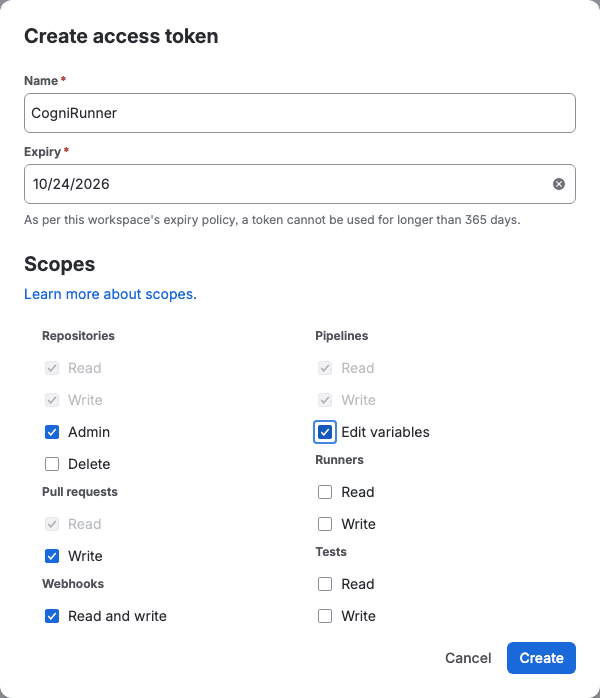
Copy the token, and I'd paste it into CogniRunner straight away. Bitbucket shows it once.
Then Repository settings, Pipelines, Settings, and switch Enable Pipelines on. A person does this. On a Free workspace Bitbucket can refuse to let a token turn Pipelines on, and the API answer behind that refusal is Two-step verification must be set up for this user in their Bitbucket settings to enable pipelines in this workspace. Bitbucket added the rule for new users in July 2021, and two-step verification on your Atlassian account doesn't satisfy it (BCLOUD-23109). I'd set it up before you start, so this step doesn't stop you halfway.
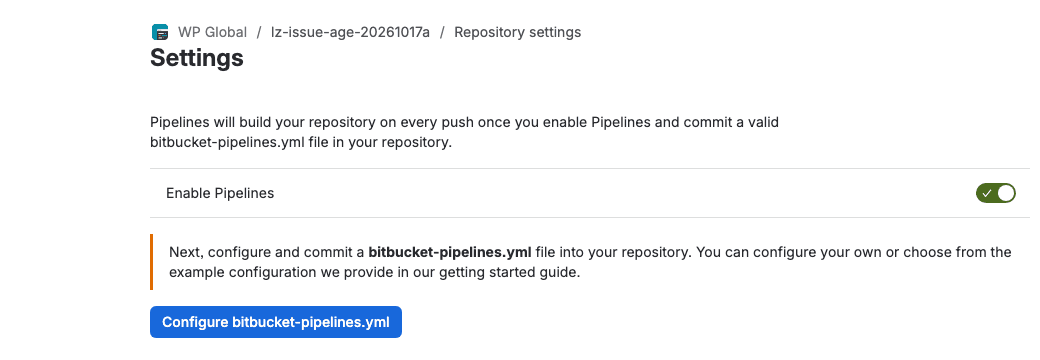
Check: the Pipelines settings page should show "Next, configure and commit a bitbucket-pipelines.yml file into your repository."
Step 4. Paste the token into CogniRunner
Back in CogniRunner: Agents, Setup, Git connections. Under Repository access tokens, your repository reads "needs a token" and "Nothing reaches this repository until its repository access token is pasted here." Press Add token, paste, Save token.
CogniRunner refuses an Atlassian account API token (ATATT) or an app password (ATBB) pasted into any Bitbucket field, before it's stored or sent. Since 1.33.0 the Marketplace build stores no Atlassian account API token for Bitbucket. If you still have app passwords anywhere else, Bitbucket's cut-off for them has already passed; our migration tutorial covers what replaces them.
Check: you should see the row change to "token saved".
Step 5. Read the manifest and confirm the commit
Tell the Coder the token is in:
1The access token is in. Build the app now and commit it.We had created the repository by hand, so ours started "The repository exists now and its access token is in." The turn took 126 s and ended on a commit card listing 6 files: .gitignore, README.md, manifest.yml, package.json, src/frontend/index.jsx and src/index.js. Click manifest.yml on the card and the diff opens on the right.
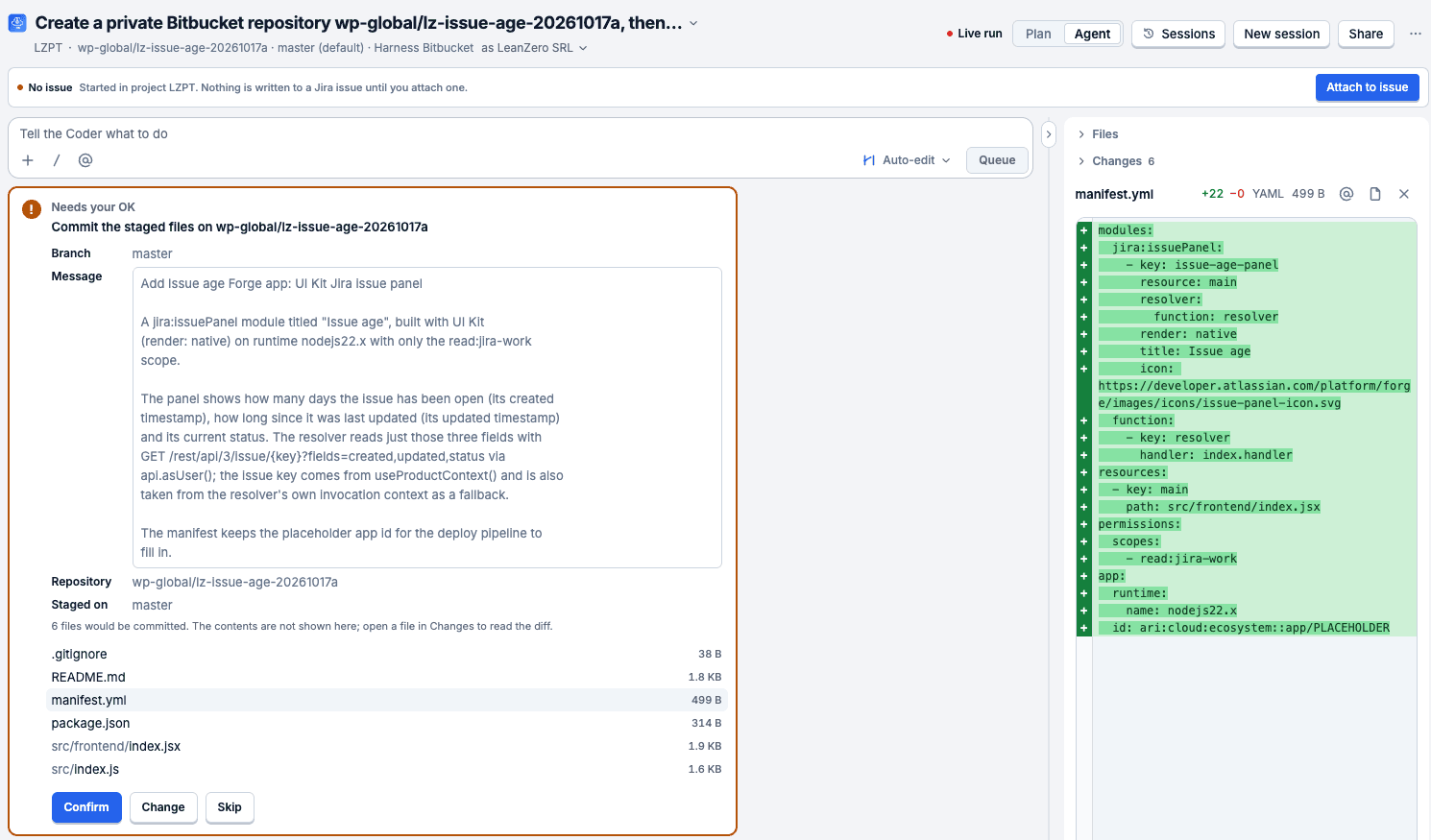
What the manifest declares:
1modules:
2  jira:issuePanel:
3    - key: issue-age-panel
4      resource: main
5      resolver:
6        function: resolver
7      render: native
8      title: Issue age
9      icon: https://developer.atlassian.com/platform/forge/images/icons/issue-panel-icon.svg
10  function:
11    - key: resolver
12      handler: index.handler
13resources:
14  - key: main
15    path: src/frontend/index.jsx
16permissions:
17  scopes:
18    - read:jira-work
19app:
20  runtime:
21    name: nodejs22.x
22  id: ari:cloud:ecosystem::app/PLACEHOLDER
render: native is how the issue panel module says UI Kit. The Coder's commit message says the resolver reads three fields with GET /rest/api/3/issue/{key}?fields=created,updated,status, and read:jira-work covers all three. Read that block first on every commit card. Before the card appeared, CogniRunner refused one early commit attempt because the Coder hadn't read back three staged files ("you have not read back the staged version of: .gitignore, package.json, src/index.js"). That guard has been there since 1.26.15. I like it a lot: a model committing files it never re-read is how a half-written file ends up on master.
Press Confirm. Ours came back with this:
1It failed: commitFiles: HTTP 404: not found, or this account cannot see it.It blamed the token. It said the repository token "can read ... but is refused when writing to it ... which is what a Read-only token looks like". The workspace header told a different story: it said "as LeanZero SRL". Once a personal Bitbucket sign-in is connected, the Coder commits through it instead of the repository token, and our company account couldn't see the workspace. There's no switch back in the header. We revoked the Bitbucket entry on id.atlassian.com's connected apps page, pressed Recheck in the Coder, and the header changed to "as the site token", meaning the repository token. The next Confirm went through in 40 s.
So if your sign-in could create the repository in step 2, keep it connected and you'll probably never see this. If it couldn't, I'd disconnect it right after step 2. The misdiagnosis cost us about three minutes, and it would have cost more if we'd believed it.
Check: you should see the turn end with "Done", and the Coder's next message should name the next step: turn Pipelines on, give the token the Pipelines scopes, then Set up pipeline under Agents, Setup.
Step 6. Set up the pipeline
All our screenshots come from a development build that can store a deploy identity. It wrote the two secrets itself, and its setup commit started a deploy straight away, so our Trigger deploy was run 2. On the Marketplace build you add the secrets yourself in step 7, the setup commit ends in [skip ci], and nothing runs until you press Trigger deploy or something pushes to master, so your first run is run 1. The Marketplace part comes from CogniRunner's 1.34.0 code; we didn't run that build on 17 October.
In Agents, Setup, find the repository's row and press Pipeline. The form asks for the manifest.yml (copy it from the commit card's diff or Bitbucket's source view), the Atlassian site, the product (Jira), the branch, the app name, a Custom UI folder (pasting a UI Kit manifest sets it to "none") and the Forge developer space id. Leave Forge app id empty for a first deploy.
Press Set up pipeline. CogniRunner turns Pipelines on if the token is allowed to, writes four plain repository variables (FORGE_SITE, FORGE_PRODUCT, FORGE_ENV, FORGE_DEVELOPER_SPACE), and commits bitbucket-pipelines.yml with a .cognirunner/ folder holding the lock. The card then shows the scopes it locked.
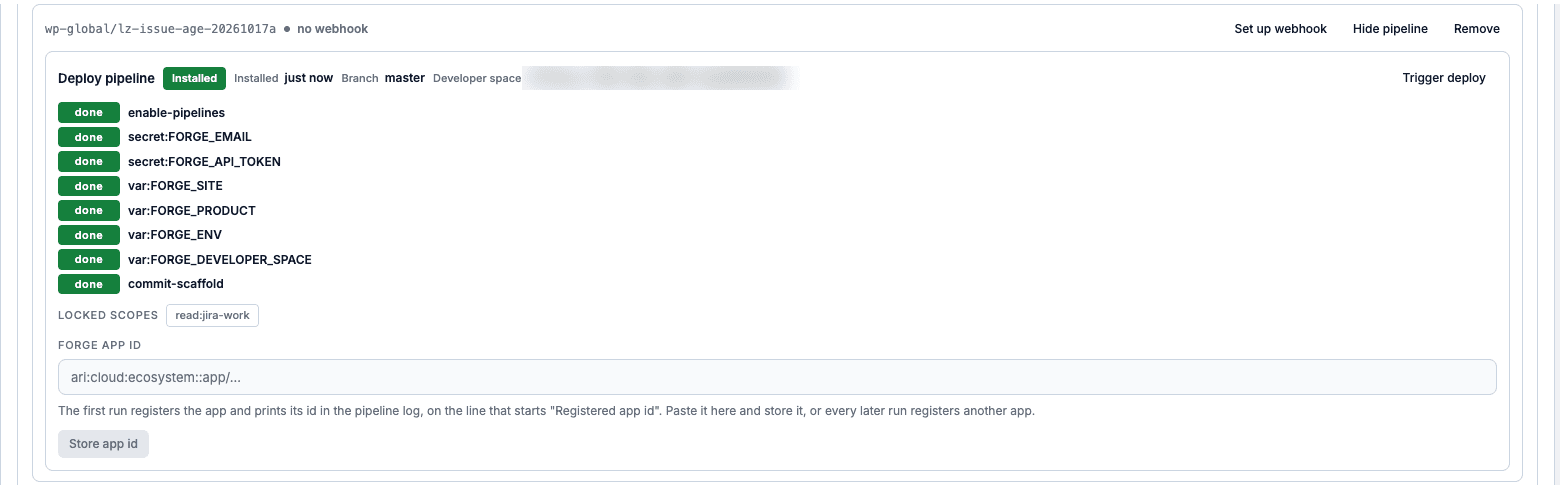
Setup only accepts scopes from an allow-list of 20. It leaves out anything that can administer apps or the site or mint credentials, so manage:app-* and admin:* are refused at setup. I think that's the right default for an app an AI wrote. The lock then pins the exact list you set up with, so a later commit that adds even an allowed scope, write:jira-work say, stops the deploy.
My advice: get the scope list right before you press Set up pipeline, because that repository won't accept a different one later (the lock section below has the details).
Check: you should see the card read Installed, with LOCKED SCOPES listing exactly the scopes in your manifest.
Step 7. Add FORGE_EMAIL and FORGE_API_TOKEN as secured Bitbucket repository variables
In Bitbucket: Repository settings, Pipelines, Repository variables. Add FORGE_EMAIL (the deploy account's email) and FORGE_API_TOKEN (its API token with scopes), and tick Secured on both. Atlassian's CI/CD guide describes the same two variables, and the Forge CLI reads them without a forge login. On the Marketplace build, until a Trigger deploy has succeeded, the pipeline card keeps this line beside Trigger deploy: "CogniRunner does not write FORGE_EMAIL or FORGE_API_TOKEN to the repository. Add both to its CI secrets yourself, then press Trigger deploy for the first deploy." (That's from the code; our development build doesn't show it.)
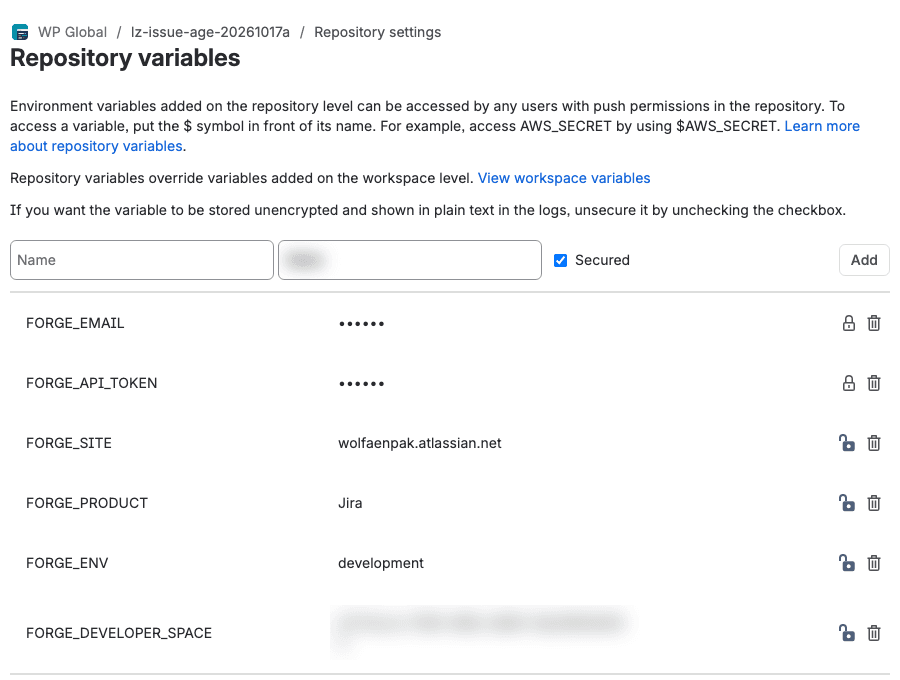
I'd use a dedicated deploy account, not your own. It still needs admin rights on the site, because the pipeline installs under it. A secured variable is still handed to each step of the pipeline, and anyone who can push to the repository can change what those steps run. The pipeline narrows that. It unsets both secrets while npm install runs, installs with --ignore-scripts, and refuses to deploy when the app carries a Babel config or a root .npmrc, two files the Forge CLI would read while it holds the token. For a UI Kit app like this one, none of the app's own code runs in CI.
Check: you should see both names in the list with Secured ticked.
Step 8. Trigger the deploy and follow the run
On the pipeline card press Trigger deploy. The dialog says "This starts a real deploy of your Forge app ... It runs in your repository's CI and it cannot be called back." Press Start deploy.
CogniRunner always sends ENVIRONMENT=development with the run, so staging and production stay with you. The card's Open the run link opens the run in Bitbucket, and for a first deploy I'd keep that page open, because the log is where the app id shows up.
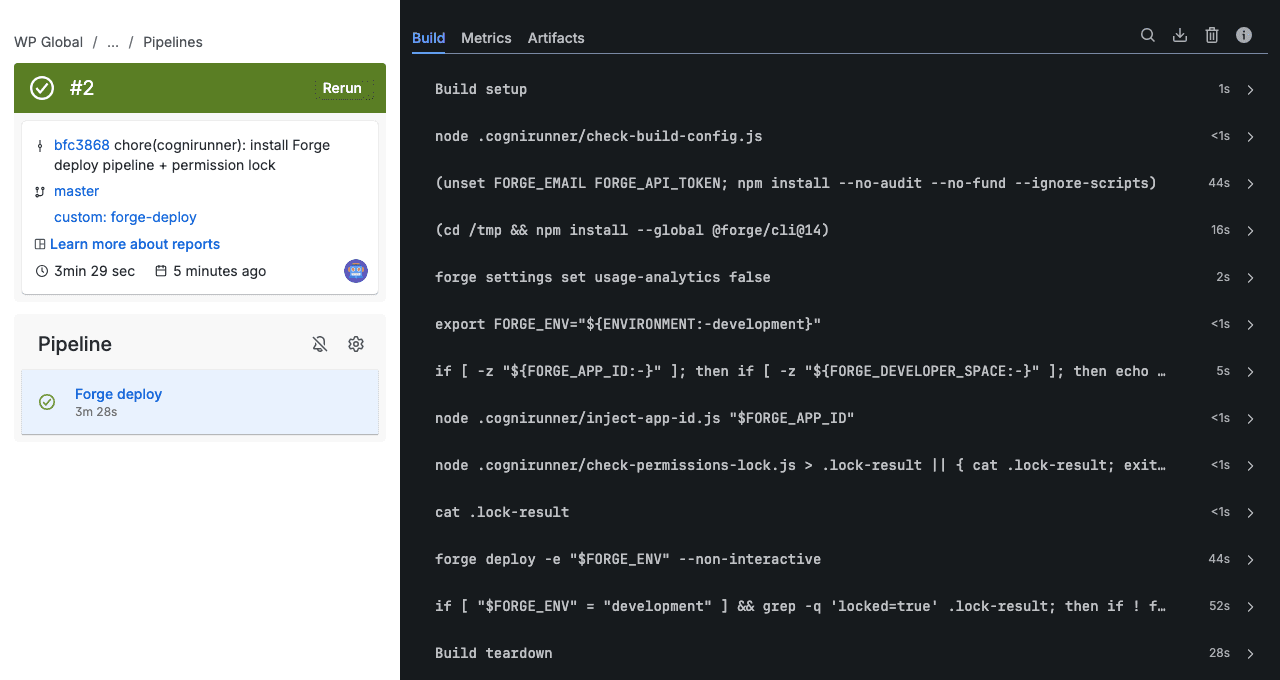
I'd read the order of commands from the top once. It checks the build config, installs dependencies with the secrets unset, installs @forge/cli@14 outside the repository, registers the app if there's no app id, and checks the permission lock. After all that comes forge deploy -e "$FORGE_ENV" --non-interactive, then the install. I like the order: the deploy and the install only run once the lock check has passed. From the deploy step's log:
1Running forge lint...
2No issues found.
3
4Deploying lz-issue-age-20261017a to development...
5
6✔ Deployed
7
8Deployed lz-issue-age-20261017a to the development environment.
Forge also printed "We've detected new scopes or egress URLs in your app. Run forge install --upgrade ..."; the install step deals with that. Earlier in the run the lock check printed permission lock: OK (2 lines) followed by locked=true. The install step printed Your app will be installed with the following scopes: - read:jira-work and then ✔ Install in Jira complete!.
Check: you should see a green run whose log has Deployed ... to the development environment.
Step 9. Store the Forge app id so forge register runs only once
On the first run there's no app id, so the pipeline runs forge register and prints the id:
1Registered app id ari:cloud:ecosystem::app/8bd18b7a-1779-4a39-a085-a6b655b54d46. This runner does not store it: store it in CogniRunner ... Until then every run registers again.Copy it into the Forge app id field on the pipeline card and press Store app id. In CogniRunner's code that writes a FORGE_APP_ID repository variable. I'd do this before anything else runs. With no id every run registers a brand-new app, and Forge's register docs warn that registering an existing app again disconnects it from its environments, stored variables, provider client secrets and storage.
We got this wrong. On our development build the setup commit had already started run 1, which registered one app, and our Trigger deploy (run 2) registered a second. The issue's apps menu listed Issue age twice. A Marketplace reader shouldn't hit this, because the setup commit there starts nothing, but a push to master before you store the id would do the same.
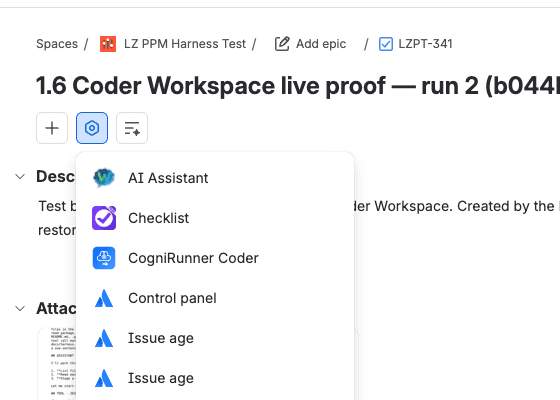
Since 1.33.1 the Coder and agents can't start Trigger deploy for you while a pipeline that has already run has no stored id. The admin card's button still can, and a push still runs the pipeline. We didn't store the id or push again in this run (we cleaned up instead), so the follow-up path, where the install takes its --upgrade branch on the same app, is described from the pipeline script rather than from our run.
Check: you should see the stored id on the pipeline card and a FORGE_APP_ID variable in the repository (from CogniRunner's code; we didn't store the id in this run).
Step 10. Ask the Coder whether it worked
Ask in the same conversation:
1I pressed Trigger deploy on its pipeline. Has that deploy finished, and did it succeed?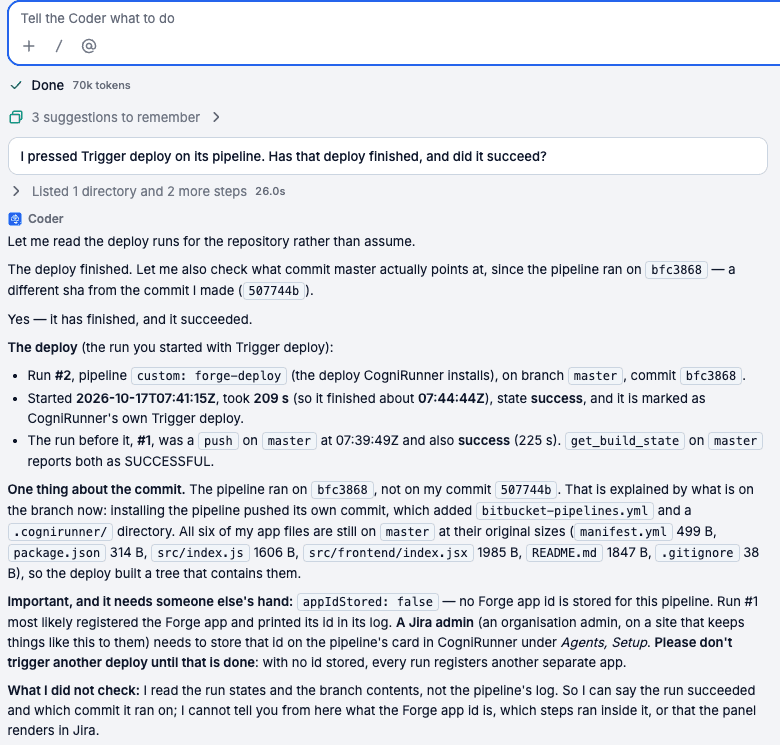
The Coder answered "Yes — it has finished, and it succeeded." It named run 2, custom: forge-deploy, commit bfc3868 and 209 s, and called it CogniRunner's own Trigger deploy. On 1.33.0 the Coder called that kind of run "push-triggered" and offered to deploy again, which with no stored id would have registered yet another app.
It also flagged appIdStored: false and asked us not to deploy again until a Jira admin stored the id. It guessed that only run 1 had registered an app, and it said it had read the run states and not the logs. Run 2 had registered one too. I still trust this answer more than the 1.33.0 one, mostly because it says what it didn't check. Read the log yourself.
Check: you should see the answer name the run you started and its result, without offering another deploy.
Step 11. Open the Forge issue panel on a Jira issue
Open any issue in the new issue view. I'd pick one whose dates you know, so the numbers are easy to check. The panel's button is in the apps menu, and only people who can edit the issue see it (issue panel docs). Pick Issue age.

On our test issue it rendered "Open for: 30 days · Last updated: 5 days ago · Status: To Do".
Check: you should see three values that match the issue's dates and status.
How the Bitbucket pipeline locks the Forge manifest scope to read:jira-work
Under the hood the lock is a file, .cognirunner/forge-permissions.lock, written at setup from the manifest you pasted. On every run check-permissions-lock.js compares the committed manifest with it:
- Scope lines added or removed: it prints
permission lock: DRIFT (scopes) - added ..., removed ... Nothing was deployed.and the job fails beforeforge deploy. - Another permission changed (content or styles): it deploys and doesn't install.
- No lock file: it deploys and doesn't install.
- A scope written in single quotes (
- 'write:jira-work') isn't read as a scope line. The run counts it as an other change: it deploys, but doesn't install. We found that while checking this article, and it's on our CogniRunner fix list.
There's no re-approve step. Running Set up pipeline again with a manifest whose scopes differ from the committed lock is refused with "CogniRunner does not install a changed permission list: put the manifest's permissions back as the lock has them." So I'd treat the scope list you set up with as final for that repository. A new repository gets a fresh lock, so that's probably the way to a wider list, though I haven't tried it. A scope change is also a major version for everyone who already installed the app; our Forge major version tutorial lists the 11 things that cause one.
Check: to verify the lock, commit a manifest with one extra scope line and you should see the next run stop with DRIFT (scopes) and Nothing was deployed. (that's from the checker's code; we didn't push one in this run).
Run forge deploy and a non-interactive forge install or install --upgrade in CI
forge install --upgrade --non-interactive fails when the app isn't installed yet, and a plain forge install fails when it is. The generated script tries the plain install first, with --confirm-scopes so it never stops to ask about scopes, and runs the --upgrade form with the same flags only if that fails. You only see the first error if both fail:
1- |
2  if [ "$FORGE_ENV" = "development" ] && grep -q 'locked=true' .lock-result; then
3    if ! forge install -s "$FORGE_SITE" -p "${FORGE_PRODUCT:-Jira}" -e development --non-interactive --confirm-scopes 2> .install-first.err; then
4      forge install --upgrade -s "$FORGE_SITE" -p "${FORGE_PRODUCT:-Jira}" -e development --non-interactive --confirm-scopes || { cat .install-first.err; exit 1; }
5    fi
6  fi
It installs only into development, and only when the lock check said locked=true. The install command reference documents --confirm-scopes as "skip confirmation of scopes for the app before installing or upgrading". The same deploy step runs on every push to main or master and as a custom pipeline called forge-deploy, the one Trigger deploy starts. Both our runs took the first branch, since each was a fresh app.
On a Custom UI app the pipeline adds a separate build step that unsets both secrets first. Bitbucket still gives repository variables to every step, so on a Custom UI app read what a change does to the UI's package.json before you confirm a commit.
Check: on a redeploy of an installed app, the install step's log should show the --upgrade command (from the pipeline script; both our runs were first installs).
If it didn't work
Confirm on the repository card says your sign-in is not connected. Connect Bitbucket from the Coder's header and confirm again. In our run that failure text was cut off mid-word ("add a repository access token for it he"). If you connected Bitbucket on or before 10 October 2026, revoke the Bitbucket entry under Atlassian third party account access on your Atlassian profile's connected apps page, then connect again: CogniRunner's sign-in changed what it asks for that day, and Bitbucket ended the earlier sign-ins.
HTTP 403 creating the repository. Your Bitbucket account can't create repositories in that workspace. I'd just create it in Bitbucket, add it under Allowed repositories, and carry on from step 3, as we did.
HTTP 404 on the commit, and the Coder blames a read-only token. This is the one I'd expect most people to hit. Look at the identity in the workspace header. If it's your personal sign-in and that account can't see the repository, revoke it (step 5).
Set up pipeline fails because Pipelines is off. CogniRunner's message is "Bitbucket refused to let the access token turn Pipelines on (on a Free workspace only a person with two-step verification may)". Set up two-step verification in Bitbucket and switch Pipelines on by hand.
The run stops with DRIFT (scopes). The committed manifest's scopes differ from the lock, and the run says "CogniRunner does not install a changed permission list: put manifest.yml's permissions back as the lock has them, then re-run." Do exactly that.
The run stops on build configuration. Remove the Babel config or the root .npmrc. Forge compiles the app itself.
Two copies of your app on the issue. More than one run registered before an id was stored. Store the id of the one you keep and uninstall the other with the command below. The Forge CLI has no command that deletes a registration, so the extra one stays in your developer space until you delete it in the developer console.
Clean up
We put our test site back afterwards. Uninstall, then check, for each app id:
1forge uninstall --app-id-override <app-id> -s <your-site>.atlassian.net -p Jira -e development
2forge install list --app-id-override <app-id>1✔ Uninstalled from the development environment in Jira on <your-site>.atlassian.net.
2The app is not installed anywhere.If you plan to build on the app, I'd keep the repository and its token, store the id of the app you keep, and uninstall any extra copy with the commands above. Otherwise delete the repository variables (or the repository), delete the token row and remove the repository from CogniRunner's connection, and delete the Coder session. Commits stay in Bitbucket until the repository goes, so if you were only trying this, I'd delete the repository and lose the variables and the commits in one go. Both of our app registrations are still in the developer space.
What you have now
Key takeaways
- A private Bitbucket repository with a UI Kit Forge app the Coder wrote: a jira:issuePanel on read:jira-work only.
- A bitbucket-pipelines.yml that checks a scope lock, then runs forge deploy and an install that falls back to --upgrade.
- FORGE_EMAIL and FORGE_API_TOKEN as secured Bitbucket variables, which the Marketplace build of CogniRunner never stores.
- The Issue age panel on your Jira issues in the development environment. Staging and production deploys are still yours to run.
To test the panel the way a person sees it, the Forge E2E testing tutorial drives a deployed Forge app's iframe with Playwright. The rest of the Coder and the pipeline is on the CogniRunner product page.
Comments
0Add a comment