
Jira CAB approval: a change advisory board process in Jira Service Management, end to end

Key takeaways
- The IT service management template on our Premium test site already had one approval step, on the Authorize status: 1 approver from each group in Approver groups, with the reporter and the assignee excluded. We added a 2-person CAB group and one automation rule that fills it in for Normal changes with High or Critical risk.
- A Normal change with no approver group sat in Authorize with 0 approvers, so nobody could approve it. The panel said there were no groups, and the only way out was back to planning or canceled.
- Transitions out of Review can skip Authorize, and none of them checks the change type. Emergency override took our test change to Implementing in 1 step with 0 approvals. A status-history JQL query found it; the approval JQL functions didn't.
- Both freeze-window blocking checkboxes were off by default. With the freeze box ticked, 3 creates inside a freeze were refused (Normal and Emergency alike), a change with no Planned start or end went through, and the 3 refused attempts used up 3 issue keys.
- approval = approved() returned 0 results with no error from the search API, which does that for any field that doesn't exist; a strict parse says the field isn't there. Approvals = approved() found the approved change. That one word decides whether your auditor's report is empty.
Back in 2021 someone on the Atlassian Community wanted a six-person change approval board, three from IT and three from the business, and couldn't find where to set how many must approve. In a follow-up comment on their own question they wrote: "where is that Change Approval window ... I can't seem to find it". That thread had 1,555 views on 20 October 2026, and the one on multi-level approvals and approver groups had 3,191. When I built a CAB on our test site on 17 October 2026, the setting was already in the template's approval step.
That step ships switched on with the IT service management template as of September 2026. It wants 1 approver from each group. Reporter and assignee are excluded. Around it I added a CAB group, a rule that sends risky changes to it, the change calendar, a freeze window, and the queries an auditor asks for. My first high-risk change went from created (00:40:39) to approved (00:43:37) in about 3 minutes.
Most of the problems were around it. A low-risk Normal change with no approver group got stuck in Authorize, and nobody could approve it. Three transitions let a change leave Review without ever reaching Authorize. Freeze windows blocked nothing until I found two checkboxes, both unticked.
What follows is what I clicked and the JQL I ran, then what JSM still can't do for a CAB, with vote counts from Atlassian's tracker.
Correction, 20 October 2026: I went back to the sources today and found a few lines I got wrong. The staff quote about recording approvers linked to the wrong Community comment, the "All / None" line came from a staff reply four days after the post I credited it to, and the "where is that Change Approval window" quote came from the asker's follow-up comment. approval = approved() coming back empty without an error isn't special to that word, because the search API does that for any field that doesn't exist. I'd given only one of two sentences on Atlassian's audit log page, and they don't agree about what gets stored without Guard. I'd also quoted a line on JSDCLOUD-5851 that isn't on the ticket, and said there was no freeze warning on a change without mentioning that Atlassian's risk insights panel needs certain fields filled in before it shows anything. Those lines are fixed in the text, and the tracker votes and view counts are from today.
Prerequisites — Jira Service Management Cloud on Premium or Enterprise (Service Collection). Change management moved off Standard on 16 October 2024. A company-managed IT service management space created from the ITSM template, so you have the Change work type and the Approver groups field. You need to be a Jira administrator for the workflow and the approval step, an organization admin or user access admin to create the group, and a space admin for Space settings. The audit query at the end uses curl and jq with an API token. Screens captured on 17 October 2026 on our wolfaenpak test site, space Harbourline Support Desk (HSD).
What we found on our test site
- The approval step already exists. The template's change workflow has one approval, on Authorize. It wants 1 person from each group and excludes the reporter and assignee. Atlassian's Enforce an approval step doc says the default workflow "doesn't force approvals", and that was true of the older template. Change workflows created from it on our site on 29 and 30 July 2026 had approvals on "Awaiting CAB approval" and "Peer review / change manager approval", both switched off. Ours, created on 29 September 2026 and never edited, has one approval on Authorize, switched on.
- No approver group means a stuck change. A Normal change that reached Authorize with an empty Approver groups field had 0 approvers, so nobody could approve it.
- Three exits skip Authorize. "Emergency override", "Standard change" and "Mark as done" leave Review with no condition on the change type. A Normal change in Review was offered all three.
- The person who raised a change can't approve it. On a high-risk change I raised, the panel listed me under "Excluded approvers", which left one possible approver in a two-person CAB.
- Freeze windows are advisory until you tick a box. With "Prevent change creation during freeze windows" on, Jira refused 3 creates that overlapped a window. A change without planned dates went through.
- One word breaks the audit query.
approval = approved()comes back empty from the search API, which stays silent when a field doesn't exist;Approvals = approved()works.
The Jira Service Management change management workflow: standard, normal and emergency changes
Atlassian describes three change types. Standard changes are "low-risk, pre-authorized changes that are well understood and fully documented", Normal changes "need to be scheduled, assessed and reviewed following a process", and Emergency changes "must be implemented as soon as possible" (What are changes?). The CAB is for the risky Normal ones, and Atlassian's own CAB guide puts it as a group that "reviews and approves higher-risk changes".
I read the workflow from the site before touching anything. It's called "HSD: Change Management workflow for Jira Service Management" and its statuses are Review, Planning, Authorize, Awaiting implementation, Implementing, Completed, Failed, Declined and Canceled. From Review there are eight exits. "Normal change" goes to Planning, then "Ready for approval" takes it into Authorize (Review also has its own Ready for approval). "Standard change" goes straight to Awaiting implementation, "Emergency override" to Implementing and "Mark as done" to Completed. Decline, Mark as canceled and Fail close it. None of the exits checks the Change type field, so an agent can send a Critical Normal change down the Standard path.
If you're following Atlassian's docs, the status names may not match. Their Jira admin page on statuses lists "Awaiting CAB approval" and "Peer review / change manager approval" among the default JSM statuses, and the auto-approve standard changes page still moves changes "through the Peer review / Change manager approval stage". Our template, created on 29 September, has Authorize instead. I saw the same set when I built a Submit-to-CAB gate for the CogniRunner validator tutorial, so I'd probably trust your own workflow over the docs here.
If your space is older, you'll probably see the docs' statuses and approvals that are switched off. On our site, July's workflows had both approvals off and read the Approvers user field (customfield_10003), not Approver groups. Turn the approval on and point it at a group field before the steps below. I read that from those workflows' configuration; I didn't switch one on myself.
On the request form ("Request a change") you get Change type (Standard, Normal, Emergency), Change risk (Critical, High, Medium, Low), Impact, Urgency, Change reason, Implementation plan, Backout plan, Test plan, and Planned and Actual start and end. Only Summary and Description are required. Approver groups isn't on the form, so something else has to fill it.
CAB approver groups in Jira Service Management and how many approvals a change needs
Atlassian's doc lists the options for asking a CAB: name the members in a multi-user field, use a group, or preset the same approvers on a request type (Request approval from CAB members). I'd pick a group. People join and leave the CAB, and you change one group instead of each rule and request type.
I read the approval configuration on the Authorize status straight from the workflow API, because the docs don't list the options:
1"approvalConfiguration": {
2  "active": "true",
3  "conditionType": "numberPerPrincipal",
4  "conditionValue": "1",
5  "exclude": ["reporter", "assignee"],
6  "fieldId": "customfield_10078",            <- Approver groups
7  "prePopulatedFieldId": "customfield_10079", <- Affected services
8  "transitionApproved": "9202",
9  "transitionRejected": "9232"
10}
In plain words: 1 approval from each group in Approver groups, and the reporter and assignee can't approve. The panel on the change says the same thing, "1 person from each group in 'Approver groups' must approve." The pre-populated field means approvers can also come from the Affected services on the change, if your services have approvers set.
So, back to that six-person board with three IT and three business people. Put cab-it and cab-business in Approver groups and the default setting asks for one approval from each side. If you need all three from each side, as that asker did, change the number in the approval step. The setting is "Number of approvers" in the workflow editor (Add an approval step to a workflow). I didn't change it on our site. No screenshot, sorry.
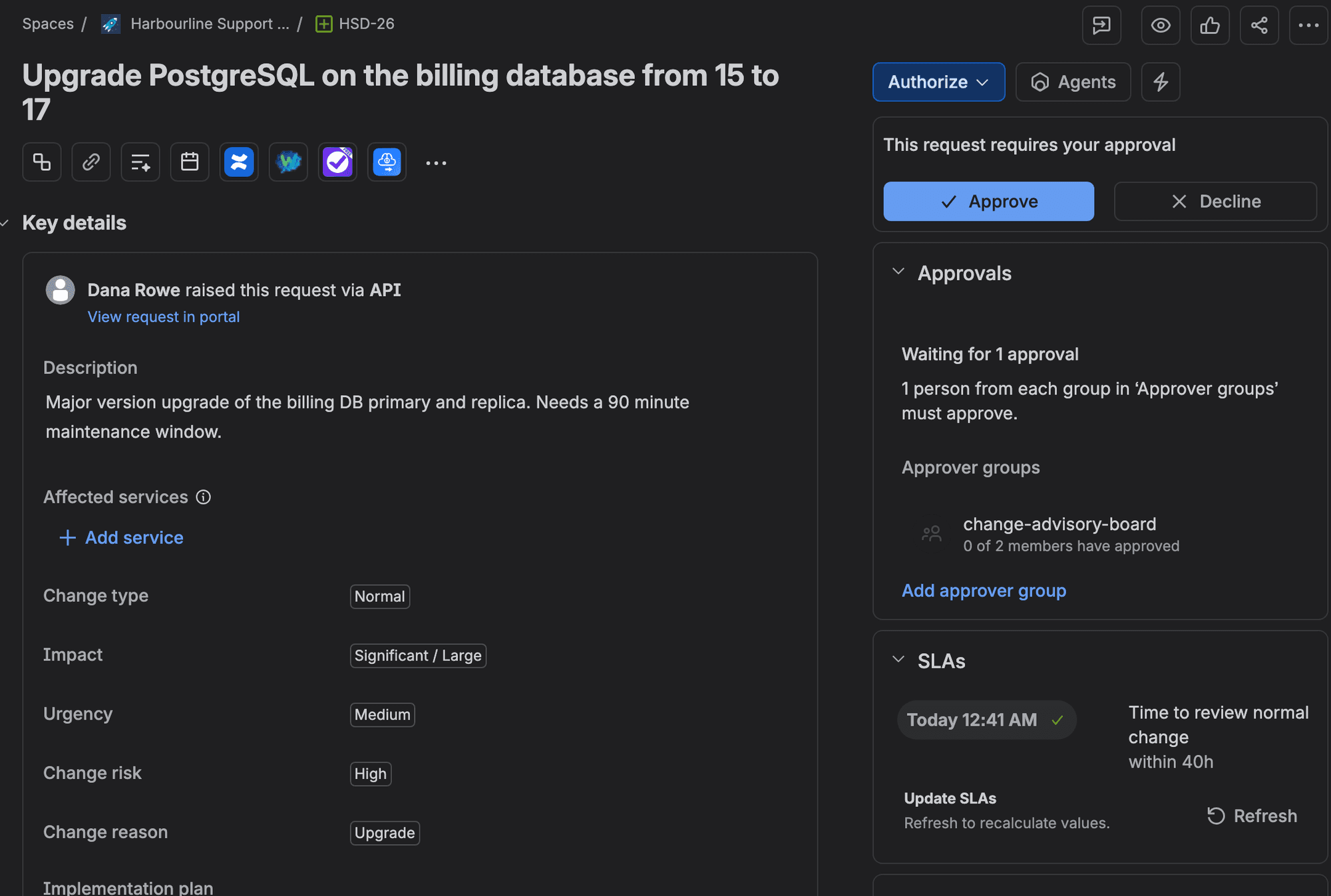
After I approved HSD-26, the approval record still listed Gabriela, our second CAB member, as "pending". The step was finished. The change had moved on. Atlassian staff explained in 2021 that approvers' names are recorded "after the approval is complete for audit purposes". Jira doesn't record which group they were in when there are several (staff reply under the group approvals announcement). So "pending" on a closed step means "never answered".
Make the Jira CAB approval step mandatory in the change workflow
In a space created from the current template, the approval is already there. Your job is getting the right group into Approver groups on the changes that should see the CAB. I did it with one automation rule, because the CAB should only see Normal changes with High or Critical risk. Low-risk changes can go to a change manager or a peer.
- 1
Create the CAB group
In Atlassian Administration, go to Directory > Groups and create change-advisory-board. Add your CAB members. Ours had two: Gabriela and me. Approvers don't need an agent licence. Atlassian says they "just have to be customers of the service space" (What are approvals?).
- 2
Open the space's automation
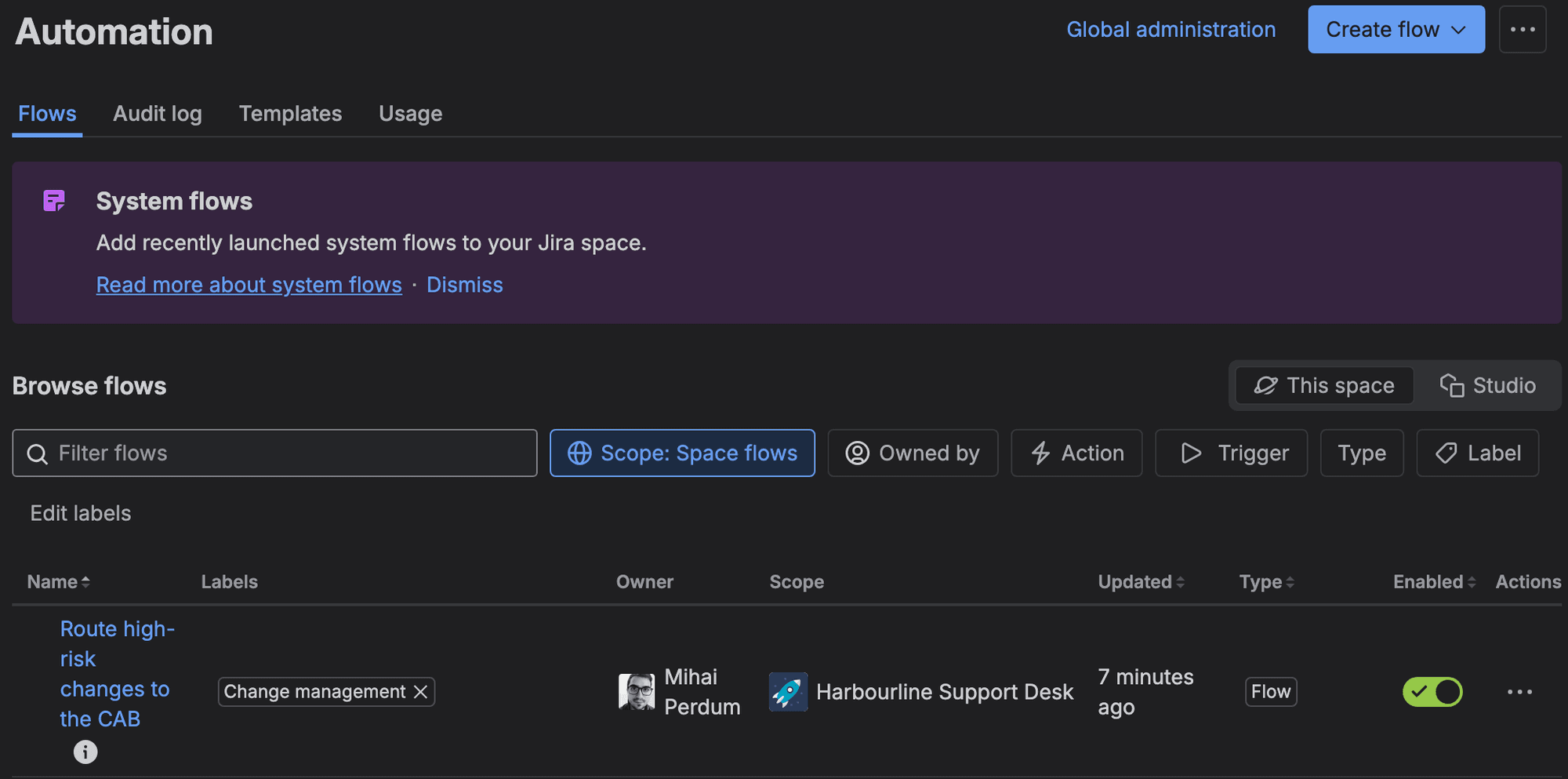
Go to Space settings > Automation and select Create flow. Our template's five system flows were already there, one of them (the deployment flow) labelled Change management.
- 3
Set the trigger and condition
Trigger: Work item created. Add a JQL condition: issuetype = "[System] Change" AND "Change type" = Normal AND "Change risk" in (High, Critical).
- 4
Fill Approver groups
Add Edit work item. Under More options, put the group in the additional fields JSON: {"fields":{"customfield_10078":[{"name":"change-advisory-board"}]}}. Your field id will differ; read it from your Authorize status as above. I built ours through the Automation REST API, so I didn't screenshot the builder's JSON box. Name the flow "Route high-risk changes to the CAB" and turn it on.
- 5
Raise a high-risk test change
Raise a Normal change with Change risk High and planned dates, on behalf of a customer (in the agent view, use Raise this request on behalf of). Don't raise it as yourself if you're in the CAB, and don't assign it to yourself: the reporter and the assignee can't approve. Approver groups should show change-advisory-board within seconds; the history showed Automation for Jira setting it 3 seconds after creation on ours.
- 6
Move it to Authorize and approve it
Transition it with Normal change, then Ready for approval. The Approve and Decline buttons appear for CAB members. Approve it and confirm the status changes to Awaiting implementation.
- 7
Raise a low-risk change too
Raise a Normal change with Change risk Low and move it to Authorize the same way. If the panel says "there are no groups", you've found the gap below.
Check that the rule did its job
I raised seven changes in all. The rule set the CAB group on the three Normal changes with High or Critical risk, HSD-26, 28 and 30. The other four (HSD-27, 29, 33 and 35) got nothing, as intended. HSD-26 was raised on behalf of a customer, so I could approve it. One Approve was enough.
What does it cost? From 3 December 2026 Atlassian bills automation past your allowance at $0.50 per 1,000 steps. Its usage doc also says that "even if a trigger doesn't find a match to start the rest of the flow, the trigger execution itself is charged as one step". Gabriela measured what real rules use in Jira automation usage: steps per rule. So that's at least one step for every work item created in the space, incidents included.
What happens to a change with no approver group ("must approve, but there are no groups")
I'd want to know this before going live. HSD-27, a TLS certificate renewal with Change risk Low, went to Authorize like the others. The rule had skipped it, as designed, so Approver groups was empty.
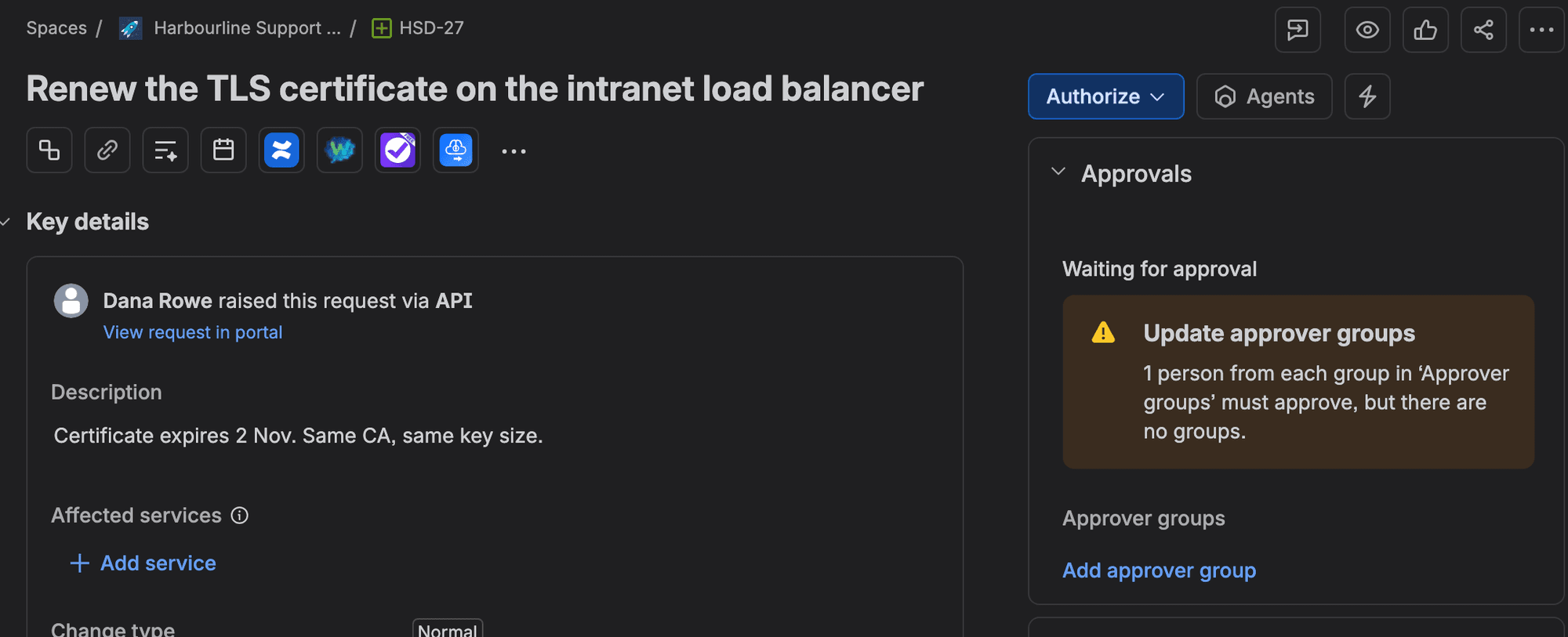
The panel said "1 person from each group in 'Approver groups' must approve, but there are no groups." Over REST it showed "approvers": [] and "canAnswerApproval": false. Like any change in Authorize it offered only Back to planning and Mark as canceled, and with no approvers nothing else could move it. It just waits. With no approvers there's nobody for Jira to ask, so only an agent who opens the change sees the warning. I'd run this JQL in a filter each morning until you've fixed the routing:
1project = HSD AND issuetype = "[System] Change" AND status = Authorize AND "Approver groups" is EMPTYOn our site it returned exactly HSD-27, which is what it should return. Then I set Approver groups on HSD-27 by hand while it sat in Authorize. Both CAB members appeared as approvers, and when I declined it about ten minutes later it moved to Declined. So a late fill unblocks the step, and the routing can wait until the change type and the risk are final, right before anyone is asked to approve. That points to a better rule than mine. Trigger it on the transition into Authorize instead of on creation. Add an else branch that sends everything else to a change-managers group. It also catches a change whose risk was raised during Planning, which my create-time rule misses. I didn't build that version, so test it on your site first.
The reporter can't approve their own change
HSD-28 was a firewall change I raised myself, Change risk Critical. The rule added the CAB group, and the panel showed "Excluded approvers: Mihai Perdum". The API listed one approver: Gabriela. I couldn't approve my own change. That's the separation of duties auditors ask about. DORA's research summary puts it as changes that "must be approved by someone other than the author" (DORA). The template does it by default, through the exclude list above.
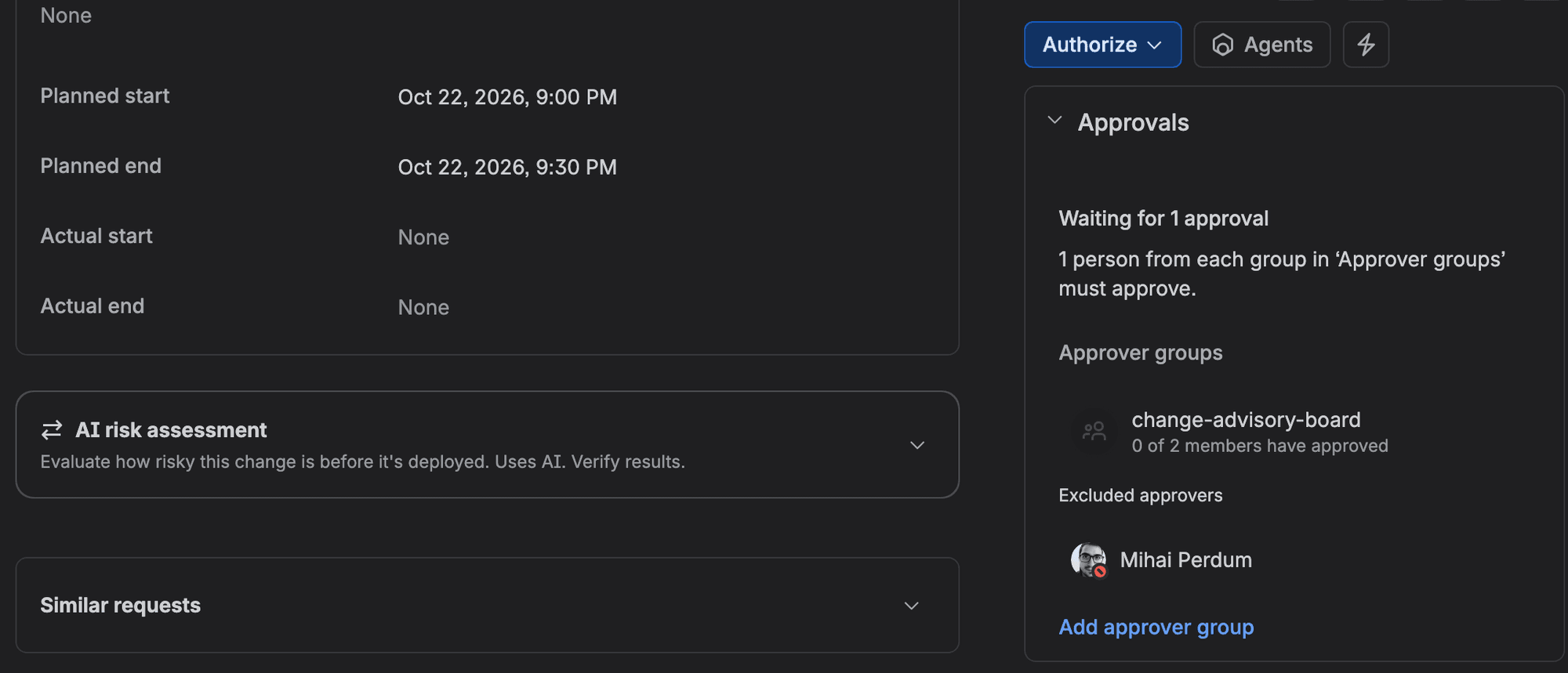
But count the approvers. With a two-person CAB, when one member raises a change, one person is left to approve it. If they're on holiday, the change waits, and Jira has no delegation for approvals (JSDCLOUD-7867, 254 votes, "Future Consideration"). I think three members is the smallest CAB worth running.
The Jira Service Management change calendar: freeze windows and CAB scheduling
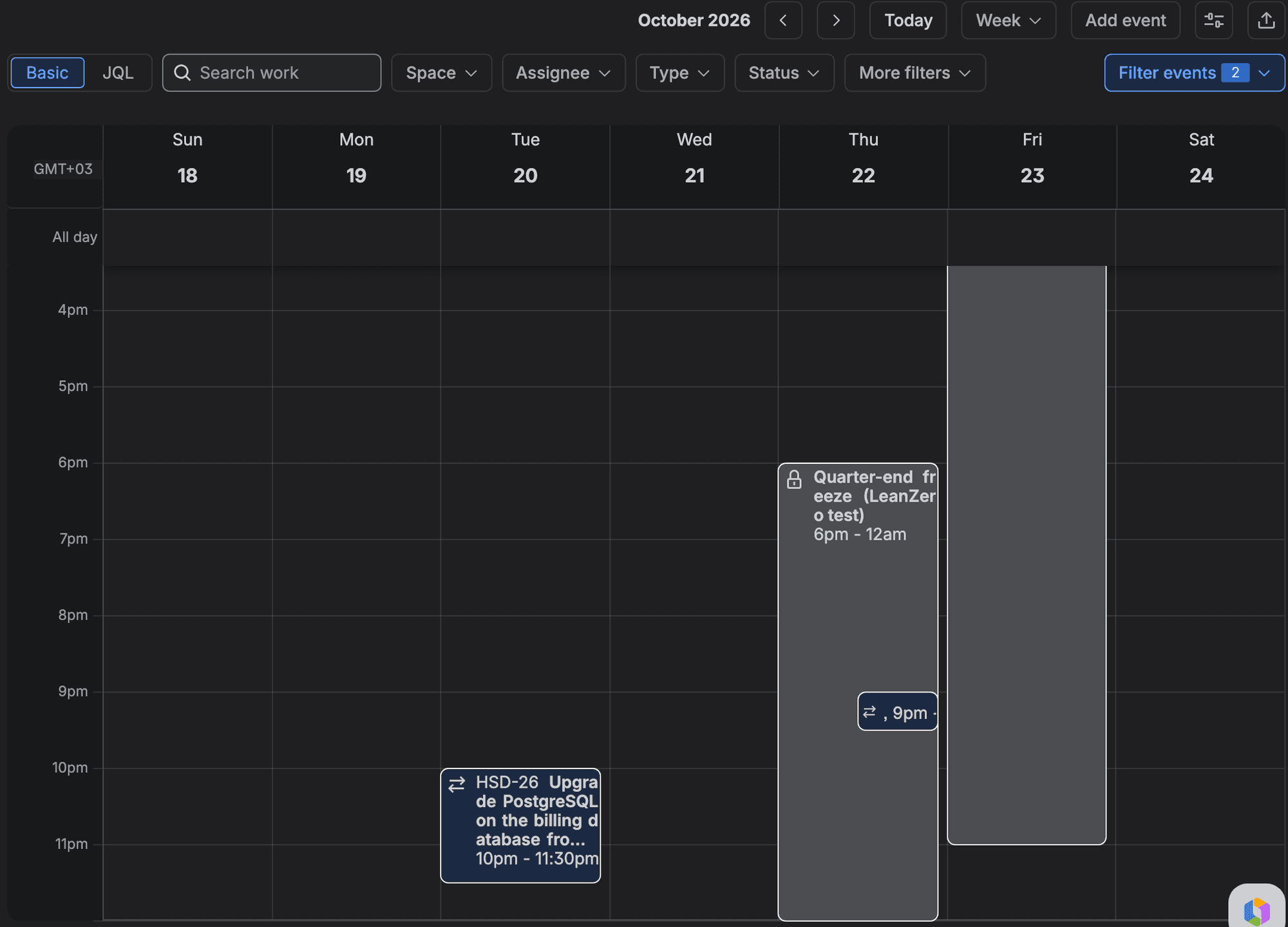
You'll find the change calendar under Operations > Change calendar in the space. You need to be an agent to see it, and a change only shows up once it has Planned start and end (or Actual) dates (What is the change calendar?). HSD-26 appeared on Tuesday at 10pm, right where its planned dates put it.
A CAB uses it to spot changes that collide and to keep changes out of frozen periods. Freeze windows and maintenance windows are created from the same calendar, with Add event > Change window.
- 1
Open the calendar
Go to Operations > Change calendar and switch to Week.
- 2
Add a freeze window
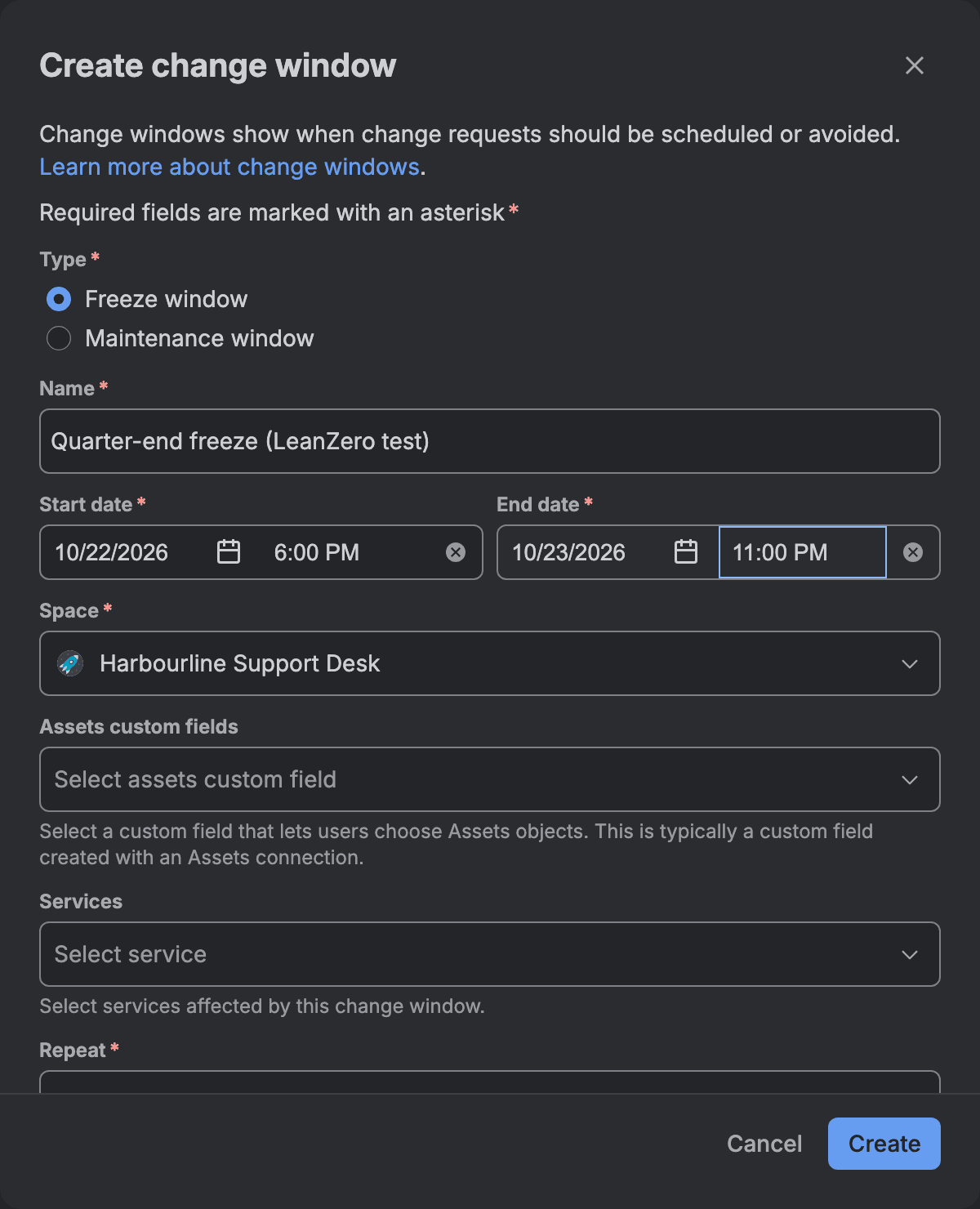
Select Add event > Change window. Pick Freeze window and give it a name and dates. I made "Quarter-end freeze" from Thursday 22 October 18:00 to Friday 23 October 23:00.
- 3
Read the conflict line, then save
As soon as the dates covered HSD-28 (planned Thursday 21:00), the dialog said "There are 1 conflicting changes scheduled at this time." with a Show conflicts link. Saved, the window is a grey block with a lock icon.
- 4
Decide whether the window should block
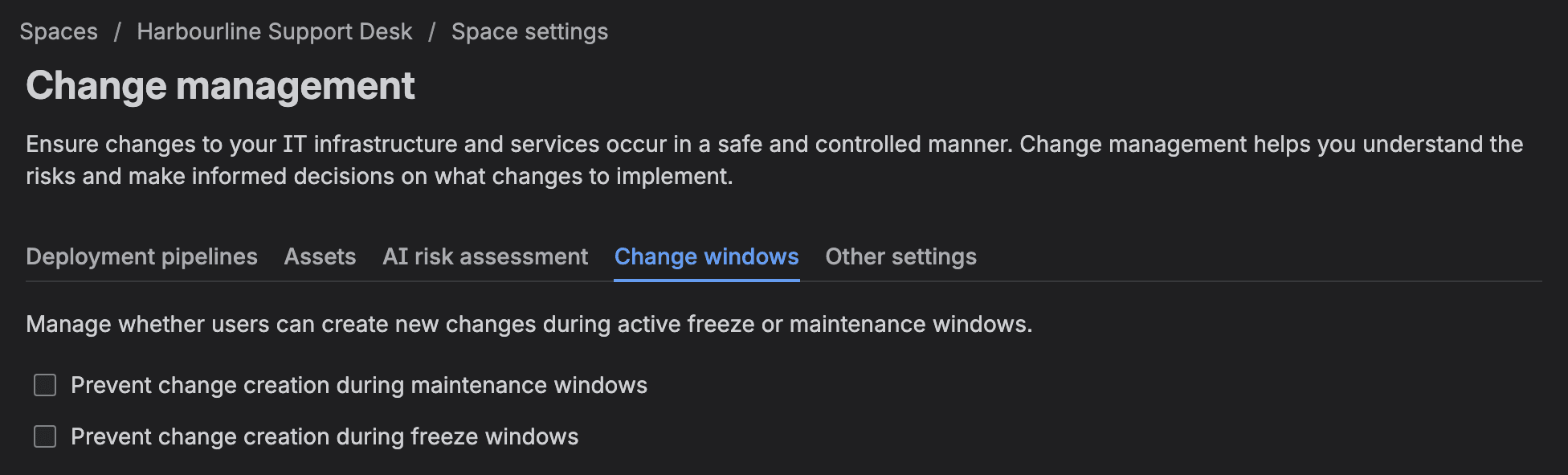
Go to Space settings > Operations > Change management > Change windows and tick "Prevent change creation during freeze windows" if you want Jira to enforce it.
Freeze windows don't block anything until you tick the box
Atlassian's support doc still calls change windows "visual indicators that show when change requests should (or shouldn't) be scheduled" (What are change windows?). An Atlassian staff post from 24 October 2025 says admins "can configure the calendar to automatically block change requests", and JSDCLOUD-14070 was closed as Fixed for Service Collection Premium and Enterprise. On our site the block existed and was off by default. You have to tick it.
About that missing warning on HSD-28. Atlassian's risk insights doc says the panel on a change shows no data at first, and needs Affected services, Affected Assets objects, Planned start and Planned end filled in to show every risk, freeze windows included. A Community asker in 2025 reports a warning on changes that overlap a freeze. So don't take my screenshot as proof that JSM never warns. Fill those fields and look at Risk insights on your own changes.
With the box off, I created HSD-30 for Friday afternoon, inside the freeze. I approved it and moved it to Implementing. Nothing objected. Then I ticked "Prevent change creation during freeze windows", added a second freeze running right then, and tried to raise more changes through the REST API:
1curl -s -u "$EMAIL:$TOKEN" -H 'Content-Type: application/json' \
2  -X POST "https://wolfaenpak.atlassian.net/rest/servicedeskapi/request" \
3 -d '{"serviceDeskId":"142","requestTypeId":"391","requestFieldValues":{"summary":"Freeze test","description":"x","customfield_10005":{"value":"Normal"},"customfield_10617":"2026-10-22T20:00:00.000+0300","customfield_10618":"2026-10-22T20:30:00.000+0300"}}'1{"errorMessage":"Your request could not be created. Please check the fields have been correctly filled in. You can't create a change during an active change window. To proceed, schedule it outside the window.", ...}I tried five creates. Each should either be refused with HTTP 400 or created, and the table shows which:
attempt | planned dates | type | result |
|---|---|---|---|
A | during the freeze running at the time | Normal | refused, HTTP 400 |
B | Thursday 20:00, inside the quarter-end freeze | Normal | refused, HTTP 400 |
C | 27 October, outside any window | Normal | created, HSD-33 |
D | Thursday 20:00, inside the quarter-end freeze | Emergency | refused, HTTP 400 |
E | no planned date fields at all | Normal | created, HSD-35, during the running freeze |
The check reads the change's Planned start and end, which is why a future freeze blocks a change planned into it (B) even though the message says "active". Emergency changes are blocked too (D). There's no bypass for urgent changes yet. Asked about one under the 24 October staff post, an Atlassian staff member replied on 28 October 2025: "At present it's All / None". And a change with no planned dates goes straight through (E). Verify it on your own site with project = HSD AND issuetype = "[System] Change" AND "Planned start" is EMPTY, which returned HSD-35 on ours. If you rely on the block, make Planned start and Planned end required on the change request type.
And the setting doesn't touch existing changes. HSD-30, already approved inside the freeze, still offered Complete and Fail after I turned the block on.
Also, the refused attempts used up issue keys: HSD-31, HSD-32 and HSD-34 don't exist. If an auditor asks why your change numbers have gaps, that's one reason.
The Jira CAB process end to end: one change from request to close, and its audit trail
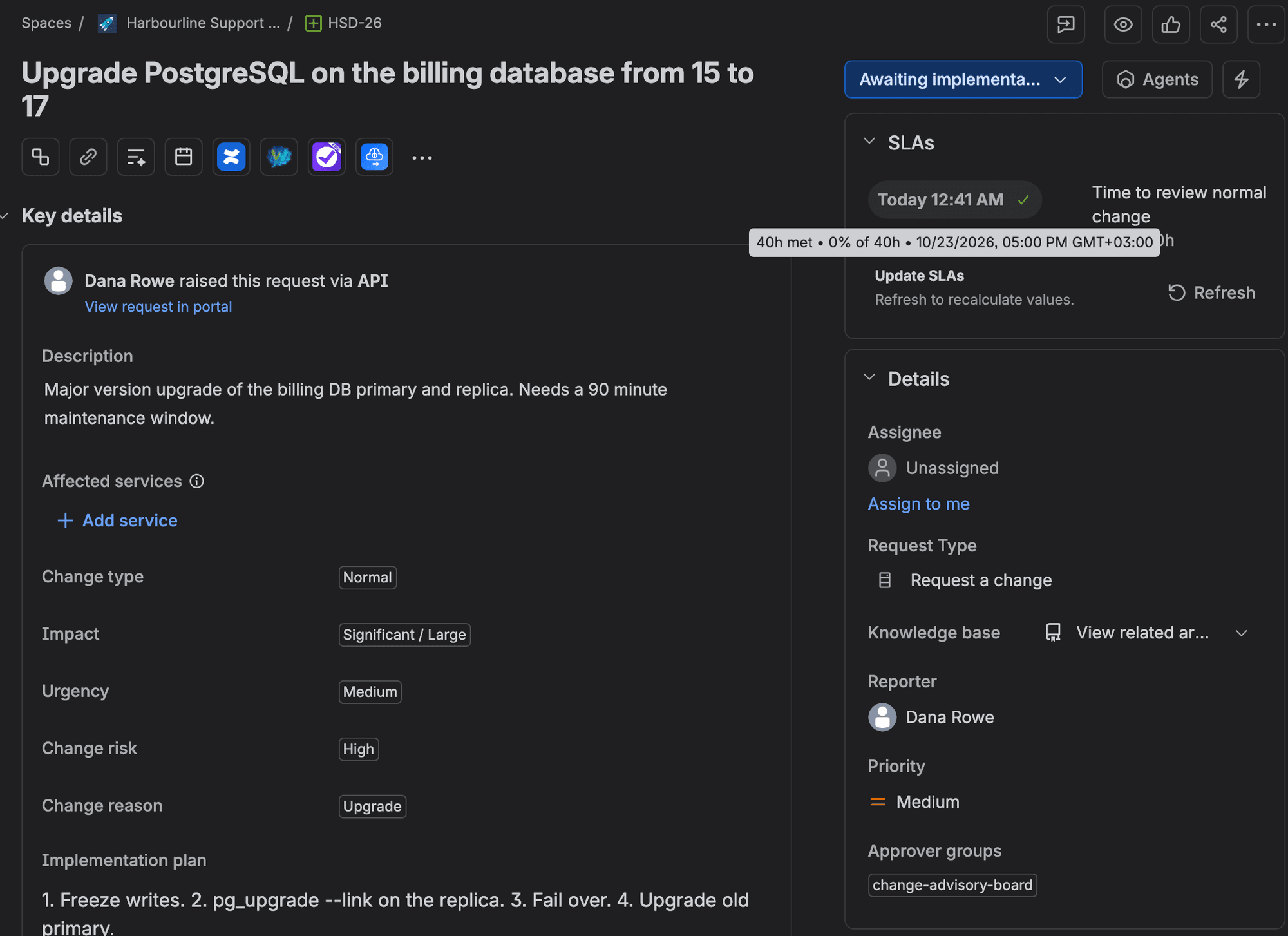
HSD-26 went like this, as your CAB would see it. Dana Rowe, a customer, raised "Upgrade PostgreSQL on the billing database from 15 to 17" as a Normal change with High risk. It had implementation, backout and test plans and a window of Tuesday 22:00 to 23:30. Within seconds the rule had put change-advisory-board into Approver groups. An agent moved it through Planning to Authorize; the SLA panel showed "Time to review normal change", a 40-hour target, met once it left Review. I approved it as a CAB member at 00:43:37. It moved to Awaiting implementation. On the night, the implementer selects Implement, then Complete or Fail.
Jira JQL for approvals: find approved, pending and skipped changes
Your auditor will ask for a list of changes and who approved each one. Jira's audit log won't give it to you. Atlassian says it records "configuration changes that can impact users and spaces" (Audit activities in Jira). The evidence is on the work items, and JQL finds it. I ran this for the approved list:
1curl -s -u "$EMAIL:$TOKEN" -H 'Content-Type: application/json' \
2  -X POST "https://wolfaenpak.atlassian.net/rest/api/3/search/jql" \
3  -d '{"jql":"project = HSD AND Approvals = approved()","fields":["summary"]}' \
4 | jq -r '.issues[] | .key + " " + .fields.summary'1HSD-30 Resize the reporting cluster during quarter-end
2HSD-26 Upgrade PostgreSQL on the billing database from 15 to 17HSD-30 is the change I approved during the freeze test above. Use your own site and project key.
Careful with one word here. Atlassian's JQL functions page writes the field as approvals, except once: its myApproval example is approval = myApproval(). Through the search API on our site, approval = approved() returned zero results and no error, and so did that example. Don't read anything into the silence. The same endpoint returns an empty list for any field that doesn't exist, and totallyNotAField = approved() came back empty too when I re-checked on 20 October. A strict parse is what tells you: "Field 'approval' does not exist or you do not have permission to view it." The field is called Approvals. If someone hands your auditor an empty list built on the singular, it looks like nobody approved anything.
These are the queries that worked on our site, and what each returned:
JQL | returned | what it means |
|---|---|---|
Approvals = approved() | HSD-26, HSD-30 | approval steps that ended approved |
Approvals = pending() | HSD-28 | waiting right now (HSD-27 showed here too until I declined it) |
Approvals = pendingBy("<Gabriela's accountId>") | HSD-28 | waiting on that person |
Approvals = approver("<Gabriela's accountId>") | HSD-26, HSD-27, HSD-28, HSD-30 | everywhere she is or was an approver, decided or not |
Approvals = myApproval() | HSD-26, HSD-27, HSD-30 for me | where I am or was an approver, decided or not (I declined HSD-27) |
Approvals = declined() | error | there is no declined function (JSDCLOUD-5420, 62 votes) |
Watch approver() and myApproval(). The first lists HSD-26 for Gabriela, who never decided anything on it, and Atlassian's doc says the second covers requests where you "may or may not have already approved". Neither is a who-approved report.
Catch the changes that skipped the CAB
The exits that skip Authorize are where a CAB loses sight of changes. HSD-29, "Emergency patch for the VPN gateway CVE", went from Review to Implementing with "Emergency override". No approval at all. I tried to catch it with NOT Approvals = approved() and got the opposite. It returned HSD-26, the approved one. It missed HSD-29, which has no approval record at all. What worked was asking the status history:
1project = HSD AND issuetype = "[System] Change"
2  AND status was not Authorize
3  AND status was in (Implementing, "Awaiting implementation", Completed, Failed)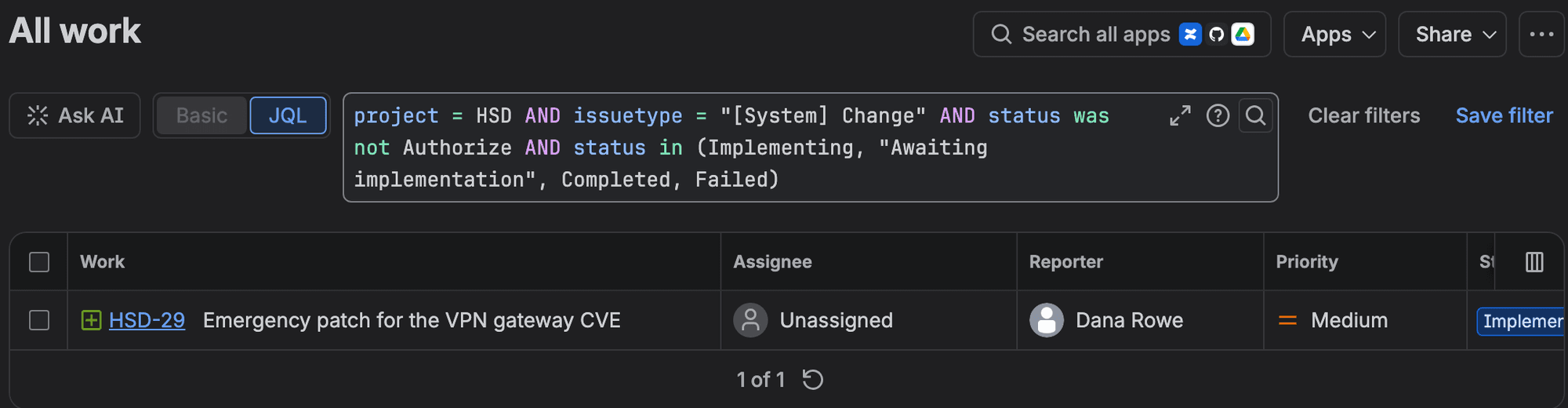
The same query catches the other two exits, Standard change and Mark as done, because it lists every change that ever reached Implementing, Awaiting implementation, Completed or Failed without passing Authorize. The screenshot shows my first version with status in, which reads only the current status; both returned HSD-29, but status was in also catches a change that was implemented and then canceled. Real standard changes will show up too. Keep them in the CAB's weekly look-back, because a Critical change sent down the Standard path looks the same. ITIL 4 uses "change authority" for whoever approves a change, partly to kill the common misreading of v3 that every change goes to the CAB (Joe the IT Guy). Standard changes and peer reviews can take a different route. Atlassian recommends only "asking for CAB approval on the riskiest changes" (10 change management best practices). The query is how the board reviews the emergencies afterwards.
It misses one path, and it's the worst one. A change the CAB declines can go "Back to review" from Declined, then down Standard change or Emergency override. I did exactly that with HSD-27: declined at 01:26:32, back to Review, then Standard change to Awaiting implementation. None of those transitions has a condition. Because HSD-27 did pass through Authorize, the status-history query doesn't list it. This one does:
1project = HSD AND issuetype = "[System] Change"
2  AND status was Declined
3  AND status was in (Implementing, "Awaiting implementation", Completed)
It returned HSD-27 and nothing else on our site. It would also list a declined change that was reworked and properly approved the second time, so read each hit before you raise an alarm. Run it weekly.

Where the rest of the evidence lives
In Atlassian Administration, the organization audit log keeps events for up to 180 days (View audit log activities). What it stores depends on your plan. The same page says an upgrade to Atlassian Guard or an Enterprise plan logs more at the organization level, and in another sentence that without them organization-level logs store no events at all, so check what yours shows before you promise an auditor anything. Approval data also doesn't come out when you export a change to Word or print it (JSDCLOUD-6511, 30 votes, "In Progress"), and commenters there mention ISO, SOC 2 and HITRUST audits. So save the JQL filters, and export the results as CSV on a schedule your auditor agrees with.
What Jira Service Management cannot do natively for a CAB
I only list what Atlassian's tracker or docs confirm.
gap | what happens today | tracker, 20 Oct 2026 |
|---|---|---|
No reason on approve or decline | there's no screen on the Approve or Decline transition, so a CAB member can't be made to say why | JSDCLOUD-6989, 738 votes, Gathering Interest |
Approval transitions skip validators | the approver "can approve or decline the request even if the required field is empty", which Atlassian's KB calls expected behaviour | JSDCLOUD-6988, 482 votes |
No built-in reminder | Atlassian's answer is an automation flow (Remind change reviewers), which uses steps | JSDCLOUD-8369, 294 votes |
No delegation while someone is away | the change waits | JSDCLOUD-7867, 254 votes |
Pending group approvers aren't named | you see "0 of 2 members" and no names | JSDCLOUD-10260, 76 votes |
No "A or B, plus C" logic | the ticket's workaround is two approval statuses in a row, each with its own approver field | JSDCLOUD-5851, 43 votes |
No emergency bypass for freeze blocking | "At present it's All / None" (staff, Oct 2025) | no ticket found |
For validators, put your checks on a transition before Authorize, never on the approval itself. My validator tutorial puts that gate on a Submit to CAB transition one step before Authorize.
I also couldn't find a CAB meeting anywhere in the JSM Cloud docs: no agenda, no minutes, no meeting object. Atlassian's own CAB guide tells you to "create a standard CAB agenda" and "determine the meeting cadence", and that part happens outside Jira. A saved filter of Approvals = pending() sorted by Planned start makes a decent agenda.
Approve by email does exist in Cloud, according to Atlassian's doc. I didn't try it. It's under Space settings > Notifications > Customer notifications > Approval required (Manage settings for approval by email). And group approvals used to be a gap but shipped in 2021.
Can Jira be used for change management without Premium?
Not for new setups. Atlassian moved change management from Standard to Premium on 16 October 2024. The change features, calendar included, are Premium and Enterprise only now (Updating your incident, problem, and change management capabilities). Spaces that already had change request types on Free or Standard keep them. On 17 October 2026 Atlassian's pricing page showed Standard at $21.50 and Premium at $55.28 per agent per month, at its default of 75 agents billed monthly. The price per agent moves with the agent count. At those rates Premium costs $33.78 more per agent a month, about $2,534 for 75 agents, so a CAB alone is an expensive reason to upgrade. If you need the numbers for a budget conversation, our usage-based pricing budget for 2027 has worked examples.
On Standard you can still build an approval status on a custom workflow with a group field. You lose the calendar and freeze windows, which is most of this article.
The CAB setup I'd use
For a 50 to 2,000 seat company I'd start with a CAB group of at least three, so the reporter's exclusion still leaves two approvers. Route on the transition into Authorize. High and Critical Normal changes go to the CAB group, everything else to a change-managers group. Then nothing waits with no approvers. Then restrict the Review exits that skip Authorize, and the Back to review transition out of Declined, for example with a condition on Change type or on a change-manager group. I haven't tested that condition. Make Planned start and Planned end required on the change request type, since both the calendar and freeze blocking read them.
Tick "Prevent change creation during freeze windows" before your first real freeze, and agree what happens to an emergency during one, because the block makes no exception. Then save filters and look at them weekly: Approvals = pending() as the CAB agenda, the stuck-change query, the status-history query for changes that skipped Authorize, and the declined-then-implemented query.
It's maybe an afternoon of setup.
Where I could be wrong
This was one Premium test site on one night, with a two-person CAB and one approver account in the browser. I didn't change the "Number of approvers" setting, test a decline with more than one approver per group, try approval by email, approve from Gabriela's login, or check anyone's notifications. The freeze tests went through the REST API, so I didn't see the portal's version of the error. And Atlassian's change docs disagree with each other in several places (status names, freeze windows, the calendar's date fields), so read your own screens.
Afterwards I removed the rule, the group, the freeze windows and the test changes, and unticked the freeze box. Two things stay: issue keys HSD-26 to HSD-35 won't be reused, and an automation-template suggestion my test script dismissed on HSD-28 can't be brought back (that change is deleted anyway). If anything here doesn't match what you see, leave a comment and I'll update the post. More of our JSM write-ups are on the Jira Service Management topic page, including the sentiment analysis in the triage queue we saw at Team '26 Europe.
Key takeaways
- You now have a CAB group in Approver groups, a rule that routes High and Critical Normal changes to it, and an approval on Authorize that needs 1 person per group and excludes the reporter and assignee.
- You know where changes slip past the CAB (the Review exits that skip Authorize, and a declined change sent back to Review), where they get stuck (no approver group), and where they slip past a freeze (no Planned start), with a JQL query for each. The field is Approvals, plural.
- Freeze windows only block once the Change windows checkbox is ticked, they block Emergency changes too, and they read Planned start and end.
- Not covered: declines with more than one approver per group, approval by email, the Number of approvers editor, and anything on Standard plans.
Comments
0Add a comment