
Jira automation vs workflow rules after 3 December: which checks belong on the transition, and where CogniRunner fits

13 min readNovember 6, 2026
Key takeaways
- A workflow validator stops a bad transition before it happens. On our Jira Cloud test site a built-in 'Validate a field' rule on Done returned HTTP 400 with our message 'Set a due date before Done' and the work item stayed in Backlog.
- The same check written as an automation flow let the work item reach Done, then moved it back 2.487 seconds later. That run cost 4 automation steps: the trigger, the condition and two actions.
- Usage-based billing takes effect on 3 December 2026 for most Atlassian meters, automation steps included. Jira Standard includes 400 steps per user a month (Premium 750, Enterprise 1,000), and extra steps cost $0.50 per 1,000.
- Since 5 November 2026 a flow run that ends before any action runs uses no steps. Our audit log showed '4' for the run that acted and a dash, read out as 'Non-billable automation steps', for the run whose condition failed.
- Four attempts through the validator (two REST calls, one board drag, one command-palette move) wrote zero entries to the automation audit log. Atlassian defines a step as part of an automation flow, but no Atlassian page says in so many words that workflow rules are never metered.
- In CogniRunner 7.65.0, 15 of the 16 premade validators and every condition run without AI (the Confluence page check calls AI only in its Semantic mode). Only the AI prompt rules call a model, on your own key or on Forge LLM.
If a check in Jira Cloud has to stop a work item from moving, put it on the workflow transition as a validator, because automation only reacts after the move. We tested both on 6 November with the same rule, "a work item can't go to Done without a due date". The validator refused the move and nothing appeared in the automation audit log. The automation flow let the work item reach Done, pulled it back 2.5 seconds later and used 4 automation steps to do it.
That matters more from 3 December 2026, when usage-based billing takes effect for most Atlassian meters, automation steps among them. A step is one executed part of an automation flow: the trigger, a condition, an action. On Jira Standard each user brings 400 steps a month into a shared pool, and anything above it costs $0.50 per 1,000 steps. Atlassian also changed the rules on 5 November, when it republished its page on how automation usage is calculated: a run that stops before any action now uses no steps.
In June 2024 an admin called Anthony R asked on the Community whether workflow post functions "count as an 'Automation'". As he put it: "My organisation is trying to find ways to reduce the number of automations". He got good answers from experienced people, but nobody had measured it. Now we have, on one site. The result surprised me a bit. Since 5 November a guard flow like ours only costs steps when it catches someone, so moving it onto the workflow saves less money than you might hope.
The better reason to move it is that the flow lets the bad move happen first. Every check that has to stop something belongs on the transition. Automation keeps the jobs a transition can't do: schedules, events from other systems and one flow that serves many projects.
What one test on our Jira site showed
- Automation can't block a transition. A flow triggered by Work item transitioned runs after the move, and the call that made the move got a success response.
- A validator blocks it before it happens. The built-in Validate a field rule returned HTTP 400 with our own message and left the status and resolution untouched.
- The guard flow is billed per catch. The run that moved the work item back cost 4 steps; the run whose condition failed was marked non-billable.
- The validator left no trace in automation. Four attempts, zero automation audit entries, while the flow's runs showed up minutes later in the same view.
- Most common checks need no app. Company-managed projects on our site offer 20 built-in transition rules and team-managed ones 13.
Workflow transition rules vs automation rules: what each one does
A workflow is the set of statuses a work item moves through and the transitions between them. Each transition can carry rules, and Jira runs them as part of the move itself. You'll find them under four headings on the transition panel of the new workflow editor:
Heading in the new editor | Older name | What it does |
|---|---|---|
Restrict transition | Condition | Hides the transition when it isn't met |
Request input | Transition screen | Shows a screen during the move |
Validate details | Validator | Checks the values before the move completes, and refuses the move if they're wrong |
Perform actions | Post function | Runs right after the move, for example setting a field or assigning someone |
Atlassian's own words for the validator are the ones to remember: "If the validator fails, the work item won't progress to the destination status, and any actions set up for after the transition will also not be performed." A condition is quieter. "If a condition fails, the user will not see the transition button."
An automation flow (Atlassian now calls automation rules "flows") lives outside the workflow. It waits for an event, such as a transition, a new work item, a schedule or an incoming webhook. Then it checks its own conditions and runs its actions. Bill Sheboy wrote this in a 2024 Community thread: "Automation rules trigger after an event has occurred, such as an issue transition. They cannot block or prevent the event."
Workflow validator vs automation rules: blocking a bad transition
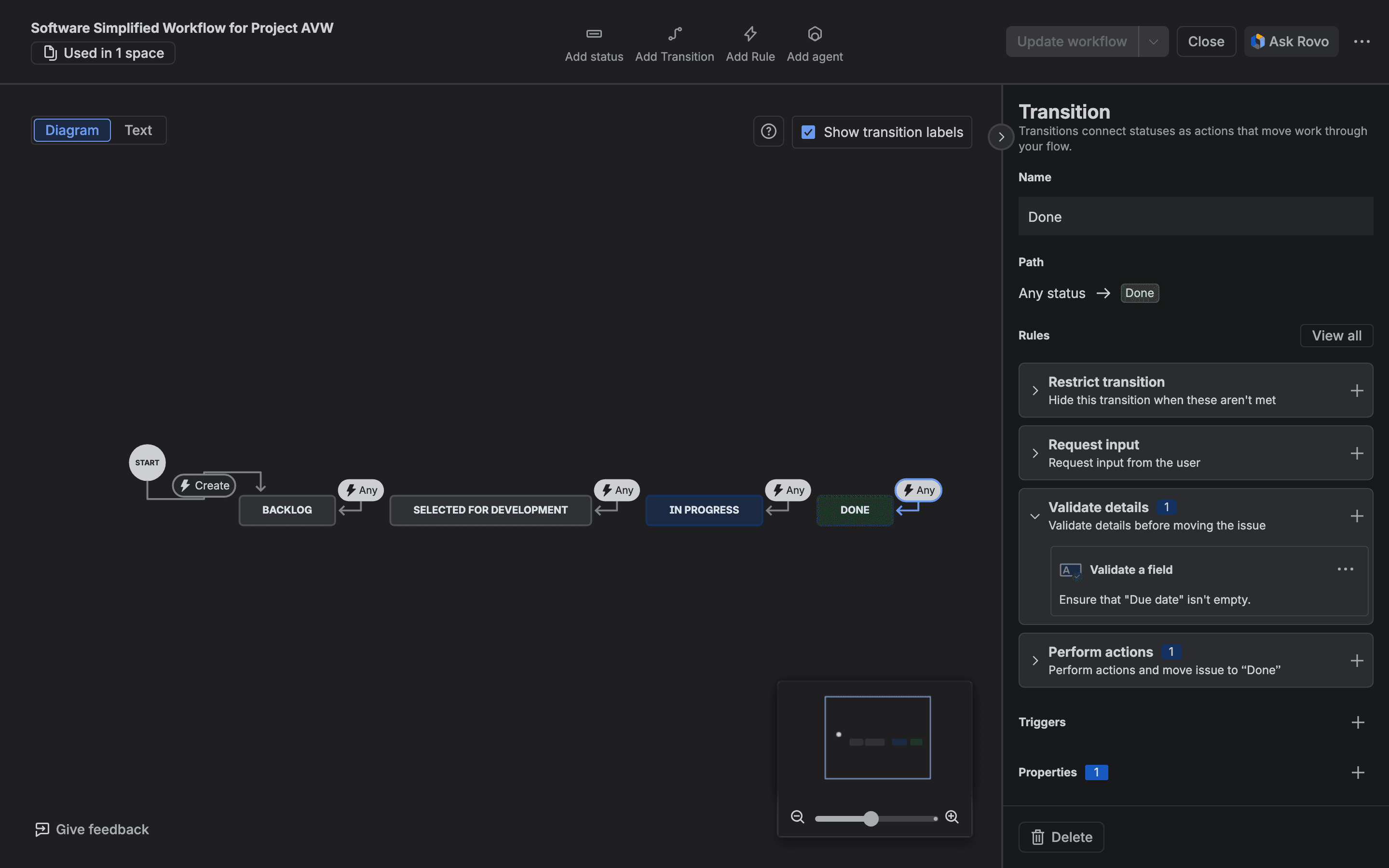
On 6 November we created a throwaway company-managed project on our test site and called it Automation vs Workflow test (key AVW). Its Done transition got one built-in rule: Validate a field, with Due date required and the error message "Set a due date before Done". We deleted the project and its test work items afterwards.
First we left the due date empty and moved AVW-1 through Jira's REST API (the interface scripts and integrations use). This came back:
1POST /rest/api/3/issue/AVW-1/transitions  {"transition":{"id":"41"}}
2HTTP 400
3{"errorMessages":["Set a due date before Done"]}
The work item stayed in Backlog. Its resolution stayed empty. Then we set the due date and sent the same call. It returned HTTP 204. AVW-1 moved to Done.
A person on the board sees the same message. We dragged a second work item, AVW-2, to Done without a due date and the card stayed where it was:
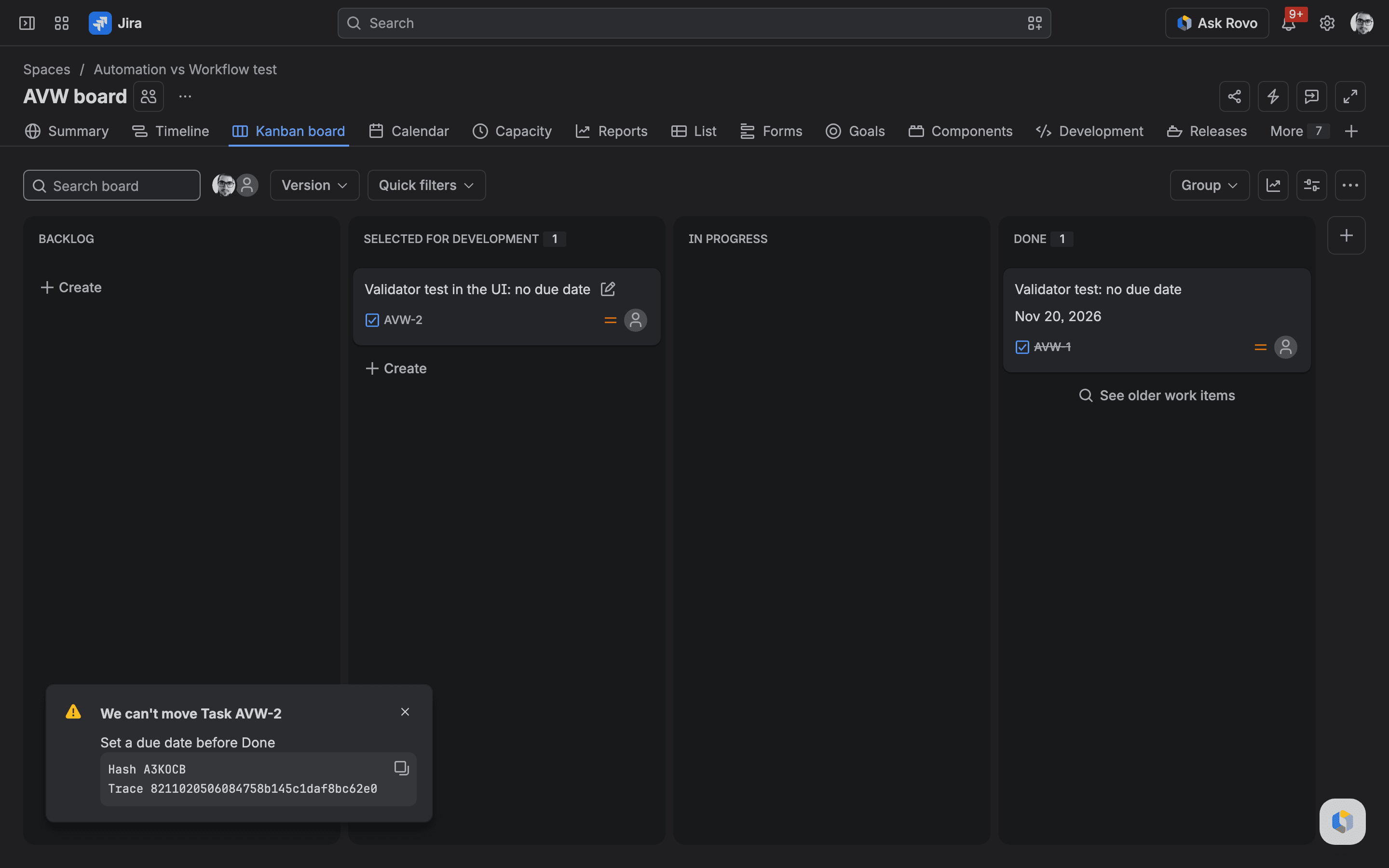
The command palette surprised us a bit. On our site, in one try, moving the same work item through it showed only a generic "We're unable to edit status. Wait a few moments, then try again." and none of our message. We didn't try the palette on a transition without a validator, so I can't say the validator caused it. If your team moves work through the palette a lot, try it once on your own site before you rely on the message.
The same check as an automation flow lets the move happen first
Next we removed the validator and built the check as a flow. The trigger was Work item transitioned to Done and the condition Due date is empty. Then it ran two actions. It moved the work item back to Backlog and added a comment explaining why.
We moved AVW-3, which had no due date, through the REST API, and the call returned HTTP 204, the same success a valid move gets. According to its changelog, AVW-3 reached Done at 01:02:34.609 (our local time). The flow moved it back at 01:02:37.096, so it spent 2.487 seconds in Done with its resolution set. The comment followed 0.735 seconds later.
For a lot of teams 2.5 seconds in Done is harmless, but anything else listening for "moved to Done" sees it too: another flow, a webhook to a reporting tool, a notification to the reporter. In August 2026 someone on the Community described where this leads: "if this isn't the case, the issue reverts to its previous status ... Since the workflow has 10 statuses, I've created 10 automation rules." A reply suggested what we measured: "Use a workflow restriction to block the transition silently, or a workflow validator to provide user feedback."

Then AVW-4, with a due date set. It moved to Done. It stayed there. The flow ran. Its condition was false, so it stopped.
What the automation audit log charged for each run
Every flow's audit log has an Automation steps column. Here are our two runs:
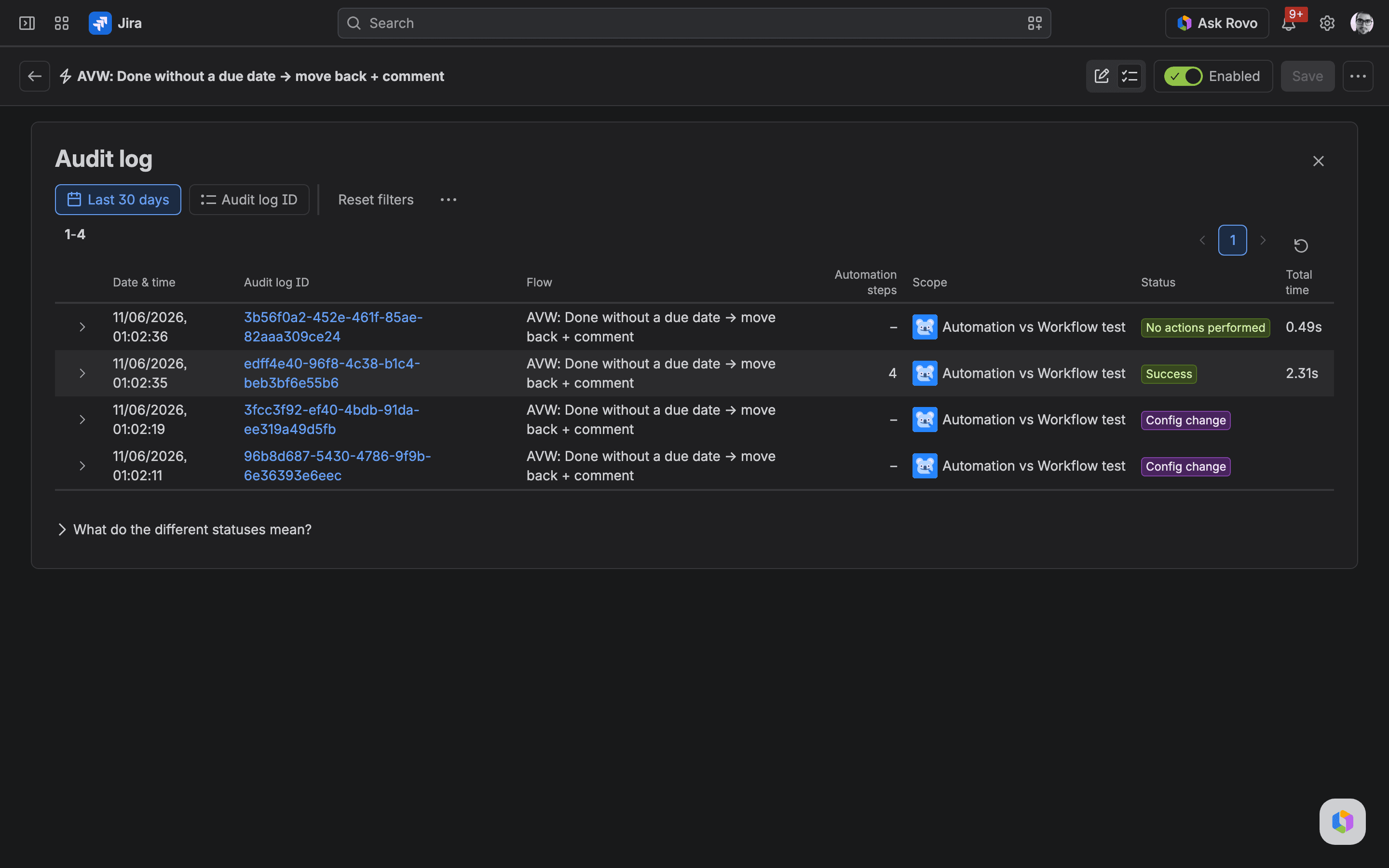
The run that acted shows 4: one trigger, one condition, two actions. The run that stopped at its condition has the status No actions performed (NO_ACTIONS_PERFORMED in the API) and shows a dash. The screen-reader text on that cell is "Non-billable automation steps", which matches the 5 November rule. The raw audit record behind that run still lists 2 component runs (the trigger and the failed condition), so Jira records the work and doesn't bill it.

We also watched the usage totals. The data behind the Usage tab still showed 0 automation steps since midnight UTC at every check until 01:08 our time. That was about six minutes after the runs. Our flow wasn't in the tab's High usage flows list yet either. So the step counts above come from the audit log. If you test this yourself, read the audit log first. Give the Usage tab time.
How much moving a guard flow saves, in one example
Here's a made-up but ordinary example to show the arithmetic. Say 2,000 work items go to Done in a month and 5 % of them are missing a due date.
With the guard flow, the 100 bad moves each cost 4 steps, so 400 steps. The 1,900 good moves stop at the condition. Since 5 November they cost nothing. With a validator, none of the 2,000 moves shows up in automation.
You'd spend 400 steps a month. That's a single Standard user's monthly allowance. If your pool is already used up, it's $0.20 of extra usage at $0.50 per 1,000. Before 5 November the 1,900 runs that stopped at the condition would have cost steps too. We measured 2 steps for that kind of run on 15 October. That would have been another 3,800 steps.
So for a check like this the money is small now. The reason to move it is that a validator stops the bad move and tells the person why, while the flow cleans up after it. Flows that loop over subtasks, branch, or run on every update are different. For those you should count the steps. We measured eleven test flows we built in Jira automation usage: steps per rule. One note on that tutorial: its 2-step figure for a run that stops at a failed condition was right on 15 October, and Atlassian changed the rule on 5 November.
A few more billing facts that come up when you plan. Premium includes 750 steps per user a month and Enterprise 1,000, pooled across the organisation. Extra usage is on by default for most organisations. If an admin turns it off and the pool runs out, flows stop until the next reset, and events from that time aren't replayed. Rovo agent actions in a flow are billed in Rovo credits; we covered what a Rovo agent call costs in a flow separately.
Do workflow validators and post functions use automation steps?
Atlassian defines a step as "a single executed part of an automation flow". A validator, condition or post function on a transition isn't part of any flow. Community answers have said for years that they don't count. Hana Kučerová replied to Anthony in 2024 that "workflow post functions don't count as an automation usage". Walter Buggenhout wrote in January 2026 that "conditions, validators and post functions are elements of workflows and have nothing to do with automations." I couldn't find an Atlassian page that says it in those words.
Our test covers a validator and the built-in post function that sets the resolution on Done. We made four attempts through the validator: two REST calls (one refused, one accepted), a refused drag on the board and a refused move in the command palette. Afterwards the automation audit log for the project and for the whole site was empty. A few minutes later the same view showed the flow's runs.
No flow was listening on that project while we tested the validator, we didn't test a workflow condition, and it was one run of each on one site. So we can say a native validator did the blocking without any automation component involved. We can't say anything yet about rules from Marketplace apps. You'd need to test those one by one.
Built-in workflow rules you can use before reaching for automation
We asked our test site's REST API which transition rules it offers (GET /rest/api/3/workflows/capabilities). A company-managed project came back with 20 built-in rules. A team-managed one came back with 13. The seven extra on company-managed include Block transition until approval, Trigger a webhook and showing a screen during the transition.
These are the ones I'd look at first when you're moving a check out of automation:
Built-in rule | Where it sits | What it does |
|---|---|---|
Validate a field | Validate details | Field required, field changed, field has a single value, field matches a regular expression (a text pattern), date comparison, date range |
Validate that people have a specific permission | Validate details | Refuses the move unless the person has a project permission |
Restrict who can move a work item | Restrict transition | Hides the transition from everyone except the people, groups or roles you name |
Restrict to when a field is a specific value | Restrict transition | Shows the transition only when a field holds a value |
Block transition until approval | Restrict transition | Hides the transition while an approval is pending (company-managed only) |
Update a work item field | Perform actions | Sets a field after the move |
Assign a work item | Perform actions | Sets the assignee after the move |
The built-in rules have limits. A workflow condition can't read what someone types into a transition screen; Atlassian says "you need a validator to do this". And in a 2024 thread Bill Sheboy pointed out that the built-in validators couldn't check whether a fix version name contains a given text.
Where automation is still the better tool
Automation does a few things you can't get from a transition rule.
Scheduled work. You can run a flow every 7 days or on a cron expression, for example to close stale requests. A transition rule only runs when someone moves a work item.
Events from outside Jira. With an incoming webhook trigger, you can run a flow when another system posts to it.
One rule for many projects. John Funk explained his habit back in 2022: "I like to use Automation rules for most post function type stuff. Mainly because I can implement one universal rule that applies to multiple projects/workflows. Otherwise, I have to add the post function to every workflow."
Branches and loops. Updating every subtask, or every linked work item, is what flows are built for. A single flow can hold up to 65 conditions, branches and actions.
Bill Sheboy also made a reliability point in favour of workflows: "it is possible a workflow function could consistently succeed while an automation engine outage might prevent the automation rule from triggering when expected." A post function runs inside the transition, while a flow depends on a separate service picking up the event.
Jira automation vs workflow: the decision table I'd use from 3 December
The check | Put it on | Why |
|---|---|---|
A field must be filled, match a pattern or hold a valid date before the move | Validator (Validate a field) | It stops the move and shows your message, and no flow runs |
Only certain people or roles may move a work item | Condition (Restrict who can move a work item) | The transition is hidden from everyone else |
Set a field or assignee on this one transition | Post function (Perform actions) | Runs as part of the move |
The same field update across many projects | Automation flow | One flow to maintain; budget the steps |
Anything on a schedule or from another system | Automation flow | Transition rules can't do it |
A form that must be submitted, when a flow already drives the transition (for example an auto-close) | Automation flow condition | Atlassian's advice for forms: the validator for manual transitions, automation when a flow drives the transition |
A check the built-in rules can't express | An app's validator | Same timing as a native validator; check how the app charges for it |
When Jira automation fails on a workflow validator or condition
A flow that moves work items goes through the same validators as everyone else. Add Validate a field to Done, and an existing auto-close flow that sends work items to Done without that field will fail. Trudy P Claspill's workaround on the Community is a second transition without the validator for the flow to use, hidden from people with the Restrict from all users rule. Our capabilities read showed that rule on company-managed projects only.
Where CogniRunner fits: checks the built-in rules can't express
CogniRunner is our app, and Mihai built it. It adds its own rules to the Jira workflow editor, and they run on the transition with the same timing as the native ones. A CogniRunner validator refuses the move before it happens, like Validate a field does. The version on the Marketplace today is 7.65.0, released on 5 November 2026.
Whether a CogniRunner rule costs you anything depends on whether it calls an AI model. You pick that per rule.
- Premade validators: no AI, with one exception. There are 16 of them. They go from Field is required and Field matches a pattern to All sub-tasks must be resolved and checks on a linked pull request or build. Each runs a fixed check and returns. The exception is the Confluence page validator in its Semantic mode, which reads the top 3 matching pages and asks the AI to judge them; its default mode only runs a search.
- Conditions: never AI. CogniRunner is built on Forge, Atlassian's platform for cloud apps. A Forge app's condition is a Jira expression (a small formula Jira evaluates itself, with no network access), so an AI condition can't exist there. CogniRunner has 14 condition types that work this way, among them issue type, priority, parent status and pull-request state. Its field checks work on custom fields only.
- AI validators and the semantic post function: these call a model. You describe the check in words and a model judges each transition. That runs on your own provider key, and your provider bills you. Or it runs on Forge LLM (the AI models Atlassian hosts for Forge apps), which LeanZero pays for. Each site gets a monthly Forge LLM allowance of 75 % of what it pays for the app, at least $1 and at most $1,500 a month on CogniRunner's Standard edition.
- Static post functions: code, no AI at run time. The code is written with AI when you set the rule up, then runs as stored code on each transition.
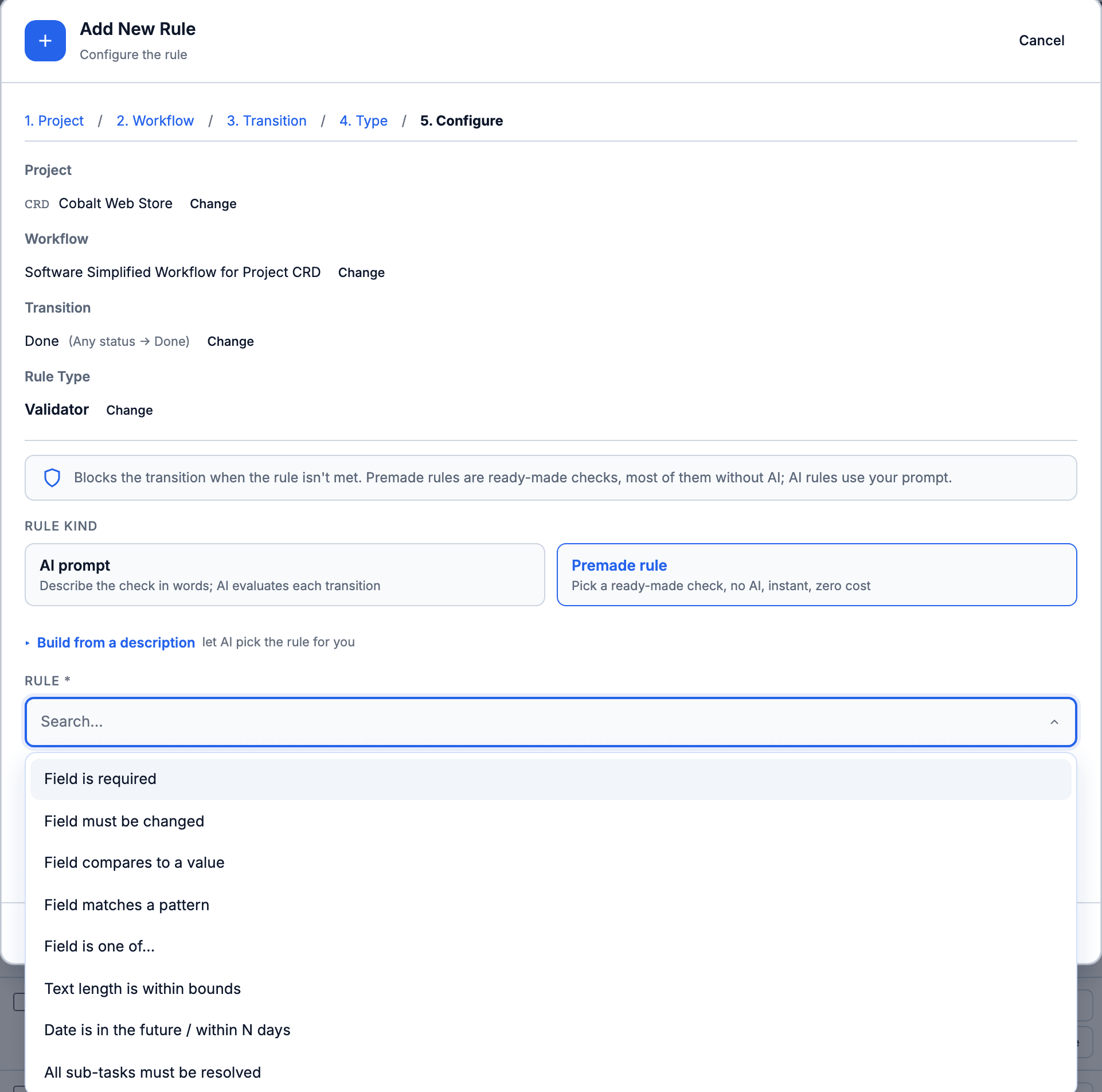
You should know about two limits before you install anything. First, premade rules fail open: if a check hits an error (a failed read, a broken configuration), it lets the transition through. The same happens when a site's Forge LLM allowance runs out: AI validators let every transition through until the month resets, unless you switch to your own key. If a check must never be skipped, keep it as a native Validate a field rule where one exists. Second, we haven't measured whether a CogniRunner AI validator costs less than the automation flow it would replace. It depends on your model and how often the transition runs.
The app is free for sites of up to 10 users. Larger sites pay $0.10 per user per month, and $0.08 per user in the tiers above 2,500 users, per the listing on 6 November. A Forge app's rules aren't part of an automation flow, so by Atlassian's definition they aren't automation steps, though we haven't measured that for CogniRunner. Atlassian's Forge pricing says compute for Forge modules is "paid by the developer of the Forge app". The CogniRunner page on our site has the full feature list. If you want to see an AI validator stop a coding agent, there's a walkthrough with Claude Code.
What I'd do before 3 December
These steps fit a company-managed project; team-managed spaces offer fewer built-in rules (13 against 20 on our site). You don't need an app for any of it.
- In Jira, go to Settings, then System, then Global automation, and select Usage. If the tab offers a choice of usage model, pick Upcoming usage model to see steps. You'll see your top flows by step usage.
- For each of the top ten, select the flow to open its audit log. Look for flows that revert a status, re-open a work item or comment "please fill in X". Those are doing a validator's job after the fact.
- Before you add a validator, check which other flows move work items into the same status. They'll be refused by the new rule too, so give them their own transition (see the section on when automation fails on a validator) or add the field first.
- Open the project's workflow in the workflow editor and select the transition. Under Validate details, select the plus sign and add Validate a field with the field and your error message. Then select Update workflow to save it.
- Turn off the old guard flow in its flow builder, so it doesn't run on top of the validator.
- Check it worked: drag a test work item without the field to the target status. The board shows "We can't move" with your message, and the old flow's audit log shows no new run.
Then look at the flows you keep. Since 5 November a run that stops at a condition before any action has run is free. A condition near the top of a busy flow probably saves you more steps now than it did in October.
I'd love to hear what you find in that Usage list. Which of your top flows turned out to be doing a validator's job? Tell me in the comments or find me on the Atlassian Community.
Comments
0Add a comment