
Merge duplicate issues in Jira without an app: what the native work item merge keeps

12 min readNovember 9, 2026
Key takeaways
- Jira Cloud has a native Merge bulk action for 2 to 11 work items of the same type. Atlassian has been rolling it out since 26 March 2026 and still listed it as rolling out on 9 November 2026; the panel carries a Beta label. Atlassian had closed the public merge request JRACLOUD-3592 (494 votes) as Won't Fix in July 2023.
- Merging 3 duplicate tasks on our test site took about 4 seconds by the work item history. The 2 duplicates were archived and left open: status stayed To Do, they stayed in the sprint, and JQL stopped finding them, while a REST read by key still returned them.
- Comments and attachments are copied to the target with the merge time as their date, child work items are moved, and links are copied to both sides. Description and field values come from the one item you pick and replace the target's own, so its label lzm-bravo was gone, not combined.
- Logged time doesn't move: the target stayed at 1h while 30m and 1h 30m stayed on the archived duplicates. A duplicate's extra watcher wasn't added either, and the panel has no option for worklogs, watchers or votes.
- Merge needs the Archive work items permission. Without it the panel still opens, then says 'You do not have permissions to archive work item LZMRG-2' and greys out the button. In the default software scheme, the only people role with Archive was Administrators.
- Merge showed up in software spaces of both kinds and in a business space. The two Jira Service Management spaces we checked didn't have it in their list views, or in the one queue we opened. JSM's own merge request, JSDCLOUD-4685, has 1,237 votes and is Future Consideration.
Jira Cloud is rolling out a way to merge duplicate issues without an app. Atlassian calls issues "work items" these days (your team may say tickets), and the new Merge bulk action folds 2 to 11 of them, all of the same type, into one target work item. It's been rolling out since 26 March 2026 and the panel is labelled Beta, so your site may not have it yet. On our Premium test site it was there, and on 9 November 2026 we merged three duplicate tasks in about four seconds, going by the work item history.
Here's what you get. Comments and attachments from the duplicates are copied onto the target, child work items move over, and links are copied. Description and field values come from the one item you choose, and they replace the target's own values. Logged time stays behind. The duplicates aren't deleted or closed: Jira archives them and links them to the target with a "merged into" link. And the two Jira Service Management spaces we checked had no Merge option in their list views, or in the one queue we opened.
If you've ever searched for this, you know how long the answer was no. In February 2018 someone on the Atlassian Community asked how to merge duplicate issues into 1 "so that both users are notified". One of the first replies said "you can't merge issues. I would link them as duplicates and close one of them. You can add the author of the first one as watcher for the second one, if you want." In July 2023 Atlassian closed the public request JRACLOUD-3592 (494 votes, open since 2004) as Won't Fix, saying merge "would be highly complex to implement" and pointing people to Marketplace apps or to linking and closing. Less than three years later the native merge started rolling out, which is good news for everyone who voted.
So if you pay for a merge app today, the decision is about what you'd lose by switching. For tidy duplicates in a software or business space I think you lose very little. For logged time, watchers or service desk tickets an app still does more. Below is the click path, everything we measured item by item, the permission that blocks most people, and how the native merge compares with the apps.
The native merge archives the duplicates and copies their content
We merged three duplicate tasks in a company-managed Scrum space, read every item back over the REST API, then tried the limits and the other space types. These are the findings, each argued further down.
- The duplicates are archived and stay open. Their status stayed To Do, resolution stayed empty, and they stayed in the sprint. JQL stopped finding them; a REST read of LZMRG-1 still answered 200.
- Comments and attachments are copies. The target gained 4 copied comments and 2 copied attachments, each dated at the merge, while the duplicates kept their originals. Jira also added a site-wide "Merged" link type during the first merge.
- One item's fields win. We took field values from LZMRG-1, so the target's label lzm-bravo was replaced by lzm-alpha and its start date moved from 12 to 10 November.
- Logged time doesn't move. 1h stayed 1h on the target; the 30m and 1h 30m stayed on the archived items.
- The limits hide the button without a word. With 12 items, or a Task and a Bug together, the Merge option simply isn't there.
- Archive permission decides who can merge, and the two service spaces we checked showed no Merge in the views we tried.
How to merge two or more tickets in Jira with the Merge bulk action
Before you start: you'll need Edit work items and Archive work items in that space, plus the global Make bulk changes permission (that's how we read the release note's "perform bulk actions"). Our test site is on Jira Cloud Premium; we didn't test Free or Standard (more on plans below). Merge showed up in software spaces of both kinds (company-managed and team-managed) and in a business space (the release note calls these Jira Business projects). When you're done you'll have one target work item and the duplicates in the space's Archived work items list.
- In the space's Backlog or List view, tick the checkbox on 2 to 11 work items of the same type. A floating bar opens at the bottom of the screen with "2 selected" (or however many you ticked).
- In that bar, select the ⋯ (More actions) button at its right end. On our site it sat next to Delete. Use the ⋯ in the bar, not the ⋯ on a row: the row menu has no Merge. A small menu opens with Merge.
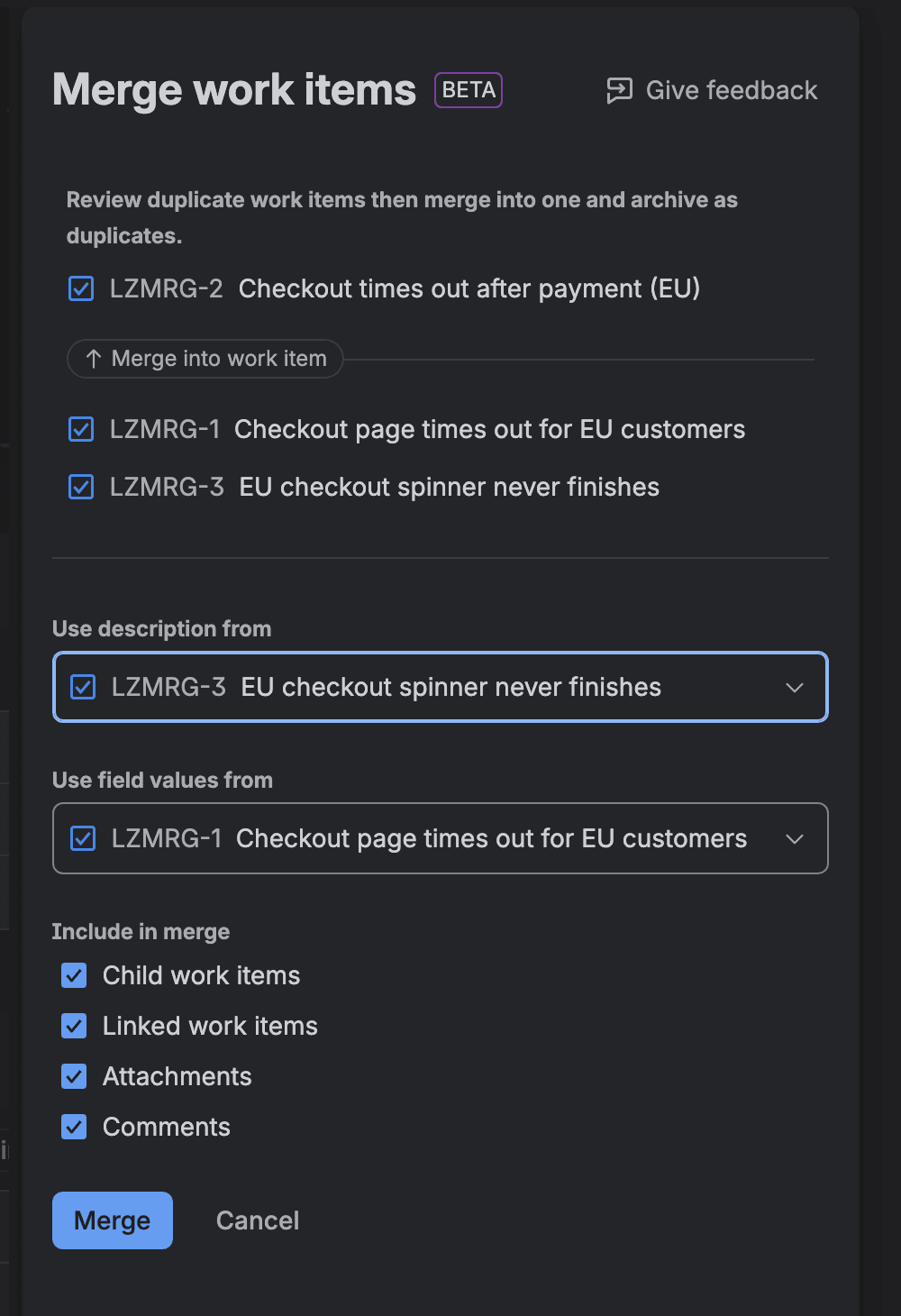
- Select Merge. The Merge work items panel opens on the right, with the first work item in your list as the target above a "Merge into work item" divider.
- Optional: to pick a different target, hover over its row and select the Make target work item button. That row moves above the divider.
- In Use description from, choose the work item whose description you want to keep, and then pick one in Use field values from. Check both even if you changed the target in step 4: they stay on the first item until you change them.
- Optional: under Include in merge, untick anything you don't want carried over: Child work items, Linked work items, Attachments, Comments. All four are ticked by default.
- Select Merge. There's no confirmation step. A flag says "Merging work items..." and "Stay on this page until the merge is finished", and a few seconds later it reads "Work items merged".
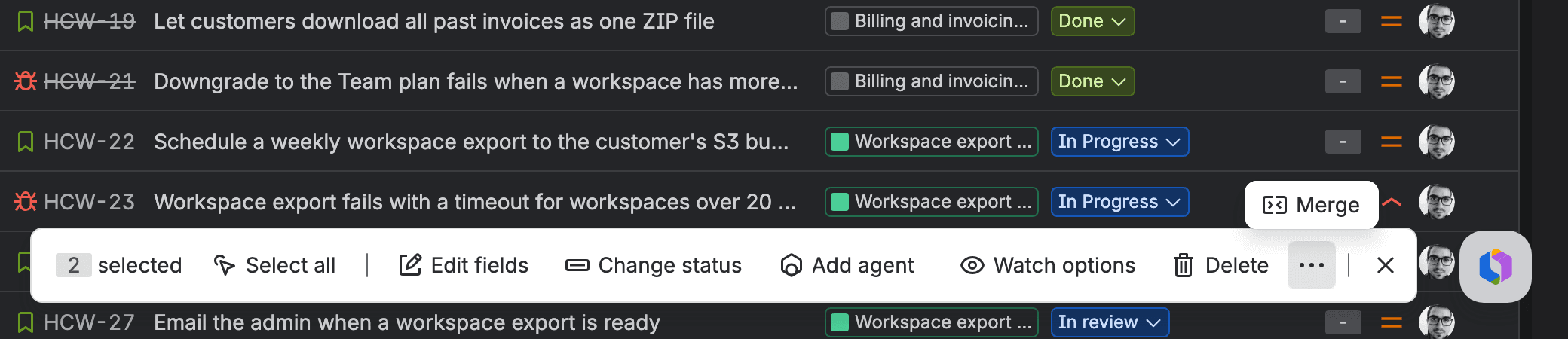
If you tick two items of the same type and the bar has no ⋯, Merge may not have reached your site yet, your plan may not include archiving, or you're in a service space (see the Jira Service Management section). To check a merge worked, open the target. Under Linked work items you should see a "merged from" group listing the duplicates, and each duplicate opens with a banner saying it's archived.
What the Jira merge work items action keeps, archives and drops
We built three duplicate tasks in a throwaway company-managed space, LZMRG-1 to LZMRG-3, each with its own description, label, start date, comments, a small attachment, logged time and a link to another item, two of them with a subtask. We made LZMRG-2 the target, took the description from LZMRG-3 and the field values from LZMRG-1, and left all four boxes ticked. Then we read every item back. The server's history put the whole merge at about four seconds, and the success flag showed within six. This is the target before and after:
On the target (LZMRG-2) | Before | After the merge |
|---|---|---|
Summary | its own | unchanged |
Description | its own | LZMRG-3's text |
Labels | lz-merge-test, lzm-bravo | lz-merge-test, lzm-alpha (replaced) |
Start date | 12 Nov 2026 | 10 Nov 2026 (LZMRG-1's) |
Comments | 1 | 6: its own, 4 copies, 1 from our automation rule |
Attachments | 1 | 3 (2 copies, dated at the merge) |
Subtasks | 1 | 2 (LZMRG-1's subtask moved here) |
Links | blocks LZMRG-5 | the same, plus merged from LZMRG-1 and -3, plus the duplicates' two "relates to" links |
Time logged | 1h | 1h |
Status, sprint | To Do, Sprint 1 | unchanged |
What we didn't test: merging items from different spaces, sprints or statuses, the notifications a merge sends, votes (only the target had one), and leaving the page while the flag says to stay.
Comments and attachments are copied, with the merge time as their date
The four comments and two attachments that arrived on the target are new copies with new IDs, dated 9 November 2026 at 12:53 AM (our site's time, UTC+2), the minute we merged. The originals were posted at 12:43 AM. The duplicates kept their own comments and files, so nothing is lost, though the target's comment thread is now ordered by merge time. In a second merge, a comment written by our automation rule kept "Automation for Jira" as its author on the copy, so the author name carries over.
The target's History tab showed seven entries at the merge time: four for links, plus one each for the description, labels and start date. There was no history line for the copied comments or attachments, and no single "merged" entry.
Description and fields come from one item, so values get replaced
"Use field values from" means exactly that. Jira took LZMRG-1's labels and start date and wrote them over the target's. The target's own label, lzm-bravo, was gone, because the two label sets weren't combined. The summary stayed. If two duplicates each carry something you need in a field, put it on the item you'll pick before you merge.
Child items move, and links are copied to both sides
LZMRG-1's subtask changed parent to LZMRG-2. The "relates to" links from the duplicates were copied to the target and also stayed on the duplicates. Jira added "merged from" links on the target and "merged into" on each duplicate, so you can always get from one to the other.
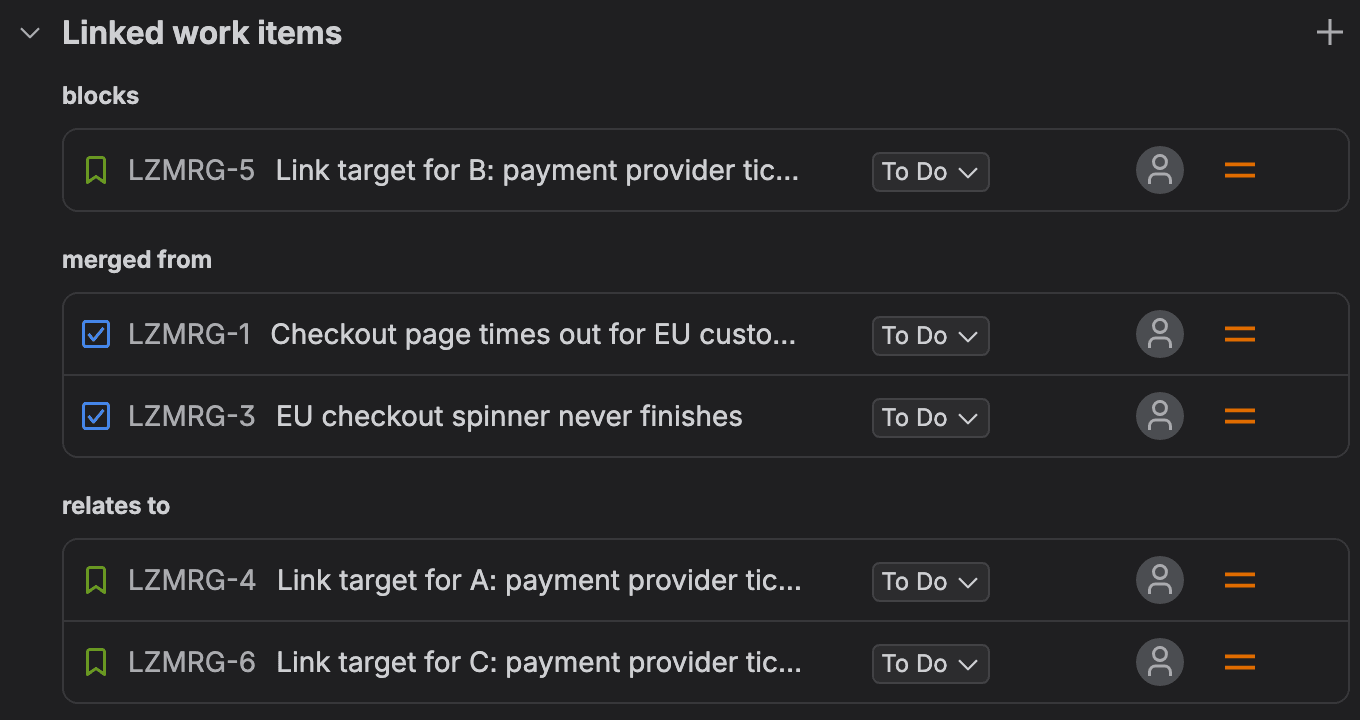
To make those links, Jira created a link type called "Merged" (inward "merged from", outward "merged into") for the whole site during our first merge. Atlassian's link types doc already lists "merged into" and "merged from", so I think it's intended. Still, if you curate your link types, you'll see a new one appear.
Logged time stays on the duplicates
The target showed "1h logged" before and after. The 30 minutes on LZMRG-1 and the 1h 30m on LZMRG-3 stayed on those items, now archived. In a second merge, the duplicate's one extra watcher (the Automation for Jira account) wasn't added to the target. The panel has no option for worklogs, watchers or votes. If your team reports on logged time per work item, that time now sits on items your filters no longer find.
The duplicates are archived, stay in the sprint, and drop out of JQL
Each duplicate got a "merged into" link and then an archive entry in its history. Status stayed To Do, resolution stayed empty, and the sprint field still said Sprint 1. Opening one shows a banner: "This is an archived work item. You will need to restore it before you can edit it."
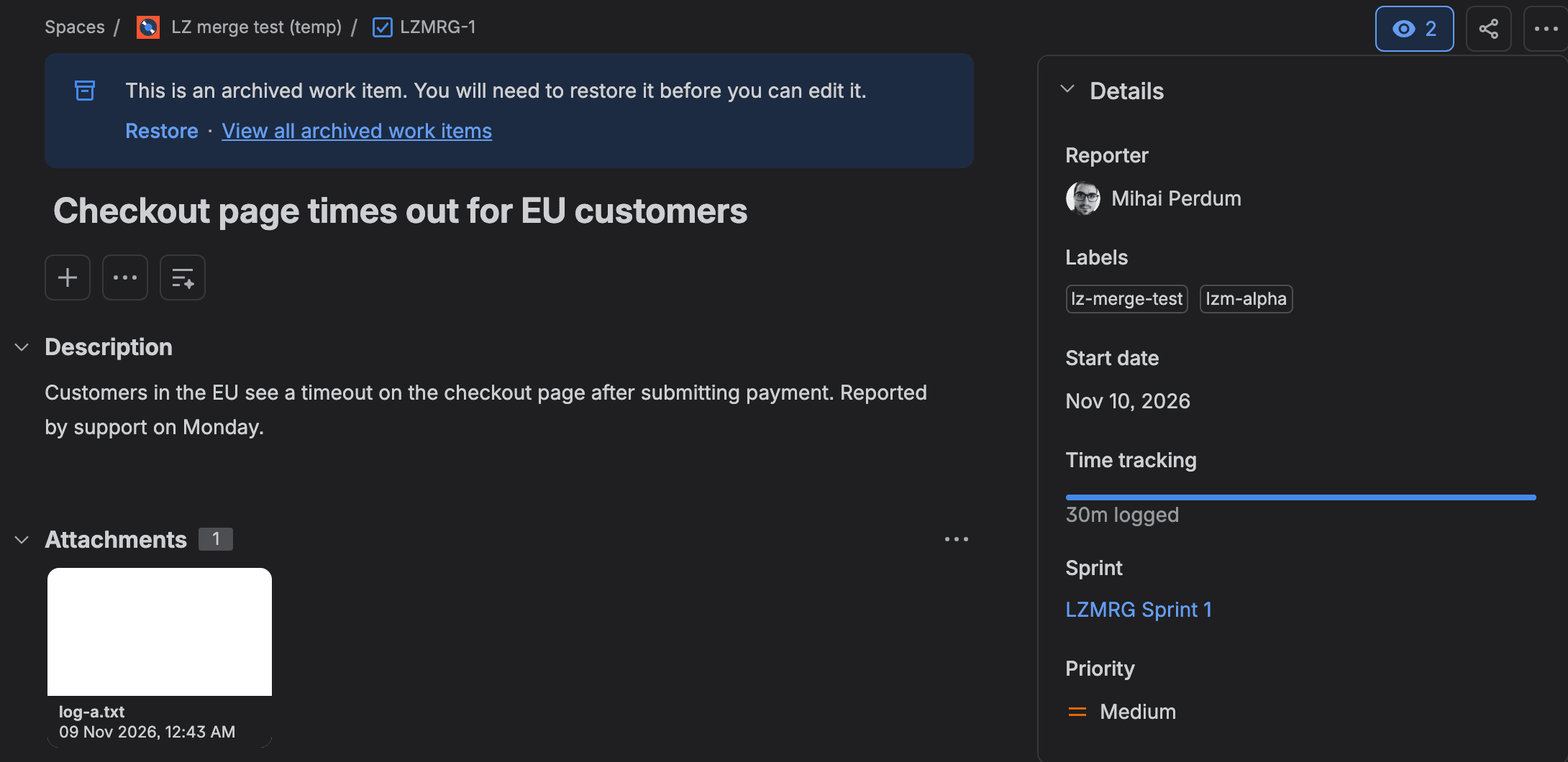
JQL stopped finding them: key in (LZMRG-1, LZMRG-3) returned 0 results. A direct REST call to /rest/api/3/issue/LZMRG-1 still returned the item with HTTP 200, so an integration can still read them by key, though it can't edit them. Both duplicates were listed on the space's Archived work items page with the date and who archived them.
That matches Atlassian's archive doc: an archived work item "will only appear in Archived work items and can no longer be edited", and you can restore it. We restored LZMRG-1 from its banner. It came back to JQL with its own comments, attachment, links and the 30m of logged time. Its subtask didn't come back. That stayed with the target, which also kept everything the merge had copied. So restoring brings back the old item next to the merged one, and the merge itself stays.
Archive permission decides who can merge
The release note says you need "permission to edit work items, perform bulk actions, and archive work items". The third one is the one that catches people. On our new company-managed space, the default software permission scheme gave Archive work items to the Administrators role and to atlassian-addons-project-access (the role Jira uses for apps), so for people it was Administrators only. Our site-admin test account wasn't in that role. Merge was still in the menu and the panel still opened. Then it showed this:
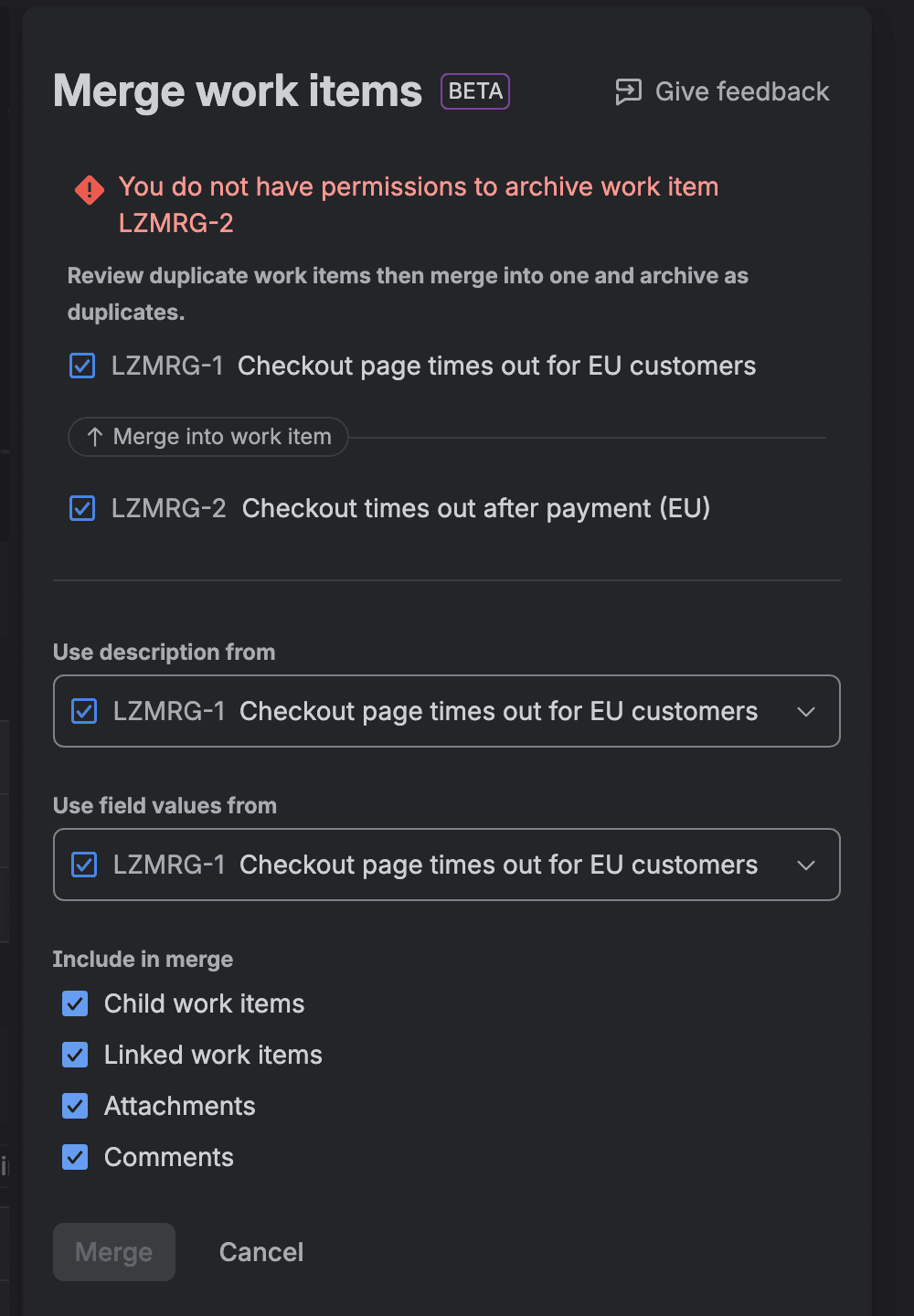
After we added the account to the space's Administrators role, Jira took about 10 seconds to apply the new permission, and Merge worked. If your agents or team leads need to merge, add the Archive work items permission (and Restore archived work items, so they can bring back a duplicate archived by mistake) to a role they hold in the space's permission scheme. Atlassian describes Archive as the permission "commonly granted instead of the Delete work items permission, as archived work items can be recovered", which is a good argument for handing it out.
Which plan you need is less clear. The release note names no plan, and neither does the archive doc. Atlassian's REST endpoints for archiving work items say "License required: Premium or Enterprise". Our site is on Jira Premium (Atlassian Administration lists it that way), so we can't tell you whether Merge runs on Standard. If you're on Standard, look for Archive work items in your permission scheme first. If it isn't there, Merge won't run for anyone.
The 11-item and same-type limits hide the button without a message
Atlassian's note says "between 2 and 11 work items of the same type". We tried both edges. With 11 tasks ticked, the panel listed all 11. Tick a 12th and the ⋯ button is gone. Two Tasks and a Bug did the same. There was no greyed-out Merge and no message, just no button.
With the ⋯ gone, the last action in the bar, just before the ✕, is Delete. When our test script clicked where the ⋯ had been, it opened "Delete 3 work items?" with "This is irreversible." We cancelled. Nothing had been deleted. So if Merge isn't where you expect it, count the selection and check the work types before you click anything.

One merge ran our automation rule twice
We set up a test automation rule on our space: trigger Work item updated, filtered to our test label, action add a comment. One 3-item merge ran it twice: once on the target for its changed fields, and once on the moved subtask for its new parent. The audit log showed 3 steps per run, 6 in total, and no run for the two archived duplicates. Atlassian's trigger list has no "work item archived" or "merged" trigger to hang a rule on.
So if you run rules on Work item updated, expect one run on the target plus one per moved child. With a 3-step rule like ours and one moved child per merge, 100 merges come to about 600 automation steps. Our usage pricing budget shows how automation usage compares with the rest of the bill.
Merge or link duplicate issues in Jira: what each one leaves behind
The old advice was to link one item as a duplicate of the other and close it. I think it's still the better choice whenever you need the duplicate to show up in reports.
Link as duplicate, then close | Native Merge | |
|---|---|---|
The duplicate afterwards | closed with a resolution, still in JQL and reports | archived, status unchanged, read-only, gone from JQL |
Comments and attachments | stay where they were | copied to the target |
Child work items | stay put | moved to the target |
Fields | each item keeps its own | one item's values replace the target's |
Time logged | stays put | stays put, now on an archived item |
Works in Jira Service Management | yes | no Merge in the two service spaces we checked |
Undo | reopen | restore from archive, but moved children stay on the target |
Link-and-close keeps the duplicate visible. That matters if you count duplicates as a quality signal, or if customers or watchers sit on the duplicate. Merge is better when you want one complete record and the duplicates out of the way.
Jira Service Management merge tickets: no Merge in service spaces, so link or use an app
Atlassian's release covers "Jira Software and Jira Business projects", and its product list for the change names only Jira Software. We checked anyway. In our service space's All open queue, two requests of the same request type gave a bulk bar with Triage, Find similar requests, Link work item, Comment, Assign, Transition, Approve and Delete, and no Merge. The space's list view had no ⋯ either, for two service requests, for two incidents, and for two plain Tasks in a second service space. We didn't open the site's third service space. Team-managed and business spaces on the same site did show Merge.
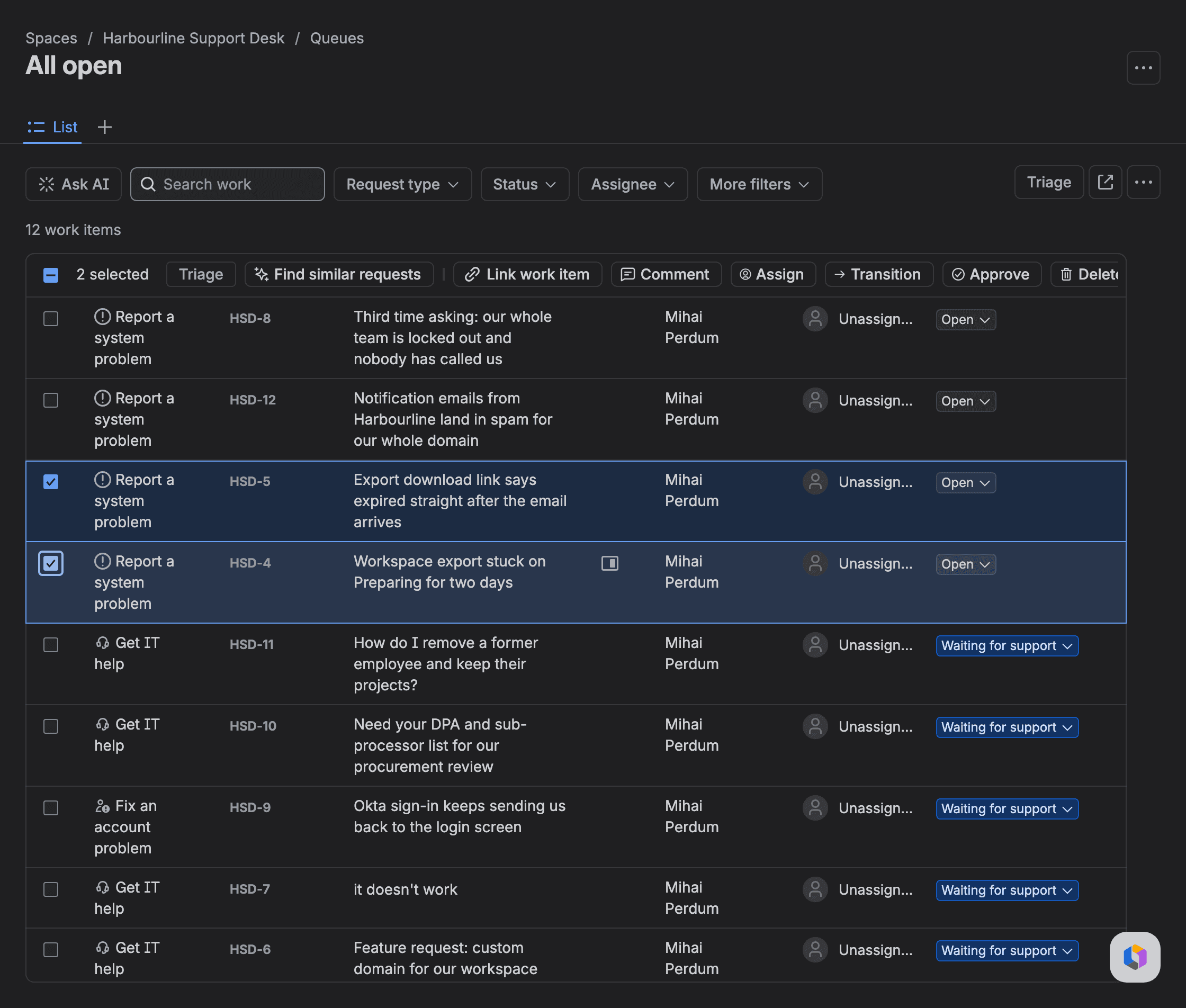
JSM's own request for this, JSDCLOUD-4685, has 1,237 votes and is marked Future Consideration. Atlassian's 2022 note on it says "we currently support linking tickets as the recommended solution". So for service desks, the advice from the 2018 thread above still stands. Link the duplicate request and close it. If the other requester needs updates, add them as a watcher, as that reply suggested. Or use an app. If the duplicate is really two customer accounts for the same person, that's a different job, and we covered it in JSM duplicate customer after an email change.
Do you still need a Jira issue merger app?
Between them, the merge apps on the Atlassian Marketplace cover the gaps we measured. Here's what each one names, from the vendors' own listings and docs on 9 November 2026:
App | What its listing or docs name beyond what native Merge did in our test | Marketplace installs |
|---|---|---|
Merge Agent for Jira (codefortynine) | work log, votes, watchers; across projects and issue types (native needs one type); resolves or closes duplicate customer requests | 767 |
Service Pack for Agents, formerly Issue Merger (Appsvio) | watchers, worklog, votes; JSM request participants and organizations, public and private comments | 454 |
Ticket Merger (Transition Technologies PSC) | can create a new work item as the target instead of editing an existing one; free | 381 |
Merge Assistant (La Forge) | detects likely duplicates; notifies JSM customers when their request is merged | 34 |
Try the native merge before you renew an app, unless you need worklogs or JSM
If your duplicates live in Jira Software or business spaces and nobody reports on time logged against them, I'd try the native merge before you renew a merge app. Give the Archive work items and Restore archived work items permissions to the role that does triage. Then test one merge on a throwaway space the way we did, and check the target afterwards. If you rely on worklogs, watchers or votes carrying over, or you run a service desk, keep the app for now, and keep an eye on JSDCLOUD-4685.
One open question I'd love your take on: when you merge duplicates, do you keep them visible somewhere for reporting, or do you want them out of sight? Tell us on the Atlassian Community or in the comments where you found this, and if your Standard site shows Merge, I'd like to hear that too.
Comments
0Add a comment