
How to check Rovo credits usage for each user, and send them a monthly report

Key takeaways
- Rovo credits usage per user lives in one place: Insights > Platform usage > Rovo credits > Users, and Atlassian keeps filtering by user to organization admins. On our test org it showed one total per user per period (150 and 40 credits on 20 October) and nothing finer.
- The period filter offers Last 30, 60 and 90 days plus the current billing period. A finished billing period disappeared from the list, so you have to read each person's number before the reset.
- Export data has no options at all. It emails a link to a CSV of up to 3 months or 1 million usage events, starting from the earliest available date, and Atlassian says the link expires after 24 hours.
- On the same page at the same moment our meter said 214 credits used, while the breakdown tabs added up to 190 and the chart said 150. The breakdowns trail the total, and the gap closed later: the previous period's 609 matched on both.
- ROVO-960, 'Allow each user to view their own Rovo Credits usage', had 23 votes on 21 October 2026 and no workaround. A note from the admin after each reset fills that gap until Atlassian does.
To check Rovo credits usage for each user, an organization admin opens Atlassian Administration and goes to Insights, then Platform usage, then Rovo credits, and reads the Users tab. Nobody else can see it, including the users themselves. On our test org on 20 October 2026 it said Mihai had used 150 credits this billing period and I'd used 40, out of a shared pool of 3,710.
Adriaan asked about exactly that on the Atlassian Community in June: "We've been promoting adoption, which means we are on track to be running out of credits within the year." He wanted his people to use Rovo responsibly, and there was nothing he could show them. Four months later the request for it, ROVO-960, still says "Current Workarounds: None available for now."
So the number has to come from you. And Atlassian's own page says "On December 3, 2026, extra usage billing takes effect for Rovo credits". Your finance people are probably already asking who spends what.
But the Users tab won't keep the number for you. Its period filter goes back 90 days at most, and a billing period that has ended drops off the list. The CSV export arrives as an emailed link that Atlassian says expires after 24 hours. If you want a report each month, someone has to read the tab at the right moment and write it down. You'll end this with a reminder, a CSV log, and a script that writes one short note per person from it.
Prerequisites — Atlassian Cloud on a paid plan with Rovo credits in Platform usage. You need to be an organization admin: Atlassian's usage-based pricing page says filtering by user is "organization admins only", and the open tickets ROVO-1014 and AX-2215 ask for site and product admins to get it too. For the report you'll need Python 3 (standard library only). Screens captured on 20 October 2026 on our wolfaenpak test org as an org admin. Atlassian's pages and tickets read on 21 October 2026.
Per-user Rovo credits usage is one number per period, kept for 90 days
- Per user means one total per period. The Users tab shows a name, an email and a Used figure for each person. Clicking a name does nothing, and View profile opens the directory page, which has no credits on it.
- The longest window is 90 days. The filter offered Last 30 days, Last 60 days, Last 90 days and the current billing period (Oct 15, 2026 to Nov 15, 2026). The period before it wasn't in the list any more.
- The export is all or nothing. The dialog has a Cancel and an Export data button, no choice of tab, period or format, and it emails you a download link.
- The numbers on one page didn't agree. 214 on the Allowance used bar, 190 on each breakdown tab, 150 on the Credits this period chart.
- The pool hides who spends it. Over the last 90 days one person on our org used 1,575 of the 1,625 credits, about 97%. Nobody else would ever know that from inside Rovo.
Open Insights > Platform usage to monitor Rovo credit use
In Atlassian Administration, pick your organization, then Insights in the left sidebar, then Platform usage. You'll see a table of meters. Select Rovo credits (Rovo Dev credits is a separate meter, and that one users can check themselves under Rovo Dev, Your usage). The page opens on the Usage tab.
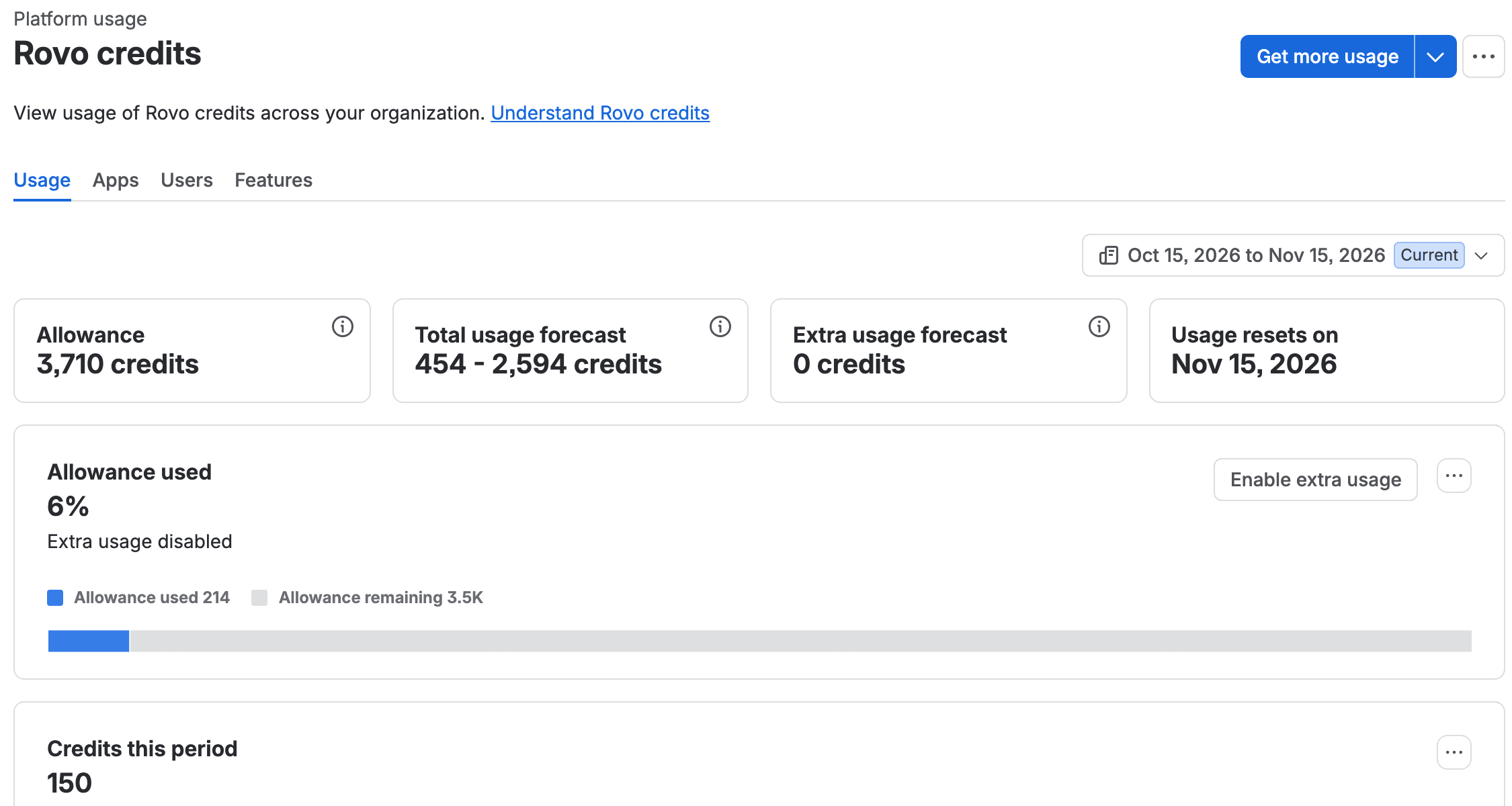
The cards at the top give you the pool, two forecasts and the reset date. Ours said "Allowance 3,710 credits" and "Usage resets on Nov 15, 2026". The allowance adds up what your paid seats bring. On Jira and Confluence that's 25 credits per user per month on Standard, 70 on Premium and 150 on Enterprise. Service Collection and Teamwork Collection bring ten times that. Above the pool, Atlassian's list price is $0.01 a credit. So to read a number on this page as money, divide it by 100. Mihai's 759 credits in the last 30 days would be $7.59 if all of it were extra usage.
Write the reset date down. Then don't trust it blindly. On 14 October our card said "Usage resets on Oct 19, 2026", and then the new period started on the 15th, four days early. The card still said the 19th less than an hour before the old period ended, so looking again wouldn't have warned us. I couldn't find out why, so there's a fallback for a missed day below the steps.
If you're here because the pool is running out, the cap is a different screen, and Mihai walked through it in setting a Rovo usage limit.
Read the Users and Features tabs for each user's credits
Select the Users tab. It says "Track how many Rovo credits each of your users spend." Below that you get one row per person who used any credits.
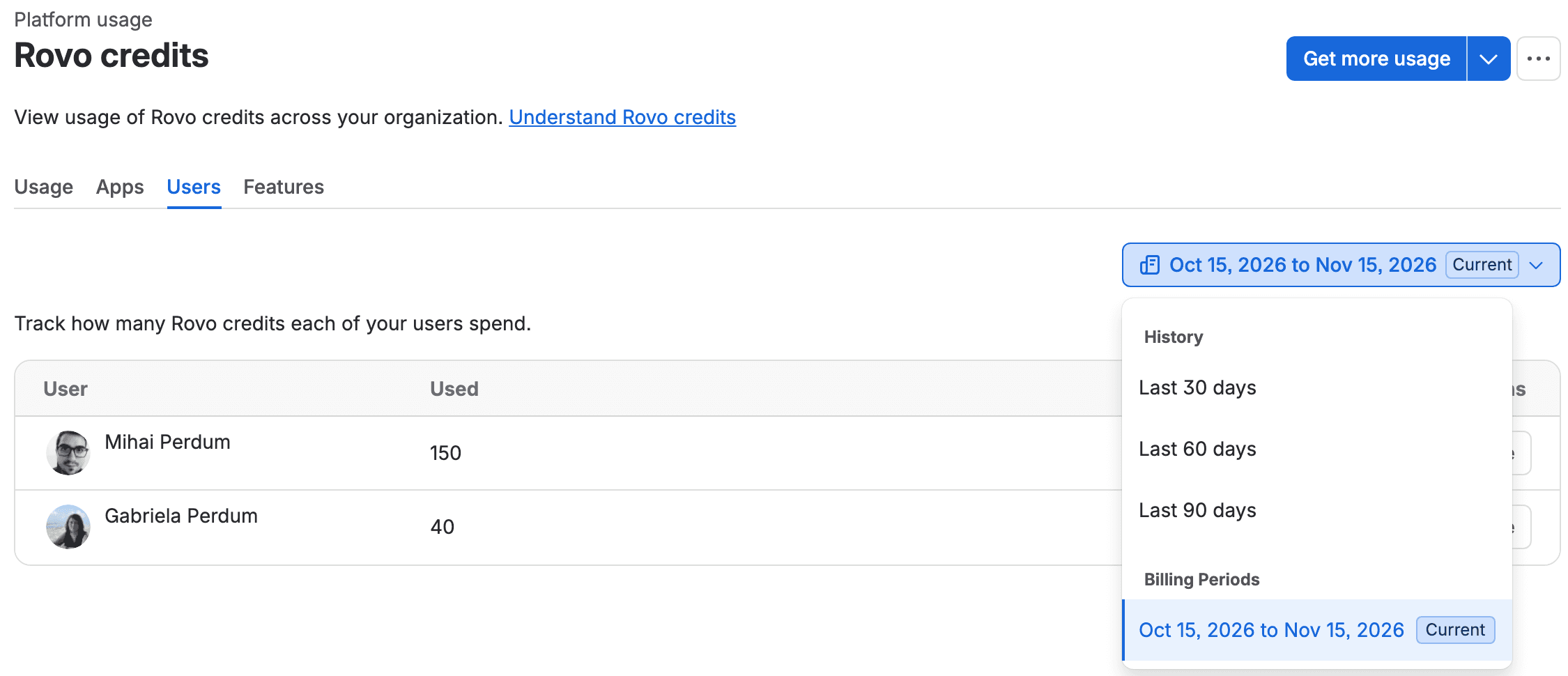
The dropdown at the top right sets the period, and it carries over when you switch tabs. These are all the options we had:
1History
2  Last 30 days
3  Last 60 days
4  Last 90 days
5Billing Periods
6  Oct 15, 2026 to Nov 15, 2026   Current
There's no custom range and no previous billing period. AI-1357 asks for a month picker and 12 to 24 months of history, and it had one vote when I read it. "Last N days" ends at the end of today, so it won't line up with a billing period. The report below reads the Current period for that reason.
You should see one row per person, and the Used column should add up to within a few credits of Allowance used on the Usage tab (190 against 214 for us). Here's the same tab on Last 30 days:
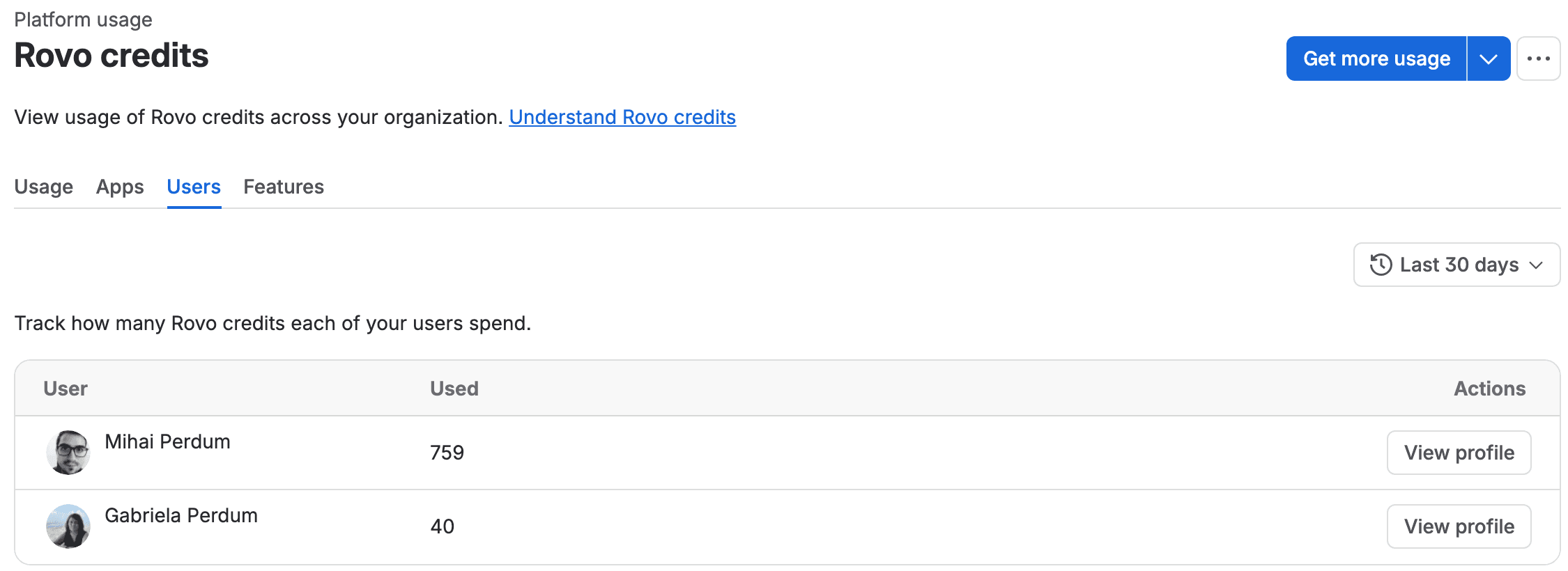
I checked the arithmetic. Could I trust it? The previous billing period (19 September to 14 October) had 609 credits for Mihai, and this one has 150. Last 30 days started on 20 September, so it covers all of the old period except its first day, when nobody used anything: 609 + 150 = 759. Mine was 40 in both views.
The tab has no search box. The column menu next to Used offers "Pin column" and that's it, so you can't sort it yourself (ours came sorted by Used, highest first). With two users we saw no pagination, and the page asks for 20 rows at a time behind the scenes. What does it look like with 500 people? I don't know yet. On Last 90 days a third account turned up with 10 credits, someone with an outside email domain. The Apps tab had 10 credits on a second site in our org at the same time, which is probably theirs. Every site in the organization draws on the same pool.
Now select Features. Same period, one row per feature:
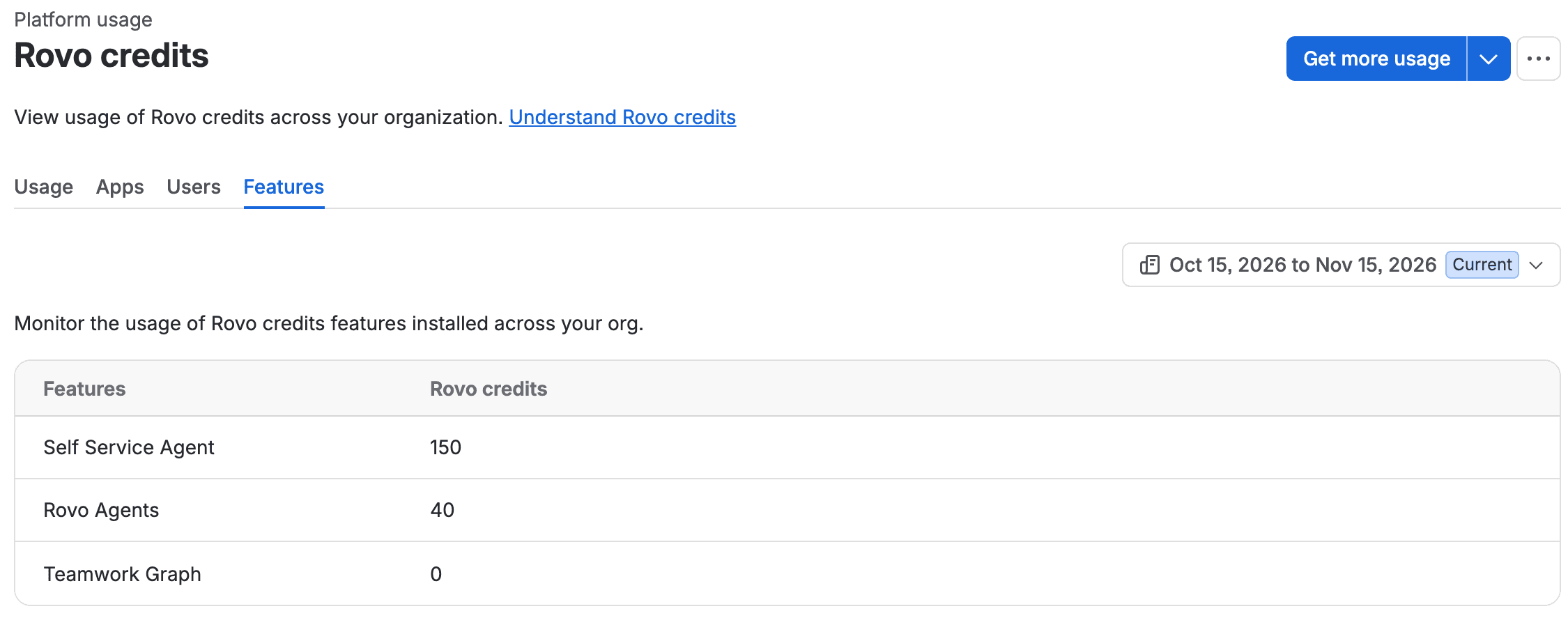
Ours said Self Service Agent 150, Rovo Agents 40 and Teamwork Graph 0. Over the last 90 days Rovo Chat was 1,435 of the 1,625. The Apps tab does the same by product and site (Jira Administration 1,059, Rovo 406, Jira Service Management 150 over 90 days). Neither tab filters by user. On a small org you can often guess who did what (Mihai's 150 this period and the Self Service Agent's 150 are probably the same credits). On a big one you can't. For that you need the CSV.
The numbers on the page don't agree, so use the Users tab for people
At the same moment on 20 October, the Usage tab said "Allowance used 214". The Users tab added up to 150 + 40 = 190, the Apps and Features tabs also added up to 190, and the Credits this period chart said 150. When we measured single Rovo actions in October, the total moved within 22 seconds while the Features tab and the chart caught up minutes later (Rovo credits per user has those measurements). AI-1340 says usage from earlier in the day "may not appear in the dashboard until the following day."
The gap does close, though. On 14 October the meter said 609 while the Features tab trailed it at 483, and the per-user figure for that period is now exactly 609. So for the per-person report, use the Users tab and read it as late as you can on the last day, before midnight UTC.
There's also a "View the Rovo trends dashboard" link at the bottom of the Usage tab. That one counts users and interactions, refreshes "every 48-72 hours" and, in Atlassian's words, "may include AI features that don't count toward Rovo credits". It's useful for adoption. For credits, stay on Platform usage.
Export Rovo credit usage to CSV from Platform usage
The CSV is where each event comes with its user and its feature together. Atlassian's page says the export includes "feature, user, agent, timestamp, and number of credits consumed".
Open the … menu at the top right of the Rovo credits page (next to Get more usage) and select Export data.
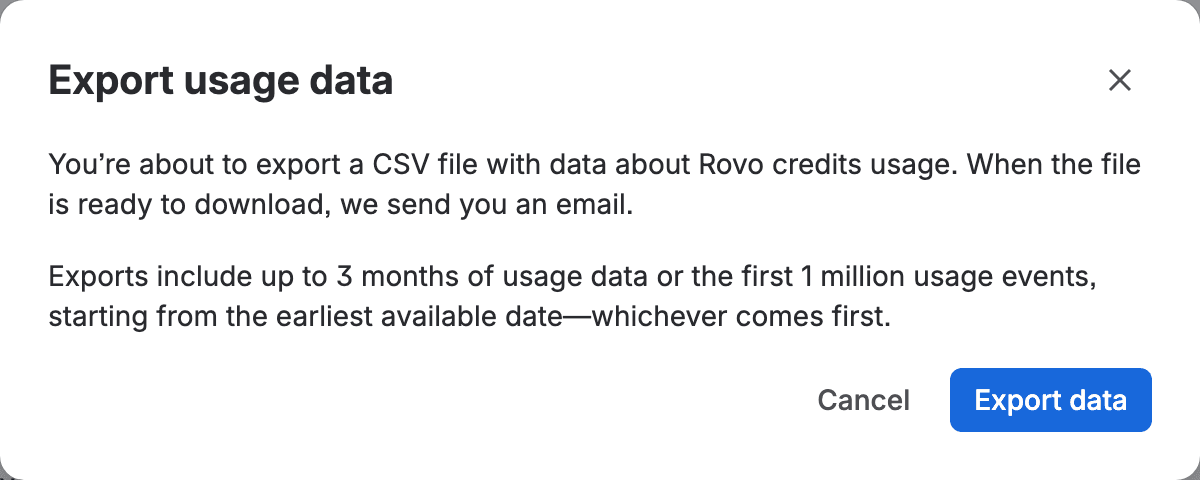
After you confirm, a message says "We send you an email when your CSV file is ready to download. If you don't receive it in 15 minutes, try again or contact support." Atlassian's doc adds: "In the email, select Download CSV file. This link expires after 24 hours."
We requested our export on 20 October from Mihai's admin account, and I couldn't get into that mailbox before writing this, so the column list above is Atlassian's and I haven't checked it against a real file. Two open tickets tell you what to expect once you have one. ROVO-1267 says the Agent column "contains not agent names but agent IDs", so you'll need the agents list to translate them. On ROVO-1265 someone at Atlassian explains that "Admin Insights intentionally hides Feature data prior September 1st", so older rows have a blank Feature.
Read the window wording slowly. "Starting from the earliest available date" sounds like the export begins at your oldest data and stops at 3 months. If that's literal, an org with more than 3 months of history would get its oldest months and miss last month. Our oldest usage is from early September, so I can't test it yet. Check the first and last timestamps in your file the first time you download it.
There's no public API for this. Not yet. AX-2000, "API to export rovo credit usage", had 36 votes on 21 October, and on the developer forum an Atlassian staff member confirmed that nothing exists yet (agreeing with an answer Mihai had posted there). Atlassian's usage page lists a "human-readable" export and per-user allocations as planned "to launch by December 3, 2026". Until those ship, it's this button and a person.
Build a monthly Rovo credits usage report for each user

The rhythm I'd use: read the Users tab for the Current period just before the reset, add one line per person to a CSV log, run a script that prints the summary and writes the notes, then send them. Keep the export beside the log for anyone who asks where their credits went.
- 1
Find the reset date
on the Usage tab, read Usage resets on and set a reminder for the last day of the period. Ours reset four days before the card said, so if the period has already changed, use the Missed the day? calculation below.
- 2
Read the Users tab on that day
Insights, Platform usage, Rovo credits, Users, period set to the one marked Current, as late as you can before midnight UTC (our periods turned over at 00:00 UTC, which is late afternoon on the US West Coast).
- 3
Add one line per person to your log
the period, the allowance from the Usage tab, the name, the email if you'll mail the note, and the Used number.
- 4
Note the Features split
switch to Features with the same period and copy the rows next to your log, so you can answer "what used my credits".
- 5
Export the CSV
open the … menu, select Export data, and download the file from the email within 24 hours.
- 6
Run the report script
it prints each person's share of the pool and writes one note per person.
- 7
Send the notes
each note starts with a To: line when you logged an email.
Missed the day? The old period is gone from the dropdown, and the closest you can get from the page is Last 30 days minus the new Current figure, read on the first day after the reset. On a month-long period it still misses the old period's first day or two, and every day you wait loses another. It matched exactly for us (759 minus 150 is 609) only because our old period was short and nobody used Rovo on its first day. I got our 609 by asking the page's own backend for the old dates, which isn't something I'd ask you to do.
The log is a plain CSV. This is ours, with the real numbers from our org. The second period hadn't ended yet when I ran it (I read it on 20 October to test the script):
1period,allowance,user,email,credits
22026-09-19 to 2026-10-14,3430,Mihai Perdum,,609
32026-10-15 to 2026-11-15,3710,Mihai Perdum,,150
42026-10-15 to 2026-11-15,3710,Gabriela Perdum,gabriela@leanzero.net,40
Save it as rovo-log.csv. If you type a number with a thousands comma, put it in quotes ("1,575") or leave the comma out; the script stops if it finds an unquoted one. The allowance moved inside the current period on our org (3,430 on 15 October, 3,710 by the 19th), so take it from the Usage tab on the day you log. Then save this as rovo_report.py in the same folder:
1#!/usr/bin/env python3
2"""Rovo credits report per user, one billing period at a time.
3
4rovo-log.csv columns: period,allowance,user,email,credits
5One row per user per billing period, copied from the Users tab
6(Insights > Platform usage > Rovo credits > Users, period = Current)
7just before the reset. email may be left empty.
8"""
9import csv, re, sys
10from collections import defaultdict
11
12log = sys.argv[1] if len(sys.argv) > 1 else "rovo-log.csv"
13num = lambda s: int(s.replace(",", "").strip())   # "1,575" in quotes, as a spreadsheet saves it
14periods, allowance, used, email = [], {}, defaultdict(dict), {}
15with open(log, newline="") as f:
16    rows = csv.DictReader(f)
17    for row in rows:
18        p = row["period"]
19        if None in row:
20            sys.exit(f"Line {rows.line_num}: too many columns. Write 1,575 as 1575 or \"1,575\".")
21        if row["user"] in used[p]:
22            sys.exit(f"Line {rows.line_num}: {row['user']} is in {p} twice. Make each name unique.")
23        if p not in periods:
24            periods.append(p)
25        allowance[p] = num(row["allowance"])
26        used[p][row["user"]] = num(row["credits"])
27        email[row["user"]] = (row.get("email") or "").strip()
28
29latest = periods[-1]
30prev = periods[-2] if len(periods) > 1 else None
31written = {}
32users = sorted({u for p in periods for u in used[p]},
33               key=lambda u: -used[latest].get(u, 0))
34total = sum(used[latest].values())
35print(f"Period {latest}: {total} of {allowance[latest]} credits "
36      f"({total / allowance[latest]:.0%} of the pool)")
37for u in users:
38    now = used[latest].get(u, 0)
39    before = used[prev].get(u, 0) if prev else None
40    change = "" if before is None else f"  (previous period {before})"
41    print(f"  {u:<20} {now:>6}  {now / allowance[latest]:>4.0%} of pool{change}")
42    name = re.sub(r"\W+", "-", (email[u] or u).lower()).strip("-")
43    if name in written:
44        sys.exit(f"{u} and {written[name]} would share note-{name}.txt. Give one of them an email.")
45    written[name] = u
46    with open(f"note-{name}.txt", "w") as out:
47        if email[u]:
48            out.write(f"To: {email[u]}\n\n")
49        out.write(
50            f"Hi {u.split()[0]},\n\n"
51            f"In the billing period {latest} you used {now} Rovo credits. "
52            f"The whole company shares one pool of {allowance[latest]} credits "
53            f"per billing period, so that is {now / allowance[latest]:.0%} of it."
54            + (f" In the period before you used {before}." if prev else "")
55            + "\n\nAtlassian doesn't show this number to users yet, so I send it "
56              "after each reset. Questions about where the credits went: ask me.\n")
57print(f"Wrote {len(users)} notes.")
Run it:
1python3 rovo_report.py rovo-log.csvThis is what it printed on our log:
1Period 2026-10-15 to 2026-11-15: 190 of 3710 credits (5% of the pool)
2  Mihai Perdum            150    4% of pool  (previous period 609)
3  Gabriela Perdum          40    1% of pool  (previous period 0)
4Wrote 2 notes.
You should see one line per person, and the folder should now hold note-mihai-perdum.txt and note-gabriela-leanzero-net.txt (named after the email when there is one, so two people who share a first name don't overwrite each other; if two people share a whole name, the script stops and asks you to tell them apart). Check that the total on the first line matches what the Users tab showed (190 for us). If it's a lot lower than the Allowance used card, the tabs are still catching up, so read them again later that day.
People who didn't use Rovo in the latest period still get a note with 0, as long as they're somewhere in your log. I kept that. "You used 0" helps when you're deciding who needs a Premium seat at all.
On a big org, copying 500 rows from a tab that has no search is a chore. It helps that ours came sorted by Used, highest first. If yours does too, the top rows are your heaviest users. And if you need everyone, the CSV is the better source once you've seen its columns: filter the rows to the billing period's dates using the timestamp column, then sum the credits per user in a spreadsheet pivot and paste the result into the log.
Read the report before you send it
Give the summary line a minute before the notes go out. I'd look for three patterns, and each leads to a different decision.
The first is one person far ahead of everyone. On our org Mihai used 1,575 of 1,625 credits over 90 days, about 97%, mostly Rovo Chat. In a pooled allowance that's fine until the pool runs short. Then, with extra usage off or its cap reached, new credit-consuming Rovo requests (Chat, agents) pause for everyone, while Search keeps working; with it on, the overrun is billed at $0.01 a credit. A heavy user is usually your best Rovo champion, so talk to them before you think about limits (per-user limits don't exist yet; ROVO-1224 asks for them).
Then there are people who show 0 period after period. Their seats still add to the pool (70 a month per Premium Jira or Confluence seat, 700 on a Premium collection, for each product they're licensed on), so they aren't costing you Rovo money. But if the seat was bought for Rovo, that's a conversation about training.
And watch for accounts you don't recognise, like our outside account with 10 credits. They spend from your pool, and the Users tab is the easiest place to spot them.
For the boss who asked "who is using it", the summary line and the top few rows are usually the whole answer.
Send each user their own Rovo credits usage, because they can't view it
This is the note the script wrote for me:
1To: gabriela@leanzero.net
2
3Hi Gabriela,
4
5In the billing period 2026-10-15 to 2026-11-15 you used 40 Rovo credits. The whole company shares one pool of 3710 credits per billing period, so that is 1% of it. In the period before you used 0.
6
7Atlassian doesn't show this number to users yet, so I send it after each reset. Questions about where the credits went: ask me.
Check each note's first number against that person's row on the Users tab before you send it (40 for me). Then make the wording yours. Maybe add the line your company cares about, like a budget owner or a link to your Rovo guidelines. Keep it short. People read a number and a comparison, and they skip a paragraph about pooled allowances. On a big org "1% of the pool" will read as 0% for most people, so swap in what their own seat brings (70 a month on Jira Premium, for example), which means more to one person.
Now think about privacy for a minute. The Users tab shows names next to amounts, and each note is about one person. I'd send each note only to its person and keep the full table for whoever owns the budget. If your company has a works council or a policy on monitoring, check it covers this, because per-person usage reports can count as monitoring in some places.

Keep more than 90 days of Rovo credits history
Since the page forgets, your log is the history. Keep it in a folder or a Confluence page that only the budget owners can see, and add to it each period. Save each export file next to it, renamed with the date you downloaded it. The link is gone after 24 hours and the dashboard forgets after 90 days. When Atlassian ships the per-user allocations and the human-readable export it lists as planned by 3 December, look at them again; they may replace half of this.
If you're also budgeting for the rest of usage billing, the 2027 budget for 50, 200 and 500 seats puts Rovo credits next to automation and the other meters.
If your screens don't match
If there's no Platform usage under Insights, you're probably not an organization admin. A login outside our org got "You need permission" on the Rovo credits link when we tried it, and Atlassian's own pricing page keeps filtering by user to org admins.
An empty Users tab means nobody spent credits in that period, or the tab hasn't caught up yet. Try Last 30 days, then look again later in the day.
Atlassian's Learning lesson "Monitor Rovo using insights" describes the page without a Features tab. We had Features on 14 and 20 October, so your page is probably newer than the lesson.
Seeing a big "Jira Administration" number with no clear owner? A Community thread reports "2,000+" credits under "Jira Administration" spread across dozens of users. AX-1975, an open Atlassian bug, says AI use from Jira products gets labelled Jira Administration instead of the product, so the label says nothing about admins. On our Apps tab, Jira Service Management credits did show under their own name, but the bug is about the export, which we haven't been able to open yet, so check the labels in your own CSV. On our org this period Jira Administration held 40 credits, the same 40 as the Rovo Agents row and as my row on the Users tab. The Users tab tells you who. The CSV's Feature column may say what, though the poster in that thread found no clear label there either.
If no export email arrives within 15 minutes, the message on screen says to try again or contact support. Check spam, and look in the inbox of the admin who clicked, since the dialog says "we send you an email".
What you have now
Key takeaways
- A reminder on the last day of each Rovo credits period, and the Users tab path (Insights > Platform usage > Rovo credits > Users, period Current) to read each person's number from.
- A CSV log that keeps each period's per-user credits beyond the dashboard's 90 days, with the export files saved before their link expires.
- A script that prints each person's share of the pool and writes a short note you can send, because users still can't see their own number (ROVO-960).
- What it doesn't cover: per-user limits (they don't exist yet), caps and extra usage (see the usage limit tutorial), and the exact CSV header, which I haven't seen on our own export yet.
Have you found a better way to give people their own number than a note after each reset? I'd love to hear it, in the comments or by mail to gabriela at leanzero.net, and I'll add it here.
Comments
0Add a comment