
Can't Delete Your Atlassian Organization Because of Rovo? How to Get It Removed

12 min readOctober 24, 2026
Key takeaways
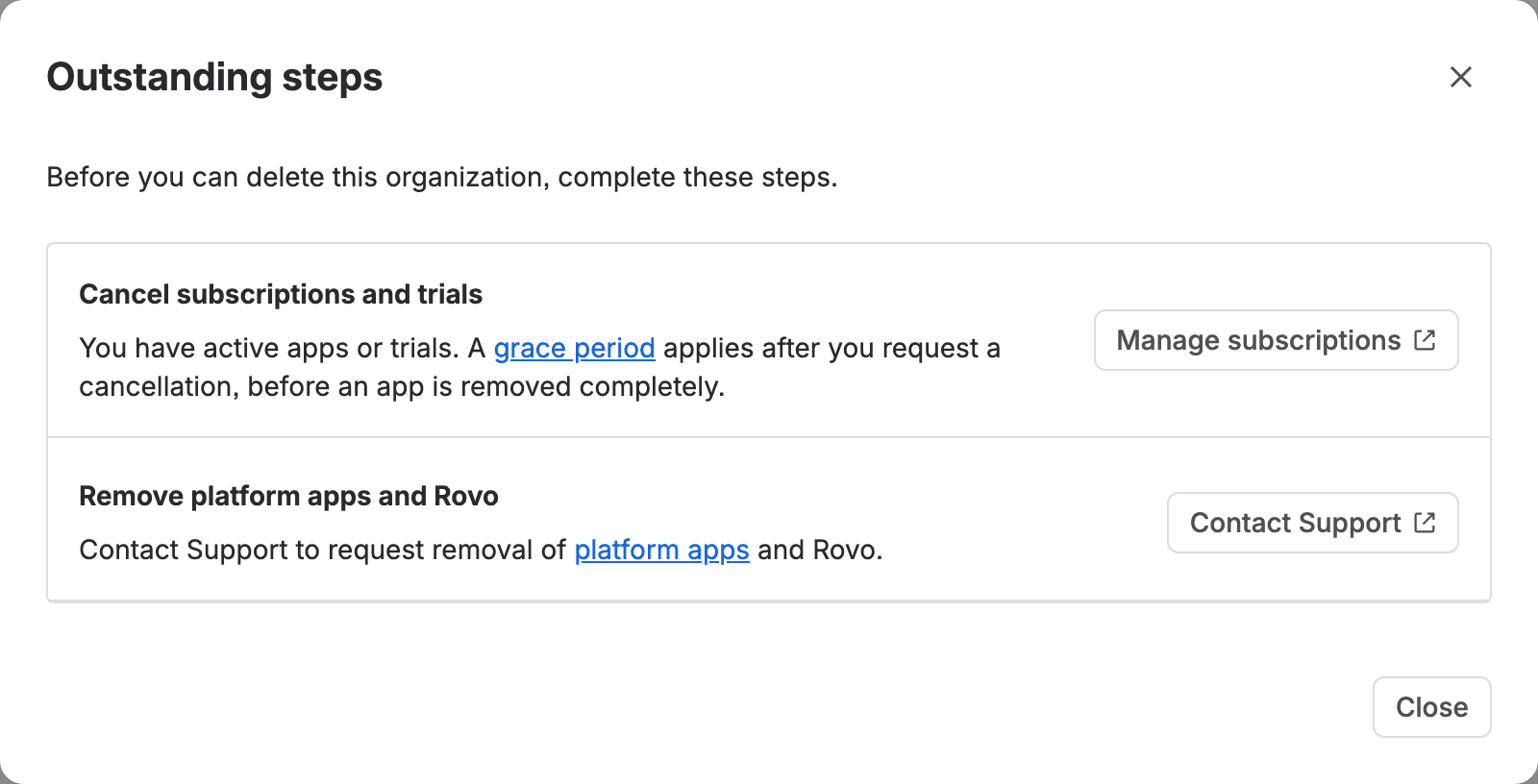
- On our test org on 23 October 2026, Delete organization was greyed out with 2 outstanding steps. The second reads: Remove platform apps and Rovo. Contact Support to request removal of platform apps and Rovo.
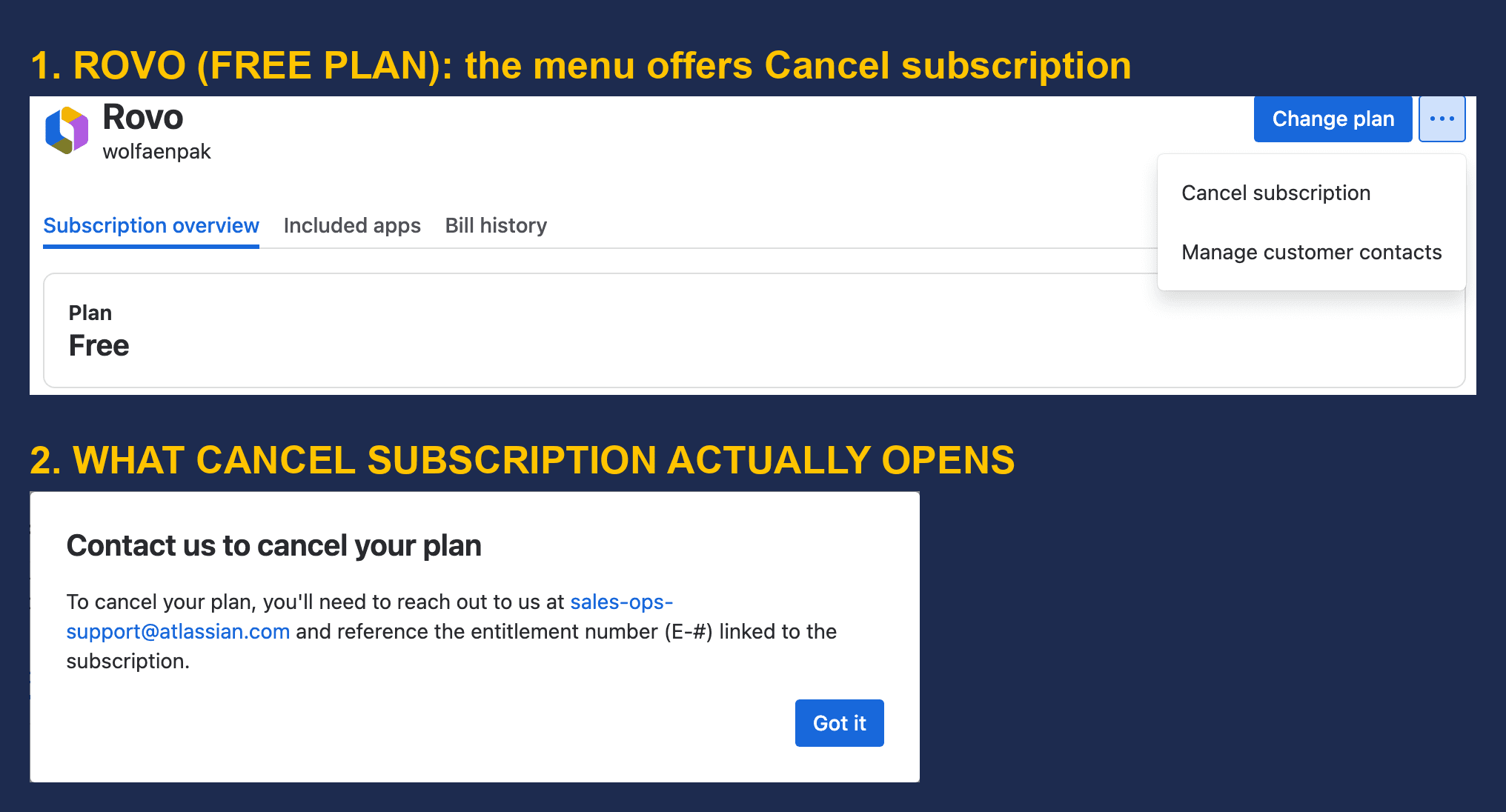
- Rovo sits in Billing as its own subscription on a Free plan. Its menu has Cancel subscription, but clicking it only opens Contact us to cancel your plan, which asks you to email sales-ops-support@atlassian.com and quote the entitlement number (E-#).
- Rovo isn't in the Apps list at all (searching it returned 0 of 90 apps), and the Rovo credits meter has 3 menu items with no Deactivate, while our paid Service Collection plan has Deactivate in the same menu.
- On the Community, 3 Atlassian staff replies took 16 to 32 hours to route people to billing. None of the 17 threads we read (6,369 views) says when the org was finally deleted, and ROVO-144, the request for self-service, has 374 votes and no Atlassian comment since May 2025.
- Transfer apps, the route for merging orgs after a cloud-to-cloud move, checks Rovo as well. Atlassian's doc says billing must deactivate Rovo first; our screen also showed Your destination organization doesn't have Rovo enabled for 2 of our 3 possible destinations.
In July someone opened a Community thread called "Stuck in loop: Cannot delete account due to platform apps and Rovo, but restricted from opening a support ticket". They wanted the whole account and organization gone. Delete organization told them to "Remove platform apps and Rovo - Contact Support", and that really is the only way through: Rovo can't be removed from an organization without someone at Atlassian doing it for you.
We looked at the same screen on our own test org, wolfaenpak, on 23 October 2026. The Delete organization button is grey. The Outstanding steps dialog lists two blockers, and you can clear the first one yourself by cancelling subscriptions. The second reads, word for word: "Remove platform apps and Rovo. Contact Support to request removal of platform apps and Rovo."
So you raise a ticket with Atlassian's billing team and ask them to remove Rovo and the platform apps. Then you wait out the grace period, and the button should unlock. We also found a second route that none of the 17 Community threads we read mention. Rovo has its own subscription in Billing, and its Cancel subscription item opens a box that says to email sales-ops-support@atlassian.com with the entitlement number.
I think this matters more than it looks. It doesn't only hit people tidying up a forgotten trial. If you're consolidating organizations after a migration, the Transfer apps flow checks Rovo too. On our org it checked something the docs don't mention.
What we found when we tried to delete, transfer and cancel on our own org
We did this as an org admin on wolfaenpak, our Atlassian test organization (nothing on it is production). Mihai's test harness is a script that drives a real browser. It opened each screen, saved a screenshot and the page text, and recorded the requests the admin pages sent. We checked Organization settings (Profile), Apps, Billing and the Rovo access page. We changed nothing, and we closed each dialog before its last step.
- Delete organization stays disabled with 2 outstanding steps. They are "Cancel subscriptions and trials" and "Remove platform apps and Rovo". The button has no tooltip. You see the reason only after you click View steps.
- Rovo is an organization-level entitlement on our org. The deletion check itself just returns
"productsRemoved": false. But the same page loads the org's entitlements, andcom.atlassian.rovois listed there asACTIVE. - Rovo isn't in the Apps list. Searching Apps for "Rovo" showed "Showing 0 results out of 90 apps", even though Atlassian's billing doc says to look for it there.
- Billing has two Rovo rows. One is Rovo credits, the usage meter, with Upgrade plans, Enable extra usage and Manage customer contacts in its menu. The other is Rovo itself on a Free plan, with Change plan and Cancel subscription.
- Cancel subscription on Rovo doesn't cancel it. It opens "Contact us to cancel your plan" and asks you to email sales-ops-support@atlassian.com with the entitlement number. The only button is Got it.
- Transfer apps showed a Rovo blocker of its own. We could pick 3 destination orgs. For 2 of them the transfer stopped on "Your destination organization doesn't have Rovo enabled". For the third, that card wasn't there.
- We found no separate merge screen. Merging is the Transfer apps flow. Its first page says "When the transfer is complete, we'll delete your current organization."
Why you can't delete your Atlassian organization while Rovo is on it
Atlassian's deletion doc says so in its list of things to do first: "You can't directly cancel certai[n] apps, like Rovo and Atlassian Guard, you need to contact Atlassian support to request removal." (The missing letter is theirs.) That line is pretty new. The Wayback Machine copy from 5 October 2025 has no Rovo in it, and the copy from 4 November 2025 does.
AX-429 on Atlassian's public tracker explains why: "Since Rovo is a free product that admins can't delete, it blocks the organization deletion to happen, requiring manual intervention from Atlassian." To delete an org, its apps have to go first. And Rovo is one you aren't allowed to remove.
The blocker also says "platform apps". Atlassian's doc defines those as apps "pre-loaded onto any Atlassian site", and lists Home, Goals, Teams, Analytics, Administration, Rovo, Chat, Search and Studio. Community askers also name Projects. You can't remove these yourself either, so put them in the same ticket.
How did Rovo get there if you never bought it?
Most people asking on the Community didn't add Rovo. Atlassian did. On 9 April 2025 it announced Rovo for all customers, "included in your existing subscription". Its Rovo licensing FAQ says that on a paid Standard, Premium or Enterprise plan "Rovo will be automatically added to eligible sites as part of the rollout". The same FAQ says you can trial Rovo through a trial of Jira, Confluence or JSM on those plans.
So the usual story goes like this. Someone starts a Premium trial and Rovo comes along. The trial ends. With no payment details, Atlassian "will change your app to a Free plan" (its doc on adding apps). Jira or Confluence can then be cancelled like any other app, but Rovo stays behind. One asker said Rovo and Teams showed "Managed by Atlassian" with no remove or cancel option.
Sandboxes are the odd one out. Atlassian's doc says Rovo switches itself on in sandboxes created after 14 April 2025. But there you get a self-service "Deactivate Rovo" on the site row. I'd love to see that on production orgs too.
Blocking Rovo isn't the same as removing it
Admins in the Community threads keep mixing these two up. Atlassian Administration has a Rovo access page where you can put apps on a blocklist. It turns AI features off. It doesn't remove Rovo from your org.
The page hints at it. On our org the blocklist section reads: "Rovo can still access data for the apps you block, but external AI models don't have access to that data." Atlassian's doc on Rovo access says blocking an app "will disable all current and upcoming AI features for that app". It also says "Any content previously generated by Rovo will remain." We found nothing in it about cancelling Rovo.
James O'Connor wrote a Community article called "Why is deleting Organisations so painful?" (1,451 views, 26 comments). In the comments someone suggested deactivating AI, and he replied that to delete an org, Rovo "has to be removed", and "the only way that can be done is by the Atlassian support team." We didn't flip the blocklist to test whether it changes the deletion blocker.

How to delete Rovo from your Atlassian organization: the billing ticket that works
There are two documented doors, and both lead to Atlassian's billing people. The ROVO-144 workaround says to "raise a ticket with our billing support team to get the Rovo subscription cancelled", and links the Pricing, Billing & Licensing page. The Contact Support button in our Outstanding steps dialog opens that same page. The other door is the email address in Rovo's own cancel box, sales-ops-support@atlassian.com. That's the same address Atlassian's transfer doc gives for cancelling Enterprise plans.
Jessica, answering for the Atlassian Team in June, wrote: "our billing team is the channel where you can ask deletion of products directly". She added that Free accounts can open requests there "with no restrictions". In another thread she said technical support "are also not able to perform the deletion of those products". We haven't sent either request from our own org, so I can't tell you which door is faster.
What I'd do, in order:
- Decide what you want first. If you're deleting the org, cancel the subscriptions and trials you're allowed to (Billing, Manage subscriptions) and remove your domains. Cancelling an app deletes its data once the grace period ends, so export first. If you're moving apps to another org, cancel nothing and only ask for Rovo to be deactivated (see the transfer section below).
- Screenshot the Outstanding steps dialog. Organization settings, Profile, then View steps under Delete organization.
- Find Rovo's entitlement number. In Billing, find the row named Rovo with the Free plan (on our org it was on page 2 of the list, and Rovo credits is a different row). Open it, and the number starting with E- is in the breadcrumb at the top.
- Send the request. Either email sales-ops-support@atlassian.com, as the cancel box says, or use the Pricing, Billing & Licensing form from the Contact Support button. Log in first on the form, it shows "YOU'RE LOGGED OUT" otherwise.
- Ask in one plain sentence. Something like: "Please remove Rovo (entitlement E-xxxx) and the platform apps from organization , so we can delete it. Per ROVO-144 this can't be done in Atlassian Administration."
- Include the identifiers. Your organization URL (admin.atlassian.com/o/ and your org ID), the site URLs in it, and the screenshot. Arkadiusz Wroblewski, a Community Champion, suggests exactly these. Say whether the org should be deleted afterwards, or whether you only need Rovo gone for a transfer.
Which menu path in the contact form gets you to a ticket?
I couldn't verify this part. The contact form builds its options in the browser, and our headless browser couldn't open the dropdown. Community answers give three different paths. Tomislav Tobijas (a Champion) says "Your Account → Cancel cloud subscription, then click Need more help?", then a Submit a support request button under the chatbot. Marc from Devoteam says Quotes and Plan Changes, then Change cloud plan, then Need more help. An older answer says admin.atlassian.com, Support, Billing & org management. The email route skips the form entirely, which is one reason I'd try it first.
What if you're on a Free plan and can't open a ticket?
Five of the askers we read say they couldn't open a ticket on a Free plan. Two say the form sent them to articles or to the Community instead of letting them submit. Atlassian staff say Free accounts can open billing requests "with no restrictions". In the threads we read, posting on the Community anyway did work. Three times an Atlassian Team member opened a ticket for the asker, after 16, 29 and 32 hours.
How long until Delete organization unlocks after the ticket
Probably weeks. Atlassian's deletion doc says apps "aren't fully deactivated until 15 days after the date the cancellation takes effect". With the original billing experience you can delete the day after. With the improved billing experience you wait "an additional 60 days after the apps are deactivated". Atlassian's doc on removing apps says 14 days. You can't easily tell which billing experience you have, so ask in the ticket.
Champions answer fast on the Community, 7 to 25 minutes in the threads we timed. But we read 17 deletion threads with 6,369 views between them, and none says when the org was finally gone. One admin, Carla, shared the ticket wording she reuses: "Please expedite the removal of all apps and deletion of org ID- org name-". She says it lets her delete orgs "within a few weeks instead of months". Two others still have old orgs: one that a support ticket "couldn't get rid of", and demo orgs another admin has been "unsuccessful in getting removed, even after support tickets".
Before you start, know that once the org is deleted, you can ask support to restore it within 15 days. And deleting an org also deletes its admin API keys and audit logs, so export what you need first.
Transfer all apps to another organization: deactivate Rovo first
If you're merging organizations, read this part twice. Atlassian's transfer doc says: "If your organization has a Rovo subscription, you'll need to contact our billing support team to deactivate Rovo before you start the transfer. After deactivation, Rovo subscriptions can be re-enabled in the destination organization through the Apps section in Atlassian Administration." That sentence appeared between August and September 2025, per the Wayback Machine. The checklist also asks you to turn AI off for each app before the transfer and back on afterwards.
Our transfer screen showed something extra. We opened Transfer apps, picked a destination org and got seven blocker cards. Most were about our test org's own setup (Atlassian Guard, API keys, data classification levels), and one of them read: "Your destination organization doesn't have Rovo enabled. Enable Rovo in your destination organization, then try again." The check behind it said "Destination org is missing org-level packages required by source org: Rovo". We tried all three destinations. For one, the Rovo check passed and the card went away.
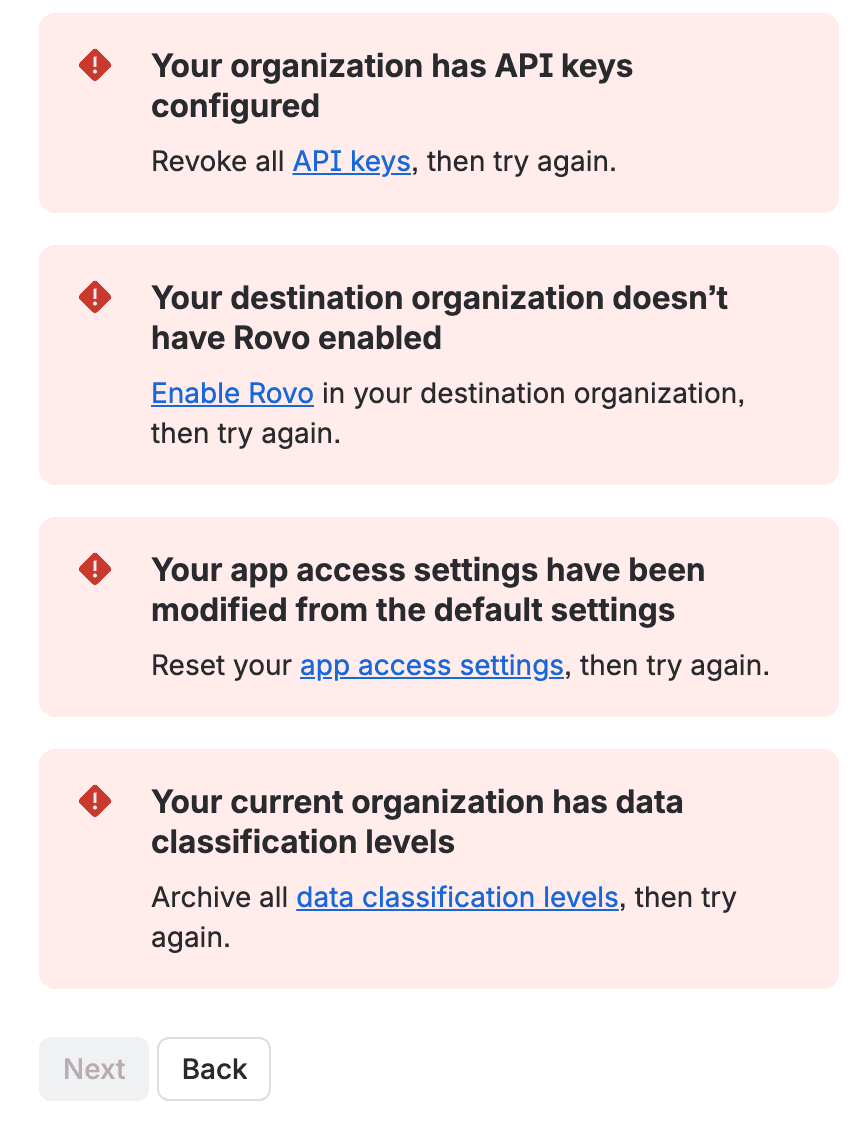
The wording says "required by source org", so that check exists because our source org has Rovo. Deactivating Rovo on the source, as the doc asks, may clear it. We didn't test that. AX-2002 on the tracker adds another twist: a Rovo licence on the source can grey out the Transfer products button without showing up in the pre-check list. The ticket quotes the hidden reason, "reparentBlockers": ["ROVO_LICENSE"]. Our button wasn't greyed out, so we didn't hit that one.
So for a transfer, ask billing to deactivate Rovo on the source. Then click through Transfer apps again and see whether the destination card is still there. If it is, enable Rovo on the destination.
Merge Atlassian organizations when the source org has Rovo
Atlassian's merge page says merging "is done by transferring all apps from one organization to another". After the transfer, the unwanted org is deleted. So the Rovo checks above apply to a merge too. ROVO-144 calls it out for the new user management experience: "Customers cannot merge organizations until Rovo is deleted." With the centralized user management experience you can't transfer apps yourself. The merge page says support "may be able to help" if the orgs have 1 to 20 sites and under 180k events (users, groups and memberships added up).
Where this bites in a migration (DC to Cloud and Cloud to Cloud)
If you're coming from Data Center, watch the orgs you create along the way. Atlassian's cloud migration trials run on Standard or Premium for up to 12 months, and can go on a new cloud site. Rovo can be trialled through those plans, so I'd expect Rovo to turn up on a rehearsal org. Atlassian doesn't say that about migration trials, so treat it as my inference. The trial doc also says that if you don't subscribe, "your data will also be deleted after 15 days". It says nothing about the org, so the org (and its Rovo) can outlive the trial.
If you rehearse JCMA (Atlassian's migration assistant) runs against a throwaway site, that site sits in an org of its own unless you put it somewhere else. Darryl Lee wrote under the same "so painful" article that his accidental sites date from April 2024, "shortly after migrating from on-prem to Cloud". Before your first test migration, decide which org is the real one and put the rehearsal sites in it. On Premium or Enterprise you can use sandboxes, where Rovo has a self-service Deactivate. Even there, CLOUD-12357 (In Progress) says Rovo can make a forced sandbox deletion fail.
If you're doing Cloud to Cloud, the leftover is the source org. Copy product data (Atlassian's cloud-to-cloud tool) moves projects and spaces between orgs. It leaves the source where it was, and Atlassian's billing doc says you pay for both until you move the source to Free. On Free, Rovo is still there, and so is the org. Maybe you'll consolidate by transferring the remaining apps instead. Then the workaround on Atlassian's own bug COMMERCE-49 (closed in 2025) is blunt: "Make sure to cancel the Rovo subscription, before the org consolidation." Mihai wrote more about how orgs relate to Copy product data in our guide to Atlassian cloud architecture for migrations, and about keeping user and group identity straight in a C2C move in migrating Jira users and groups with the same name.
So put the Rovo request in your migration plan with an owner and a lead time of weeks. Don't leave it for cutover week.
What I'd do if I were cleaning up orgs this quarter
Send the Rovo request as soon as you know an org has to go. Delete organization can't unlock until Rovo is gone, and the grace periods above only run out after that. In the same request, ask for the org to be deleted after the apps are gone. For a consolidation, ask for Rovo to be deactivated on the source, then walk the Transfer apps screen once to see the other blockers before you book a date. And vote on ROVO-144 and AX-429 (114 votes). Neither has an Atlassian comment yet.
Keeping Rovo and watching the cost instead? We measured what each action spends in Rovo credits per user. And how to set or turn off extra usage before 3 December covers the spending cap you can change yourself.
Now I'm curious. Have you had Rovo removed from an org this year? Did the sales-ops email work, or the billing form, and how long did it take until Delete organization was clickable? Tell me in the comments. I'll add the answers here, because I couldn't find anyone who has written that number down.
Comments
0Add a comment