
Jira's new create screen: turn it off for your site or just for you

11 min readOctober 26, 2026
Key takeaways
- Turn it off for the whole site: Settings > System > General configuration > Edit Settings > Options > Simple create as default > OFF > Update. We didn't find a REST property for it, so plan on clicking it in the UI on each site.
- With the switch OFF, pressing c on a board opened the old Create Story dialog with Space and Work type dropdowns. The double-load bug JRACLOUD-99633 was closed as Fixed on 22 October 2026, and we couldn't reproduce it.
- Without admin rights, expand to the full form, open the ••• menu and switch on Always open in this view. Atlassian staff said they shipped a fix and the toggle should now hold your choice across sessions. We didn't test that part.
- In our tests, 3 required system fields kept the compact window and a 4th opened the full form. A custom Create screen, a second tab and a required Paragraph field each opened the full form too.
- One required single-line text custom field was also enough to open the full form. We saw it once, on one work type, so treat it as an observation, not a rule.
- Of the tracker tickets about the setting itself, 99633 is fixed, 99920 is an open bug in Needs Triage, and 99873 and 99926 are suggestions in Gathering Interest (read 26 October 2026).
To turn off Jira Cloud's new create screen for everyone, a Jira admin opens Settings > System > General configuration, clicks Edit Settings, and sets Simple create as default to OFF in the Options section. If you aren't an admin, there's a per-user version too: expand the window to the full form, open the ••• menu and switch on Always open in this view.
Atlassian calls the new window Simple create in the setting, Quick Create in its support doc and the streamlined Create experience in its staff announcement from 2 July 2026. I'll call it the compact window here, and the expanded version the full form. A lot of the 109 comments under that announcement ask how to get the old form back, and one Community question asks whether you can disable it at the admin level. Yep, you can.
We flipped the switch on our own test site on 25 October 2026 and then tried to make Jira open the full form by itself. Our test account uses the dark theme, so that's what the screenshots show.
Prerequisites: Jira Cloud, and the Jira admin permission for the site-wide switch. The per-user toggle needs no admin rights (Atlassian's article says "No admin action needed."). The staff article says the new window doesn't apply yet to Jira Service Management or Jira Product Discovery, and we didn't test either. No source mentions a plan restriction, but we only tested on one Premium site.
Before you flip it
It's site-wide. There's no per-space version, and it's the only admin control we found. So as far as we found, an admin can't turn it off for one person either (each person can, see below). It's easy to undo, though. Turning it back ON is the same page and the same Update button. We did exactly that when we finished.
With the switch OFF, the dialog we got had no Show more toggle. We didn't find a way back to the compact window for a single user (we didn't open that dialog's ••• menu). As far as we saw, everyone gets the old Create dialog.
You should also know where our testing stops. We only used a company-managed space, so I can't tell you how team-managed spaces behave. We pressed c on a board each time, and the staff article says inline create on a board, the timeline and the roadmap opens the new window when required fields need filling in, and so does creating child work items. I don't know which form those use with the switch OFF. We didn't check whether people who already have Jira open need to refresh. And none of the three Atlassian pages we read says whether this switch is here to stay.

Turn off "Simple create as default" in Jira's General configuration
- 1
Open Jira admin settings
click the cog and pick Jira admin settings. The admin settings open.
- 2
Go to System > General configuration
the URL ends in /jira/settings/system/general-configuration, and the page lists Simple create as default as on. Atlassian's staff article and support doc call it General Configurations, plural, but the menu and the release note say General configuration. (The old /secure/admin/ViewApplicationProperties.jspa address redirects here.)
- 3
Click Edit Settings
the address changes to /secure/admin/EditApplicationProperties!default.jspa, a long form with radio buttons.
- 4
Scroll to Options and pick OFF next to Simple create as default
it's the first row of the Options block, with the help text quoted below.
- 5
Click Update, then open General configuration again
you should see Simple create as default listed as off.
- 6
Check it on a board
press c. You should see the old Create dialog, with a title like Create Story and Space and Work type dropdowns at the top.
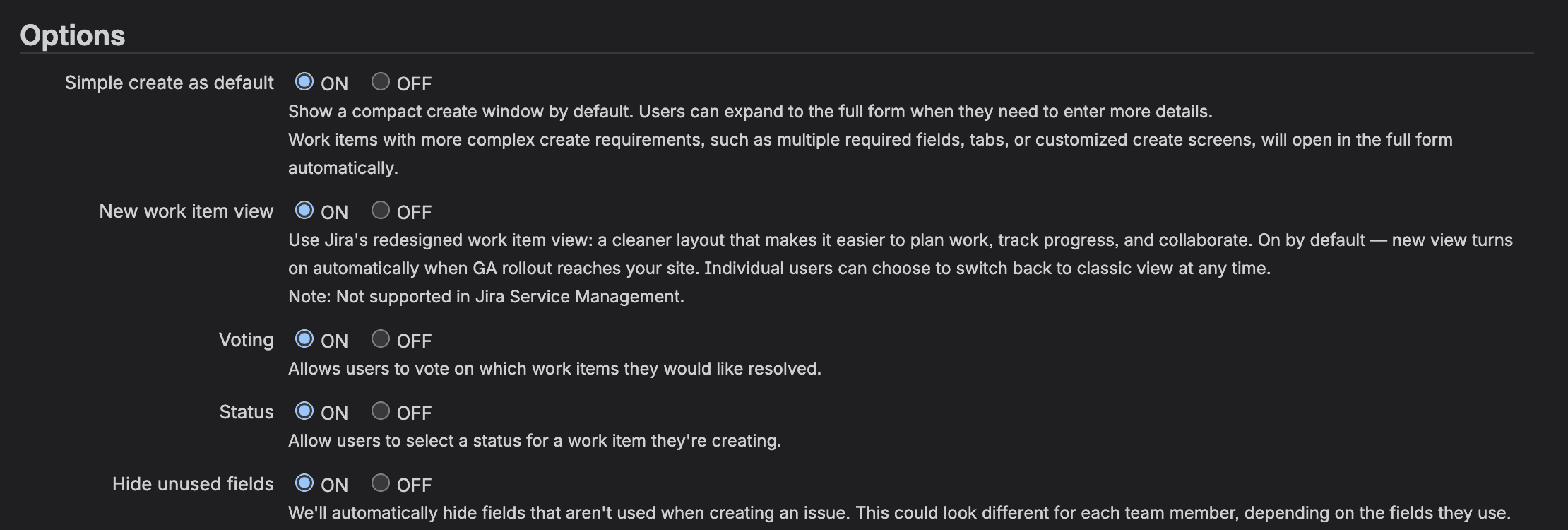
Jira's own help text under the radio buttons lists the rules. Verbatim from the page:
1Simple create as default   ON   OFF
2Show a compact create window by default. Users can expand to the full form
3when they need to enter more details. Work items with more complex create
4requirements, such as multiple required fields, tabs, or customized create
5screens, will open in the full form automatically.
Two more rows in the same block change what the create window shows. Status ("Allow users to select a status for a work item they're creating.") and Hide unused fields are both ON on our site. We didn't change either.
If you were hoping to script this across a lot of sites, I couldn't find a way. I pulled the application properties on our site and searched the key names:
1curl -s -u "$EMAIL:$API_TOKEN" https://your-site.atlassian.net/rest/api/3/application-properties > props.json
2jq length props.json
3jq -r '.[].id' props.json | grep -iE 'create|simple|modal|gic'
This is what it printed on 26 October 2026:
166
2jira.global.configuration.contexts.created
You should see the count and no key about simple create. That one match only has "created" in its name. But the list isn't complete. Voting, from the same Options block, isn't in it either, yet ?key=jira.option.voting reads fine. So all this shows is that the list doesn't name the setting. We tried a few likely keys by name and got 404s, and we didn't find a way to script it.
What you get with the switch OFF
I pressed c on a board in our test space (ZZSC, a company-managed space we made for this and deleted afterwards), and this came up.
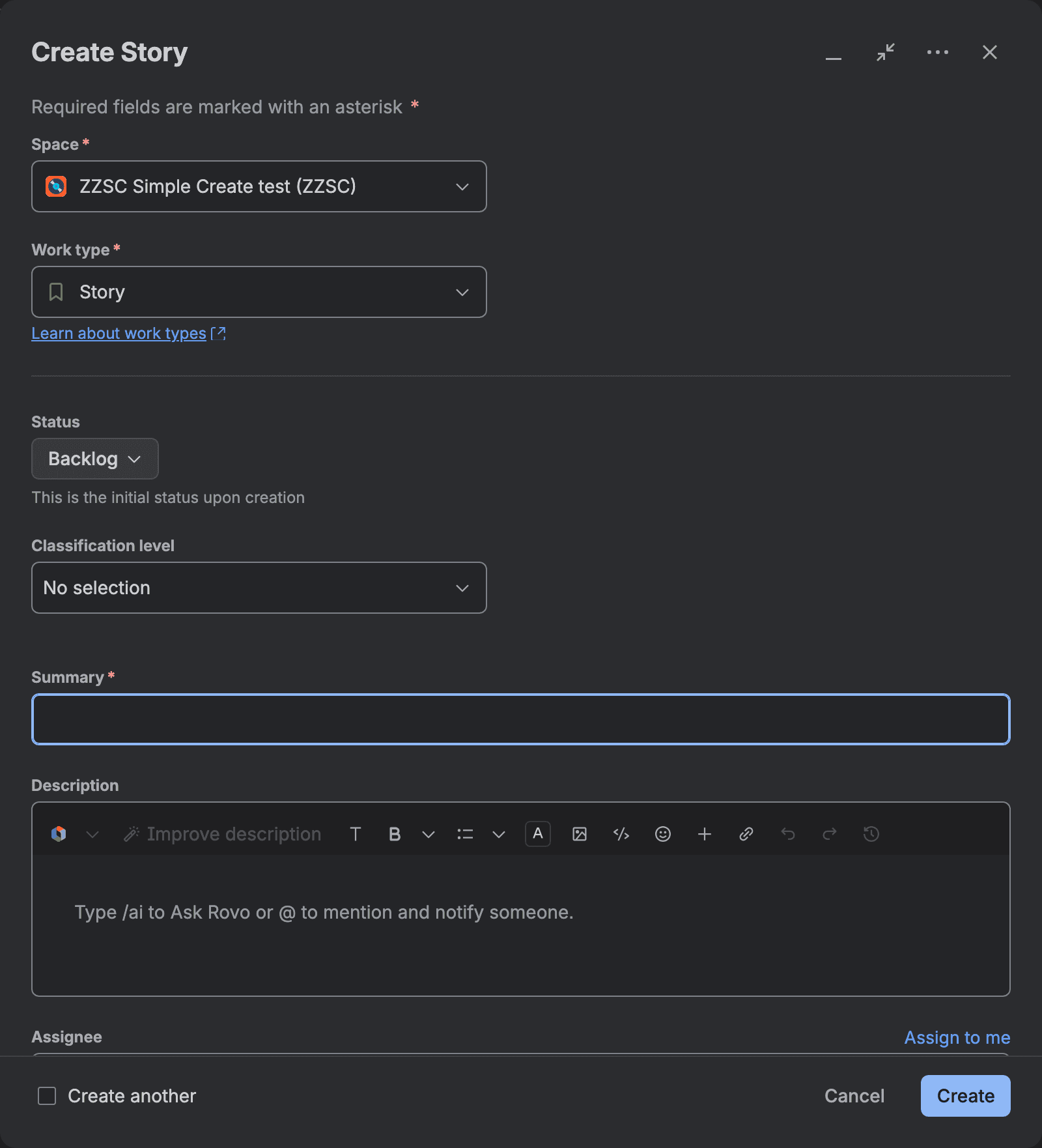
The strings, if you're checking that you got the old one:
1Create Story
2Required fields are marked with an asterisk *
3Space *          ZZSC Simple Create test (ZZSC)
4Work type *      Story
5Status           Backlog   This is the initial status upon creation
6Classification level
7Summary *
8Description
9Cancel   Create
There was a bug about exactly this setting. JRACLOUD-99633, "Setting Simple create as default to Off results in double load of Create screen", was closed as Fixed on 22 October 2026. We tried it three times with the switch OFF, three days after the fix, and only ever got the old dialog, with no trace of the new window loading first. With the switch back ON, the same check caught the new window in all three tries. So the check itself worked.
Can you disable the new issue creation form for one user? Always open in this view
Not from the admin side, as far as we found. The only admin control is the site-wide switch. But each user can make the full form their own default. It's a toggle in the full form's menu, so you have to expand the window first. These are also the steps to send to people who aren't admins.
- 1
Open the create window
click Create, or press c on a board. You get the compact window, with the summary at the top and a row of chips under it.
- 2
Click the two-arrow icon
it's the middle of the three icons at the top right, and its tooltip says Show more. The window grows into the full form and the tooltip changes to Show less.
- 3
Open the ••• menu
its tooltip says More options (Atlassian's article calls it More actions). A menu opens with Configure fields, Find your field, Hide unused fields and Always open in this view. There's no ••• button in the compact window. You need step 2 first.
- 4
Switch on Always open in this view
the toggle should turn on (we didn't flip it on our account, more on that below).
- 5
Check that it stuck
close the window and press c again. You should see the full form straight away.
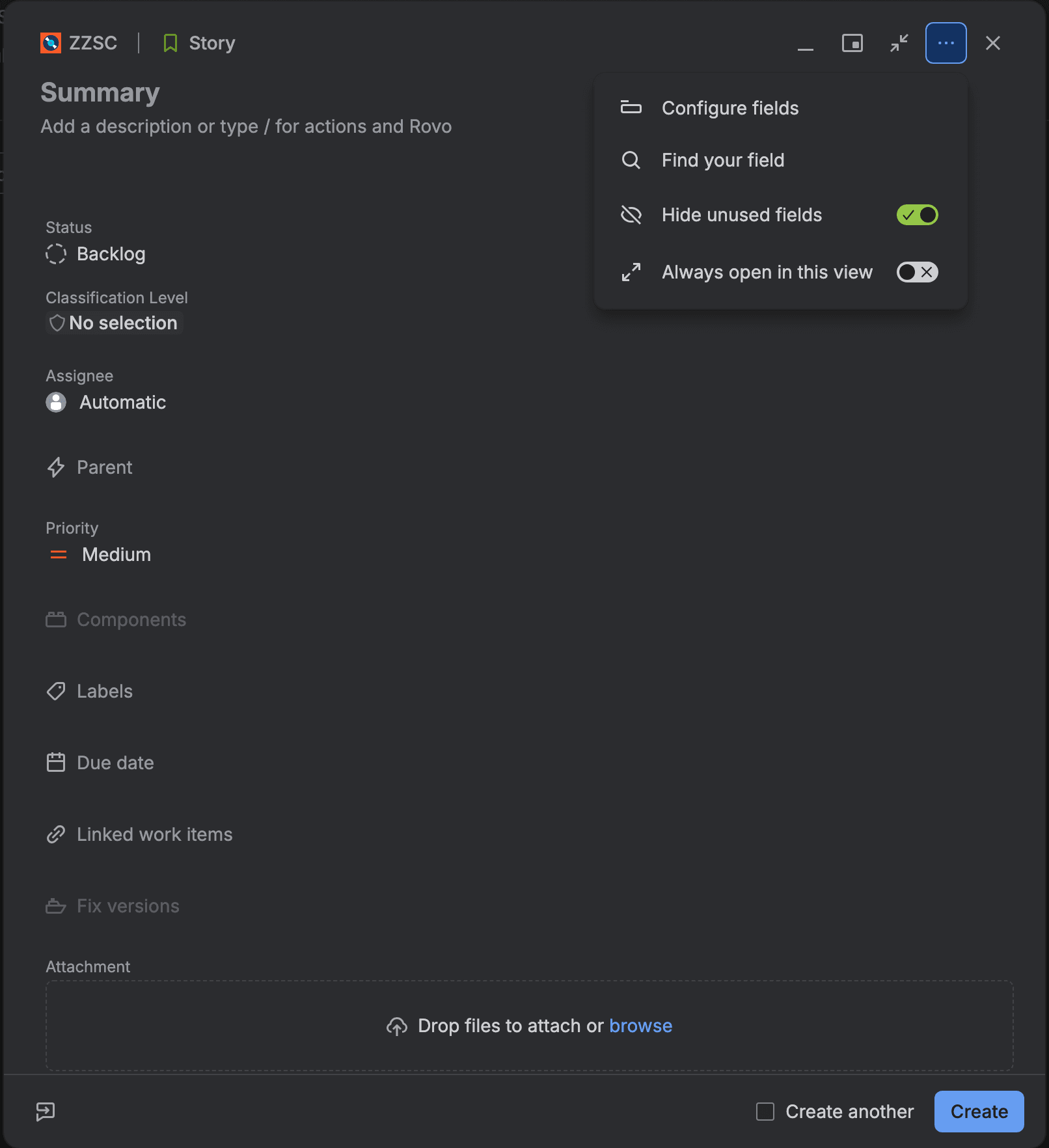
Look at the header line. The full form keeps Space and Work type there, as ZZSC | Story above. Atlassian's support doc describes the same header, "represented by the space icon, space key, and work type name". Both are buttons in that header (we didn't click them to see what they offer). In the old Create dialog they're labelled dropdowns, so if your team wants those back, that takes the site switch.
I didn't flip the toggle on our test account, so I haven't checked that it sticks. Mark Baird reported in the staff thread that clicking it just closed the menu and the toggle never switched on. Atlassian's reply was that they had "identified the cause and shipped a fix. The toggle should now save your preference and hold it across sessions."
When Jira opens the full create form on its own
Even with Simple create as default ON, some work items skip the compact window. Atlassian's staff article lists "tabs, more than three required fields, custom create screens (CMP spaces), Forge UI app modifications, or a complex field type such as rich text." CMP means company-managed. The support doc says the compact window "always shows Title, Description, and up to three required fields", with the required ones as chips under the description.
We tried them one change at a time, on the Story work type in our ZZSC space. Full means the window opened without the Show more toggle and listed every field.
What we changed | Which form opened |
|---|---|
Nothing (baseline) | Compact |
A custom screen mapped to the Create operation | Full |
Same, with the Create mapping removed again | Compact |
A second tab on the default screen | Full, with both tabs in the dialog |
Due date required (1 required field) | Compact |
Due date and Labels required (2) | Compact |
Due date, Labels and Components required (3) | Compact, with 3 Required chips |
Plus Fix versions required (4) | Full |
One required single-line text custom field | Full |
Two required single-line text custom fields | Full |
The same text fields, optional | Compact |
An optional Paragraph (rich text) custom field | Compact |
The same Paragraph field, required | Full |
A Forge UI modification | Not tested (needs a Forge app with a UI modifications module) |
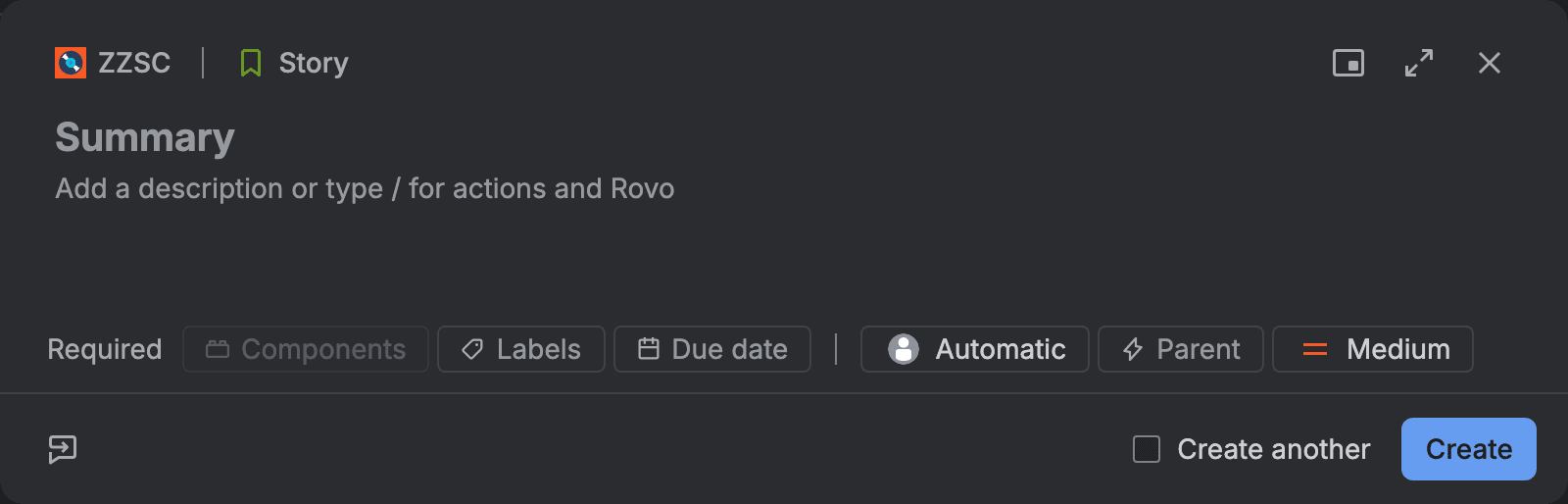
A custom create screen opens the full form (company-managed spaces only)
Mapping our own screen to the Create operation in the screen scheme opened the full form every time. Removing that mapping brought the compact window back. It has to be the Create operation specifically: Kanad from Atlassian told Rune Rasmussen in the staff thread that if your custom screens are only assigned to Edit or View, and Create still points at the default screen, you'll get the streamlined view. Team-managed spaces don't have screen schemes, so the article says CMP. If you're not sure which kind of space you're in, our post on sub-tasks under an epic in company-managed vs team-managed spaces shows how to tell.
A second tab on the create screen opens the full form
Adding a second tab, ZZSC Tab 2, to the default screen opened the full form, and the dialog showed both tabs (Field Tab and ZZSC Tab 2) across the top. If your create screen already has tabs, your users won't see the compact window for that work type.
Three required fields stay compact, a fourth opens the full form
With system fields this matched the docs. Up to three required fields kept the compact window, and making Fix versions required as a fourth opened the full form. We used Fix versions because Jira wouldn't let us make Assignee required at all.
One required text field was enough, once
A single required single-line text custom field, ZZSC Req 1, opened the full form, well under the three-field limit. Two of them did the same, and with both made optional again we got the compact window back. No doc I read mentions this. I ran it once, on one site and one work type, so I don't know yet if it's a rule about custom text fields or a bug.
A required rich text field opens the full form
A Paragraph custom field that renders as rich text was fine while optional. Making it required opened the full form. Description is rich text too, and it's always in the compact window, so the trigger seems to be a required rich text field.
Known bugs and open requests for the new create screen, with JRACLOUD keys
Statuses as of 26 October 2026, read from jira.atlassian.com. The first four come up around the setting itself, and two of them aren't bugs.
Ticket | What it says | Type | Status | Votes |
|---|---|---|---|---|
JRACLOUD-99633 | Simple create as default Off double-loads the create screen | Bug | Closed, Fixed 22 Oct 2026 | 1 |
JRACLOUD-99920 | Version picker misses exact matches past 50 versions | Bug | Needs Triage | 0 |
JRACLOUD-99873 | Simple create should respect the screen's field order | Suggestion | Gathering Interest | 1 |
JRACLOUD-99926 | Allow the Reporter field in the Quick Create modal | Suggestion | Gathering Interest | 1 |
JRACLOUD-99522 | Enter key doesn't insert line breaks in Paragraph fields | Bug | In Progress | 0 |
JRACLOUD-99460 | No formatting toolbar on rich text fields | Suggestion | Gathering Interest | 8 |
JRACLOUD-99003 | Field descriptions are missing from the new Create Screen | Suggestion | Gathering Interest | 5 |
JRACLOUD-99230 | Show custom field descriptions | Suggestion | Gathering Interest | 5 |
JRACLOUD-99264 | Restore visible field borders in the new create experience | Suggestion | Gathering Interest | 3 |
JRACLOUD-99171 | Create from Video is missing | Bug | Gathering Impact | 1 |
JRACLOUD-99920 is the one open bug of the first four. Its workaround is to "Disable Simple create as default to use the classic create screen, which correctly retrieves all pages of search results." JRACLOUD-99873 says the same switch "restores the correct field order". For the Reporter, JRACLOUD-99926 points you to the expand icon and then the ••• menu > Always open in this view, the per-user toggle from above.
Two older ones are already closed. JRACLOUD-99349 (a linked item field cleared between Jira and Jira Service Management) was fixed on 23 September, and JRACLOUD-98974 (the error "Field 'customfield_xxxx' cannot be set. It is not on the appropriate screen, or unknown.") on 5 August.
Summary is back, and the rollout dates don't agree
Atlassian renamed Summary to Title for a while and then posted "We're rolling Summary back". Our site shows Summary, while the support doc, last modified 25 September 2026, still says Title.
Even the dates don't agree. The release note says the rollout started in April 2026, the staff article says mid-July, and Julia Foden wrote in the thread that "it has actually been rolling out since at least May".
If you're cleaning up create-screen complaints anyway, the select field None tutorial covers a related one: a default value that hides None. And the Jira reports retirement is another Jira Cloud change from the same months.
If it didn't work
You can't find General Configurations. It's General configuration, singular, under System in Jira admin settings. You need the Jira admin permission to see it.
There's no Options section. The view page only lists the values. You'll find the radio buttons on the Edit Settings page.
You can't see the Create button. Press c on a board instead. It opens the same window.
The full form opens even with the switch ON. Go through the table above. Check what's mapped to the Create operation in the space's screen scheme, whether the create screen has tabs, how many fields are required for that work type, and whether any of them is a custom text or rich text field.
Always open in this view won't stay on. Atlassian said in the staff thread that they shipped a fix for this. If it still happens, send support the link to their reply to Mark Baird in the announcement thread.
What you have now
Key takeaways
- The site-wide switch: General configuration > Edit Settings > Options > Simple create as default > OFF > Update, and the old Create dialog with Space and Work type dropdowns on your boards.
- The per-user option, the ••• menu > Always open in this view, for people who want the full form without changing the site.
- A tested list of what forces the full form: a custom Create screen, tabs, a 4th required field, a required rich text field, and (once, on our site) a single required text custom field.
- The ticket keys with their real statuses, so you know which ones are bugs and which are suggestions to vote on.
Did your team switch the site back, or did people get used to the compact window after a couple of weeks? And if you've seen the one-text-field thing too (or the opposite), tell me in the comments or mail gabriela at leanzero.net :)
Comments
0Add a comment