303 is not an error: how an attachment migration ships zero bytes
Mihai Perdum
Author
16 min readAugust 18, 2026
Key takeaways
Jira Cloud's attachment content endpoint answers 303, Confluence Cloud answers 302, and a follower written for 301/302 silently writes a zero-byte file on Jira.
Nothing in that chain returns an error status, and Jira Cloud accepts the resulting zero-byte upload with HTTP 200, so a count-based audit passes.
On Jira Cloud you can delete the redirect follower entirely: ?redirect=false returns the bytes on the API host, with Range support. Confluence has no such parameter.
Atlassian document that on an SSO-fronted Data Center the same call lands on the login page instead — a non-zero body that looks like data, which is worse than a zero-byte file.
Join your audit on filename plus byte size, never on filename alone. Identical bytes uploaded twice get different attachment IDs and different media file IDs.
A zero-byte attachment is the kind of bug that survives a migration audit, so I spent this morning finding out exactly how far a broken attachment download can travel before something complains about it. The answer, measured end to end, is: all the way onto the destination issue, under the correct filename, with a success status at every single step.
That is the failure I want to take apart here, because no individual step in it misbehaves, and because the two migration routes we sell — Data Center to Cloud, and Cloud to Cloud — break it in opposite directions. Everything below with a number attached was run on 18 August 2026 against my own Jira and Confluence Cloud test tenant, and the commands are here so you can reproduce it on yours in about five minutes.
The endpoint does not return your file
Start with the thing that surprises people: asking Jira Cloud for an attachment's bytes does not get you the bytes.
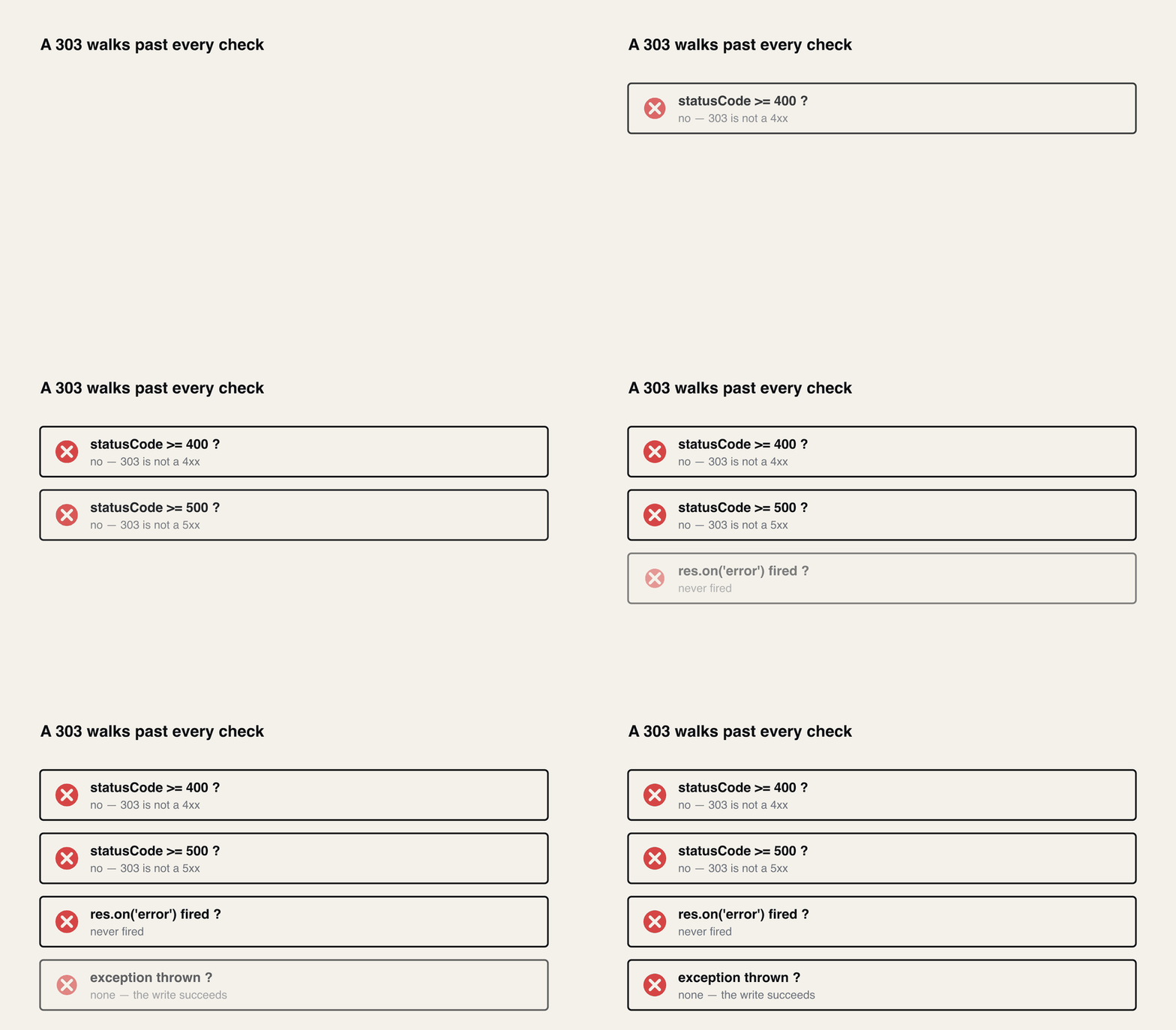
Every guard you would plausibly have written passes. The file is written, the row is marked done, and the run continues.
303, not 200 and not 302. That is the documented happy path, not an edge case — Jira's own OpenAPI spec lists 303: Returned if the request is successful. See the Location header for the download URL. The bytes live on api.media.atlassian.com, which is a different host from the one you authenticated against, and the thing that lets you read them is a signed token in the query string.
Now do the same to Confluence, for the same file uploaded to a page on the same site:
302. Same company, same site, same media host, same week — one product says 303 and the other says 302. Confluence's spec describes that endpoint as "Redirects the client to a URL that serves an attachment's binary data", and the only success response it documents is the 302.
If your reaction is that this does not matter because any HTTP client follows redirects, hold that thought for ninety seconds.
The follower that has the bug
Here is a redirect follower. I did not construct it to fail; it is the shape that turns up in migration code because https.request in Node does not follow redirects at all, so everyone hand-rolls this once and never looks at it again.
Pointed at both products, same file, same 118,784-byte payload:
text
1JIRA  /rest/api/3/attachment/content/10939
2   -> status 303       0 bytes  sha e3b0c44298fc1c14  *** WRONG ***
3CONF  .../child/attachment/att302120961/download
4   -> status 200  118784 bytes  sha f26b1c5299ab1fc1  OK
e3b0c442... is the SHA-256 of the empty string. The Confluence side is correct and the Jira side is empty, from one function, because 303 is not in the list.
Read what that function returns on the failing path. status: 303. Every guard you would plausibly have written passes: it is not a 4xx, it is not a 5xx, res.on("error") never fired, no exception was thrown. If your downloader checks if (res.statusCode >= 400) throw, and most do, it sails through. The file is written, the plan row is marked done, and the run continues.
-L follows anything redirect-shaped, 303 included. And there is a second thing curl does that is worth knowing about, which you can see with -v on curl 8.7.1:
The second request has no Authorization line. curl drops credentials when a redirect crosses a host boundary, unless you explicitly pass --location-trusted. A recursive follower like the one above passes headers straight through on every hop, so it does the opposite.
I assumed that would break, and went looking for the 401. It does not break:
text
1media host, correct Authorization header  -> status=200 bytes=118784
2media host, GARBAGE Authorization header  -> status=200 bytes=118784
3media host, no header at all              -> status=200 bytes=118784
4media host, token stripped from the URL   -> status=401 bytes=86
A deliberately invalid header still returns the file; removing the query-string token is what returns 401. The signed URL is the credential and the header is ignored outright. So forwarding your API token to api.media.atlassian.com is not a functional bug — it is a disclosure. You have sent a long-lived Atlassian API token to a host that had no use for it, and it will be sitting in whatever egress proxy or corporate TLS-inspecting middlebox is between your migration runner and the internet. That is worth ten minutes of your time to fix precisely because nothing will ever fail to tell you about it.
The token in the URL has a clock on it
Decode the JWT out of that Location header — it is HS256 with four claims, and two of them are the interesting ones:
Ten minutes, scoped to read, scoped to one file. I polled that URL every fifteen seconds across its own expiry. It still returned 200 six seconds past exp, and again twenty-one seconds past; thirty-four seconds past, it was dead:
I cannot cleanly separate edge caching from clock skew in that twenty-second tail, so do not read it as a grace period you can rely on. The durable fact is the 600 in the token, and it has one concrete consequence for anybody using a plan-then-execute migration script, which is most of us:
never persist the resolved media URL into your plan file. Plan and execute are typically hours apart — that is the entire point of the pattern — and a plan full of media URLs is a plan full of expired tokens. Persist the stable redirector instead. Jira hands it to you already, in the attachment metadata:
That content URL does not expire. Confluence gives you the same thing as downloadLink, with one wrinkle worth a line of code: Jira's is absolute and Confluence's is relative (/rest/api/content/302088193/child/attachment/att302120961/download, with no host and no /wiki prefix). Concatenate carelessly and you will spend a while wondering why every Confluence attachment 404s.
The fix on Jira is one query parameter
This is the part I wish I had known years ago. The Jira Cloud spec documents a redirect parameter on that endpoint:
Whether a redirect is provided for the attachment download. Clients that do not automatically follow redirects can set this to false to avoid making multiple requests to download the attachment.
Identical SHA-256 to the source file. No second host, no signed URL, no expiry, no redirect follower — you can delete that whole function from the Jira path. And it supports ranges, which the redirect path gives you no clean way to use:
So a large attachment that dies partway through is resumable, on the API host, with your normal auth — which the redirect path gives you no clean way to do, because by the time you want to resume, the signed URL you were using may well have expired.
One detail that will bite anyone who sniffs response headers to decide what a file is: the two paths disagree about the same file. Through the media host it came back as text/plain; through ?redirect=false it came back as application/octet-stream;charset=UTF-8. Trust the mimeType in the attachment metadata, not the transport.
Confluence has no equivalent. I passed ?redirect=false to the Confluence download endpoint and got a 302 anyway. It is not a parameter there — the spec's whole parameter list for that endpoint is id, attachmentId, version, status — so it is simply ignored. The honest architecture is therefore asymmetric: no redirect handling at all on the Jira side, and a follower that explicitly accepts 302 on the Confluence side. If you are pulling whole spaces down, this is the same code path as exporting a Confluence space to a folder tree, and it is where the attachment count and the attachment bytes quietly stop agreeing.
Route one: Data Center to Cloud
Now the two routes, because they fail differently and the difference is not cosmetic.
On a Data Center to Cloud move you are not writing this loop for the bulk of the data. JCMA moves attachments, and it will pre-stage the binaries before cutover if you ask it to — Atlassian's guidance is that "migrating Jira attachments in advance saves you time on the migration day" and that "if new attachments appear later on, only the difference will be migrated." Use it. It is the single biggest lever on the length of your cutover window.
You write this loop for the gap. Files uploaded between the advance run and cutover, issues that moved between projects mid-migration, anything a vendor app intercepted on its way to storage. It tends to be a small set relative to the whole, and it tends to be found late.
On that route the source is Data Center, and Data Center's failure mode is worse than Cloud's. The attachment URL there is under /secure/, which is served by the web interface rather than the API, and on any instance fronted by SSO the request gets redirected to the identity provider. Atlassian document this themselves, for Data Center specifically: the REST call "lands at the SSO login page, not returning the expected data", and — read this sentence twice before you scope the work — "downloading issue attachments through REST APIs is not a supported use case."
Follow that redirect and what you get is the login page: an HTML document, served with a success status, written to disk under whatever name you were expecting. That is more dangerous than the Cloud zero-byte case, because a file with a non-zero length passes exactly the check most people add after they have been burned by zeroes once. Our production Data Center downloader accepts [301, 302, 303, 307, 308] and re-applies Authorization on every hop, which is right for that host and is precisely the behaviour you do not want on Cloud. If you share one HTTP client between the two sides — and the tidy-looking abstraction is to share one — you inherit both problems at once.
The Data Center half of this section is the one part of the article I did not run myself, because I do not have a Data Center instance to point at. It is Atlassian's own documentation plus the behaviour of code we run on real jobs, and I would rather label it than blur it.
Route two: Cloud to Cloud
Cloud to Cloud has no JCMA. There is no assistant to hide any of this from you, so the REST API is the route in, and that means both ends of the copy are the surface described above: you hit the 303 on the read and the CSRF filter on the write, on every single file.
It also invites a specific wrong assumption. Account IDs genuinely do port across a Cloud organisation — that is the one identifier that survives, and it is why filters move Cloud to Cloud and bind to the wrong fields on arrival instead of erroring. It is tempting to extend that intuition to attachments. It does not extend.
I uploaded byte-identical files to two issues on one site:
text
1attachment 10939 -> media file 1ef94d03-eaf7-470f-9e65-46bd5ed6a534
2attachment 10940 -> media file 1f215982-bc67-45e8-b6c9-723519d75ebc
Different attachment ID and a different media file ID, for the same bytes on the same tenant. Nothing is content-addressed and nothing is deduplicated. Across two tenants you have even less. So the only join key you get between source and destination is the pair you can compute on both sides: filename plus byte size. Not filename. Not ID.
The upload side lies to you about why it failed
While we are here, the write half has its own trap, and it is the reason people lose an afternoon before they ever reach the download problem.
Attachment uploads need X-Atlassian-Token: no-check. Leave it off:
text
1Jira        POST /rest/api/3/issue/TPP-27/attachments          -> 404  XSRF check failed
2Confluence  POST /wiki/rest/api/content/302088193/child/attachment -> 403  XSRF check failed
Same missing header, same message, two different status codes. And Jira's choice of 404 is about as unhelpful as it could be, because this is also a 404:
text
1POST /rest/api/3/issue/TPP-999999/attachments   (header present, issue does not exist)
2-> 404 {"errorMessages":["Issue does not exist or you do not have permission to see it."],"errors":{}}
Two 404s from one endpoint, one meaning "your CSRF header is missing" and one meaning "your issue key is wrong", and the status code cannot tell them apart. The body can — except for one last detail:
javascript
1JSON.parse("XSRF check failed")2// SyntaxError: Unexpected token 'X', "XSRF check failed" is not valid JSON
Seventeen bytes, served with content-type: application/json;charset=UTF-8, that are not JSON. So the error handler that does JSON.parse(body).errorMessages throws a SyntaxError and you never see the words "XSRF check failed" at all. You see a parse error, on a 404, and you go and check your issue keys. Guard the parse and log the raw body on failure.
The success responses are asymmetric too, which matters if you are writing one client for both: Jira returns a bare array, so it is result[0].id, while Confluence returns { results: [...], size, _links }.
The retry that isn't
One more, because it only shows up at hour six of a long run. Bulk attachment uploads are where a migration meets 429s, and the budget on that endpoint is not the same as on a read. Sampling one response of each on my tenant, the attachment POST came back with ratelimit-policy: "jira-burst-based";q=100;w=1 against q=150;w=1 on a plain issue GET. Two things to note rather than build on: the legacy x-ratelimit-limit header reported 200 and 400 for those same two responses, so the two header families do not agree with each other, and neither carried the old Beta- prefix any more. Read Retry-After off the 429 instead of predicting from either — there is more on the points model in surviving Atlassian's points-based rate limits.
So you will retry. And if the multipart body is a stream, the retry does this:
The 400 says "Required part 'file' is not present." It is not. It was consumed by attempt one. The retry re-sent the headers and an exhausted stream, and Jira told you truthfully that there was no file part, which reads like a payload bug and is actually a lifecycle bug six hours into a run.
The fix is that a retryable request cannot hold a body — it holds a function that builds one:
Call it once per attempt. Compute Content-Length from preamble.length + stat.size + closer.length so you never buffer the file to measure it — a hundred concurrent 50 MB uploads held in memory will end the run in a different way.
Why the audit passes
The last link in the chain is the one that turns this from annoying into expensive, and it is the destination's own behaviour.
bash
1curl-s-u"$AUTH"-X POST -H"X-Atlassian-Token: no-check"\2-F"file=@empty.bin;filename=probe.bin"\3".../rest/api/3/issue/TPP-27/attachments"
Jira Cloud accepts a zero-byte attachment and returns 200. It appears on the issue, under the right name, with the right MIME type. Ask the destination what it has and it answers cheerfully:
So: the download returned 303 and no error; the file was written with length zero; the upload returned 200; the destination reports the attachment present with the correct filename. An audit that counts attachments per issue passes. An audit that joins on filename passes. Every log line is green and every byte is gone.
Warning
An audit that cannot fail is not an audit. If your verification step joins source to destination on filename alone, it will confirm a migration that moved no data at all.
Three assertions catch it, and all three are cheap:
Join on filename::size, both sides. One call per issue — GET /rest/api/3/issue/{key}?fields=attachment returns filename and size for every attachment without a second round trip.
Assert size > 0 at download time, before you upload. The empty file should never leave the source stage. Compare against the size the source metadata already told you.
Checksum a sample. Byte size catches truncation and it catches zeroes, but it will not catch an SSO login page that happens to be the right length, and on the Data Center route that is the failure you are actually exposed to. Hash a seeded sample on both ends and compare.
The general principle, and the reason this class of bug keeps recurring across the migrations we run: a status code is a claim about the request, not about the data. 303 means "the request was fine." 200 on an upload means "I stored what you sent me." Neither is a statement that the bytes on the destination are the bytes from the source, and only you can make that one. Decide up front what you will measure to prove the copy worked, then measure exactly that, rather than reading the log for an absence of red.
What I did not test
I ran everything above against one Jira and Confluence Cloud site on 18 August 2026 — a Free-plan tenant, API-token basic auth, Jira Software and Confluence. Plan matters for rate limits in particular, so treat those two ratelimit-policy readings as shape, not as your budget. The ?redirect=false behaviour, both status codes, the JWT lifetime, the zero-byte acceptance and the stream-replay 400 are all measurements from that site, not readings of documentation.
I did not test a Data Center instance — that section is Atlassian's documentation plus the behaviour of code we run on live jobs, and I have flagged it in place. I did not test Atlassian's native cloud-to-cloud data transfer, which needs two tenants and org admin; everything in the Cloud-to-Cloud section is about the REST route, which is what you end up on for partial and project-level copies anyway. I did not test very large attachments or a tenant that has raised its attachment size limit, and I would expect the timeout behaviour there to be its own article — worth knowing if you go looking, GET /rest/api/3/configuration on my tenant returned attachmentsEnabled: true and no size limit at all, so that endpoint will not preflight it for you. And the twenty-second tail past the token's exp is unexplained; I would not build anything on it.
If you want the five-minute version: put ?redirect=false on every Jira attachment read you do, accept 302 explicitly on the Confluence side, and change your audit's join key from filename to filename::size before your next run. The third is the only one of the three that also survives the Data Center login-page case.
Forge App REST API with OAuth 2.0 (3LO): Scripting LeanZero Management Plans with curl
A Forge app REST API is called from outside Jira with an OAuth 2.0 (3LO) access token. This walks the whole path with curl against LeanZero Management: the admin switch, the integration and its scopes, consent with sns, the token exchange, rotating refresh tokens, and the four 403s I hit on the way.