
Jira automation with Rovo: 2 of 10 rules worked as built, and what they cost

12 min readNovember 13, 2026
Key takeaways
- Out of 10 plain-English requests on our Jira Premium test site, 2 Rovo drafts worked as built, 7 needed edits and 1 was refused by its own editor with 'Your flow contains errors'.
- Each prompt or reply to Rovo cost 10 Rovo credits on our org meter, 140 credits for 14 turns. Saving a flow and running it without a Rovo step cost 0 credits.
- A published rule that acted cost 3 or 4 automation steps per run. Runs that stopped at a condition showed No actions performed and cost 0 steps.
- One draft looked right and silently did nothing. Its sub-task check ran on the wrong work item, so closing both sub-tasks never moved the parent to Done.
- The Create with Rovo button is back in Jira under Create flow, but the flows it makes live in Rovo Studio, where Atlassian's docs say every Studio user gets the Automation creator role by default.
We gave Create with Rovo 10 automation requests on our Jira Premium test site on 13 November 2026, and 2 of the rules it built worked as built. Seven needed edits and one couldn't be switched on at all. Each message to Rovo cost about 10 Rovo credits, and a rule that ran and did its job cost 3 or 4 automation steps per run.
The reason to test it now is a request on Atlassian's tracker. On 4 June 2026 Scott Boisvert commented on JRACLOUD-98402, which asks to bring back the "Create flows quickly with Rovo" box in Jira automation: "This is major impact to organizations that limit the use of Studio to a small group of users." By 13 November that request had 24 votes and 19 watchers, and a new Create with Rovo button was back under Create flow. The flows it builds live in Rovo Studio, where Atlassian's docs say every Studio user can create flows by default, and the drafts we got were editable by all Studio users.
Rovo is still useful. It picked a sensible trigger in 9 of 10 drafts, asked a good question when it couldn't find a Confluence space, and wrote down its assumptions when the request was vague. But two drafts would have failed silently: one ran twice and did nothing, and one would send an empty email every Monday. I think that matters more than the score.
A note on words. Atlassian now calls an automation rule a flow, a project a space and an issue a work item, and I'll use the names the screens use. Rovo Studio is Atlassian's separate app for building agents and automations with Rovo. Rovo credits are the units Atlassian bills Rovo's AI work in.
Rovo got the triggers right and the details wrong: 6 findings
- 2 of 10 drafts worked as built. Rovo refused nothing and asked one clarifying question. Seven drafts used a wrong component, field or smart value, and one was blocked by the editor.
- Generating costs Rovo credits. Our org meter moved 10 credits per message, 140 credits over 14 messages. We found no Atlassian page that says whether generating a flow is billed.
- Running costs automation steps at the usual rate. A run that acted cost 3 or 4 steps. Runs that stopped at a condition cost nothing.
- The worst draft gave no error. The "close the parent when all sub-tasks are done" flow ran twice and never moved the parent.
- Rovo doesn't check your space's setup. Its drafts named a "Closed" status our space doesn't have and searched by the old Epic Link field.
- Flows live in Rovo Studio, and the drafts we got were set so that All Studio users can edit them.
Where Create with Rovo is in Jira automation now, and why it disappeared in May
In May 2026, with the general release of Studio V2 (the current version of Rovo Studio), the old in-product Create with Rovo button "was intentionally deprecated", as the tracker AUTO-2376 puts it. From 17 August to 28 September the weekly Cloud release notes listed "Build automation rules with Rovo" as rolling out, and on 1 September Sophia Do from the Automation team announced it on the Community: "The flows you build will live in Rovo Studio, but you can view and access them from your Product Automation Flows List."
You need Jira Cloud on Standard, Premium or Enterprise with Rovo turned on for Jira, and access to Rovo Studio. Atlassian says Rovo isn't available for Jira in its Government environment. The release notes last listed the button as rolling out, so it may not be on your site yet. On our site, on 13 November 2026, this is where it was:
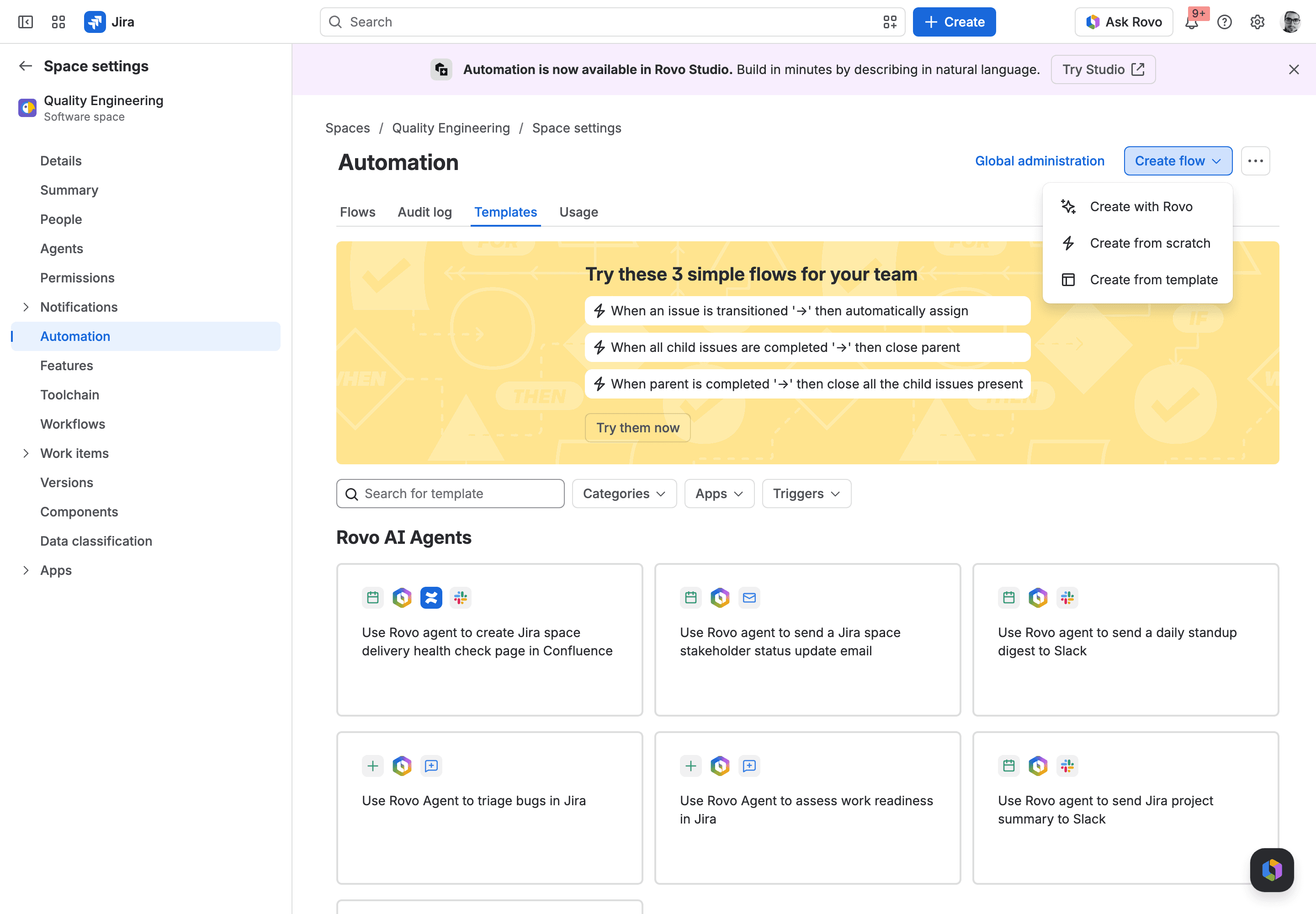
- In your Jira space, open Space settings and select Automation. A purple banner says "Automation is now available in Rovo Studio".
- Select Create flow. A menu opens with Create with Rovo, Create from scratch and Create from template.
- Select Create with Rovo. The box "Automate work in minutes with Rovo" opens, with the footer "Uses AI. Verify results."
- Describe the rule. Rovo plans it in the chat and then offers Build flow in Studio, which Atlassian's doc says opens the draft in Rovo Studio in a new tab.
For us that hand-off failed twice, with "Invoke action failed because unknown error" in the chat. We were driving a headless browser, so you may not see it in a normal one. The second route worked in all our tries: in Rovo Studio, select Create at the top and type into "Describe your idea or problem, Rovo Studio will build it". All 10 drafts below come from there. The same Jira menu is also in global automation (Jira settings > Automation).
If your users say the button "disappeared", check AI access first. Atlassian's Manage Rovo access page says Create with Rovo stays available "as long as any Jira app on that site still has Rovo enabled". We blocked Rovo for our Jira app for about three minutes and the button was still there. Our article on disabling Rovo in Jira and Confluence walks through that blocklist.
We tested 10 requests in a fresh Jira space
We made a company-managed Kanban space called RVAT, with the statuses Backlog, Selected for Development, In Progress and Done. We typed each request into Rovo Studio, signed in as an org admin, and read each draft in the flow editor component by component. A draft "worked as built" if it did what we asked with no change. It "needs edits" if it had a wrong component, field, status or smart value (a smart value is a placeholder like {{issue.key}} that automation fills in when it runs). And "can't be enabled" means the editor refused it.
We published three drafts, triggered each one by creating and moving real work items, and read the result on the work items and in the Studio audit log. A plan took 97 to 129 seconds to appear, and about 23 seconds of that was our own browser driver loading and waiting. Build flow took another 20 to 23 seconds. Afterwards we deleted all of it.
Jira automation rules examples: 10 we asked Rovo to build, scored
# | What we asked for (shortened) | What Rovo built | Verdict |
|---|---|---|---|
1 | New bug with priority Highest: assign to the space lead, add a comment | JQL condition, assign to a named person, comment | Worked as built, lead written in by name |
2 | Every Monday at 9am, email me overdue work items | Scheduled trigger, lookup, email with a table | Needs edits: the search finds nothing |
3 | New work item: create a Confluence page with key, summary, description, comment the link | Asked which space we meant, then built it | Worked as built, link shows brackets |
4 | Item moves to Done: comment on each open linked item that the blocker is resolved | Branch over linked items, comment | Needs edits: the comment names the wrong item |
5 | "Make sure urgent stuff doesn't get forgotten" | Daily reminder on Highest items, assumptions listed | Needs edits: branch over a smart value that doesn't exist |
6 | Resolved for 5 days with no update: close it, tell the reporter | Daily lookup, comment, transition to Closed | Needs edits: our space has no Resolved or Closed status |
7 | All sub-tasks Done: move the parent to Done | Sub-task check, then branch to the parent | Needs edits: ran and did nothing |
8 | Story due date changes: set the epic's due date to the latest story's | Lookup by Epic Link, variable, edit the epic | Needs edits: old field, blank trigger field |
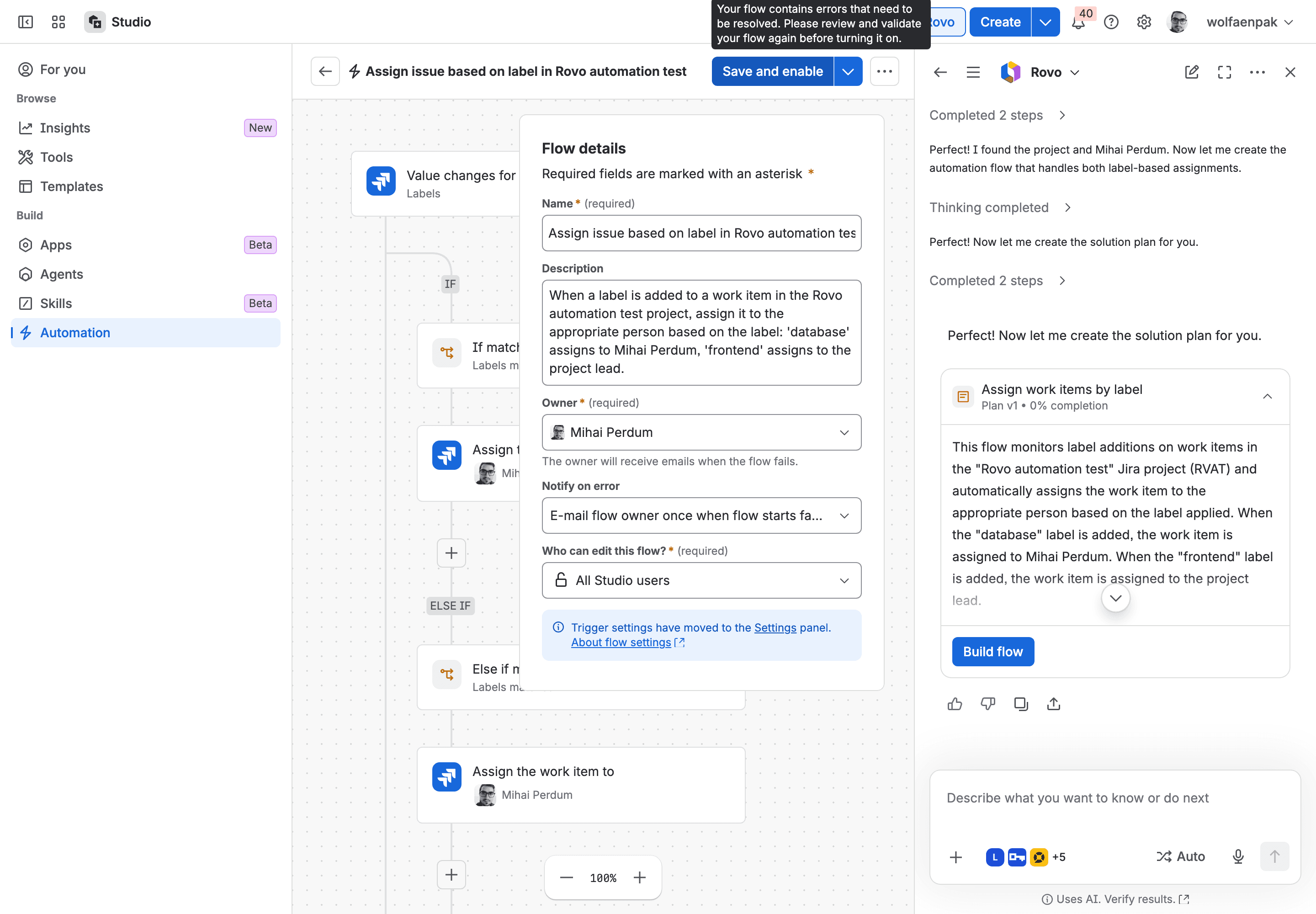
9 | Label database: assign to a named person; label frontend: assign to the lead | If / else-if on labels | Can't be enabled |
10 | High or Highest with no update for 4 hours: comment mentioning the assignee, email the lead, weekdays only | Hourly weekday schedule, lookup, comment, email | Needs edits: the mention is plain text |
Two drafts were close to what an admin would build. Prompt 1 matched issuetype = Bug AND priority = Highest, assigned the work item and commented "The project lead has been notified." It assigned the right person. But it did it by name: Rovo looked up today's lead and wrote that person into the rule, so when your lead changes the rule keeps assigning to the old one. Prompt 3 was the nicest surprise. We'd named a Confluence space key that doesn't exist on our site, and Rovo said it couldn't find a space matching LZ and asked for the right one. With the key DEMO, the flow created four real pages with Key, Summary and Description headings. The comment's link came out as [RVAT-2 - summary|url] with the brackets showing, which is cosmetic.
We asked for prompt 1 four times, twice in Jira and twice in Studio. Three plans used one JQL condition and one used two separate field conditions. The comment text also differed between the Jira and Studio routes. So don't expect the same request to give your colleague the same rule.
Mistakes Rovo made in the rules, and how to catch them in the preview
A flow that looked right, ran twice and did nothing
If you plan to switch drafts on without reading them, look at prompt 7 first. Rovo built: work item moves to Done, if the type is Sub-task, if a parent exists, if the sub-tasks match status = Done, then branch to the parent and move it to Done. A branch is the part of a rule that runs its actions on other work items, here the parent.
The trouble is where the sub-task check sits. It runs on the sub-task that just moved, before the branch, so it never asks about the parent's other sub-tasks. We created a task with two sub-tasks and moved both to Done. The parent stayed in Backlog.
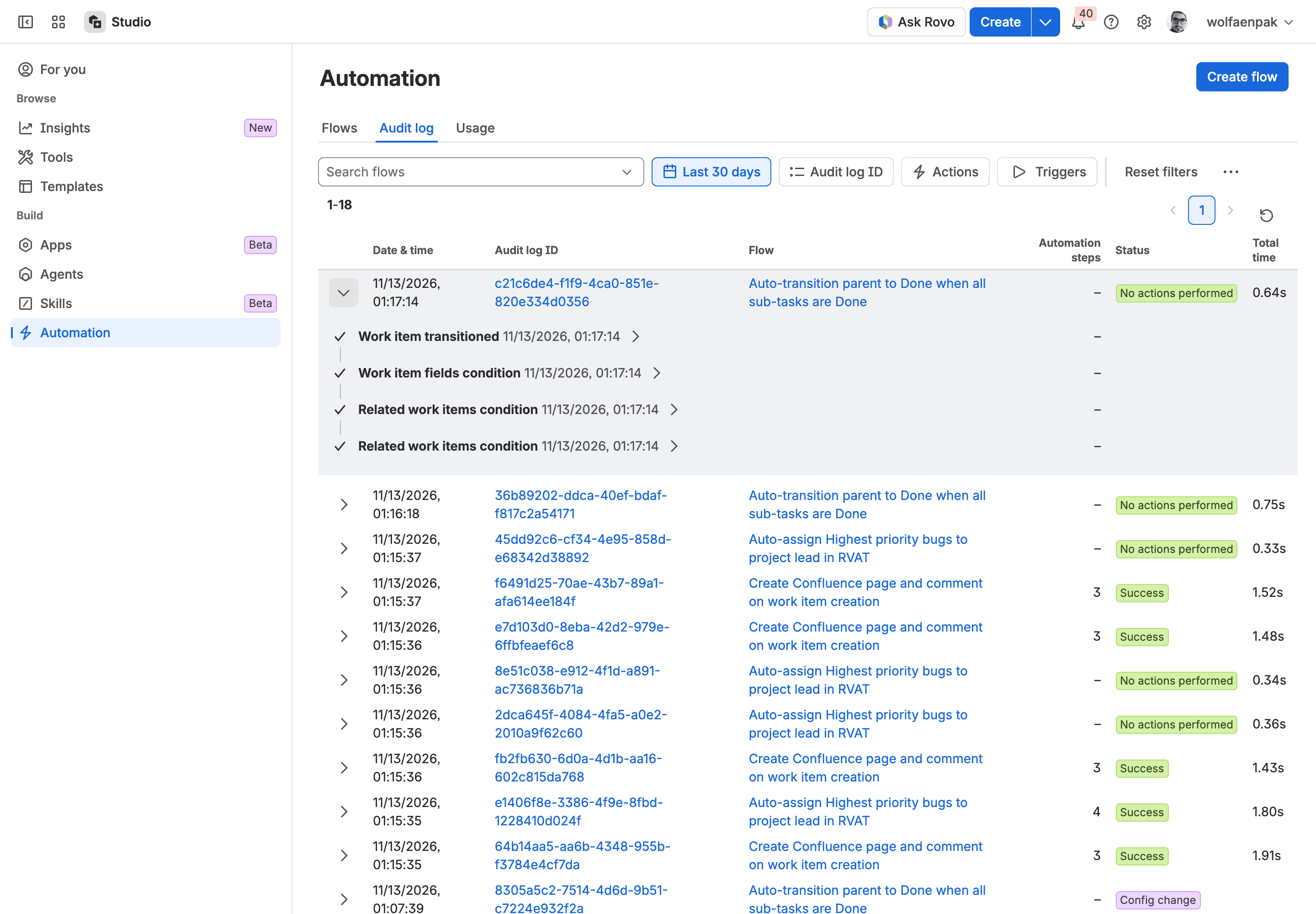
Look at the status in that screenshot. The audit log says "No actions performed", in green, and shows no error. The editor says the owner gets an email when a flow fails, and nothing here failed, so I wouldn't expect one. You'd find out when someone asks why the parent is still open. Atlassian's template list offers this exact job ("When all child issues are completed then close parent", the yellow card in the Jira screenshot above). We didn't open it, so check where its sub-task condition sits before you trust it either.
A draft that searches by the old Epic Link field
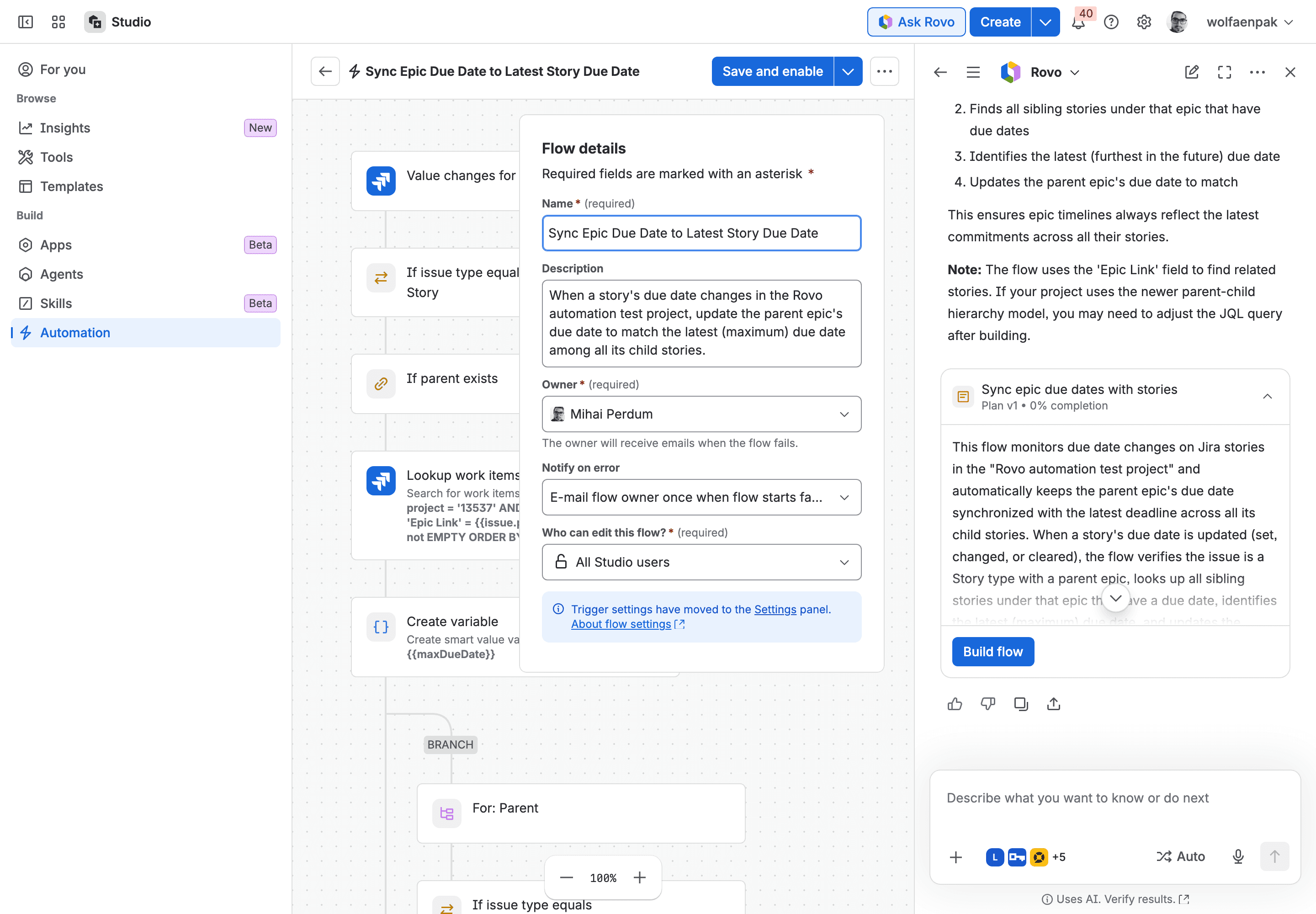
For prompt 8, Rovo looked up the stories with 'Epic Link' = {{issue.parent.key}}. Atlassian replaced Epic Link with the Parent field in company-managed spaces, and Rovo's chat note half admits it: "If your project uses the newer parent-child hierarchy model, you may need to adjust the JQL query after building." The trigger also showed no field to watch, and the last step pointed at a field the editor labelled "due (deleted field?)". It needed three edits before it could work.
A draft the editor wouldn't switch on
Prompt 9 got the logic right (if the label is database, else if the label is frontend), and again wrote the lead in by name. When we selected Save and enable, the editor said: "Your flow contains errors that need to be resolved. Please review and validate your flow again before turning it on." You can't miss this kind of failure, which makes it the easy one.
Statuses, branches, searches and mentions that don't work
A search that finds nothing. Prompt 2 filters by the space's long internal ID instead of its key. Jira's search accepts that without an error and returns nothing (we checked the same form of ID against another of our spaces), so the Monday email would arrive empty every week.
Statuses your space doesn't have. Prompt 6 transitions to "Closed" and looks for "Resolved". RVAT has neither. Rovo didn't check or warn. We didn't run it, but there was nothing for it to move to.
The wrong work item inside a branch. In prompt 4, the comment uses {{issue.key}} inside a branch over linked items. Inside a branch, {{issue}} is the linked item, so each comment names itself. It needs {{triggerIssue.key}}.
A smart value that isn't there. Prompt 5 branches over {{lookupIssue}}; the lookup's output is {{lookupIssues}}. For this vague request, though, Rovo did write down its assumptions, such as "Only "Highest" priority issues trigger reminders".
A mention that won't notify. Prompt 10 writes the assignee's name and raw account ID into the comment. Atlassian's user smart values page says a mention needs [~accountId:...].
So here's my checklist for the preview. Read the trigger's field. Check that the statuses the rule names exist in your workflow. Inside a branch, look for {{issue}} where you meant {{triggerIssue}}. Make sure no person is typed in where a role was meant. Then trigger it once on a test work item and open the audit log, because "No actions performed" can also mean "built wrong".
Jira automation cost with Rovo: credits to create a rule, steps to run it
None of the Atlassian pages we read on 13 November say whether generating a flow spends Rovo credits. How Rovo credits work lists a "Create with Rovo" row at variable credits, but that row links to Confluence's Create with Rovo for pages and whiteboards, not to automation. The name is shared: Jira Service Management has a Create with Rovo too, for building a whole service space. So we read our org's credit meter, the one behind Platform usage in Atlassian Administration, before and after.
What we did | Rovo credits |
|---|---|
One prompt, measured on its own (639 to 649) | 10 |
The whole test: 13 prompts (10 requests, prompt 1 repeated 3 times) plus 1 clarification reply | 140 |
Build flow, Save and enable, running flows without a Rovo step | 0 |
So it's about 10 credits per message to Rovo. A clarification reply counts too. That's the same 10 credits a quick Rovo Chat answer costs in our Rovo credits per user measurements. The meter is org-wide. Anyone else using Rovo in the same minutes would have shown up too. At Atlassian's extra usage price of USD 0.01 per credit, which applies from 3 December 2026, ten prompts would cost about a dollar. A 200-user Jira Standard site gets 25 credits per user per month, 5,000 credits pooled, so those ten prompts would use 2% of it.
Running a flow is billed in automation steps: each executed trigger, condition, action and branch counts, apart from a few free system steps such as Lookup work items. Atlassian's usage page says usage-based billing starts on 3 December 2026. From the audit log:
Flow | Run | Automation steps |
|---|---|---|
Highest bug: assign and comment | matched a bug | 4 |
Highest bug: assign and comment | not a bug, stopped at the condition | 0 |
Confluence page and comment | each new work item | 3 |
Sub-tasks to parent | stopped at the condition | 0 |
Four steps means the trigger and the condition plus two actions. The zero rows are new: since 5 November 2026, Atlassian doesn't charge steps for runs with the status No actions performed. Our earlier steps per rule measurements predate that change for failed conditions, so use this table for those. If a generated flow includes a Use agent action, that part is billed in Rovo credits each time it runs, which we measured in Rovo agent pricing in Jira automation; Atlassian bills Use Rovo the same way. None of our 10 drafts added either.
Who can create rules with Rovo: Rovo Studio access and the Automation creator role
In plain Jira automation, a space admin builds flows for their space and a Jira admin builds them for everything. Rovo Studio works differently. Atlassian's Manage who can create in Studio says the App creator and Automation creator roles "are granted to all Studio users by default". And Use Rovo Studio in your organization says people who had a user role in Jira, Confluence or Jira Service Management were given the Studio user role automatically, in organizations that had the previous Studio experience.
That first page also says a Studio app admin can take Automation creator away from all Studio users on Studio Standard, Premium or Enterprise: select the settings icon at the top right of Studio, open Studio settings, go to Apps and automations, and on the All Studio users row use the Roles list to clear Automation creator. Our site's Studio is on the Free plan, and its settings only showed the switch for who can create Rovo agents, so we couldn't try those steps. We also only tested as an org admin, so what a non-admin sees is still open.
On our site, the drafts had Who can edit this flow? set to All Studio users. Two open tracker items add to that. ROVO-933 says "Rovo Studio automations and their audit logs are visible to all users with Studio access". ROVO-980 says an Actor (the user a flow runs as) can't be set for Studio automations yet, and a customer comment on it says Studio flows run as their creator, so their actions show that one person's name. If you want to see how Studio's agent builder handles access, our Rovo Studio triage agent tutorial walks through it.
What I'd do before your team uses Create with Rovo
I'd let people use it, as long as someone who knows your Jira setup reads each draft before it's switched on. Rovo finds a sensible trigger and lays out the steps, and at 10 credits a message it's cheap to try. It doesn't know your space: your statuses, your fields, who the lead is, and three of its ten drafts searched for the wrong thing.
So, concretely:
- Decide who should build flows in Studio, then ask your Studio app admin to restrict the Automation creator role to that group, if your Studio plan offers it. By default it's everyone with Studio access.
- On each flow you keep, open Who can edit this flow? and pick the narrowest option it offers. We only ever saw All Studio users there, so check what your site lists.
- Read each draft against the checklist above, then trigger it once on a test work item and open the audit log.
- For common jobs, like closing a parent when its sub-tasks are done, look at Atlassian's template first and check it the same way.
For the budget, count about 10 Rovo credits per message to Rovo, plus the steps each run uses.
I'm curious how it went on your site. Did Create with Rovo get your first rule right, or did you end up rebuilding it from scratch? Tell me in the comments or on the Atlassian Community :)
Comments
0Add a comment