
Jira Planner and Rovo Work: what Atlassian's AI planner does and how to get ready

12 min readNovember 2, 2026
Key takeaways
- Jira Planner is Atlassian's AI planner for Jira: it asks clarifying questions, writes the plan as a Confluence live doc, checks whether the plan is ready, and only then breaks the approved plan into sequenced Jira work items. Atlassian announced Early Access on 19 August 2026 and, on 7 October, called it private early access under a 'Shipping Soon' heading.
- Rovo Work is a separate feature: a new mode in Rovo Chat, announced on 6 October 2026. Rovo proposes a plan, you edit it, and it runs the steps in a sandbox your admins govern. Atlassian gives it no status label and no support doc yet, only a waitlist page.
- The Work-mode waitlist page still carries the title 'Complex tasks, meet Max mode', and its first sentence matches Atlassian's May 2026 Max mode text word for word with one name swapped. We found no Atlassian statement that Max was renamed, but it looks that way.
- On our test site on 1 November 2026, Rovo Chat's reasoning menu had 3 options (Let Rovo decide, Quick answers, Think deeper) and no Work mode. Asked in Think deeper to plan a release audit for a real Jira project, it took 130 seconds and 20 steps, proposed a 10-step plan and 11 work items, and stopped to ask 2 questions before it would create any of them.
- That run also showed what a planner trips over: by Rovo's own count, 79 of the project's 88 work items had no description and none had a fix version. Atlassian says Planner pulls Jira work items and Confluence docs through the Teamwork Graph, so tidy those first.
- Getting ready for Jira Planner starts with the prerequisites Atlassian lists (Rovo enabled, Teamwork Graph connected, Confluence on the same site). After that, check live docs in the spaces where plans should land and decide who governs Rovo Work before the waitlist turns into access.
Jira Planner is Atlassian's AI planner. You give it one rough request, it asks clarifying questions, writes a Confluence plan and then breaks the approved plan into sequenced Jira work items. Atlassian opened early access in August, and at Team '26 Europe in Amsterdam in October it called Planner "private early access". Rovo Work, a new plan-first mode in Rovo Chat, was announced the same week without any status label. You can join a waitlist for both, but you can't switch either one on yourself today. When we asked Rovo Chat to plan one of our Jira projects on 1 November, it suggested 11 work items and told us 79 of the project's 88 existing items had no description.
The two names are easy to mix up, and we mixed them up ourselves when we first sketched this article. Is Rovo Work the thing that writes the plan to Confluence, or is that Planner? It's Planner. Rovo Work, in Atlassian's words, "proposes a plan, you shape it, and it executes across Jira, Confluence, and your connected tools". None of the Atlassian pages we found says it writes that plan to a Confluence page.
Work mode isn't in the Rovo Chat menu on our test site, and Planner is early access only, so we did the next best thing. On 1 November we asked Rovo Chat to plan a release audit for one of our real Jira projects. We told it to suggest the work items but not create them. It worked for 130 seconds and 20 steps. It came back with a 10-step plan and 11 work items, and then asked us 2 questions before it would create anything. Rovo called the project's missing fix versions the biggest gap. That project, LZPT, is a test bed and some of its oddities are deliberate test data, but I'd bet plenty of real projects have the same gaps: no fix versions and work items with no description.
Atlassian says Planner pulls from your Jira work items and Confluence pages through the Teamwork Graph (Atlassian's index of the work data across your apps), and Rovo Work runs across Jira and Confluence too. That's the content Rovo Chat already reads, so the cleanup that gets you a decent plan out of Rovo Chat now is very likely the cleanup Planner will need later.
Six things we found: two different features, and a planner that's only as good as your Jira
- Planner and Rovo Work are two different features. Planner writes a Confluence plan and turns it into Jira work items. Rovo Work is a mode inside Rovo Chat that plans and then runs the steps itself.
- Planner's status has moved between three wordings. "now available in Early Access" (19 August), "now open for Early Access" (4 September), then "Shipping Soon" and "private early access" (7 October). Atlassian hasn't announced general availability.
- Rovo Work has no status word at all. It has an announcement (6 October), a waitlist page and a line on the Rovo pricing page. None of the 20,629 English URLs in the support site's sitemaps is about it, and the support page comparing Rovo Chat's reasoning modes (updated 22 October) lists three modes, none of them Work.
- Rovo Work looks like the renamed Max mode, a plan-and-execute Rovo Chat mode Atlassian announced in May. The waitlist page's title still says Max mode, while its heading says Work mode.
- Rovo Chat already plans before it acts if you ask it to. Our run took 20 steps, suggested 11 work items and stopped to ask 2 questions before it would create any of them.
- The plan was only as good as the project under it. Rovo flagged its own due dates as guesses, and most of what it found was missing data in the project.
What Jira Planner does: one request, a Confluence plan, sequenced Jira work items
Atlassian's August post introducing Jira Planner describes six steps, and they're worth reading in order because the order is the point. You start with "an idea of goal, even a rough one" (that typo is Atlassian's). Planner asks follow-up questions about scope and what success looks like. It reads "your code across multi-repo setups" and "pulls in context from Teamwork Graph". It writes the plan as "editable Confluence Live Docs" (Confluence pages your team co-edits in real time). Your team co-edits it and leaves inline comments. Planner then checks "whether your spec is detailed enough for execution". Then, and only then, it breaks "the finalized plan into Jira work items, sequenced with dependencies and milestones, with each one carrying its own acceptance criteria and the context of the full plan."
The October version of the flow comes from the Team '26 Europe post about the AI-native SDLC. It's on Atlassian's blog and adds what goes into the plan: "objectives, options, recommended path, risks, dependencies, owners, and review questions that stakeholders can comment on and refine together." The work items it creates carry "descriptions, acceptance criteria, repo links, dependencies, and enough context for people and AI agents to execute safely."
Atlassian says Planner is for "tech leads, senior engineers, engineering managers, and PMs". The work it has in mind is multi-sprint features, architectural decisions "and anything where more than one person needs to agree on scope". So it's a Jira feature for software teams first. I think a marketing team planning a campaign could use it later, but that's not who Atlassian wrote it for.
Spec-driven development in Jira: why Planner starts with questions
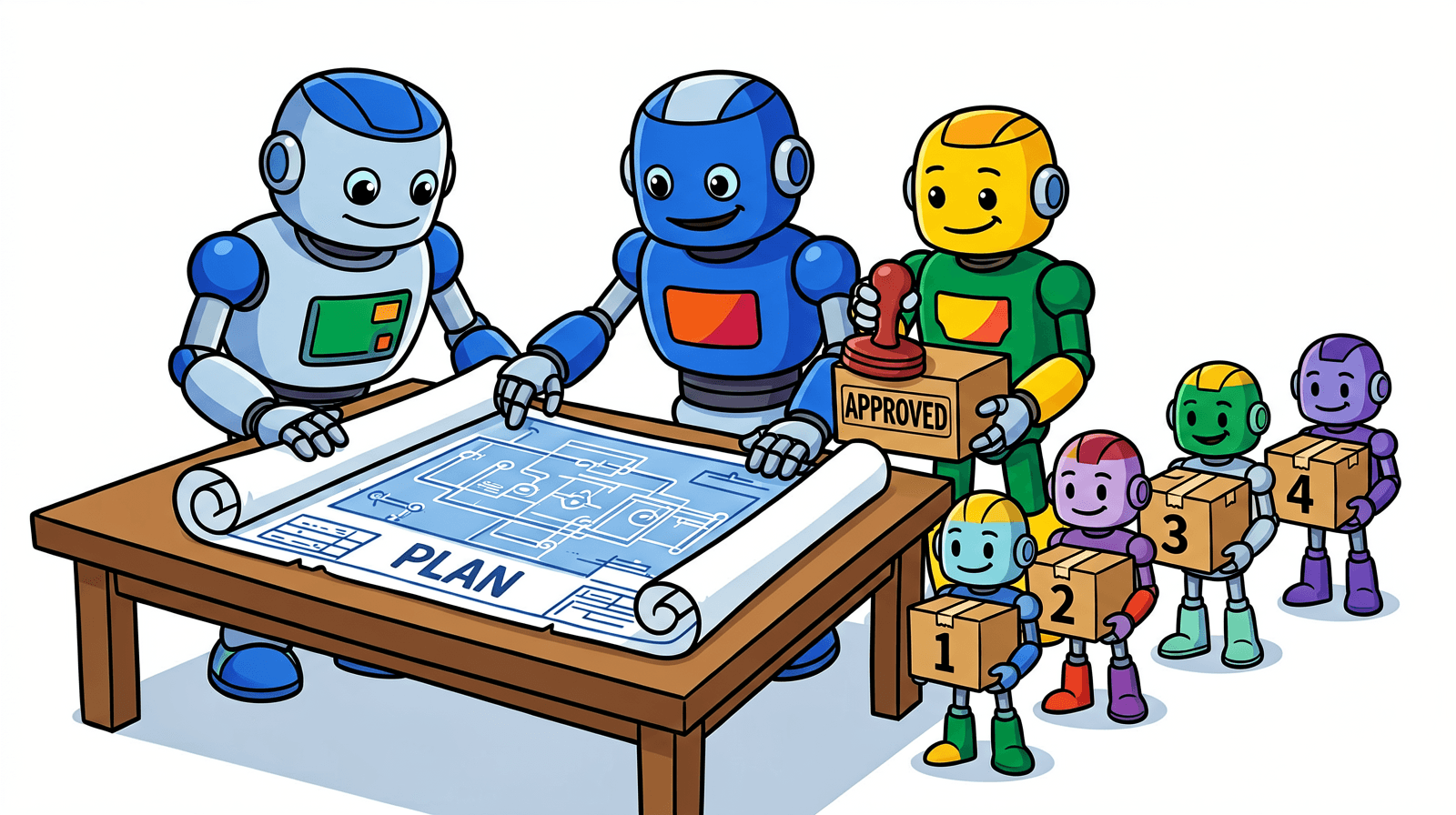
Atlassian calls this spec-driven development. In plain words: agree on what you're building before anyone builds it. Its August post quotes its own survey. 60% of engineering leaders said their teams are moving that way, and "fewer than 15% have a structured framework to actually do it."
So Planner asks before it writes. The October post lists the questions it's after: "scope, constraints, success criteria, and open decisions." The readiness check sits between the plan and the work items for the same reason. Atlassian says Planner "surfaces ambiguity upfront and tells you whether your spec is detailed enough for execution, with specific suggestions for what's missing."
Atlassian's posts don't say yet who approves the plan. The October post says Planner "Breaks an approved plan into sequenced Jira work items", and the August one says "the finalized plan". None of Atlassian's Planner posts describes an approval control, a role or a button. If your change process needs a named approver, ask about it in the early access program. Don't assume it's there.
Rovo Work: the plan-first mode in Rovo Chat
Rovo Work is announced in exactly one Team '26 Europe post, the 6 October one about the Atlassian platform. The definition is short, so here it is in full: "Work is a new mode in Rovo Chat that handles complex, multi-step tasks with human oversight to review and approve. You start with a goal, it proposes a plan, you shape it, and it executes across Jira, Confluence, and your connected tools. A task can run for hours, looping until it finds the right tools, teaches itself new ones, runs scripts, and completes the ask, all in a secure sandbox your admins govern."
The waitlist page gives examples of what you'd ask it for: "a cross‑project report, a competitive brief, or a project plan". A project plan is one possible output. Mostly, though, Rovo Work is a general worker that plans first, and Planner is the one built around Jira.
This next bit confused me for a while. The waitlist lives at two addresses, /software/rovo/max-waitlist and /software/rovo/work-waitlist. Both serve the same page. Its browser title is "Complex tasks, meet Max mode" and the heading on the page says "Complex tasks, meet Work mode". Its first sentence starts "Work mode is Rovo's new reasoning mode". Swap "Work" for "Max" and it's word for word the sentence in Atlassian's support doc for Max mode in Rovo Desktop. Max was announced on 6 May as "Coming soon in early access", and that announcement already promised "the plan to review and approve". We found no Atlassian page saying Max is now called Work, so treat this as a strong guess.
One more thing to know about cost, as a practical note only. Atlassian's Rovo pricing page lists "Work mode in Rovo Chat" among Premium AI interactions with "Variable pricing per billable event", while basic interactions are 10 credits each. In our Think deeper credits test a single message cost anything from 10 to 182 credits. A task that "can run for hours" is worth watching once it reaches you.
Rovo Work Item Planner, Jira Planner and Rovo Work: which is which
There are three names here that sound alike, plus a fourth that admins already know, so here they are side by side.
Name | What it is | Where you meet it | Status (2 November 2026) |
|---|---|---|---|
Work item Planner | An out-of-the-box Rovo agent that breaks epics or pages into smaller tasks | Rovo agents, in Jira or Chat | Part of Rovo's built-in agents today |
Jira Planner (Planner) | Spec-driven planning: questions, a Confluence live doc plan, a readiness check, then sequenced work items | Jira, with Confluence and the Teamwork Graph | Early access via waitlist, onboarded in waves; "private early access" since 7 October |
Rovo Work (Work mode) | A Rovo Chat mode that plans, then runs multi-step tasks that can run for hours in an admin-governed sandbox | Rovo Chat | Announced 6 October, waitlist open, no status label or support doc |
Plans (Advanced Roadmaps) | Jira's timeline planning across teams. Atlassian's weekly changelog listed a Rovo "Suggest child work items" action as rolling out from May to early August, then dropped it without saying why | Jira Premium and Enterprise | Existing feature; we found no support doc for the Rovo suggestion action |
You can try the Work item Planner agent right now. Its use-case page suggests prompts like "Break down my epic into subtasks." and "Turn this page into a list of tasks." Atlassian's descriptions of it don't mention a Confluence plan or a readiness check, and that's the main difference from Jira Planner.
Rovo Chat planned our Jira project before acting, and found 79 empty descriptions
On our test site the Rovo Chat reasoning menu, on the night of 1 November, had three options: Let Rovo decide, Quick answers and Think deeper. No Work mode, no Max. (On 8 October, when we wrote up the Team '26 Europe announcements, the menu also had Deep Research. It's not in that menu any more on our site.)
So we used Think deeper. Atlassian describes it as Rovo spending "more time analyzing and planning before responding". The project was LZPT, the Jira project we use as a test bed for one of our own apps. We sent this prompt from Mihai's admin account: "Make a plan to get the LZPT project ready for a release audit next month. Show me the plan first as numbered steps with an owner and order for each, and suggest the Jira work items it would create, but do not create anything yet."
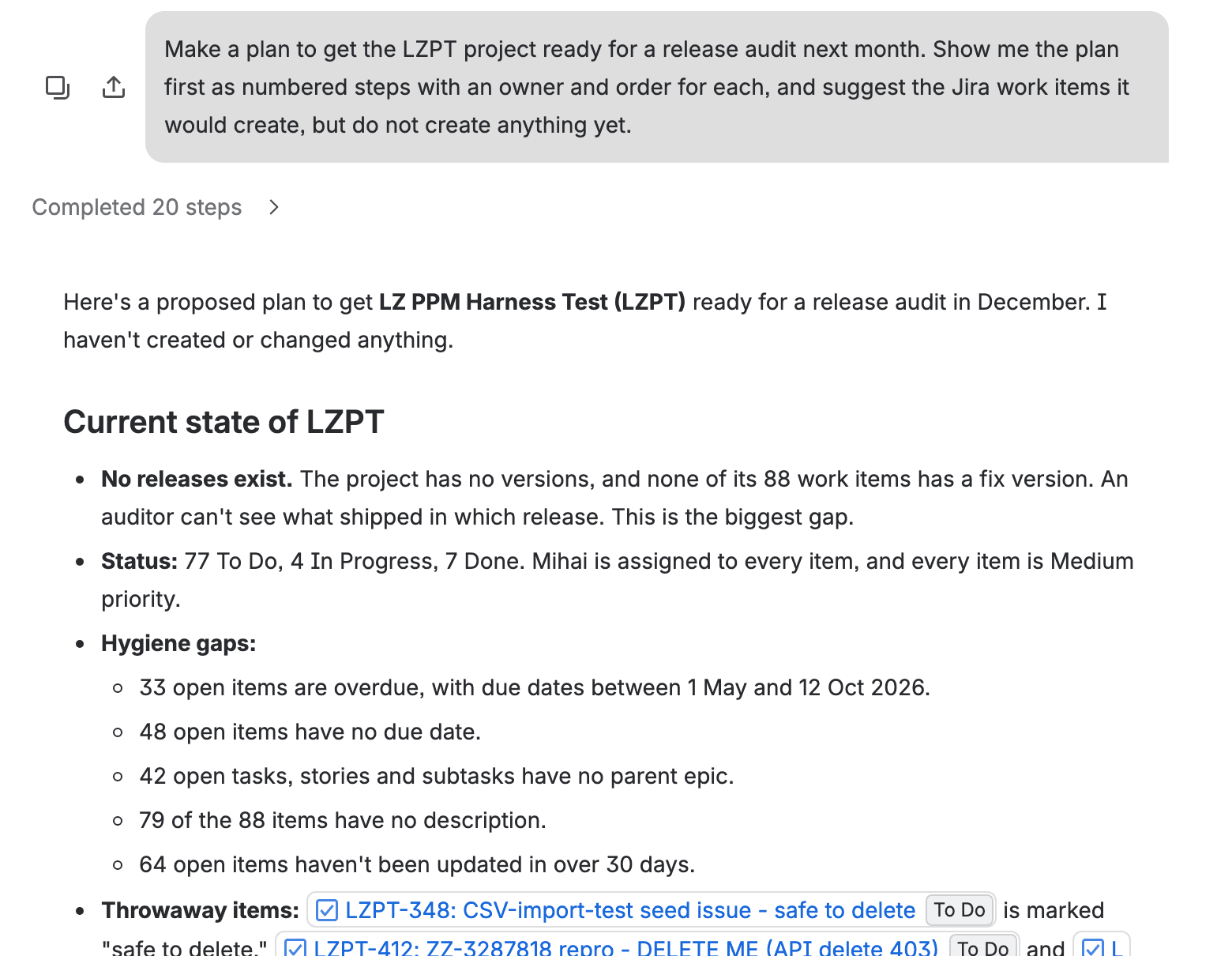
It finished in 130 seconds. "Completed 20 steps" sat above the answer. The first line was reassuring: "I haven't created or changed anything." Then, before any plan, it described the project. These are Rovo's counts, and we didn't re-run them in JQL.
None of the 88 work items has a fix version, and the project has no versions at all ("This is the biggest gap"). Every item is Medium priority and assigned to Mihai. 33 open items are overdue, with due dates between 1 May and 12 October 2026. Another 48 have no due date. 42 have no parent epic and 64 haven't been updated in over 30 days. And almost all of them, 79 of 88, have no description.
It also spotted our deliberate test data (circular dependencies, and an item whose start date is after its due date, in epics E1 to E6). And it found the throwaway items, one of them with "safe to delete" in its title.
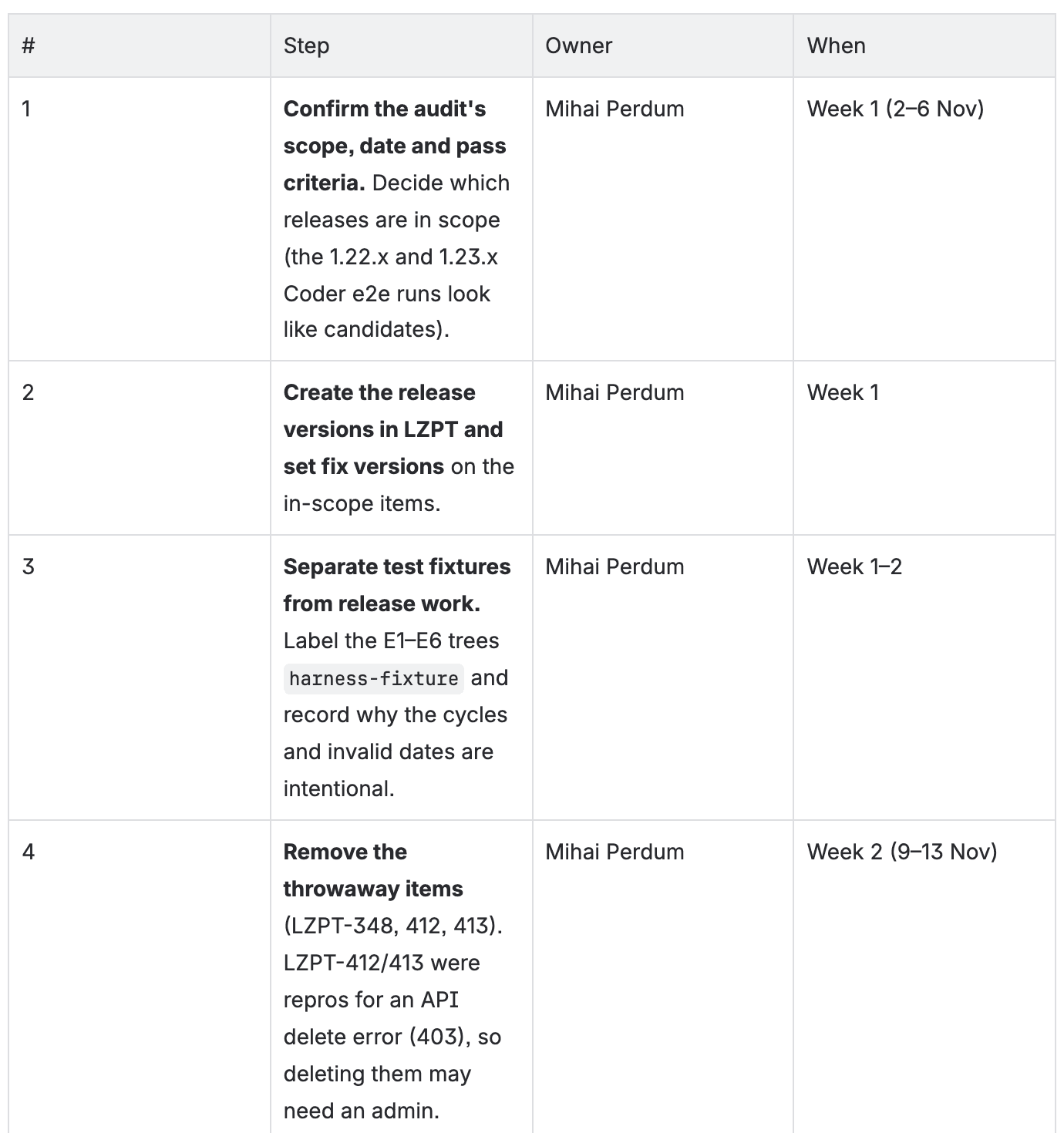
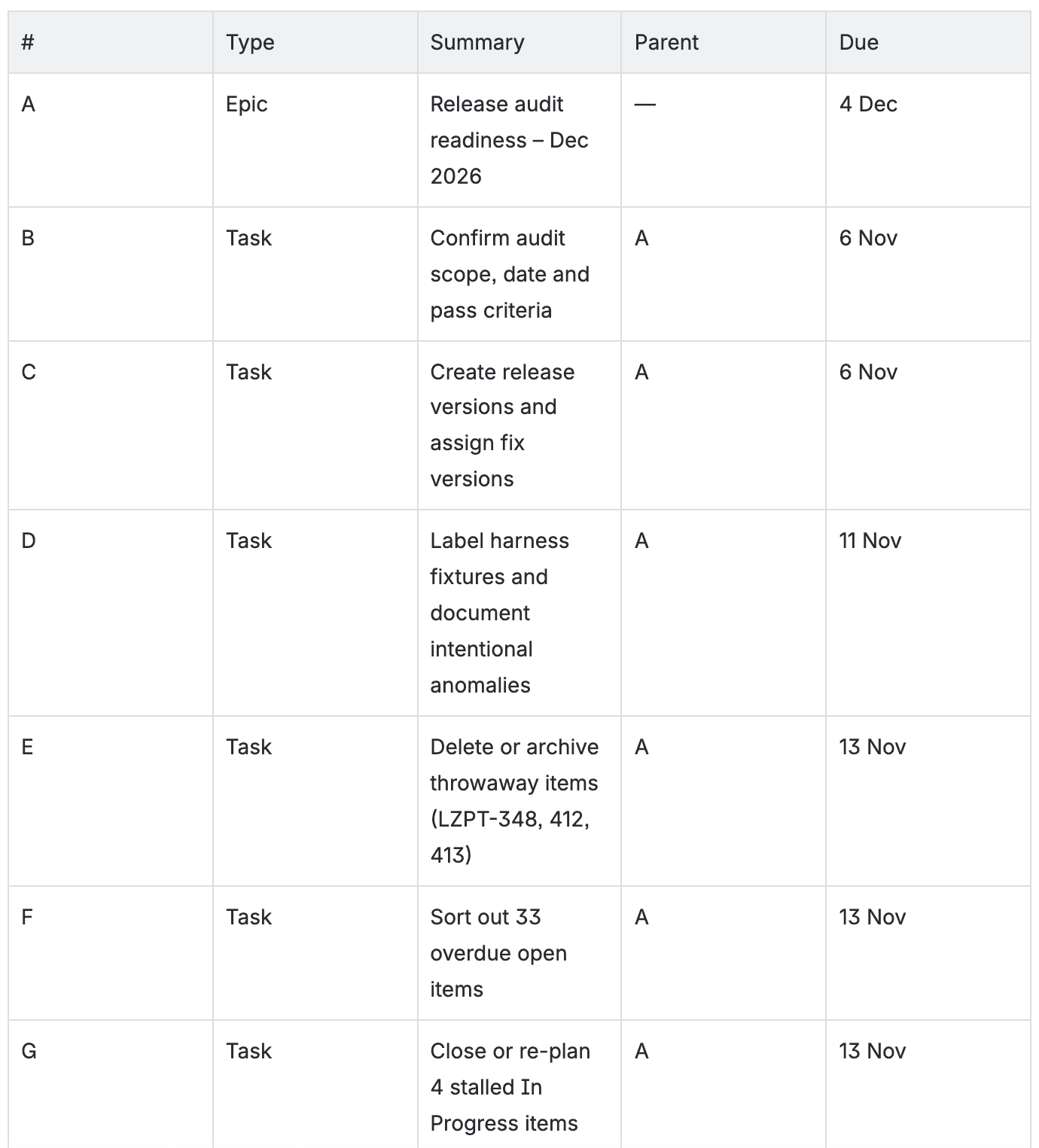
The plan had 10 steps over five weeks, from confirming the audit's scope (2 to 6 November) to a freeze in the week of 30 November. Step 8 was the evidence pack: release notes in Confluence, a saved "audit scope" filter and a dashboard. Step 9 suggested me as the pre-audit reviewer. Then came the work items it would create. One epic, "Release audit readiness – Dec 2026", due 4 December. Under it, 10 tasks due between 6 November and 4 December.
And then it stopped. I liked that. "Before I create anything, I need two answers from you", it wrote. The first was the audit date: "I assumed early December, so every due date above is a guess." The second was whether I should really be the reviewer, since "Gabriela isn't currently assigned to anything in LZPT." It also noticed that LZPT's description calls it a test harness, "Safe to delete". A real audit, it said, might be better off in a dedicated release project. Fair point. We didn't click create, because LZPT is our test bed and we want it messy.
So how close is this to Planner? On the order of things, closer than I expected: it looked first, proposed, asked, and only then offered to create. It's missing two things Planner promises, though. The plan lives in the chat, where your team can't comment on it the way they would on a Confluence live doc. And there's no readiness check, only Rovo's own note that the dates are guesses. This was one run on one project with one prompt, so please read it as a demo. It's not a benchmark. We didn't measure its credits either.
Jira Planner and agents: how an approved plan hands work to people and coding agents
Atlassian is clear that the work items Planner creates are meant for both humans and agents. The August post says that after the plan becomes work items, "agent orchestration takes over, picking up exactly where planning left off." The October post lists Planner next to agent loops and AI Review. All three (agent loops turn backlog items into pull requests, AI Review reviews code) share one availability line: "available in private early access."
What does an agent picking up a Jira work item look like today? Rovo agents can already be assigned work items, mentioned in a comment, triggered by a workflow transition or a board column, and that experience is "currently in beta". In automation they can run without anyone confirming each action, but the "Let this agent take actions" toggle is off by default, including on existing rules. In interactive use, Atlassian's best-practice page says "work items won't be updated, pages won't be edited, and emails won't be sent until a human approves them."
There are known gaps on today's path too. A public Atlassian ticket, ROVO-704, describes an agent that creates epics and stories but "fails to create Tasks/Sub-tasks on the first attempt". The reason given is that the bulk create API can't create sub-tasks in the same call as their parent stories. It has 6 votes. And a Community thread with 2,335 views reports agent-created items coming out with an empty description unless you open "Edit Detail". Planner promises acceptance criteria on every item. I'd like to see whether it gets past those gaps.
Early access status: who can use Jira Planner and Rovo Work today (only the waitlist)
For Planner, only teams Atlassian has onboarded from its waitlist. For Rovo Work, there's a waitlist, and we couldn't find anyone who says they have it yet.
For Jira Planner, the 4 September Jira release note says it "is currently available in Early Access for eligible Jira Cloud customers. You will need Rovo enabled, Teamwork Graph connected, and Confluence available on the same site." Atlassian is "onboarding teams in waves". The waitlist sits on Atlassian's Jira page for new AI development features, with four other programs. The Community announcement from August has 1,231 views and 3 comments. Two of them say "very informative" and "Great", and the third has been deleted, so there's very little public feedback to go on.
Rovo Work's waitlist form asks what you'd use it for, with six choices from research and analysis to work management.
What I couldn't find for either one: a plan tier requirement, a price for Planner, a date for general availability, or a single support article. Atlassian's beta switch for Rovo is on by default (you'll find it under AI and Rovo in Atlassian Administration). Atlassian also warns that "even if you've disabled beta features for your organization, some early access experiences may still be accessible." So don't count on that switch to keep an early access feature away from your users.
How to get ready for Atlassian's AI planner: Teamwork Graph, Confluence and admin controls
This is what I'd do this month, in this order. Step 1 is Atlassian's stated requirement. Steps 2 and 3 follow from how Atlassian says Planner works, though it doesn't list them as requirements. Step 4 is my opinion from our run, and steps 5 to 7 are my suggestions based on Atlassian's docs.
- Check the three prerequisites. Rovo enabled, Teamwork Graph connected, and Confluence on the same site as Jira. Not sure what the Teamwork Graph links up on your site? Our Teamwork Graph explainer shows what it connects and what we saw with zero connectors.
- Switch on live docs where plans should land. Atlassian doesn't say Planner needs this per space, but plans are live docs, and live docs "can be turned on or off in any given space by admins." A new live doc is "immediately visible in the sidebar, and anyone with access to the space can see it". So pick a space whose audience is fine seeing a draft plan.
- Decide whether code is in scope. Planner reads code across repositories, and the October post names Code Context as one of its sources. Code Context is off by default, with one exception: when a paid Bitbucket workspace is connected to a Jira site with Rovo on, Atlassian turns it on automatically and indexes that workspace. The index is stored in the United States, and data residency isn't supported for it. If you use Bitbucket, check whether it's already on, and let whoever owns data residency in your company make the call.
- Give your work items descriptions and parents. This one is my opinion and you won't find it in Atlassian's docs. Rovo built its plan from what it found, and on LZPT that was mostly empty descriptions and open items with no parent epic. A planner that groups work by epic and writes acceptance criteria will only be as good as what it reads.
- Settle your work type hierarchy before you need it. Jira's default has three levels (epic, story, subtask), and Premium and Enterprise sites can add more. Atlassian's warning is blunt: changing the hierarchy "will break existing parent and child relationships" and "cannot be undone", and it applies to all company-managed spaces. Do that thinking now. The week Planner starts creating parent items is too late.
- Name who governs Rovo Work. Atlassian says the sandbox is one "your admins govern", but there's no doc on those controls yet. Agree internally who that admin is. Meanwhile, look at the agent controls you do have today. Agent creation is open to all users by default, and you can limit it to up to 10 groups. And if no agent account is set up, agents act as the person who triggered them.
- Try today's planning tools on one real project. In Jira, select Ask Rovo and type /create-work-items followed by what you want. Rovo lists suggested items in the chat; select Preview to open them in a canvas, edit them, then select Create all. It needs beta AI features on and it's rolling out gradually. In the list view, "Break down with Rovo" (also still rolling out) suggests child items for a parent. Or do what we did: ask Rovo Chat for a plan first and the items second.

So should you join the waitlist?
If you run Jira for software teams who already plan big features in Confluence, yes, join the Jira Planner waitlist. While you wait, do steps 1 to 3 on your site and steps 4 and 5 on one project. Anyone with access to the space can see the plans it writes, and people and agents will pick up the items it creates. A tidy project probably decides whether you edit that first plan or throw it away.
If your interest is Rovo Work, join that waitlist too, but sort out step 6 first. Your admins will want a say in a task that can run for hours in a sandbox and write to Jira and Confluence. Atlassian hasn't published how admins will govern it yet.
Have you got into either early access program yet? I'd love to hear what Planner asked you before it wrote its first plan, or whether Rovo Work actually showed up in your Rovo Chat menu. Tell me on the Atlassian Community or at gabriela@leanzero.net :)
Comments
0Add a comment