
Who deleted a Jira issue (work item)? Find the user in the audit log

11 min readNovember 21, 2026
Key takeaways
- A delete made by an automation rule is logged under Automation for Jira, and a script on an API token under the token owner's name. So the name in the log belongs to whoever owns the credentials.
- Moving a space with 15 work items to trash wrote 1 audit entry, and deleting it for good wrote "Project deleted". Neither wrote an entry for any of the 15 work items.
- The site audit log keeps entries for 1, 3 or 6 months, the only choices in its settings. Our site was on 3 months, so its oldest entry was from 24 August 2026.
- A comment and an attachment we deleted on 21 November 2026 never reached the site audit log. Both showed in the work item's History tab, which goes when the work item is deleted.
- Our Jira admin account got 403 on 3 delete calls in a new space until we added it to the space's Administrators role. Delete work items is a space permission, and Jira admin doesn't include it.
To see who deleted a Jira issue in Jira Cloud (Atlassian now calls issues "work items" and projects "spaces"), open Settings > System > Audit log and type the work item key, or "Deleted Jira issue", in the search box. The entry names the user and the time. You need the Administer Jira global permission, and at least one of your Jira apps has to be on a paid plan. I'll use Atlassian's new words from here on.
That entry is fairly new in Cloud. Atlassian closed the request for it, JRACLOUD-59371, on 16 February 2025, after nine years and 746 votes. Before that, Community answers for Cloud said no, correctly at the time. A Community Champion wrote in January 2024, in the thread Can I view a deleted issue and see who did it in Jira Software?, that "Cloud doesn't log the Jira issue delete". Plenty of those older answers still rank, which is why the question keeps coming back.
So on 21 November 2026 we ran a test on our own test site. We created 23 work items in a throwaway space and deleted 8 of them through five different routes: the work item menu, the REST API, a parent with its sub-task, a bulk call and an automation rule. All 8 showed up in the site audit log. Then we moved the space, with its last 15 work items, to trash and restored it. They all came back.
The log answers who and when. It can't tell you what the work item said, because it keeps only the key, and it can't bring the work item back. It also forgets. Six months is the most it keeps.
What we found: all 8 deletes logged, with the key only
- All 8 work items we deleted through the five routes showed up in the site audit log within a few seconds. The automation delete is logged under "Automation for Jira", so the log doesn't say whose rule it was.
- Each entry holds the work item key and nothing else about the work item: no summary, no space name, no fields.
- Deleting a parent with a sub-task wrote two entries, and moving a whole space to trash wrote one entry for the space and none for its 15 work items. Deleting that space for good added "Project deleted", still with no entry per work item.
- Retention on the site log is 1, 3 or 6 months, and Jira's own settings go no higher.
- Deleted comments and attachments, and archiving, never reached the site audit log. The work item's own history had them.
- In a space created through the REST API, our Jira admin account got "403" on its deletes until we added it to the space's Administrators role.
Find deleted issues in the Jira Cloud audit log, step by step
Before you start. Role: a Jira admin (the Administer Jira global permission). Plan: any paid Jira Cloud plan; the log isn't there if every Jira app on the site is on Free. This is Jira Cloud; the Data Center route is further down. When you're done you'll have the name of the person or app that deleted the work item and the minute it happened.
- In Jira, select the Settings cog at the top right, then System. The System settings page opens.
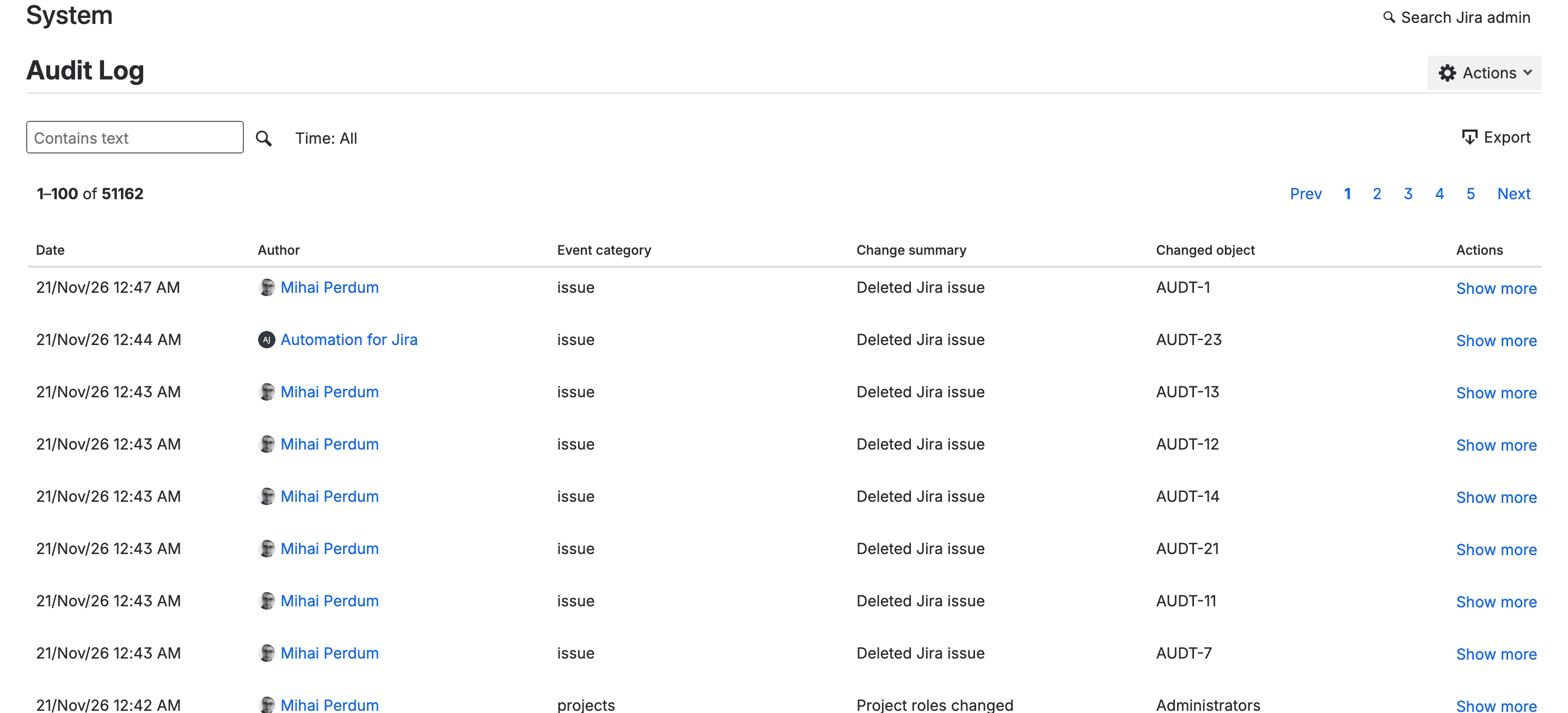
- In the left menu, select Audit log. A table of audit events opens, newest first.
- In the Contains text box, type the work item key you're missing (for example, AUDT-11). If you don't know the key, type
Deleted Jira issueinstead. - Press Enter. The table now lists only the matching entries.
- Read the row: Author is who deleted it, Date is when and Changed object is the key.
- Optional: select Show more on the row to see the rest of the entry.
You should see a row with "Deleted Jira issue" under Change summary and the key under Changed object. If you see nothing, check the date against your retention setting (it's further down): an entry older than that is gone.
You can get the same records from the REST API with GET /rest/api/3/auditing/record and the same Administer Jira permission, which is handy if you want them in a spreadsheet or a ticket. A delete record from our test held an id, the summary "Deleted Jira issue", the category "issue", the author's account ID and the time. Its eventSource was empty. The only part about the work item was objectItem: the key and the type ISSUE_DELETE.
Which deletions the audit log records: one at a time, bulk, automation and API
Atlassian's Data Center article warns that some of its methods only catch deletes made with the Delete button, and it says nothing about Cloud paths. So we tried each path in our throwaway space, AUDT, and read the log after each delete.
How it was deleted | Work items | In the audit log? | Author shown |
|---|---|---|---|
Work item menu, ••• then Delete | AUDT-1 | Yes, 0.3 seconds later | The person who clicked |
REST API with an API token, one work item | AUDT-7 | Yes, same second | The token's owner |
REST API, a parent and its sub-task | AUDT-11, AUDT-21 | Yes, two entries | The token's owner |
REST bulk delete endpoint, three at once | AUDT-12, 13, 14 | Yes, one entry each | The token's owner |
Automation rule with the Delete work item action | AUDT-23 | Yes, 3 seconds after we created the work item that triggered the rule | Automation for Jira |
Whole space moved to trash | the 15 left in AUDT | One entry, "Project marked as deleted" | The person who did it |
Space deleted for good, after restoring it | the same 15 | "Project deleted" and "Board deleted", none per work item | The person who did it |
An API token acts as the person who created it, so a script running on someone's token shows that person's name. If your team runs a script on one admin's token, the script's deletions look like that admin's.
For the automation row you need a second step. "Automation for Jira" tells you a rule did it, but not which rule or who built it. You'd go to the space's automation settings (or global automation, for a rule that runs across spaces) and read each rule's audit log for that minute. We didn't do that part in this test.
We used the REST bulk endpoint for the bulk test and not the Bulk change screen in Jira, so that one path is the API version.
On Premium, the delete dialog offers Archive next to Delete
On our Premium site, the delete dialog asks "Delete or archive AUDT-1?", says "Deleting is irreversible. It permanently removes the work item, comments and attachments", and won't enable the Delete button until you type the word "delete".
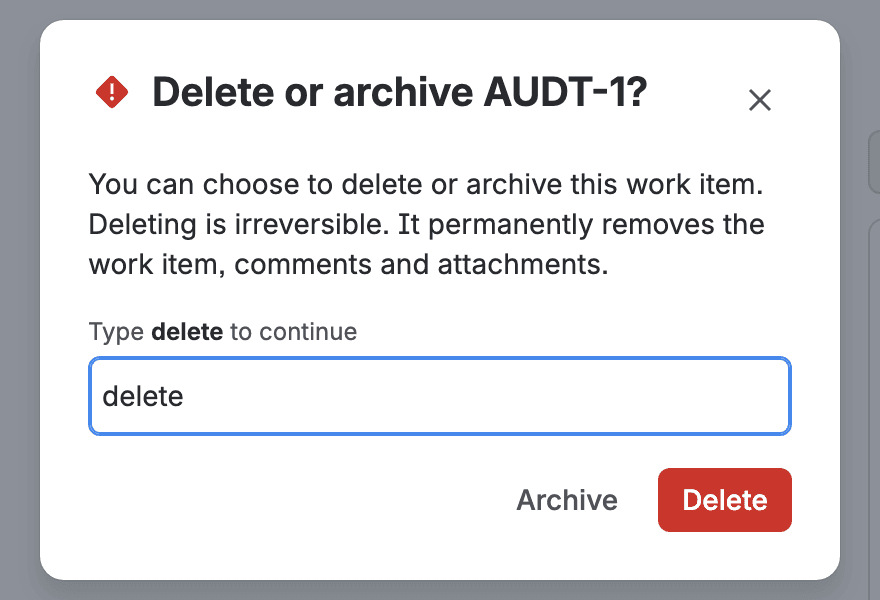
Archiving hides the work item from the space but keeps it, so you can restore it later from the space's list of archived work items if someone changes their mind. Atlassian's product manager pointed people to it in the JRACLOUD-59371 thread, as a Premium and Enterprise feature. Archiving doesn't appear in the site audit log, though: we archived AUDT-15 and restored it four seconds later, and the log had nothing for either step. The work item's change history, which we read through the REST API, recorded both.
The site audit log or the organization audit log: which one you have
There are two audit logs, and a lot of the confusion online comes from mixing them up.
The site audit log is the one above: Jira settings, any paid plan, Jira admins. Atlassian's page Audit activities in Jira says it "will show a deletion event, including the user who performed the deletion and the date and time". It also says it "isn't intended to record all activity in Jira".
The organization audit log lives in Atlassian Administration (admin.atlassian.com) under Insights, for organization admins. Atlassian's top search result, How to find which user deleted a Jira issue, points Cloud readers only there and says "Atlassian Guard Premium or Cloud Enterprise licenses may be required". That article is marked Data Center only, and it doesn't cover the site log.
Atlassian's own pages disagree about which plans see Jira user activity, such as "Deleted Jira issue", in the organization log. The audit log activities page gives the Jira "App user log" to Cloud Enterprise and Guard Premium only. The Guard plan availability page ticks Guard Standard for "Audit logs for user activities", though. Guard Standard is listed at $4.35 per user per month and Premium at $8.55 on Atlassian's Guard pricing page (the 100-user figures). If you're on Guard Standard, open the organization log and search for a key you know was deleted before you rely on it. We didn't read our own organization log for this test.
For the question "who deleted this work item", I think the site log is enough, and paid sites already have it. You'd probably want the organization log only if you need a year of history or one log across Jira and Confluence.
Jira Cloud audit log retention: how long the deletion record stays
Under Audit log > Actions > Audit Log Settings, the Retention period list offers exactly three choices: 1 month, 3 months and 6 months. You pick one and select Save. Our site was on 3 months, and the oldest entry we could read on 21 November was from 24 August 2026. Atlassian's page only says "e.g. 6 months", so I can't tell you whether 3 months is the default or a value someone on our side picked earlier.
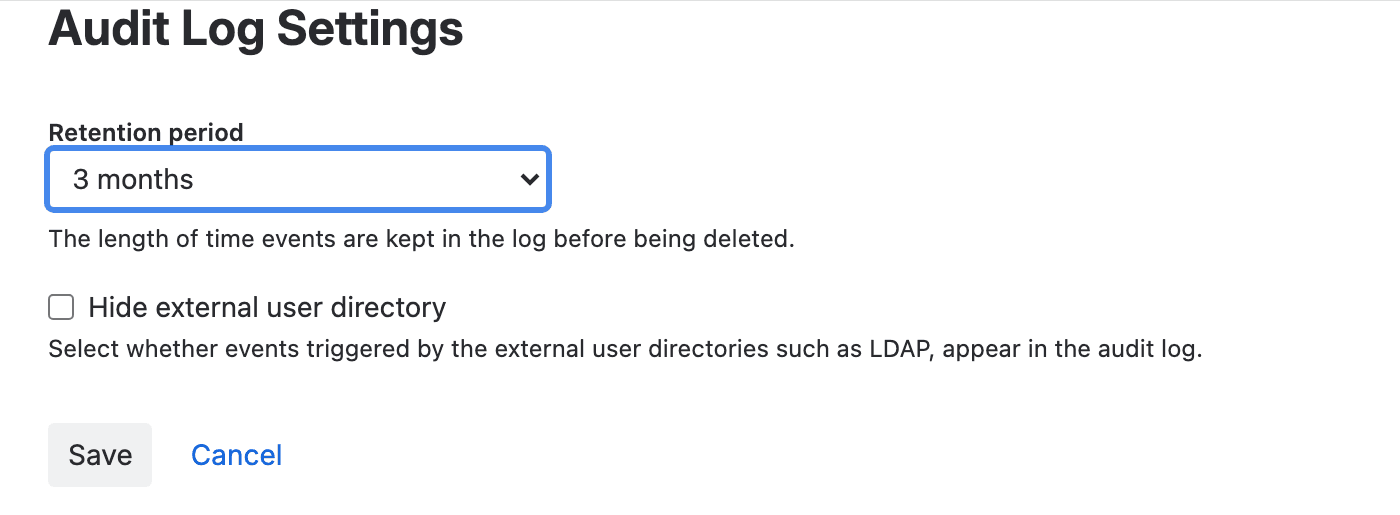
Six months is the ceiling, and the request to raise it, JRACLOUD-68267, has 233 votes and the status Gathering Interest. If an auditor asks for more than 6 months of evidence, you have two native ways to keep it. First, export the log every month. The Export button saves up to 100,000 events as a CSV file; past that, it keeps the newest. It also ignores any filter you typed.
Second, there's the organization audit log with Guard. Atlassian says that from 1 October 2026 it keeps 365 days of activity. Its CSV export is capped at 10,000 activities from the past 180 days, though.
Once an entry passes the window it's gone for good. For the organization log, Atlassian adds that upgrading your plan later "doesn't recover events from before you upgraded".
Comments and attachments: look in the work item's History, not the audit log
The Jira site audit log doesn't record a deleted comment or a deleted attachment, and Atlassian's category table for it has no row for either. (In service spaces, Atlassian says work item and attachment activity is also shared with the Jira Service Management audit log, in beta since October 2026, under Settings > Jira Service Management > Audit log. We didn't check it.) On 21 November we added a comment to AUDT-9 and deleted it three seconds later. On AUDT-10 we did the same with a small text file. Nothing in the audit log. The History tab under Activity on each work item had both, with the person and the minute.
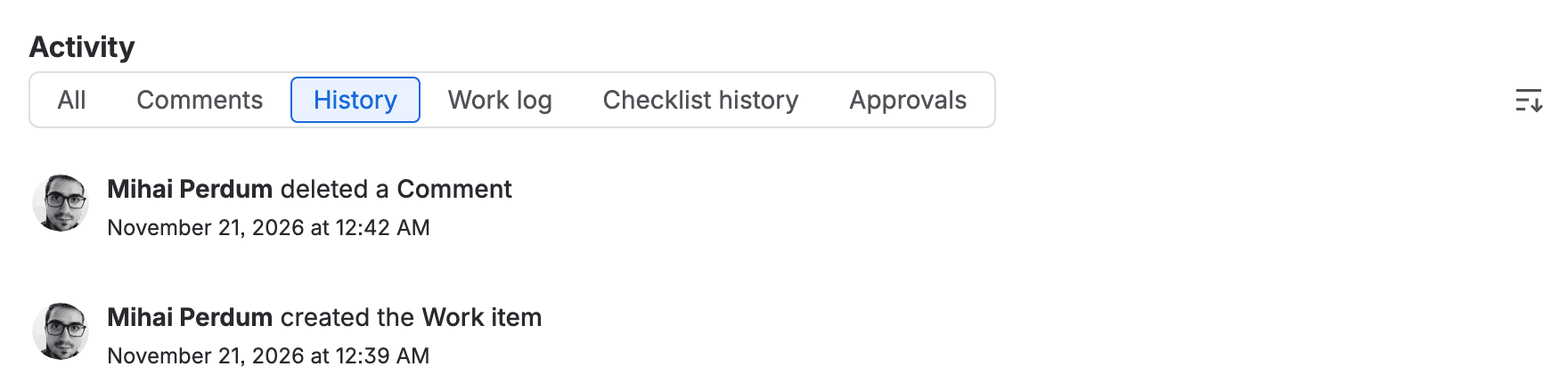
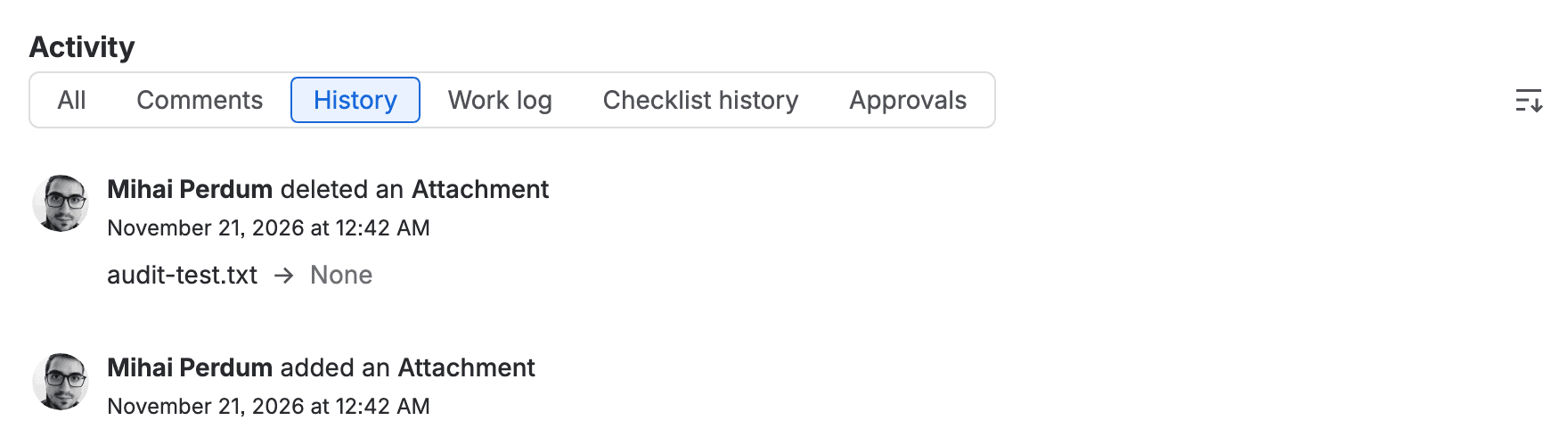
This trail lives inside the work item. If someone deletes the whole work item, its History goes with it, along with every comment and attachment entry the History tab used to show you.
Can you restore a deleted Jira issue? Not without a backup
No. Atlassian's page says a deleted work item is "permanently removed from your Jira site" and "can't be recovered unless you have a backup or export from before the deletion". There's no recycle bin for single work items; the request for one, JRACLOUD-36415, has 722 votes and is Under Consideration.

Here's what you can get back.
A whole space, for 60 days. Moving a space to trash keeps it, with its work items, for that long. We trashed AUDT and restored it, and all 15 work items left in it came back. The audit log recorded "Project marked as deleted" and "Deleted project restored", each with the space name.
An archived work item. You restore it from Archived work items.
Anything in a backup. Atlassian Backup and Restore is a paid add-on for Premium and Enterprise plans billed annually. Atlassian's pricing page estimates $7,000 a year for Jira at 1,000 users. When it became generally available in February 2026, Atlassian's announcement described restoring "to an empty production site or sandbox". We don't have it on our test site, so we couldn't try pulling one work item back from it.
The audit log still helps with the backup route. Its key and time tell you which backup to open and which work item to look for.
How to check audit logs in Jira Data Center for deleted issues
Data Center has had this since Jira 8.8.0. Atlassian's Data Center article says to set Audit Logs > Settings > Coverage > End user activity to Advanced. From then on it records events such as "Issue deleted" and "Issue attachment deleted". It only works for deletions made after you change the setting. We run Cloud only, so this part comes from Atlassian's article and not from our test.
Stop the next deletion: the Delete work items permission
This one caught us out. Our test account is a Jira admin, so it can read the audit log. In the AUDT space we created through the REST API, it still got "403" on its first deletes, and the bulk call said "You do not have permission to delete the selected AUDT-14 issues."
Delete work items is a space permission. Being a Jira admin doesn't give it to you. AUDT used the permission scheme "Default software scheme", which grants Delete work items to two holders only: the space's Administrators role and the role apps use (atlassian-addons-project-access). Our admin wasn't in that role. We added it, and the deletes went through. Jira logged the role change too: "Project roles changed", Administrators, with the account added. So if someone adds themselves to a role and then deletes things, the log shows both steps.
Atlassian's work item permissions page also says that Delete work items removes the work item "including their associated data, even if the user doesn't have Delete all comments or Delete all attachments permissions".
What I'd change on your site
If you run a Jira Cloud site with more than a handful of people deleting things, this is what I'd do, in this order:
- Set Retention period to 6 months under Audit log > Actions > Audit Log Settings, and select Save. It costs nothing, and if you're on 3 months it doubles the window. I think that's the right value for pretty much any paid site.
- Look at who holds Delete work items in each permission scheme. Keep it on the space Administrators role and take it off broad groups. People who tidy up can archive instead (Premium and Enterprise), if their space permissions allow archiving.
- If you need evidence older than 6 months, export the audit log CSV once a month and keep the files. A scheduled call to
GET /rest/api/3/auditing/recorddoes the same job.
One more option, which we haven't measured. If you want the summary of what was deleted, look at Atlassian's own knowledge base article. It shows an automation rule with the Work item deleted trigger and a Log action that writes the key and {{initiator.displayName}}. You could add {{issue.summary}} to the message. Once usage billing starts on 3 December 2026, Atlassian's usage page counts the trigger as a step each time it runs and doesn't count the Log action. It also says runs that end with no actions performed cost nothing, and it doesn't say which way a Log-only run falls. We tried to create this rule through the Automation API on our site and got a server error twice, so we haven't measured it. Our measured guide to automation steps per rule shows how to read what a rule actually costs once it runs.
If you're weighing Guard for the longer organization log, our piece on what Atlassian's data security policies need Guard for covers the plan lines, and how many Jira administrators you need is the other half of the "who can delete" question.
Has the audit log ever settled a "where did my work items go" argument for you, or did it stop at the key? Tell me in the comments or on the Atlassian Community; I'm curious how many of you already had retention on 6 months.
Comments
0Add a comment