
Rovo MCP server pricing: what a tool call costs in Rovo credits

12 min readNovember 20, 2026
Key takeaways
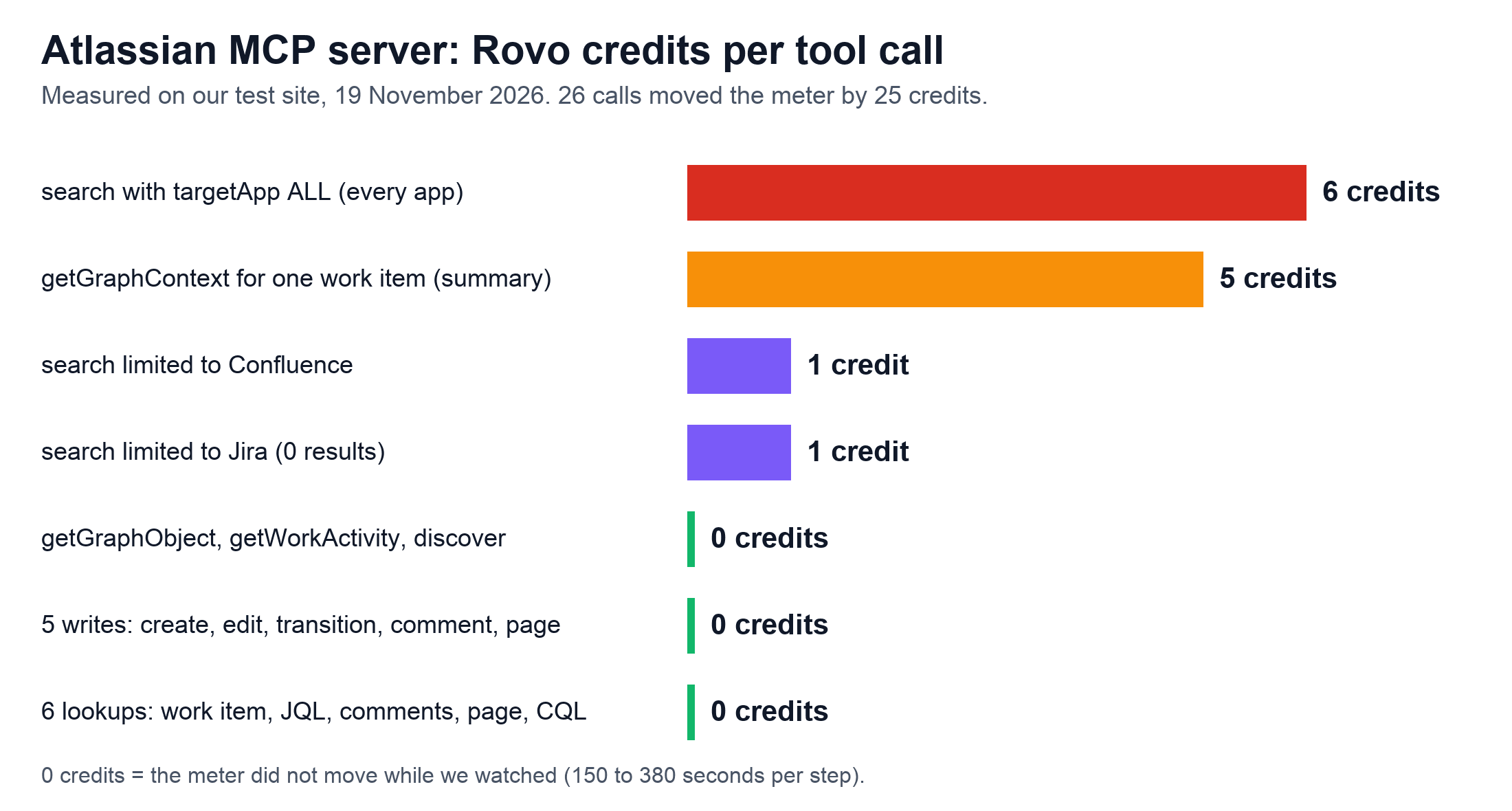
- We made 26 tool calls through the Atlassian MCP server on our test site on 19 November 2026. The Rovo credits meter went from 616 to 641, and 7 of the 26 calls account for all 25 credits.
- Six lookups and five writes in Jira and Confluence moved the meter by 0 credits. Reading a work item and running a JQL search were among the lookups, and creating a work item and a page among the writes.
- The same question cost 6 credits across all apps and 1 inside Jira alone, where it found nothing. A JQL or CQL search through the same server cost 0.
- The charges show up in Atlassian Administration under a feature named Teamwork Graph and under the person who made the call. No row on the meter's four tabs says MCP.
- From 3 December 2026 credits above your allowance cost $0.01 each. With 200 Jira Standard and 200 Confluence Standard seats you have 10,000 pooled credits a month, about 1,666 all-app searches.
On 16 June 2026 an answer was accepted on the Atlassian Community thread Atlasian Rovo Connector(Claude) - pricing and API call cost clarification. It said "there is no separate licence and no per-call charge from Atlassian for the MCP server itself". The thread has 3,721 views today. People are still asking, now that Atlassian has started pricing some of these calls. (MCP is Model Context Protocol, the standard an AI tool uses to call another product's functions. Each function it can call is a "tool".)
Here's where it stands on 20 November 2026. Connecting an AI tool like Claude, ChatGPT or Cursor to Jira and Confluence still costs nothing, and so does looking something up or changing it in one app. A search across all your apps is different. Rovo credits are the units Atlassian meters Rovo and Teamwork Graph usage in. On our test site on 19 November an all-app search used 6 of them each time. A search inside one app used 1, and a graph context call for one work item used 5. From 3 December 2026 every credit above your monthly allowance costs $0.01. Before then, open Usage, then Meters, then Rovo credits in Atlassian Administration. On the Features tab, look for a row named Teamwork Graph. Then check the pay-as-you-go limit on the Usage tab.
The accepted answer in that thread was right when it was written, and it saw this coming. It said the Teamwork Graph tools were "currently in beta and free". It also said the docs promised at least 1 Rovo credit per call once they left beta. A second thread, Does atlassian-rovo-mcp cost anything for using the mcp server, was asked and answered on that same 16 June: the server "uses Rovo Credits", and "over usage has no cost yet". Atlassian's How Rovo credits work page has changed since. Its latest edit is from 18 November. It now says "On December 3, 2026, pay-as-you-go billing takes effect for Rovo credits."
If you're the admin who has to say yes or no to this before 3 December, the rest of this page is our measurements and five things to check on your own site. You'll see two names for the product. Atlassian's support pages and the admin screen now say Atlassian MCP server, while the developer docs, the credits page and most people searching still say Rovo MCP server. It's the same server. I'll call it the Atlassian MCP server from here. This piece covers cost only; what the server can read and change is in our Atlassian MCP server permissions guide.
Prerequisites — check these before step 1.
Role: organization admin, so you can open Atlassian Administration at admin.atlassian.com. We ran every step as one. Product: Jira and Confluence Cloud. We tested Cloud only. Data Center isn't covered here. Plan: any paid Jira, Confluence, Service Collection or Teamwork Collection Cloud plan includes a Rovo credits allowance. Our test organization has Service Collection Premium with 4 users and Rovo turned on, and its meter shows an allowance of 7,105 credits. Atlassian's table gives Service Collection Premium 700 credits per user, which would be 2,800 for 4 users. We haven't traced why ours is higher, so read your own allowance on the Usage tab. An AI tool that can use MCP, for step 3 only. We give the Claude Code command because Atlassian documents it. About 20 minutes, most of it waiting for the meter.
When you're done you'll know what the MCP server has cost you so far and who used the credits. You'll also know where the charged tools can be blocked, and what your pay-as-you-go limit is.
What we found on 19 November 2026
- Eleven calls that read or changed one thing in one app cost 0 credits. Six were lookups, a JQL search among them, and five were writes.
- An all-app search, the
searchtool withtargetAppset toALL, cost 6 credits both times we asked the same question. The same tool limited to Confluence or Jira cost 1, even when it found nothing. - A graph context call on one Jira work item cost 5 credits when it ran alone. A batch of four graph calls with it in cost 5 as well.
- Of our 26 calls, 7 were charged, for 25 credits in total. The other 19 cost nothing.
- All 25 credits showed up in the admin meter under a feature called Teamwork Graph and under the user who made the calls. No row on the meter's four tabs says MCP.
Is the Rovo MCP server free? What Atlassian's docs say today
Connecting, lookups in one app and writes are free. What Atlassian labels Enriched is charged, apart from Enriched tools still in beta, which mostly aren't billed until they leave beta. Both lists sit in one row of the credits page, called Teamwork Graph Context. Teamwork Graph (TWG in Atlassian's docs) is its map of how your work and the people doing it connect across apps. We explained it in What is Atlassian Teamwork Graph?. Under Free that row lists "Installing Teamwork Graph CLI and Atlassian Rovo MCP" (the CLI is a command-line tool), "Write operations such as updating a Jira work item", and "Requesting single product context, such as looking up a Jira work item or Confluence page's content." That row is on Atlassian's credits page. On your admin meter the charges show up in a row named just Teamwork Graph.
Under Enriched it lists calls that "involve complex queries, cross-product traversals, and enriched context lookups", and it adds that they "encompass unified search through the Teamwork Graph CLI and Rovo MCP". Unified search is Atlassian's name for what I call an all-app search here. The price cell reads "Vast majority of enriched TWG API and tool calls are 1-10 Rovo credits per call". The Rovo licensing page goes further in its FAQ: "Typical prompts require multiple TWG API calls, consuming 10-25 Rovo credits total."
There's one more line on the supported tools page that surprised me: "Enriched tools consume Rovo credits even if Rovo or AI is turned off for your site", because, the page goes on, billing doesn't depend on AI being used. So turning Rovo off doesn't make these calls free.

Sean Bourke of the Atlassian Team answered this on 7 November 2026. In the thread COST MCP he wrote: "As a general principle, access to MCP and access to key and core product features do not consume any Rovo Credits." He also wrote that "There are additional features which may utilise Rovo Credits which are enriched but do not use generative AI." That matches our run. The 11 lookups and writes cost 0 credits. The 7 charged calls were searches and graph context calls.
Search is in beta, and it's charged
On the supported tools page, search is marked Beta and Enriched. Other beta tools there carry the note "Usage is not billed during beta", and search doesn't. The page also says "Some beta tools may consume credits while still in beta; see the tool’s description for details." The tool's own description, which the server sends to your AI tool, reads: "The utilisation of this tool may consume up to 10 Rovo Credits. If the user or organization does not have any Rovo Credits available, the tool call will fail." Our meter agreed. It moved by 1 or 6 credits on every search that ran.
Rovo MCP server cost per call: lookups, writes and all-app search
Every call below went to https://mcp.atlassian.com/v2/mcp, the endpoint Atlassian's setup page gives. We signed in as an organization admin through OAuth 2.1, the sign-in where you approve access in the browser. The lookups went as one batch and the writes as another. The four graph tools ran twice: once together, when the meter moved by 5, and once one at a time, when getGraphContext cost 5 and the other three 0. Every other call went alone. "Credits" is how far the organization's Rovo credits meter moved.
Group | Tool | What we asked for | Credits |
|---|---|---|---|
Lookups | getAccessibleAtlassianResources | the sites we can reach | 0 for the batch of 6 |
Lookups | getJiraIssue | one work item | 0 (in the batch) |
Lookups | searchJiraIssuesUsingJql | 10 newest work items of one space | 0 (in the batch) |
Lookups | listJiraIssueComments | comments of one work item | 0 (in the batch) |
Lookups | getConfluenceContent | one page, full content | 0 (in the batch) |
Lookups | searchConfluence | a CQL search, 25 results | 0 (in the batch) |
Writes | createJiraIssue | a new task | 0 for the batch of 5 |
Writes | editJiraIssue | summary and labels | 0 (in the batch) |
Writes | transitionJiraIssue | one transition | 0 (in the batch) |
Writes | addOrEditJiraIssueComment | one comment | 0 (in the batch) |
Writes | createConfluenceContent | a new page | 0 (in the batch) |
Search and graph | search, targetApp ALL | "payroll upgrade cutover risks", 10 results | 6, twice |
Search and graph | search, targetApp CONFLUENCE | "how do we handle third party risk reviews", 10 results | 1, twice |
Search and graph | search, targetApp JIRA | "payroll upgrade cutover risks", 0 results | 1 |
Search and graph | search with limit 1 | rejected: limit must be 10 to 30 | 0 |
Search and graph | getConfluenceContent, AI summary | a summary of one page | 0 |
Search and graph | getGraphContext | one work item, summary detail | 5 alone; the batch of four cost 5 |
Search and graph | getGraphObject | the same work item by its URL | 0 alone; also in the batch of four |
Search and graph | getWorkActivity (beta) | the signed-in user's last 7 days | 0 alone; also in the batch of four |
Search and graph | discover | "list Jira projects" | 0 alone; also in the batch of four |
JQL is Jira Query Language and CQL is Confluence Query Language, the search syntax each app has. Of the tools in the Search and graph rows, Atlassian's supported tools page marks search, the graph context tool and getWorkActivity as Enriched; getGraphObject, discover and getConfluenceContent aren't marked. Don't plan on 0 for getWorkActivity: its entry says "Usage is not billed during beta" and that pricing will be announced when it becomes generally available.
We watched the meter for six minutes after the lookups and six more after the writes. It stayed at 616.
I didn't expect a search that found nothing to cost a credit, but it did. The same question cost six times more across all apps than inside Jira alone. We don't know why. The 6 comes from one question asked twice, so please don't read it as a fixed price. And the AI summary of a page came back for 0 credits. I suspect Confluence had stored it already.

If you look these tools up, Atlassian's pages call the charged context tool getTeamworkGraphContext, and the server we called lists it as getGraphContext, with getGraphObject beside it. On the older endpoint, /v1/mcp, our API token listed four tools, and the graph ones there had the long names.
Every charged call ran with an OAuth sign-in, so we can't say a call made with an API token is charged the same. We called getGraphContext on one work item at summary detail, so 5 is one data point, and about ten tools were never called. The calls came from our own script, one tool call at a time, so we didn't count how many calls Claude makes for one prompt.
The five checks, in order
- 1
Read the Rovo credits meter and look for a Teamwork Graph row.
- 2
Open the Users tab to see who has used the most credits.
- 3
Connect an AI tool, only if you want to watch a charge arrive yourself.
- 4
Find the two toolsets that hold the charged tools.
- 5
Check your pay-as-you-go limit before 3 December 2026.
Step 1. Check the Rovo credits meter for a Teamwork Graph row
The Rovo credits meter in Atlassian Administration records MCP charges, and you can read it before anyone connects anything.
- In Atlassian Administration, select your organization if you have more than one, then select Usage, then Meters. The list of meters opens, with a line like "Rovo credits 616 of 7,105 credits".
- Select Rovo credits. It opens on a page with tabs.
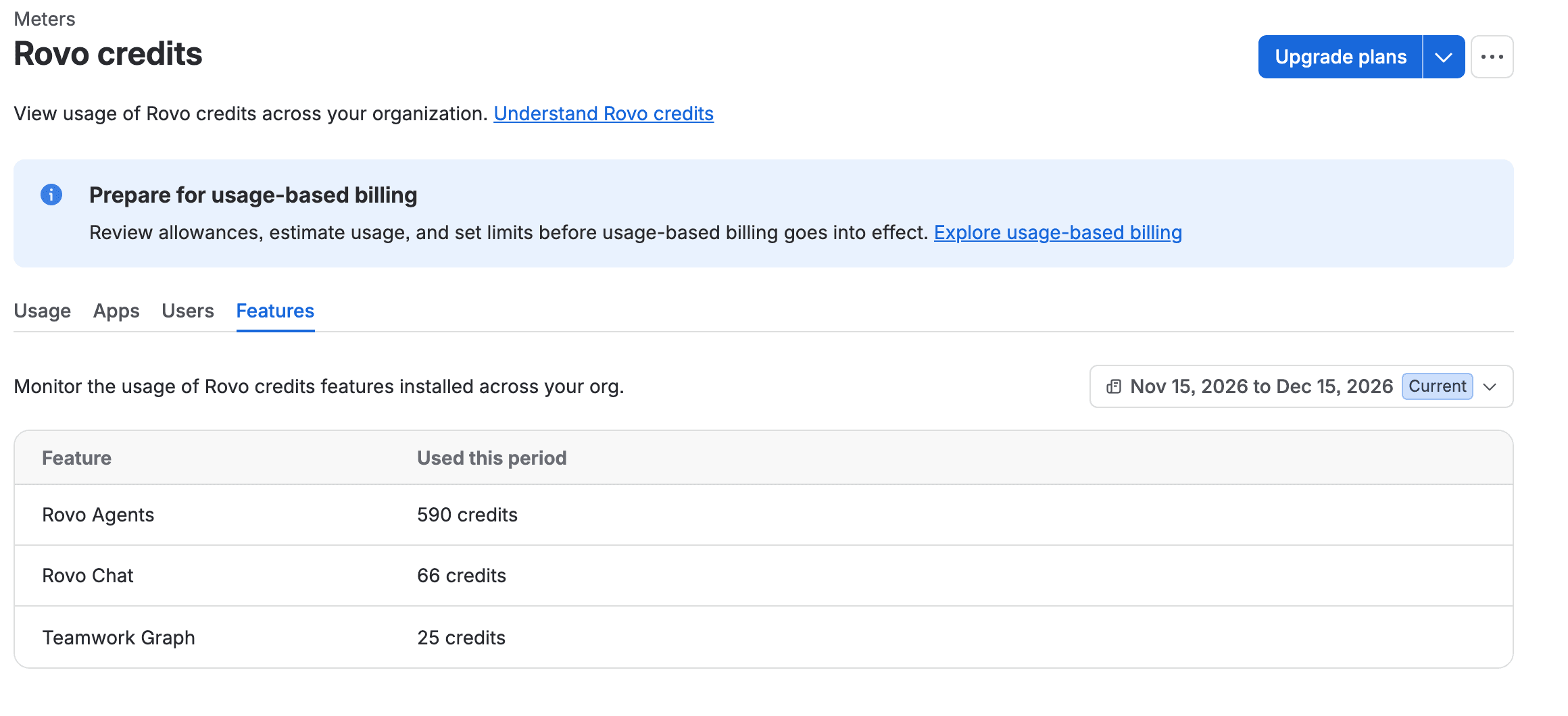
- Select the Features tab. You see one row per feature with its credits for the billing period.
- Look for a row named Teamwork Graph. On our organization every charged MCP call was counted in this row. Its number is what all-app searches and graph context calls have cost since the period started. We didn't run the Teamwork Graph command-line tool, so we can't say whether its calls land here too.
Check that it worked. You're on the Features tab and can read a credits number next to each feature. Before our run ours had two rows, Rovo Agents with 590 credits and Rovo Chat with 66. After it there was a third.
The path has moved since our older Rovo pieces. In October this screen was under Insights, then Platform usage. How to check Rovo credits usage for each user still describes the tabs correctly.
Step 2. See who used the credits on the Users tab
- On the same Rovo credits page, select the Users tab. You see one row per person with their credits for the period.
- Read the list, which on ours was ordered by credits used, highest first. The number per person covers all their Rovo use, so it tells you who to ask, not what they ran. A charged MCP call is added to the person who was signed in when it ran.
- Optional: select the Apps tab. It didn't change in our run. Don't expect MCP usage there.
- For more detail, select Export data. Atlassian's credits page says the file includes "feature, user, agent, timestamp, and number of credits consumed". Atlassian emails you a download link, and the dialog says exports "include up to 3 months of usage data or the first 1 million usage events".
Check that it worked. On our site the calling user went from 437 to 462 credits, the same 25 the Features tab gained. The export we took in October has columns for Date, App, Actor ID, Feature and Agent, and it already had a Teamwork Graph row at 0 credits. We haven't opened an export that holds MCP calls, so we can't tell you what else marks them in the file.
Step 3. Optional: connect Claude Code and watch a search reach the meter
You don't need this step to read your costs. Do it if you want to check a charge on your own site.
- In a terminal, run the command from Atlassian's setup page. Claude Code should print a line starting "Added HTTP MCP server".
1claude mcp add --transport http atlassian https://mcp.atlassian.com/v2/mcp- In Claude Code, run
/mcpto sign in, as Atlassian's page says. We signed in with a script, not through this prompt. - In the terminal, run
claude mcp listand look for the Atlassian line ending in "Connected". Connected means the server answered. It doesn't mean a tool will run: our entry with an API token header showed Connected with a token that couldn't run a single tool. - In Atlassian Administration, open Usage, then Meters, and note the Rovo credits number.
- Ask Claude to use the Atlassian
searchtool across all apps for a phrase from your own site. Look at which Atlassian tool it calls. If it'ssearchJiraIssuesUsingJqlorsearchConfluenceinstead, those cost us 0 credits and the meter won't move, so ask again and name thesearchtool. - Wait a minute and reload the meter. When our script called
search, the total moved 21 to 64 seconds later.
We ran items 1 and 3 on Claude Code 2.1.326, with our own server name and a token header. Our charged calls came from a script, so we haven't seen what a prompt typed into Claude costs.
Step 4. Find the two toolsets that hold the charged tools
The charged tools sit in two toolsets (Atlassian's tools page calls them groups). Per the supported tools page, search is in search_atlassian and the graph context tool is in read_teamwork_graph. The JQL and CQL search tools are in other toolsets, search_jira and search_confluence. They cost us nothing. An organization admin can block either charged toolset and Jira and Confluence lookups and writes keep working. Blocking read_teamwork_graph also blocks the free graph tools in it, because every tool follows its toolset.
- In Atlassian Administration, select Connectors, then Atlassian MCP server. The server's page opens with its tabs along the top.
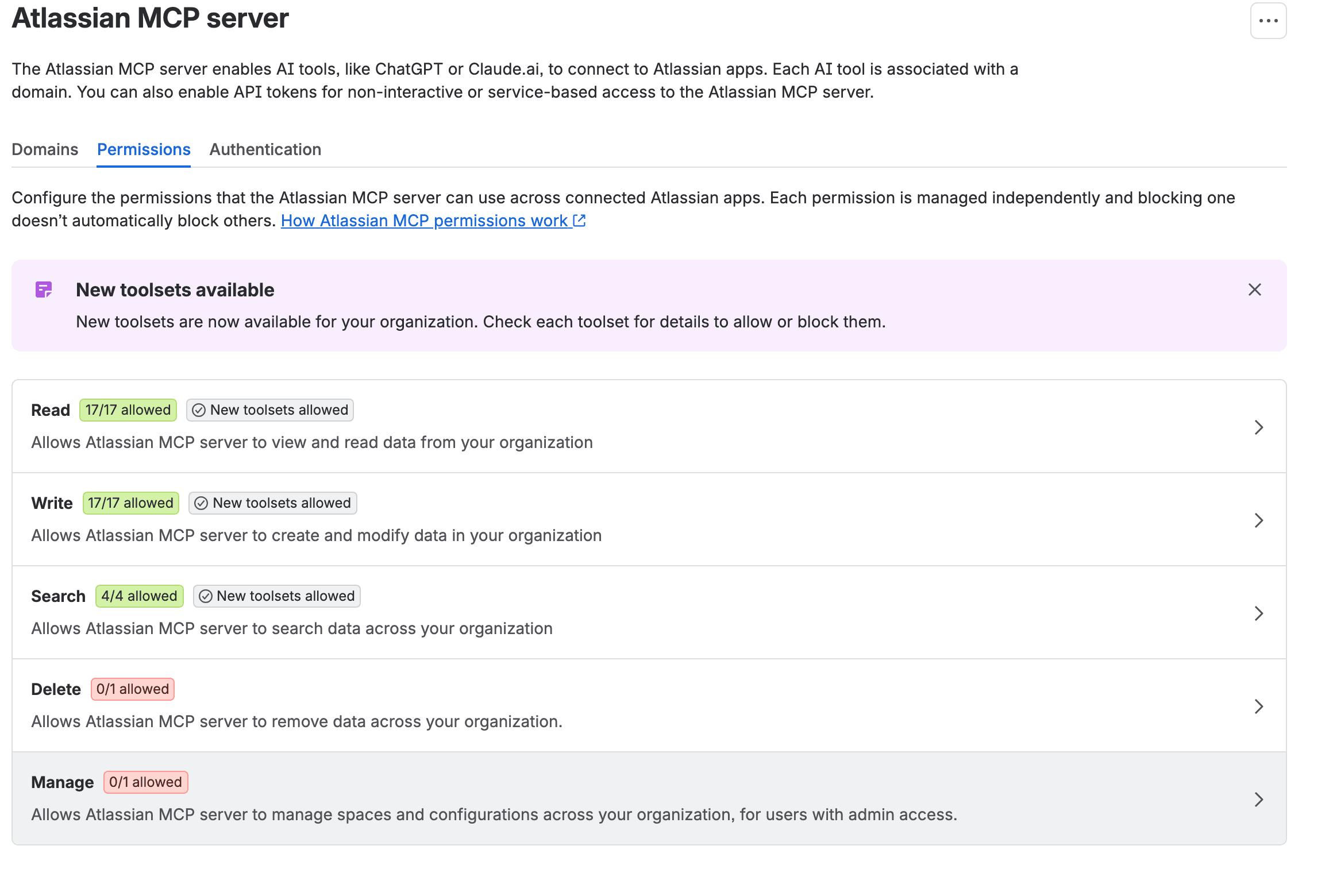
- Select Permissions. You see five rows, from Read to Manage, each with a count of allowed toolsets.
- Select Search to see the toolsets in it,
search_atlassianamong them. - Select Read to find
read_teamwork_graph.
Check that it worked. You can name the row each charged toolset sits in and whether it's allowed. On ours, Search showed 4/4 allowed. Read showed 17/17.
We didn't block anything in this run. The Atlassian MCP server permissions guide has the clicks for blocking a toolset and what a blocked user sees. Atlassian's permissions page says changes "take effect immediately — no restart or reconnection is required."
Step 5. Check your pay-as-you-go limit before 3 December 2026
Pay as you go is Atlassian's name for usage above your allowance (until recently the docs called it extra usage). The credits page says it's "enabled by default" and lists "$0.01 per Rovo credit, or $10 per 1,000 credits". When it's on, "Billing continues up to an admin-defined spending cap".
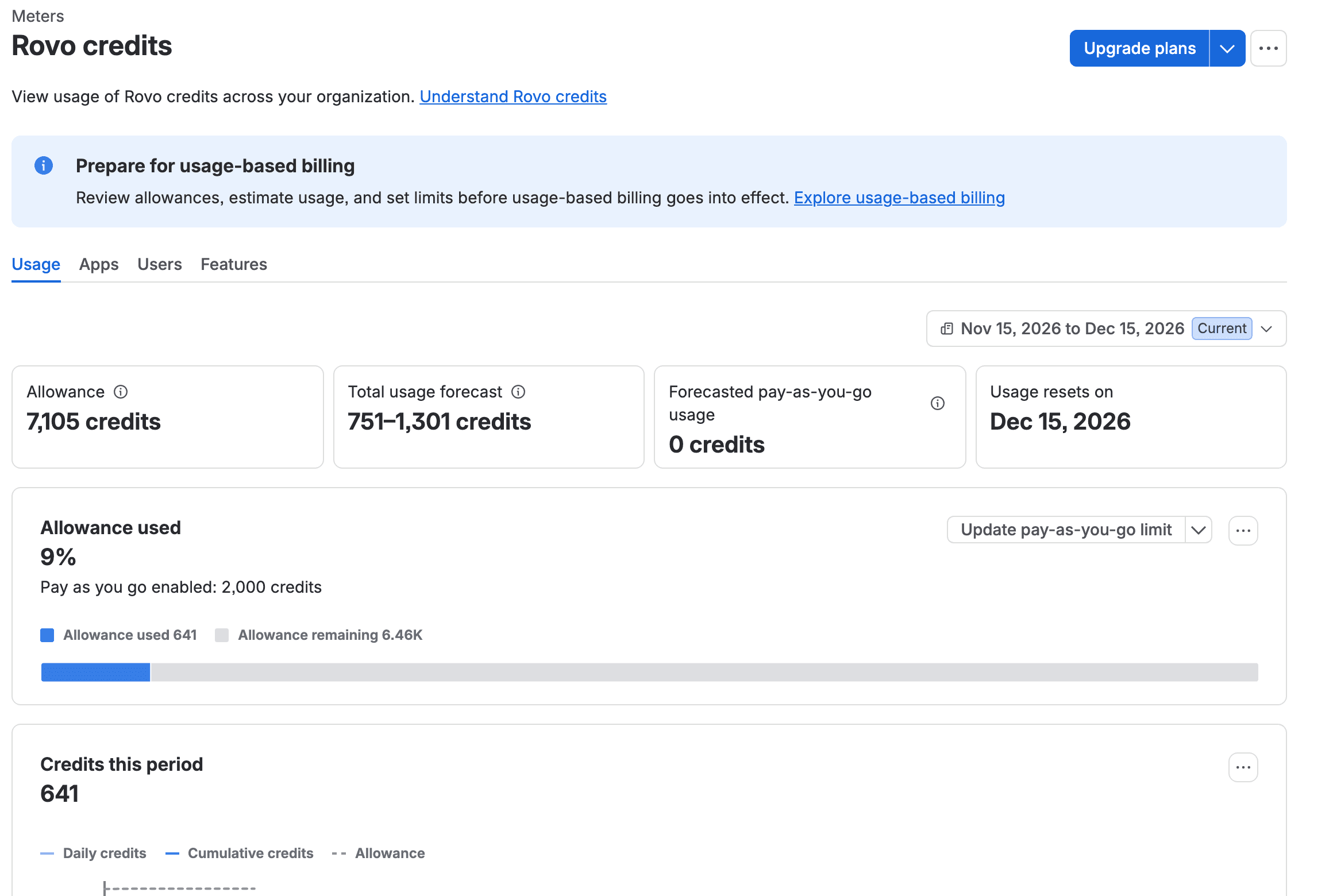
- Open Usage, then Meters, then Rovo credits, and select the Usage tab. Ours showed "Pay as you go enabled: 2,000 credits". If that's the cap, it's $20 a month at list price.
- Select Update pay-as-you-go limit, the button next to that line on our organization, where pay as you go was already on.
- Set the most credits you're happy to pay for in a month and save. Atlassian's steps say "Set your limit using the slider or enter a specific value."
Check that it worked. Back on the Usage tab, the "Pay as you go enabled:" line should show your number. We didn't change ours, so we haven't seen that line update. We also don't know whether 2,000 is a number Atlassian sets for everyone or one set on our organization before us, so read yours. Our tutorial on setting or turning off extra usage walks through the dialog. It also covers what happens when you turn pay as you go off.
One consequence is specific to MCP. With pay as you go off and the allowance used up, Atlassian's licensing page says "enriched Teamwork Graph API and tool calls are paused until the allowance resets next month". By that wording your AI tool should keep reading and writing work items while its all-app search fails. We didn't run our pool dry to see it.
Atlassian MCP server pricing from 3 December 2026: what 200 seats would use
Your allowance is pooled. Atlassian's table gives Jira and Confluence 25 credits per user per month on Standard and 70 on Premium, and adds them up across the organization. So 200 Jira Standard seats plus 200 Confluence Standard seats is 10,000 credits a month, the same seats on Premium is 28,000, and unused credits don't roll over. If your Usage tab shows a different allowance, use that number in place of 10,000.
The table below is our arithmetic. It takes the 6 credits our all-app search cost and 22 working days. It also assumes no other Rovo use, though your Rovo Chat and agents draw from the same pool.
People using an AI tool with MCP | All-app searches per person per day | Credits per month | Over a 10,000 pool | Cost at $0.01 |
|---|---|---|---|---|
20 | 5 | 13,200 | 3,200 | $32 |
50 | 10 | 66,000 | 56,000 | $560 |
200 | 10 | 264,000 | 254,000 | $2,540 |
Ten a day is our guess. It fits someone who keeps the AI tool open all day. We didn't measure real use. Put your own number in the second column and the rest of the row follows. Atlassian's FAQ expects 10 to 25 credits for a typical prompt. If your people's prompts cost that, the credits column is roughly two to four times higher, because we priced one search at 6 credits. The cost grows faster, because the allowance stays the same: the first row would cost $120 to $450 in place of $32. If the same people only search inside Jira or Confluence, at the 1 credit we measured, the middle row drops to 11,000 credits and costs $10.
For the rest of the bill (automation, Rovo agents, the seat price itself) we worked a 50, 200 and 500 seat example in Atlassian usage-based pricing: cost per user.
If it didn't work
There's no Teamwork Graph row. Maybe nobody has made a charged call this period. Or the call is still on its way. The Usage tab total moved within about a minute for us. The Features tab caught up in batches. One call took about 13 minutes to show.
There's no Usage in the menu. In October the same screen sat under Insights, then Platform usage.
The numbers on the tabs don't add up to the total. Ours don't either. Before the run the Features rows summed to 656 while the total said 616, and after it 681 against 641. That gap of 40 was there before we started. We can't explain it.
If your people connect with an API token. Allow API token authentication was off when we arrived. With it off, every tool call with a personal API token returned "You don't have permission to connect via API token. Please ask your organization admin for access." Listing the tools still worked. It returned 26 of them. The switch lives under Connectors, Atlassian MCP server, Authentication. After we turned it on, the same token returned "Unable to resolve user scopes from the user-context token". The error ended in "The session token is missing the scope claim required to authorize this operation." Our token had been created without scopes. Creating one with scopes asked for an emailed verification code. We stopped there and used the OAuth sign-in, then turned the switch back off.
The server doesn't answer at all. First check it's up. Without a sign-in it should return a 401, like this:
1curl -si -X POST https://mcp.atlassian.com/v2/mcp | grep -i -e "^HTTP" -e "^www-authenticate"1HTTP/2 401
2www-authenticate: Bearer resource_metadata="https://mcp.atlassian.com/.well-known/oauth-protected-resource/v2/mcp"We got this on 20 November 2026. A 401 that asks for a sign-in means the server is up. If you get nothing back, look at Atlassian's Rovo status page, which has a component named MCP. It was operational when we read it on 20 November. Its history has two incidents for MCP alone, on 21 and 22 October.
What I'd do this month
If your people already use Claude, ChatGPT or Cursor with Jira, look at the Features tab today. A Teamwork Graph row with a few hundred credits is probably fine on a pool of thousands. A row that grows by thousands a week deserves a pay-as-you-go limit before 3 December. It might also be worth asking people to use a Jira search when a Jira search will do.
I wouldn't block the search toolset for that. An all-app search that finds the right page cost us 6 credits. That's nothing inside your allowance and 6 cents at list price once you're past it, and I think that's cheap for what it saves. I'd block it only where no budget owner has agreed to cover the overage. I'd unblock it the day one does.
What you have now
Key takeaways
- The place where MCP charges show up: Usage, Meters, Rovo credits, Features, in a row named Teamwork Graph.
- A measured price list for one site. Lookups and writes cost 0 credits, a search inside one app 1, an all-app search 6 and a graph context call 5.
- Where the charged toolsets sit, so you can block them if you need to.
- Your pay-as-you-go limit, checked before 3 December 2026.
If you run the same check and your all-app search costs something other than 6, I'd really like to know what you asked it and what your site has connected. Tell me under the post on the Atlassian Community or on LinkedIn, and I'll add your number to the table.
Comments
0Add a comment