
Rovo usage limit: set or turn off extra usage before 3 December

Key takeaways
- Enabling Rovo extra usage on our test org on 16 October 2026 was an order on the company card: $0 due today, USD 0.01 per credit, and a line saying the order contains an auto-renewing subscription.
- Straight after enabling, the limit dialog said 'You currently have no limit set.' Without a limit the 'system limit' applies, and I couldn't find a published number for it on Rovo credits.
- A 1,000-credit monthly limit showed an estimated monthly cost of USD 10.00. The slider has ticks at 0, 1,700, 3,400 and 5,100, and the field takes a typed value.
- Extra usage is per meter: switching it on for Rovo credits left automation steps (USD 0.50 per 1,000 steps) off.
- The audit log list showed 'Updated <allocation:usageType> extra usage limit for <allocation:name>', tags unfilled. The Organizations events API had the values (Rovo credits, limit none to 1,000, then 1,000 to 0 for the disable), but each event carried the time of the change before it.
- Five Atlassian pages say extra usage is on by default. The cloud pricing FAQ and the Jira pricing FAQ still say opt-in. Our org was off on 14 and 16 October.
On 16 October I switched on extra usage for Rovo credits on our test org, set a monthly limit of 1,000 credits and switched it off again. The first dialog surprised me. Turning extra usage on is an order, charged to the card on file, and the limit it gives you afterwards is "No limit".
A 1,000-credit limit costs at most $10 a month at Atlassian's list price of $0.01 per credit, and the dialog printed exactly that: "Estimated monthly cost USD 10.00". Billing for extra Rovo credits starts on 3 December 2026, 48 days after I did this. Without a limit you're under a "system limit", and I couldn't find a number for it on any page I checked, which I don't like at all.
Atlassian's pages also disagree about whether you'll find extra usage on or off. The support page, the usage-based pricing FAQ and the legal terms say on by default. The cloud pricing FAQ and the Jira pricing page still promise an explicit opt-in. Our org was off on both days I looked.
My short answer, if you're deciding this week: turn it on and set a limit you'd pay without a meeting, on Rovo and on automation. If a surprise bill is worse for you than Rovo pausing for a few days, leave Rovo off. The clicks are below, and how I'd size the number is at the end.
Prerequisites — Atlassian Cloud on a paid plan (Standard, Premium or Enterprise) with Rovo credits in Platform usage. You need to be an organization admin or a billing admin; site admins can't set limits or switch extra usage. The first enable needs a payment method on file, which only a billing admin can add. The optional API check needs an organization API key that can read events, plus curl and jq. Screens captured on 16 October 2026 on our wolfaenpak test org, as org admin. Prices and quotes read on Atlassian's pages the same day.
What we found on our own org
- Enabling extra usage is a purchase. The dialog is a checkout with "$0 due today (excluding tax)", "USD 0.01 per credit", and "Your order contains at least one auto-renewing subscription."
- I couldn't find a number for the system limit on Rovo. The dialog says "When no limit is set, the system limit applies." Its link goes to a licensing FAQ that doesn't mention a system limit.
- The screens don't match Atlassian's procedure. The doc says "Select Update extra usage limit". Our menu said "Set extra usage limit" until a limit existed, and "Disable extra usage" sat in the dropdown next to "Get more usage".
- The audit log list doesn't fill in its own template. Its rows read
Updated <allocation:usageType> extra usage limit for <allocation:name>. - The API has the values, with shifted times. The events showed "Rovo credits", the limit going from none to 1,000 and then from 1,000 to 0 when I disabled it, but each one carried the timestamp of the previous change.
Rovo usage limit: what it is and where it lives
Every paid seat brings a monthly allowance of Rovo credits, and the whole organization draws from it together. On Jira and Confluence it's 25, 70 or 150 credits per user per month on Standard, Premium or Enterprise. On Service Collection and Teamwork Collection it's 250, 700 or 1,500. Allowances refresh monthly on your usage billing date and unused credits don't roll over. What a Quick answer or a Think deeper message costs is in my measurements in Rovo credits per user.
Extra usage is what happens past the allowance. With it on, Rovo keeps working and each extra credit is billed at $0.01. With it off, credit-consuming features pause until the allowance resets. The limit is a monthly cap on those extra credits, set separately for each meter (Rovo credits, automation steps and the others in Platform usage).
Our test org's allowance is 3,430 credits a month. The "Get more usage" button opens a Contributions tab that lists what each app adds: Confluence Premium 350, Service Collection Premium 2,800, Jira Premium 280. In the last 30 days we used 649.
Atlassian's doc on managing extra usage describes the system limit as "a technical ceiling on usage" that applies "regardless of plan or admin-configured settings" and is "designed to be well above typical usage levels". I looked for the figure for Rovo credits on the support docs and on the linked FAQ (rendered in a browser, every section expanded) and couldn't find it. The only system limit I found with a number is Customer Service Management's 250,000 AI agent resolutions a month.
Rovo usage quota: is extra usage on by default or opt-in?
I read every Atlassian page I could find that answers this on 16 October. Five say on. The support page How Rovo credits work says "Extra usage is enabled by default, and admins can set spending limits". The usage-based pricing FAQ answers its own question with "Yes, for most organizations. Extra usage is enabled by default". The Rovo plans page says "If extra usage is on (default setting)", Atlassian's usage page says "Extra usage is enabled by default and billed in arrears", and the Usage-Based Offering Terms, effective 1 October 2026, put it in §2.2(a): "By default, usage above Customer's Allowance and any applicable Pack is enabled".
The cloud pricing FAQ and the Jira pricing page still promise an opt-in. The FAQ says "Extra usage billing requires opt-in. You're never charged beyond your allowance unless an billing admin explicitly enables extra usage." The FAQ on the Jira pricing page says Atlassian "has committed to at least 90 days' notice and an explicit opt-in before that changes." The procedure doc, Manage extra usage for a meter, doesn't state a default at all.
The opt-in wording is older. In June the Rovo support page said extra usage was "not currently billed" and promised "at least 90 days' notice and require an explicit opt‑in" (Wayback, 12 June 2026). Atlassian's usage-based pricing announcement went out on 1 September, 93 days before 3 December, and by 4 September the support page said "enabled by default".
On our own org it was off. On 14 October the Rovo meter page had an "Enable extra usage" button, and on 16 October the dropdown offered "Enable extra usage" on both Rovo credits and automation steps. Atlassian's own qualifier is "for most organizations", and no page says which organizations are the exception or when the default reaches them. I'd probably look now and again in late November.

How to set or turn off Rovo extra usage, step by step
- 1
Open the Rovo credits meter
Atlassian Administration, then Insights, then Platform usage, then Rovo credits.
- 2
Read the dropdown next to Get more usage
"Enable extra usage" means it's off; "Set extra usage limit" or "Update extra usage limit" means it's on.
- 3
Enable extra usage, if you want a limit rather than a hard stop
confirm the $0 order.
- 4
Set extra usage limit
move the slider off "No limit" or type a number of credits, then Save.
- 5
Reopen the dialog to verify the limit
you should see your credits and an estimated monthly cost.
- 6
Disable extra usage, if you'd rather Rovo pause
confirm "Disable".
- 7
Check Automation steps too
same dropdown, its own switch and limit.
Step 1: Open the Rovo credits meter in Platform usage
Go to admin.atlassian.com, pick your organization if you have more than one, then select Insights, Platform usage and Rovo credits. Platform usage lists every meter with its allowance used.
The page changed while I was writing this. On 14 October the Rovo credits page showed the allowance and an "Enable extra usage" button. By 16 October the allowance was gone from that page, and the controls had moved into a split button at the top right: Get more usage, a chevron, and a "…" menu with Export data and Manage subscription. If yours still looks like the older page, its button does the same job.
Step 2: Read the dropdown next to Get more usage
Click the chevron next to Get more usage.
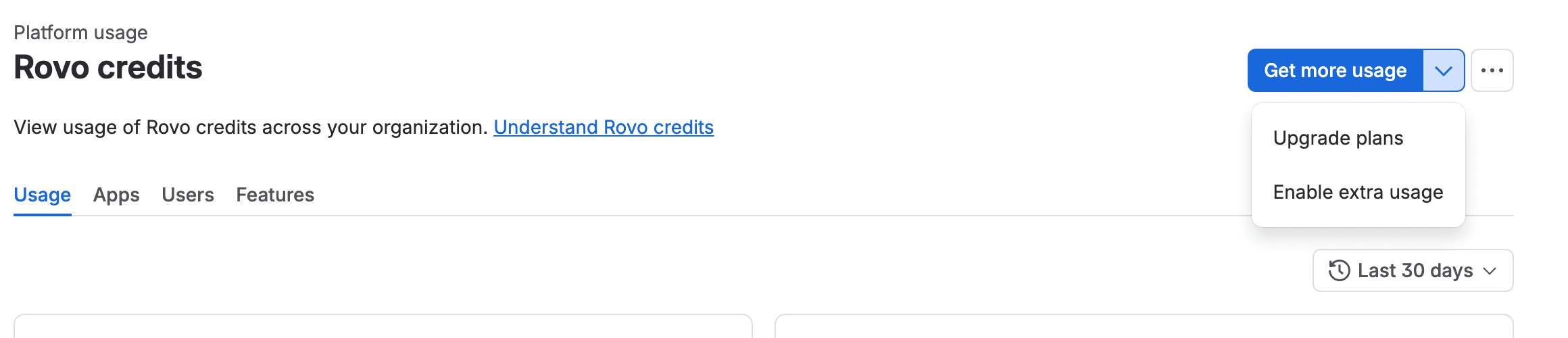
With extra usage off you'll see Upgrade plans and Enable extra usage. With it on you'll see Set extra usage limit (no limit yet) or Update extra usage limit (a limit exists), plus Disable extra usage.
If it's off, maybe you don't need to do anything. Off means Rovo pauses when the allowance runs out and nothing is billed. Step 3 is for when a pause mid-month would hurt more than a capped bill.
Step 3: Enable extra usage (it's an order)
Select Enable extra usage. A checkout dialog opens: "Enable monthly extra usage for Rovo credits to keep features active".
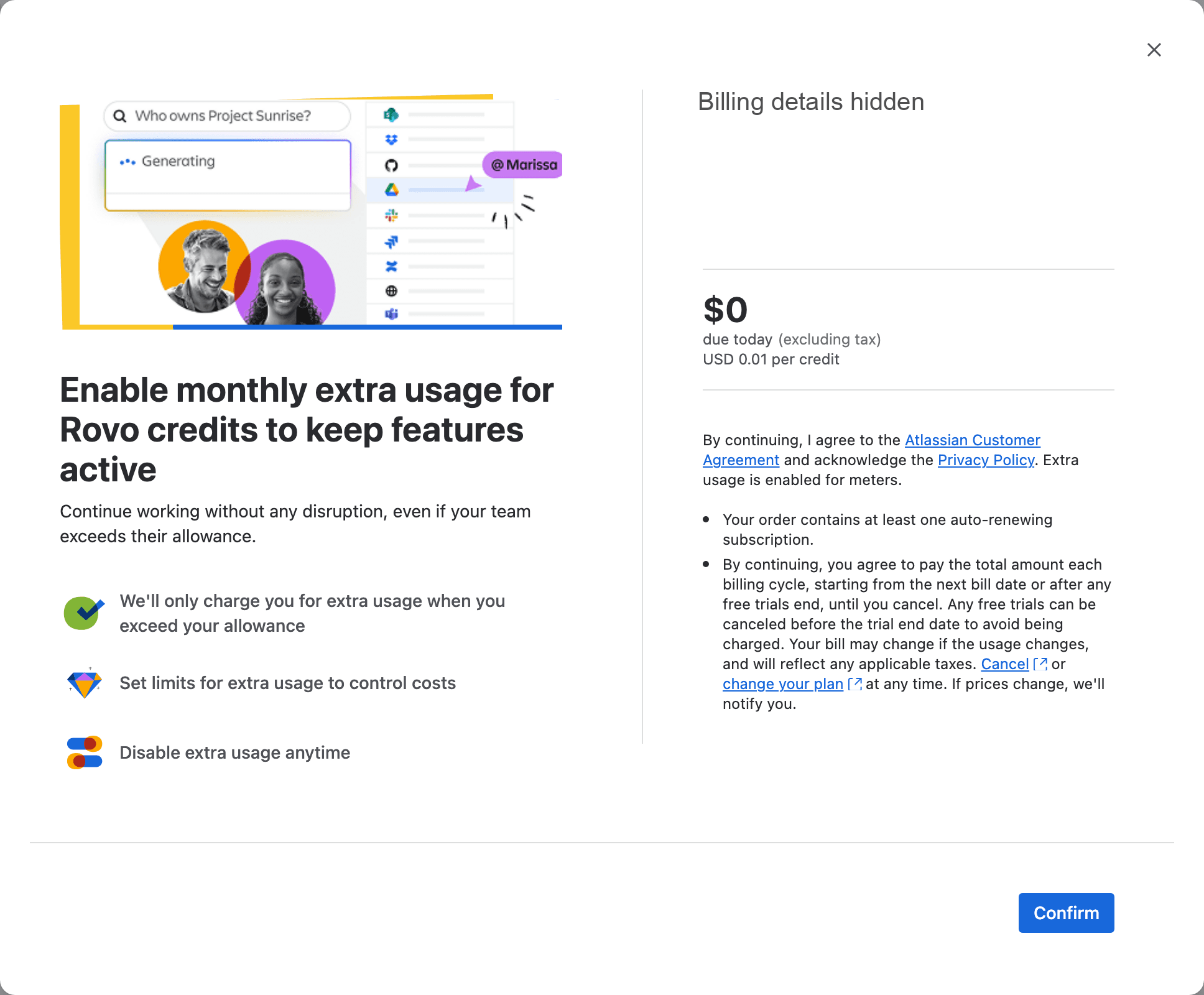
The right side is a normal Atlassian checkout. It names the company and the card it will charge, then says "$0 due today (excluding tax)" and "USD 0.01 per credit". The small print adds "Extra usage is enabled for meters" and "Your order contains at least one auto-renewing subscription." If someone in finance reviews Atlassian orders, tell them this one is the extra usage switch.
If there's no payment method on file, an org admin can't go further. Atlassian's billing doc says "a billing admin must first enter the payment information to proceed."
Select Confirm. When the page reloads, the dropdown reads Upgrade plans, Set extra usage limit, Disable extra usage.
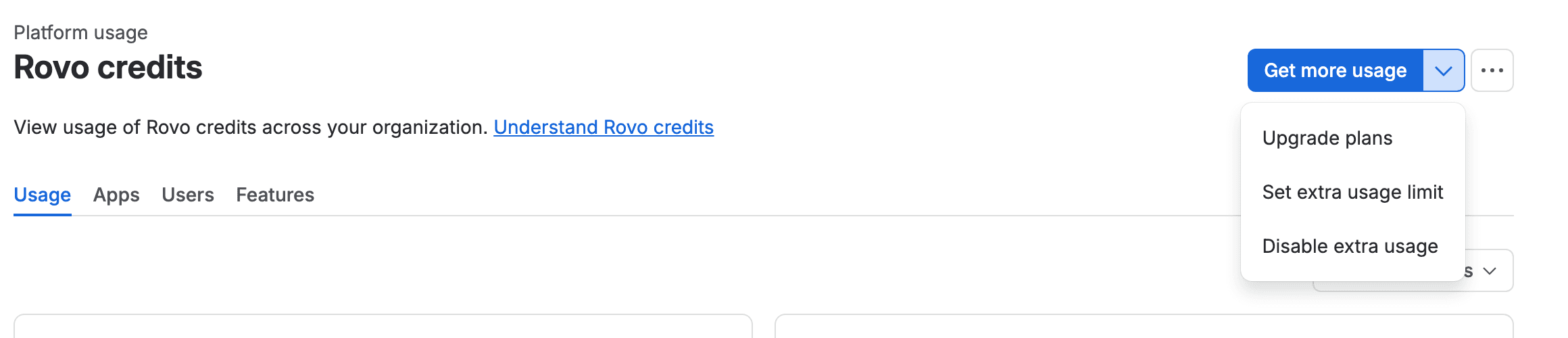
I opened the automation steps meter a few minutes later and its dropdown still offered "Enable extra usage". Enabling one meter didn't touch the other.
Step 4: Set extra usage limit
Select Set extra usage limit. The dialog it opens is titled "Update extra usage limit".
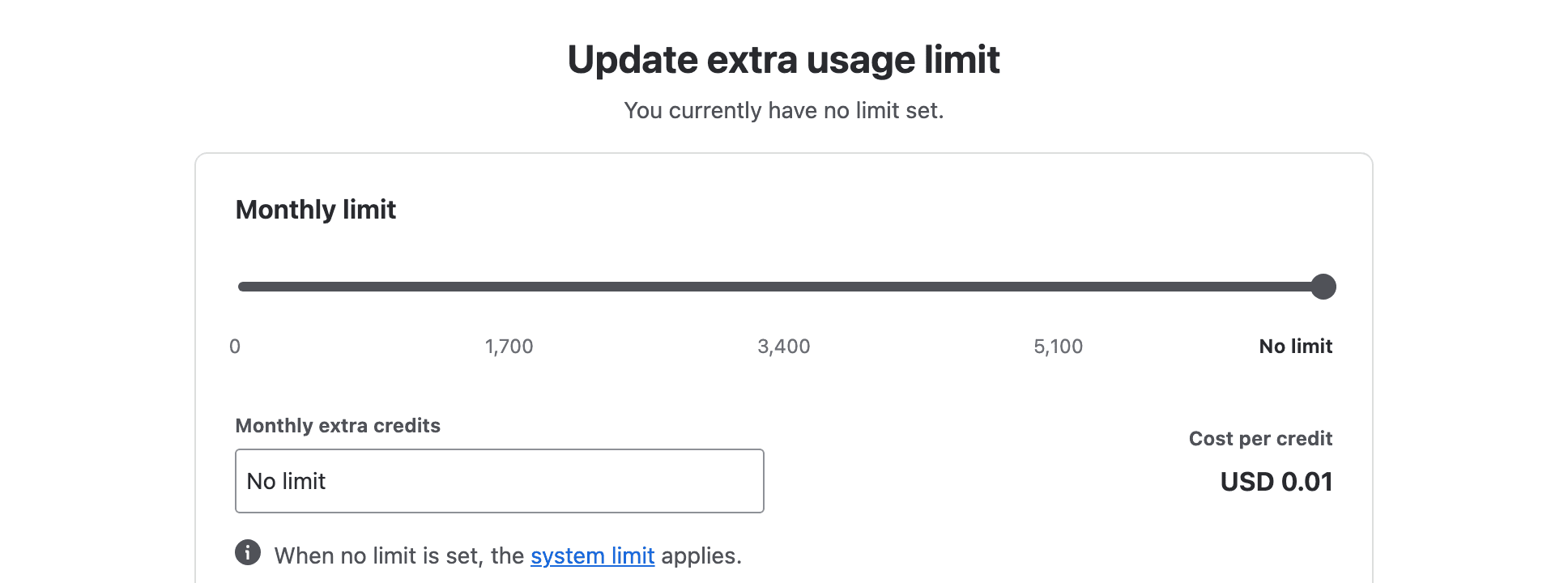
The slider runs from 0 to "No limit", with ticks at 0, 1,700, 3,400 and 5,100 on our org. The field below it, "Monthly extra credits", is read-only while the slider sits at "No limit". Move the slider down and the field opens, so you can type an exact number. I typed 1,000 and selected Save.
The number is in credits beyond your allowance, at $0.01 each. 1,000 credits is $10 a month. 5,000 is $50, and 10,000 is $100.
Atlassian's doc also warns: "If you set your monthly limit to a number lower than the extra usage you've already incurred, your organization won't be able to use metered features until usage resets." Lower a limit late in a busy month and Rovo stops on the spot.
Step 5: Reopen the dialog to verify the limit
Open the dropdown again. The item now reads Update extra usage limit.
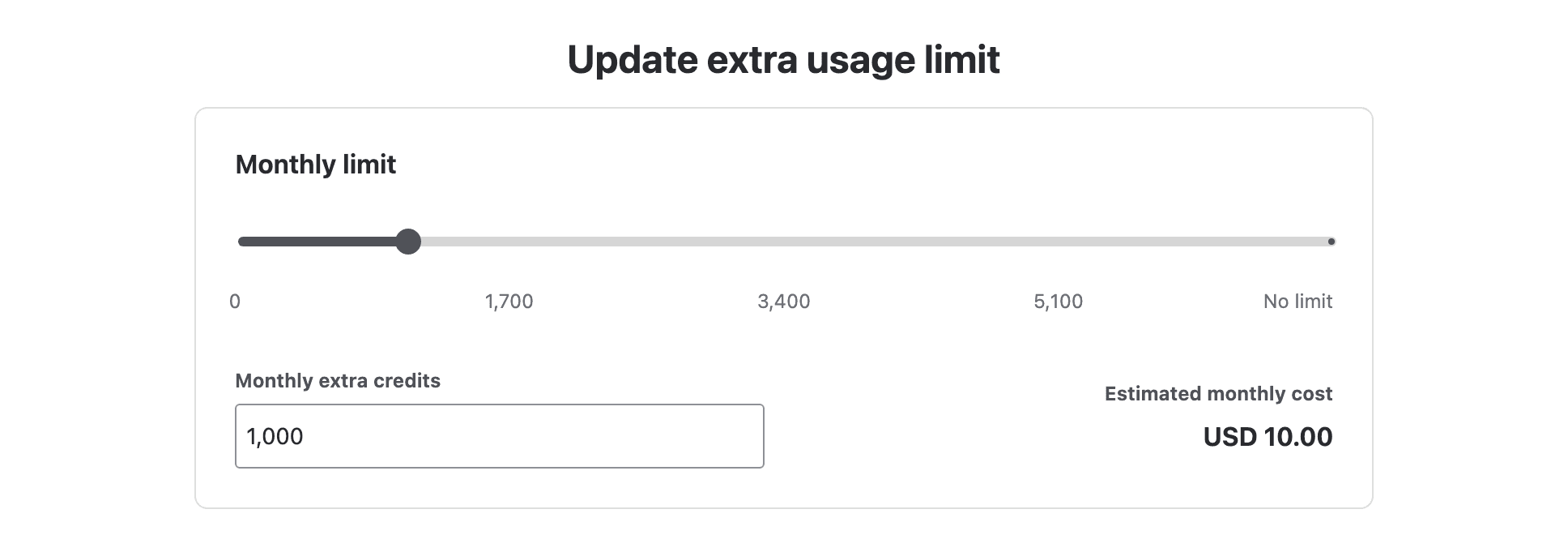
You should see your number in "Monthly extra credits" and an "Estimated monthly cost" (ours was USD 10.00), and the "You currently have no limit set." line should be gone. On the first open the cost box stayed grey for a few seconds before it filled in.
Step 6: Disable extra usage
Select Disable extra usage.
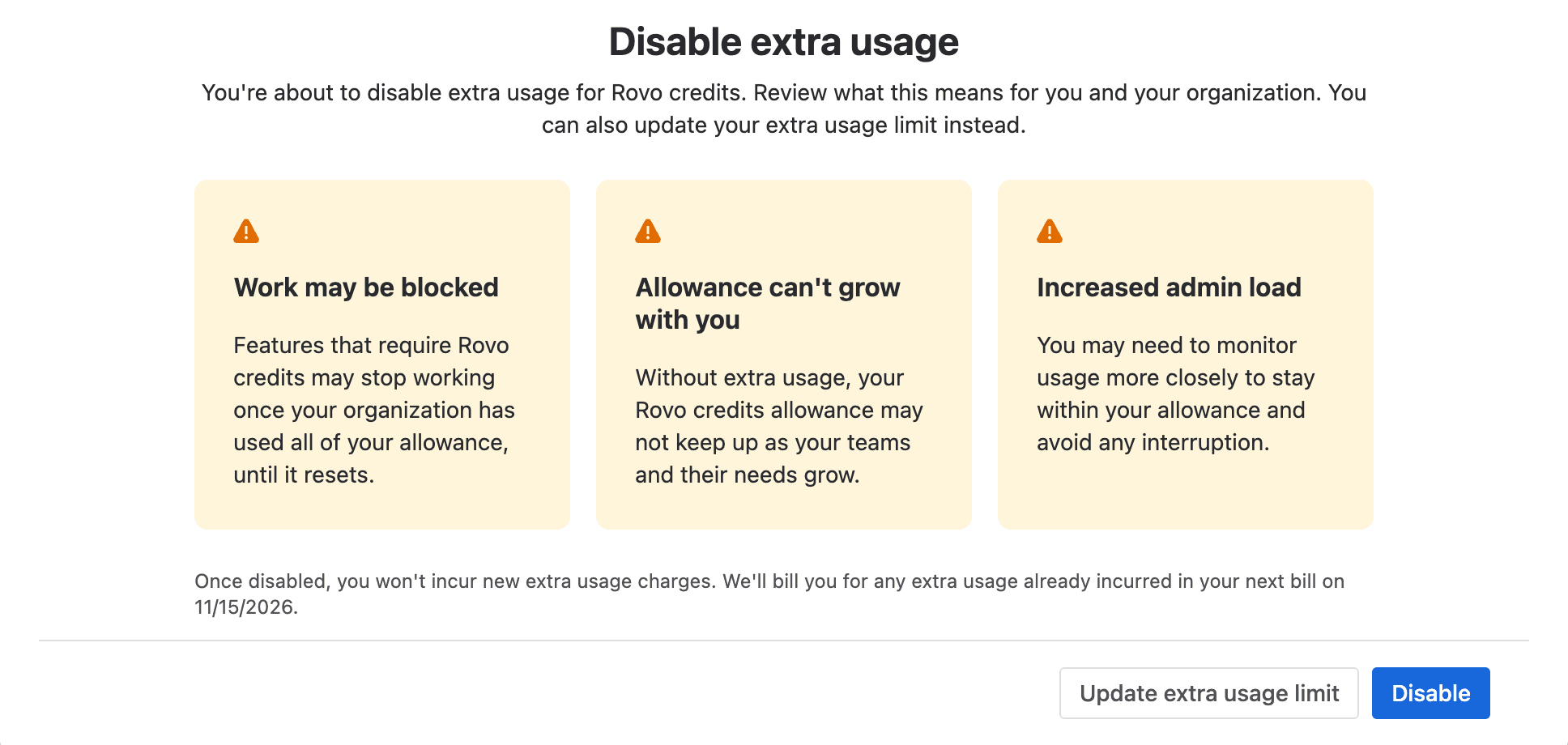
It says "Features that require Rovo credits may stop working once your organization has used all of your allowance, until it resets", and "Once disabled, you won't incur new extra usage charges. We'll bill you for any extra usage already incurred in your next bill on 11/15/2026." The usage-based pricing FAQ adds "The change takes effect immediately."
Select Disable. On our org the Rovo dropdown went back to Upgrade plans and Enable extra usage, the state we started from, and automation still showed the same.
Step 7: Check Automation steps too
Open Platform usage, then Automation steps, and read its dropdown the same way. Its enable dialog says "USD 0.50 per 1,000 step", and Atlassian's automation doc gives the example that 10,000 steps over the allowance cost $5.00. I opened only that enable dialog on automation, not its limit or disable dialogs, so I can't show you those; its limit will be in steps. Don't copy Step 6 here without reading the automation section below first.
Check the change in the audit log and the Organizations events API
Go to Insights, Audit log. The rows are there, but the list doesn't fill in which meter or what value.

All three rows in the list read Updated <allocation:usageType> extra usage limit for <allocation:name> or Updated <allocation:usageType> extra usage for <allocation:name>. Going by the API events below, the two 00:51 rows are my Save (the mode change and the new limit) and the 00:55 row is my Disable. None of them is the enable. If you have limits on two meters, the list doesn't tell you which one somebody changed, or to what. (I didn't manage to open a row's details panel, so I can't say whether it fills the tags in.)
The Organizations REST API has the values. With an organization API key that can read events, this lists the last 24 hours of limit changes:
1curl -s -H "Authorization: Bearer $ADMIN_API_KEY" \
2  "https://api.atlassian.com/admin/v1/orgs/$ORG_ID/events?action=allowance_allocation_overage_updated&from=$(( ($(date +%s) - 86400) * 1000 ))" \
3| jq -r '.data[].attributes | .time + "  " + (.context[0].attributes.usageType) + "  cap "
4    + ((.context[] | select(.attributes.snapshotType=="before") | .attributes.overageCapFormatted) // "none")
5    + " -> " + ((.context[] | select(.attributes.snapshotType=="after") | .attributes.overageCapFormatted) // "none")'
You should see one line per limit change, newest first. On our org it printed:
12026-10-15T21:55:37.441Z  Rovo credits  cap 1,000 -> 0
22026-10-15T21:51:34.488Z  Rovo credits  cap none -> 1,000
The values line up with my clicks but the times don't. "none -> 1,000" is the Save in Step 4, which the browser sent at 21:55:36 UTC, and "1,000 -> 0" is the Disable in Step 6 at 21:58:24. Each event carries the time of the change before it: 21:51:34 is the second my enable order went through, and 21:55:37 is the Save. Nothing is stamped 21:58. So on our org, in this one test, the values were right and the timestamps were one change behind. The audit log list has the same offset. Its rows say 00:51 and 00:55 local time, and none says 00:58.
Disabling is a limit of 0. The browser's request for my Disable click sent a limit of 0 in the same LIMITED_OVERAGE mode the Save had set, and the event recorded the limit going from 1,000 to 0. (The mode change from OVERAGE to LIMITED_OVERAGE came with the Save, in a separate allowance_allocation_enforcement_updated event.) And no event describes the enable itself. In the events, the only sign of it was the timestamp on the next change. (The order itself went through, so it may show up under Billing; I didn't check Bill history.) Also, the API refused an ISO date in from with "Invalid date" and accepted milliseconds since the epoch.
Atlassian extra usage limit per meter: Rovo credits vs automation steps
The two meters fail differently, so I wouldn't treat them the same:
Meter | Price over the allowance | When it pauses | What keeps working |
|---|---|---|---|
Rovo credits | $0.01 per credit | New billable Rovo requests; a chat or agent task already running finishes | Rovo Search, summaries, chart insights, definitions |
Automation steps | $0.50 per 1,000 steps | New steps stop, manual triggers too | Flows already mid-run complete; nothing that fired during the pause is replayed |
If Rovo pauses, people lose Chat until the reset and keep Search. Annoying, and nothing is lost. A paused automation meter drops the triggers that fire during the pause: Atlassian's automation licensing page says those events "are not stored or replayed when the allowance refreshes." So for automation I'd keep extra usage on with a limit, and never switch it off on a site where people rely on the rules. If you haven't looked at what your rules use, I counted steps on 11 rules in the automation usage tutorial.

What stops when the Jira and Confluence Rovo usage limit is hit
Every app on the org draws from one Rovo allowance, so a limit hit in Confluence stops Rovo in Jira too. Other meters keep going: the usage-based pricing FAQ says only the exhausted meter pauses, and "All other meters continue to operate independently."
With extra usage on and the limit reached, Atlassian's support page says "billable interactions pause until the allowance resets or more credits are purchased." The Rovo plans page adds "If a Chat conversation or Agent task is already in progress when the limit is reached, it will complete." Rovo Search, summaries, chart insights and definitions are free and keep working.
Who hears about it? The same FAQ says notifications go to "your organization and billing admins" at 80% and 100% of the allowance, and at 80% and 100% of any limit you set. The e-mail goes to both roles. The banner on the Platform usage page and the bell in Atlassian Administration are "visible to organization admins only". Your users get nothing: "Your end users don't receive billing or allowance notifications directly." The meter doc differs slightly: with extra usage off, it says Atlassian notifies "organization admins" only. I couldn't reconcile the two, and our org was nowhere near a threshold, so I didn't see either alert myself.
So your users find out when Rovo stops answering. Something like this, sent before December, saves the service desk a few tickets:
From 3 December our Rovo credits are capped each month. If Rovo Chat or agents stop answering, we've used this month's credits. Rovo Search keeps working, and everything comes back on our reset date.
Turn off extra usage, or disable Rovo in Jira and Confluence entirely?
Turning off extra usage doesn't remove Rovo. It only stops billing past the allowance. If you want no AI at all in an app, that's a different screen.
Atlassian's doc Manage Rovo access (updated 13 October) gives the path as AI and Rovo, then Access, then Add app, pick the apps and select Block access. On our org the sidebar item is just called Rovo, and I didn't open that screen on 16 October, so take the sub-item names from the doc. Blocking an app "will disable all current and upcoming AI features for that app", and "Any content previously generated by Rovo will remain." For Jira there's a catch: the shared features (Search, Chat, Create with Rovo) stay on while any Jira app on the site still has Rovo. The same doc warns that deactivating AI changes "do not take immediate effect".
You can't yet switch off one feature, such as Deep Research, and keep the rest: ROVO-369 asks for it, 16 votes, "Gathering Interest". You also can't cap one person's credits. The Rovo support page says "Coming soon: you'll be able to allocate Rovo credits by user", and ROVO-532, quota controls by app and user, has 51 votes. Blocking Rovo for a user group exists only in the newer Enterprise access screen.
If your screens don't match
- No "Enable extra usage" in the dropdown. Look for "Set extra usage limit" or "Update extra usage limit" instead. Extra usage is already on, which Atlassian says is the default for most organizations.
- No Platform usage, or the dropdown is missing. Check your role. Atlassian's billing permissions table gives "Set and update usage limits" and "Enable and disable extra usage" to billing admins and org admins, and "No" to site admins.
- Enable stops at payment details. A billing admin has to add a payment method first.
- The doc says "Update extra usage limit" and you see "Set". You haven't saved a limit yet. Same dialog.
- "You've reached your Rovo Dev credit limit … increase your extra usage limit". That's Rovo Dev, a separate meter with its own per-user limit under "Rovo Dev credits" in Platform usage. It isn't the Rovo credits meter.
- A Community answer says quotas "are not being enforced". That answer is from September 2025. Atlassian's page now says "On December 3, 2026, extra usage billing takes effect for Rovo credits."
The limit I'd set before 3 December
Start from your own usage. The Rovo credits page shows "Credits used" for the last 30 days, and the Contributions tab under Get more usage lists what each app adds to your allowance (add them up; ours came to 3,430). Ours were 649 against 3,430, about 19%, so on this org a limit is insurance. If yours is already near 100% before December, a limit is a budget line, and you should size it from what you used.
On our org I'd turn Rovo extra usage on and set the limit at 1,700 credits, about half the allowance. That's at most $17 a month, which I'd rather pay than explain why Rovo stopped on the 20th. On automation I'd do the same with a limit, because of the replay rule above.
For your org, take the extra bill you'd sign off without asking anyone and divide by $0.01. If $100 a month is that number, the limit is 10,000 credits. Watch the 80% e-mail for a month or two before raising it. If any surprise bill is worse than a pause (a fixed public sector budget, say), leave Rovo extra usage off and send the note above.
When does a charge show up? Atlassian's billing doc says "For most customers, extra usage is billed monthly." Its doc on annual subscriptions says extra usage "is aggregated annually and billed at the end of your billing cycle." Annual plans may be the exception to "most customers", so if you're on one, ask Atlassian or your partner which applies to your contract. Automation's extra usage billing starts on the same date, 3 December.
Open the dropdown today and again in late November. Ours was off both times I looked, and that may not last.
Where I could be wrong
This is one test org on one night, as an org admin, on screens that changed between 14 and 16 October and could change again before December. I didn't see an 80% or 100% alert, didn't check anyone's inbox, didn't open the Rovo access screen or an audit row's details, and didn't test a typed limit above the slider's top tick. The disable dialog gave 15 November as our next bill date, while our billing preview shows 3 November on the Service Collection row and no date on the Rovo credits row, and I can't tell you which governs extra usage. The timestamp offset in the events is from one test. And I couldn't find the Rovo system limit's number. If you have it, mail me and I'll add it.
My notes from Team '26 Europe cover how the December switch was announced.
Key takeaways
- A fresh enable has no limit. Each meter has its own limit; on Rovo it's in credits and costs at most credits × $0.01 a month, and on our org disabling was sent and logged as a limit of 0.
- The audit log list doesn't name the meter or the value. The Organizations events API does, with timestamps one change behind on our org. Per-user limits and per-feature switches don't exist yet, and I couldn't find the system limit's number.
Comments
0Add a comment