
Find inactive users in Jira and Confluence: the free way, and the Cost Slasher beta

Key takeaways
- Cost Slasher went public on the Atlassian Marketplace on 15 October 2026 as version 3.2.0. In the listing's words, 'automatic release stays off until recovery, warnings, activity and capacity are verified.' Until it's on, the app doesn't read your users' last-active dates.
- Atlassian's own user export already finds inactive users for free: its Last seen in column records the last time someone viewed an app for at least 2 seconds. A native inactivity deactivation, AX-1169, has been Under Consideration since May 2019 with 781 votes.
- On a 250-user Jira Standard site on monthly billing, 25 idle seats cost $205 a month at the 13 October 2026 list price, $2,460 a year. Cost Slasher at 225 users costs $2,184 a year, so on Jira alone it is close to break-even.
- Cost Slasher is free up to 10 Jira users. At 100 users it costs $1,320 a year, the most expensive of the eight licence apps I priced that day, and at 500 users $2,920, second only to resolution's $3,450.
- The warning period can't go below 24 hours because Atlassian's activity data can be a day late, unknown activity never counts as inactivity, and automatic release for JSM agents stays disabled.
- Pairing the recovery service needs LeanZero, and parts of the service, email notifications included, run in AWS Ireland. The Admin API key stays in Forge secret storage. Cost Slasher is not a Runs on Atlassian app.
Atlassian bills every user who has access to an app, whether they log in or not. Their words: users "are automatically counted towards billing even if they don't accept your invite or log in." You can find the inactive ones for free with Atlassian's own export. On 15 October we released Cost Slasher, a beta app that adds per-app inactivity policies and time away on top. It doesn't remove anyone for inactivity until you've verified it on your own site.
Prices went up this week. Since 13 October, Jira Standard's first 100 users cost $9.70 a month each, up from $9.05. So around renewal most Jira admins end up asking the same question. Who here hasn't opened Jira in two months, and why am I paying for them?
Below: the free way to find them, what Cost Slasher does today and what stays switched off, the arithmetic on what an idle seat costs against what the app costs, how to install it, and what I got wrong. The screenshots come from the production install on our demo site, taken the evening it went public.
If I were the admin deciding, I'd want to know this first:
- Automatic release ships switched off, and until it's on the app doesn't read your users' last-active dates.
- The warning period can't go below 24 hours.
- Unknown activity means the seat stays.
- A seat counts as reclaimed only when the access is verified gone.
- Time away releases your licence for the absence and keeps your place in the seat pool.
- JSM agents get a policy but no automatic release.
- It isn't cheap at 100 users.
How to find inactive users in Jira without an app, and what the export misses
You don't need any app to find inactive users in Jira Cloud. Atlassian already has the data.
- Go to admin.atlassian.com, open your organization, then Directory and Users.
- Export the users of the site. The CSV has a Last seen in column per app, which Atlassian defines as "the date the user last viewed the app's workspace for a minimum of 2 seconds." (Export users from a site)
- Sort by that column and pick a cut-off (60 or 90 days, your call). Take out admins and service accounts, then anyone you know is on leave.
- Remove app access or deactivate them, by hand or in bulk (Atlassian's bulk steps).
You can get the same dates from the Organizations REST API as last-active dates, with one line of fine print: "The data for the last activity may be delayed by up to 24 hours." Atlassian's pricing FAQ gives the same advice I'm giving: "Deactivate inactive users that aren't using your cloud product(s) so they no longer count towards your monthly bill."
That's fine once a year. The second time hurts. Nobody warned the people you removed, so the first you hear of it is "I can't open Jira" from someone back from paternity leave. The spreadsheet doesn't know who is on leave, and unless you keep notes there's no record of who removed whom, or why. Atlassian has no built-in inactivity deactivation that I could find: AX-1169, "Deactivate inactive user based on activity", has sat at Under Consideration since May 2019 and has 781 votes.
In my earlier post on Atlassian license management I had a CogniRunner AI agent do this job from a paragraph of instructions, and I said there that if license management is the only job, a deterministic tool is the simpler path. Cost Slasher is ours.
How Cost Slasher's inactivity policy works: allowance, warning period, restore protection, exclusions
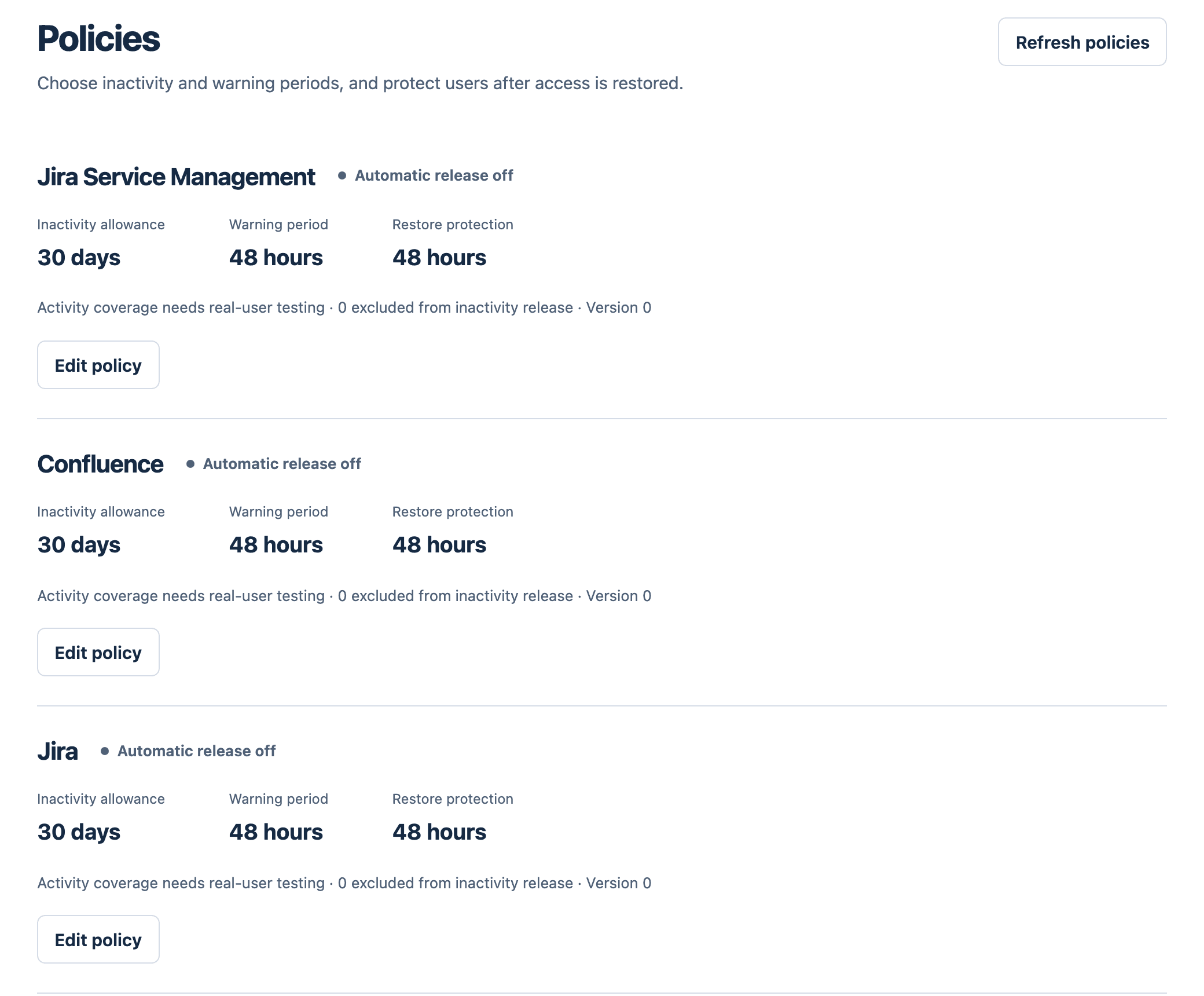
Each app gets its own policy, because someone who reads Confluence daily and opens Jira twice a quarter shouldn't be warned off Confluence. Jira and Confluence seats each get one, and so do JSM agent seats (agent seats only, never customer portal access).
The inactivity allowance is how long someone can go without opening the app before a warning is due (30 days by default). The warning period is how long after the warning reaches them before the seat can go. It defaults to 48 hours and can't be set below 24.
Restore protection keeps a seat safe for a while after someone's access comes back (48 hours by default), so a person who just returned isn't warned again on day one. Exclusions are accounts left out of automatic release for that app, say a finance lead who opens Jira twice a year.
When release is on, activity comes from Atlassian's Organizations API, the same last-active dates as the export, read with your organization's Admin API key. That key can do far more than read dates. It lives in Forge secret storage, scoped to the installation. Cost Slasher doesn't create or rotate it, and our AWS side never receives it. Remove API key in the app takes it out of Cost Slasher and blocks new changes, but it doesn't revoke the key in Atlassian Administration. Do that there.
I put the 24-hour floor in the code as a constant, with the comment "Last-active reporting can lag by one day; every policy must allow that lag." If the data can be a day late, a 12-hour warning could run out and release the seat of someone who used Jira this morning, before Atlassian's data shows the visit.
Why the beta does not remove inactive users from Jira automatically yet
The listing's release notes say: "Automatic release stays off until recovery, warnings, activity and capacity are verified." Off is the default for every new policy. Saving a policy with release switched on is refused until activity, recovery and capacity are verified (plus agent activity, for JSM). Even then, no seat goes until a warning has been confirmed delivered and the full warning period has run.
Here's what each check means on your site. Recovery: you've put Cost Slasher's recovery link into Atlassian's native access-denied message and tested it with a real account that lost its paid seat. Warnings: a warning counts from confirmed delivery, not from the moment it was handed to the mail service. Warnings go out as email through Amazon SES in our AWS Ireland region. Activity: a test account opens the app inside a window of at most 72 hours, and the app must then find that exact visit in Atlassian's activity data for that app. Capacity: the app has finished reading who already holds each managed seat, so it knows the real count before it changes anything.
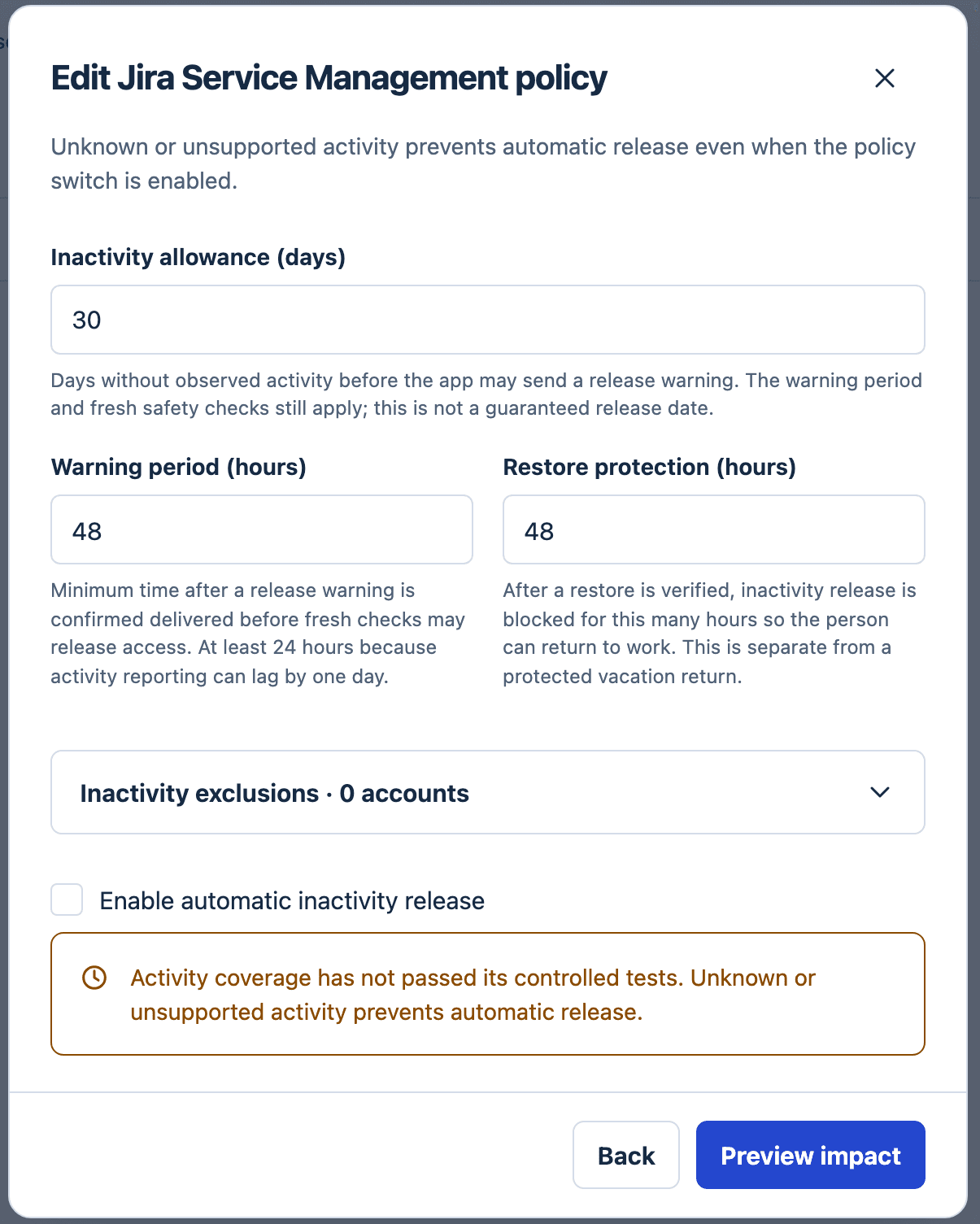
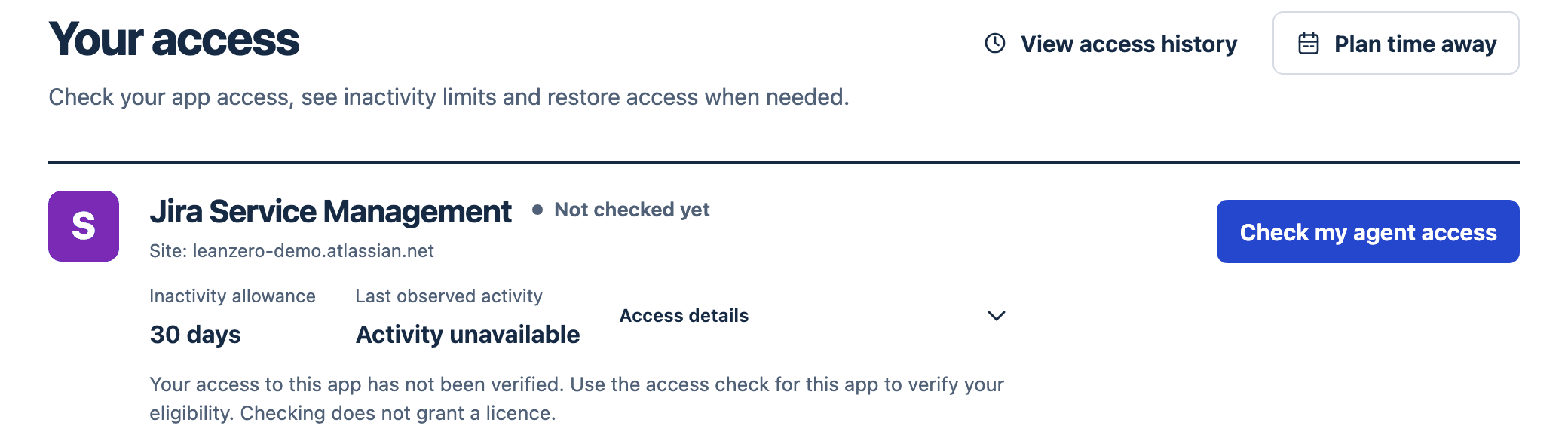
Until then, the app doesn't read your users' activity for that app. My access shows Activity unavailable, nobody gets an inactivity warning, and if you want a seat back you release it yourself. One kind of release does run on its own, switch or no switch: if a managed account is suspended, leaves the organization or drops out of the eligibility group, the app releases that seat. You do that in People: pick the app, select the accounts, add a reason, preview exactly which accounts change, then apply. The listing summary calls this "Beta; access changes require verified setup."
With release on, unknown activity still stops it. The guide is blunt: "Unknown or unparseable activity is not a never-used account and is not a release candidate." A never-used account is different: if Atlassian's answer is complete and has no date for that app, the allowance counts from the day Cost Slasher granted the seat or, for a seat that was already there when you installed it, from the day the app took it over.
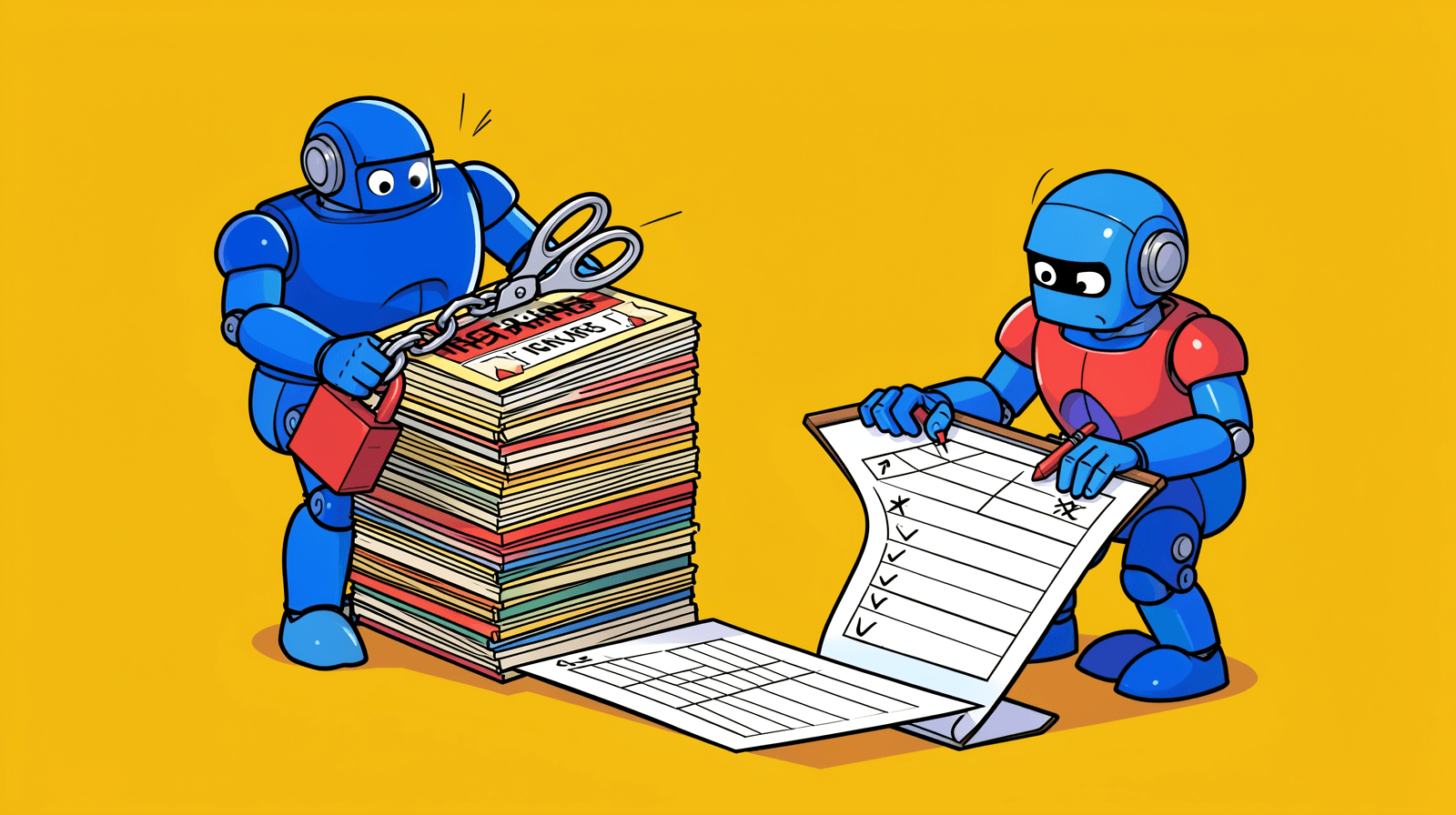
Why so careful? A seat you paid for one month too long is cheap. Removing the release manager's Jira access on release morning isn't. Most of the licence apps I looked at advertise the automatic part first ("Auto-Schedule deactivation/suspension of inactive users", "Deactivate and offboard by inactivity threshold (3 days to 6 months)"). I shipped the off switch first, and you turn it on per app once the checks pass on your site.
Confluence inactive users and JSM agents: one policy per product
Cost Slasher installs on Jira and opens in Confluence on the same site. Confluence is the common case for a separate policy: plenty of people live in Confluence and rarely open Jira, and one site-wide rule would warn the wrong people.
JSM agents are different. You can set an agent policy and limit agent seats. Automatic agent release stays disabled, though. Atlassian's last-active data records a page view of two seconds or more, which can't tell an agent who works tickets from one who glanced at the queue. Agent seats also cost more (Service Collection, the plan JSM is now sold as, is $26.90 per agent a month at Standard for the first 15 agents), so a wrong release costs more too.
What ships today: My access, time away, a seat cap, reports and audit
My access is the page members see first: their access per app, the inactivity allowance, the last observed activity, and a button to check or restore. Checking grants nothing. Restoring is a separate click. It's also how people ask for a seat in the first place.
People who already lost their seat can't open the app, so recovery starts outside it. You paste a generated message into Atlassian's access-denied settings, and it links to a recovery page on cost-slasher.leanzero.net. Signing in there only asks Atlassian who you are, and signing in alone grants nothing. (Other apps offer self-service restore too. miniOrange and OSCi advertise it, for example.)
Time away is the feature I haven't seen on the other licence apps' listings (we read ten). A member enters when they leave and when they're back, previews it, then confirms. The licence is released for the absence, and the return seat stays reserved in the pool, so nobody else takes it. Restore is scheduled to start 30 minutes before the recorded return, and there's an "I'm back early" button. It only works if they're still eligible when they come back.

A seat limit with a queue. Each app's managed group has a seat limit. When it's full, a request waits with an expiry (24 hours by default) and the app picks waiting requests up in order as seats free. The limit covers access granted through Cost Slasher's group. Access granted through other groups isn't counted against it.
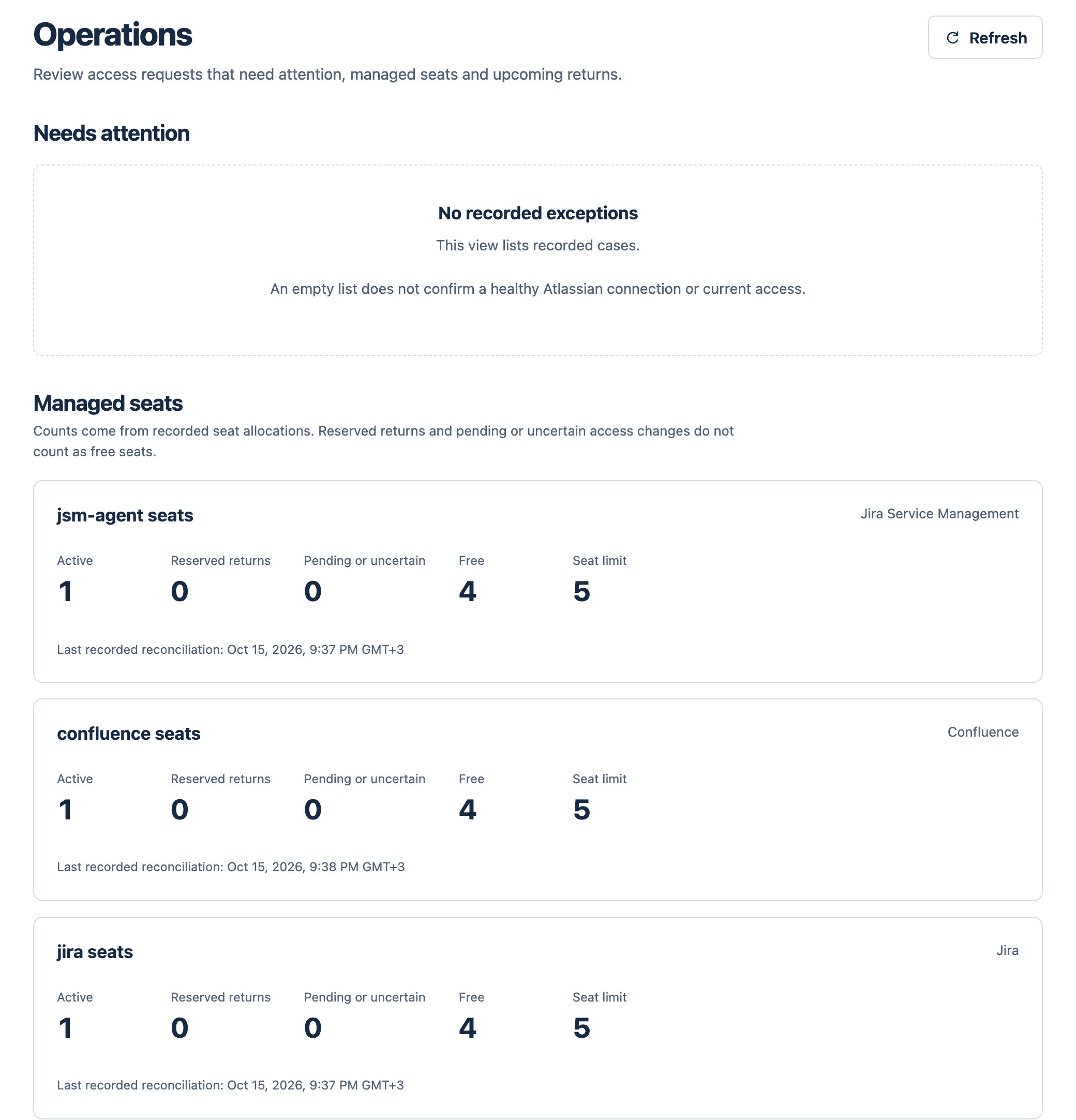
Management reports download as PDF, CSV or JSON. They hold aggregates only, with no individual names. Type in a monthly seat price and you get an estimate, which the app labels "a planning estimate" that "does not prove invoice savings".
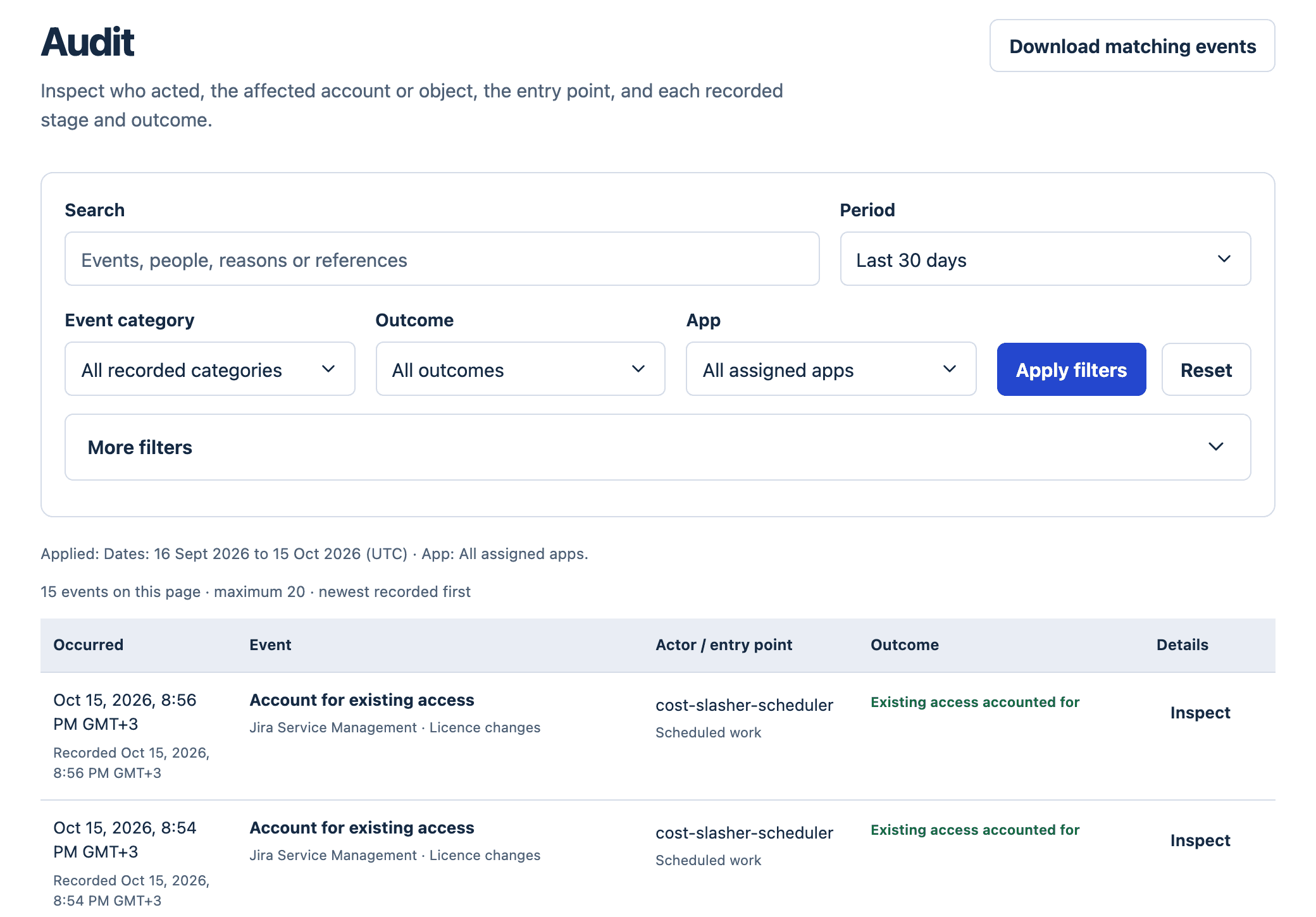
The audit log records who acted, on which account, through which entry point, and the outcome of each stage. You can filter by period, category, outcome, app, actor or account, and the download holds all matching events, across pages.
There are five roles (Member, Operator, Routing manager, Auditor, Administrator), each scoped to sites and apps, and a REST API with scoped tokens that expire.
If your groups come from SCIM, this part matters. Cost Slasher reads a SCIM-managed group only as an eligibility source and never writes to it. Seats are granted through a separate destination group that the app has verified it can write to, and routing rules (add, mirror or move) show a preview first.
What the Atlassian cloud price increase 2026 does to an idle seat
No customer has run Cost Slasher yet, so this is Atlassian's price list and a calculator, done with their tables on 15 October 2026.
Take a 250-user Jira Standard site on monthly billing, and say 25 people (10%) haven't opened Jira in 90 days. Atlassian prices monthly seats in bands, so the last 150 users pay the 101-250 rate.
Before 13 Oct | From 13 Oct | |
|---|---|---|
Jira Standard, users 1-100 | $9.05 | $9.70 |
Jira Standard, users 101-250 | $7.65 | $8.20 |
250 users, monthly bill | $2,052.50 | $2,200.00 |
25 idle seats, per month | $191.25 | $205.00 |
25 idle seats, per year | $2,295 | $2,460 |
If the same 25 people also hold Confluence Standard ($5.45 per user per month in the 101-250 band), that's another $136.25 a month, or $1,635 a year.
Cost Slasher is priced on the Jira user count, $1.32 a month for each of the first 100 users and $0.40 for each user after that up to 5,000. Once those 25 are gone the site has 225 users, which comes to $182 a month, $2,184 a year. That's about the cost of 22 idle Jira seats at $98.40 a year each, or 13 people who hold both Jira and Confluence. Up to 10 users it's free, permanently.
So on Jira alone at 10% idle it's close to break-even, and in this beta the seats are released by you, not by the app. What you'd be paying for is the policy and audit trail around each change, plus time away and the seat queue. Automatic release comes once you've verified it. Atlassian's usage billing from 3 December 2026 also pools allowances such as Rovo credits per paid user, so a removed seat shrinks that pool a little (I measured what 25 Rovo credits per user actually buys).
Annual plans are different. You pay for a tier. You only save when you drop to a lower one at renewal. Jira Standard's 300-user tier is $25,500 a year and the 200-user tier is $18,000, so getting a 280-person site under 200 is worth $7,500 a year. Cost Slasher's annual price at 300 users is $2,120.
And the competition, from each app's live pricing on the same day:
App | Vendor | Annual, 100 users | Annual, 500 users |
|---|---|---|---|
Manage Users for Jira Cloud | Bloompeak | $200 | $600 |
License Cost Optimizer for Jira | Atlassway | $790 | $2,700 |
User Management for Jira & Auto-deactivation | miniOrange | $850 | $2,100 |
Kantega User Management & License Optimizer | Kantega SSO | $850 | $2,100 |
User Management for Jira | TechTime | $1,000 | $2,375 |
Flexible User License | OSCi | $1,000 | $2,375 |
User Management and License Optimizer | resolution | $1,000 | $3,450 |
Cost Slasher | LeanZero | $1,320 | $2,920 |
At 100 users we're the most expensive. At 500 only resolution costs more. Kantega's listing says it is fully hosted on Atlassian's infrastructure, and resolution's says Cloud Fortified. Ours is neither yet. For Jira alone at 100 users I probably wouldn't pay $1,320 for it. If your people also hold Confluence or JSM agent seats, or you lose a day every time someone comes back from leave to a missing licence, I think the sum changes. And if all you want is a sorted list of last-active dates, the export from the first section is free.
Install it and the first ten minutes
First, where your data goes, because a security reviewer will ask before step 4. The app calls api.atlassian.com and cost-slasher.leanzero.net. Recovery sign-in, the controller registry (which tracks each installation's controller), shared organization budgeting and email notifications run in AWS Ireland, behind CloudFront. The Admin API key stays in Forge. Our privacy declaration states that the app doesn't support data residency, so if your organization requires Runs on Atlassian, this isn't the app for you today.
- Install Cost Slasher from the Marketplace listing on your Jira Cloud site. The listing has a Try it free button, and sites with up to 10 Jira users pay nothing.
- Open Apps → Cost Slasher. Members see My access first. The first site admin to open it gets a setup guide that shows one next step at a time. Opening setup doesn't call Atlassian's organization API or change any licence.
- Run Storage safety. It tests the app's own Forge SQL storage on your site with throwaway records and checks they get cleaned up. It touches nothing in Jira. Our demo install passed all 88 units.
- Enter your Organization ID, Directory ID and an organization Admin API key.
- Request pairing from LeanZero. Recovery runs through our service, so this step needs us. Ask through the support portal.
- Map each app: an eligibility group, a destination group that grants the paid app, and a seat limit. Applying a mapping creates a policy with automatic release off and starts a read-only count of who already holds each seat. It doesn't grant anyone a seat.
- Look at Policies, Operations and People.
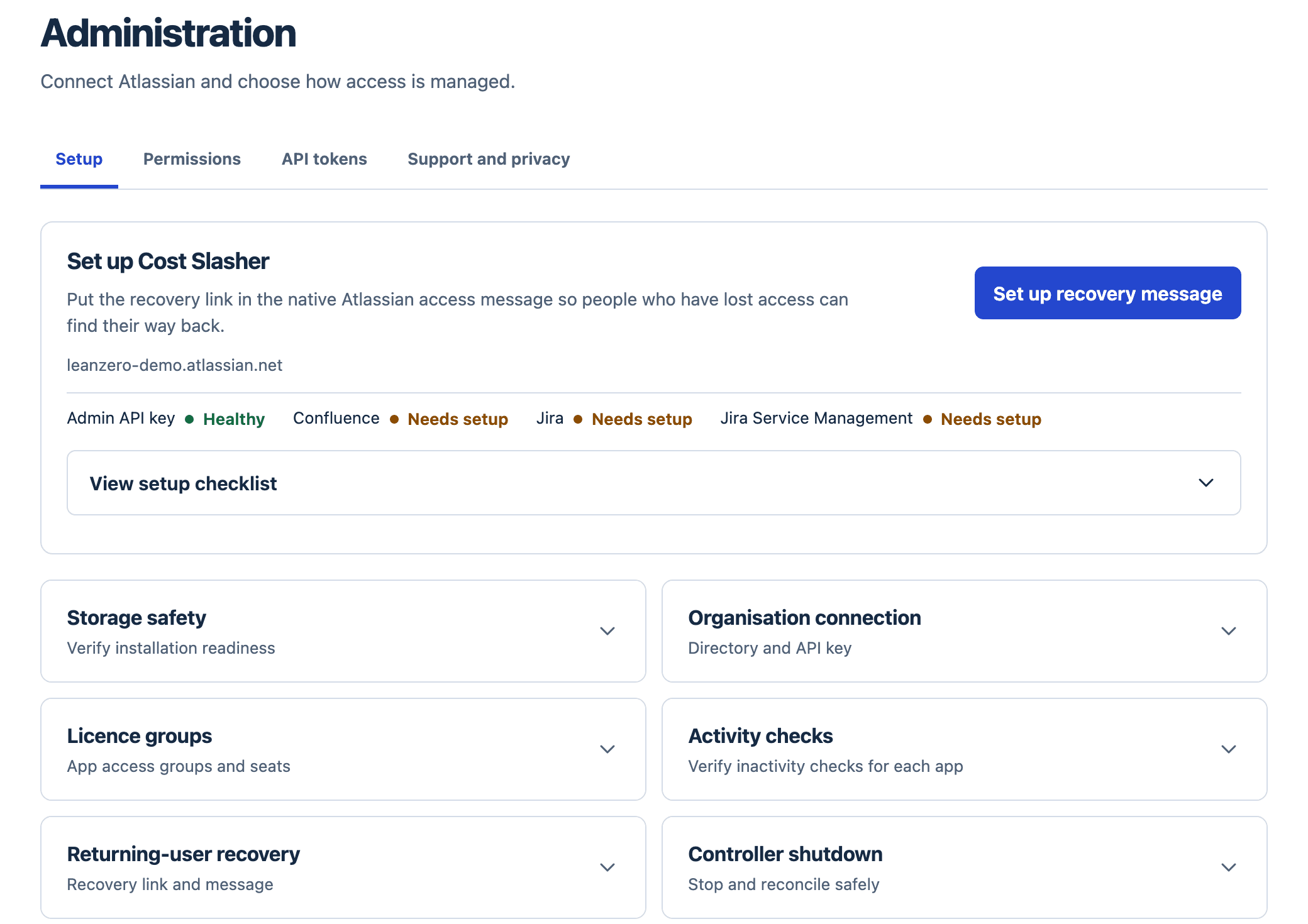
The last setup section, Controller shutdown, is the brake. It freezes new work at the revision you reviewed and cancels only operations proven never to have started. Existing paid access is kept. This short film walks through it on the production app:
We published four more the same evening, on privacy and release notes, roles and scope, the REST API's scoped tokens and usage coverage.
Where I was wrong while building it
This post. The first draft said Cost Slasher finds your inactive users. Then our red-team pass read the code. With release off, the app doesn't read your users' activity, and off is how the beta ships. The title had to change. So did the excerpt, the hero image and five sentences. A launch post that oversold its own beta was the one thing I'd told myself not to write.
A 204 isn't a freed seat. Removing someone from a group returns 204, but they may still get the same app from another group. In my CogniRunner drill the removal returned 204 and the count did drop, but the agent had no way to read the person's groups back. Cost Slasher counts a seat as reclaimed only after it reads back that effective access is gone, and the 4 October commit that fences inactivity releases added 73 test cases.
Two UX defects only showed up when we recorded the demo films. The empty-list message appeared on the last page of 12 lists and the exclusion picker, as if those lists were empty. And the setup page contradicted itself about recovery pairing when pairing was healthy. Both were fixed on 4 October. I should have clicked through those pages myself.
The demo site's first signed request failed with a 503. This was on 15 October, release day. The new production secrets sat in a different AWS namespace from the one our gateway role could read. A narrow permission grant fixed it. The enrollment tool now refuses a mismatched namespace before it writes anything.
The Marketplace shows version 3.2.0. Inside the app the footer says "App release 0.4.4", which is the same build under our own numbering.
Who should install it now
Ten users or fewer? Install it. It costs nothing.
If you're bigger and want inactive users removed on a schedule tonight, this beta isn't it yet, and I'd rather lose that sale than remove the wrong person. If you want a written inactivity policy per app and time away that keeps someone's place, install it and tell us through the support portal what breaks. The Cost Slasher product page has the full manual.
Comments
0Add a comment