
Teamwork Graph CLI: install twg and run your first ten Jira and Confluence queries

14 min readNovember 4, 2026
Key takeaways
- twg 1.4.2 installed on a Mac Studio from Atlassian's installer as one ~100 MB binary with no Node.js, and the download took about a second here. The installer also added a PATH line to ~/.zshrc, even though we pointed it at a different folder.
- You don't need the browser to sign in. With TWG_USER, TWG_TOKEN and TWG_SITE set to an ordinary Atlassian API token, twg doctor said 'API token is valid' and all our Jira and Confluence queries worked. Atlassian's support pages describe OAuth 2.1 as the method; Atlassian's own agent install notes document the token variables.
- Each of our ten queries came back in 0.6 to 1.5 seconds, except Rovo search at 5 seconds, which skipped Trello with an HTTP 400 and exited with code 3 to say the results were partial.
- Asking for --limit 200 returned 100 work items with exit code 0. The JSON still carries pageInfo.hasNextPage, so a ten-line loop paged through all 3,046 items in our biggest test project in 31 seconds, the same count Jira's own API gave.
- With twg's agent skills installed in one project folder, Claude Code (Sonnet 5.5) answered 'how many LZPT work items aren't done' correctly, 81, in 42 seconds and 16 turns for $0.31. We checked the 81 against Jira's REST count.
- Admins find the CLI under Connectors > Teamwork Graph CLI. On our test org all 32 permissions were allowed by default, the 7 Delete ones included.
Atlassian's Teamwork Graph CLI is a single program called twg that lets scripts and coding agents ask your Atlassian Cloud site questions from the terminal. You can use it by hand too. We installed version 1.4.2 on one of our Mac Studios, signed it in with an ordinary API token (no browser), and ran ten queries against wolfaenpak, our Atlassian test site. Nine of them answered in under two seconds. Rovo search, which searches all your connected tools at once, took five.
We tripped over two details along the way. Asking twg jira workitem query for 200 work items gives you 100, with exit code 0 and no warning in the text. And twg confluence search text adds "last modified in the past 90 days" to your search. An older page won't come back unless you read the query it echoes. Both are easy to handle once you know, and the steps below show how. The paging loop in Step 4 pulled all 3,046 work items from our biggest test project, the same number Jira's own count API reports.
Atlassian's own Community post introducing the Teamwork Graph CLI has close to 13,000 views. If you look after a Jira or Confluence site and you've ever exported a filter to a spreadsheet just to count something, twg can do that from a short script (Step 4). It's also what a coding agent like Claude Code uses to read your site. If you're the admin, the permissions screen in Step 2 is the part to read before your team installs it.
- 1
Install twg with Atlassian's installer and check it with twg doctor.
- 2
Sign in, either with OAuth in the browser or with an API token for scripts.
- 3
Run ten first queries against Jira and Confluence.
- 4
Use it from a script that pages properly.
- 5
Add the twg skills to Claude Code and ask it a question.
Prerequisites: an Atlassian Cloud site on Standard, Premium or Enterprise (Government Cloud is "Not available"); an account, and for scripts an Atlassian API token, that can see the projects you'll query; macOS (arm64 or x64), Linux (x64) or Windows (arm64 or x64); jq for Step 4. We tested twg 1.4.2 on macOS on 3 November 2026; we didn't try Linux or Windows.
What we found when we ran it on our test site
- Install is one binary and no runtime. The macOS installer downloaded a 100 MB file, checked its SHA-256 sum and was done. Atlassian's setup page confirms "The TWG CLI binary does not require a separate runtime (for example, no Node.js)."
- An API token works for scripts.
twg doctorprinted "Authenticated successfully. API token is valid for the configured endpoint." with the token read from environment variables, and nothing was written to disk. - Most queries take about a second. Jira and Confluence reads took 0.75 to 1.5 seconds each. Rovo search, which searches across the connected products, took 5.0 seconds.
--limitstops at 100.--limit 200gave exactly 100 items andhasNextPage: true. FollowingnextCursorgot all 3,046.- Exit code 3 means "partial", and 0 doesn't always mean complete. Rovo search hit an HTTP 400 from Trello on our site, skipped it, returned five results and exited with 3. Atlassian's changelog says a partial search with more than 10 results can exit 0, so check the JSON too.
- The agent got it right, and it was slow-ish. Claude Code reported 16 turns and 42 seconds for two simple questions. Four of its tool calls went on learning the commands from the skill and
twg help, and most of the rest on reading the JSON twg had saved to a temp file. The answer matched Jira's REST API.
What is Teamwork Graph CLI?
The Teamwork Graph is the map Atlassian keeps of who works on what across your Atlassian apps and any connected tools (we wrote a plain explainer of the Teamwork Graph a few days ago). The CLI is a command line client for it. Atlassian's support page puts it this way: it's "a command line interface to the Atlassian Teamwork Graph and Cloud services", and "Install TWG CLI and your agent — Claude Code, Codex, Gemini, Cursor, and others — can query and act across all your Atlassian products and the Teamwork Graph on your behalf".
In practice it has two kinds of commands. Native product commands (twg jira, twg confluence and about a dozen more) talk to each product's own API through Atlassian's gateway. Cross-product commands (twg rovo search, twg collaborators, twg context) use the graph itself. Atlassian marks the second kind [Enriched] in the help output, and that label matters for cost later on.
The status is a bit muddled, and you should know before you roll it out. Atlassian announced the CLI as open beta in May 2026 and posted on the Community on 30 June that it "is generally available today". The support FAQ, updated 27 October, still says "In the current beta phase, Teamwork Graph CLI is free to install and use", and the developer changelog labels 1.4.2 "Beta release" even though 1.4.2 is what the stable channel installs. I think it's fair to treat it as a supported tool whose documentation is catching up, and I'd probably still pilot it with a few people first.
Step 1: Install the Teamwork Graph CLI on macOS, Linux and Windows
Atlassian's recommended one-liner for macOS and Linux is:
1bash <(curl -fsSL https://teamwork-graph.atlassian.com/cli/install)We downloaded the installer and read it before running it. It's an 817-line bash script, and it has flags to skip the login (--skip-login) or the agent skills (--skip-skills), plus --install-dir for the location. We put the binary in a scratch folder and skipped the login and the agent skills, so we could do both by hand:
1curl -fsSL https://teamwork-graph.atlassian.com/cli/install -o twg-install.sh
2bash twg-install.sh --install-dir /tmp/lz-twg-cli/bin --skip-login --skip-skills -y
You should see something like this:
1Detected platform: darwin-arm64
2Requested release: latest (v1.4.2)
3Will install twg to: /tmp/lz-twg-cli/bin/twg
4
5Downloading https://teamwork-graph.atlassian.com/cli/twg-darwin-arm64-v1.4.2 …
6Downloading https://teamwork-graph.atlassian.com/cli/SHA256SUMS-v1.4.2 -> …
7
8twg 1.4.2 installed at /tmp/lz-twg-cli/bin/twg
9
10  ✅ Installed: /tmp/lz-twg-cli/bin/twg
11  ✅ Added /tmp/lz-twg-cli/bin to ~/.zshrc
Notice the last line. Even with --install-dir, the installer appended # Added by Teamwork Graph CLI installer and an export PATH=... line to our ~/.zshrc. That's fine on your own laptop, and less fine on a shared build machine, so check your shell profile after installing. We removed both lines afterwards.
On Windows, Atlassian's page has you download and run a PowerShell script:
1curl.exe -fsSL https://teamwork-graph.atlassian.com/cli/install.ps1 -o twg-install.ps1
2powershell -ExecutionPolicy Bypass -File .\twg-install.ps1
The same page warns: "Don't run the Windows installer from Git Bash, MINGW, WSL, or another bash-like shell." If you've seen a brew install line in an older blog post, the Homebrew tap is gone (fatal: repository 'https://github.com/atlassian/homebrew-twg/' not found, GitHub issue #7), so use the installer.
Keep the TWG CLI updated: stable and beta channels
Atlassian shipped 52 versions between 0.9.7 on 6 May and 1.4.2 (dated 27 October in the changelog), so you'll update often. twg update gets the latest stable build, and twg update --channel beta or --channel stable switches channels. The support page notes that "If you're on version 0.9.6 or earlier, twg update may not work correctly", in which case run the installer again. To remove it, twg uninstall --dry-run shows what would go, and Atlassian says twg uninstall "disables the schedule, revokes stored credentials, and removes the CLI and all local TWG configs."
Step 2: TWG CLI auth: OAuth sign-in, or an API token for scripts
For your own laptop, the normal route is twg login. Atlassian says it "displays a verification URL and a short user code, then opens your browser automatically", and the CLI then refreshes the OAuth token for you. Access tokens last 8 hours, and a small background helper (a macOS LaunchAgent, a Linux timer or a Windows scheduled task) runs every 12 minutes to refresh them before they expire.
A script or a CI job has no browser, though. Atlassian's support pages describe OAuth 2.1 as "the only authentication method TWG CLI supports, except for Bitbucket commands". Atlassian's own install notes for agents (AGENTS.md) say something different: users can "set TWG_TOKEN and TWG_USER in their environment themselves (every command reads them directly — no login needed)". So we tried it with a normal Atlassian API token on wolfaenpak:
1export TWG_USER="you@example.com"
2export TWG_TOKEN="<your Atlassian API token>"
3export TWG_SITE="wolfaenpak"
4twg doctor
The part of the output that matters:
1Resolved auth
2  Endpoint: https://api.atlassian.com/graphql
3  Site: wolfaenpak
4  Auth method: API token
5
6Connectivity
7  Status: ok
8  Token: valid
9  Auth source: TWG_TOKEN + TWG_USER
10  Message: Authenticated successfully. API token is valid for the configured endpoint.
11
12auth.conf
13  File: not found
If yours says Token: valid and Auth source: TWG_TOKEN + TWG_USER, you're signed in. TWG_SITE takes your site prefix (the part before .atlassian.net), a hostname or a cloud ID. Nothing was saved to disk. In CI that's what you want, since the token stays in your secret store and goes away with the job. Keep in mind the token acts as that user, with that user's permissions, so a CI job should use an account that can see only what the job needs.
We didn't test whether the admin permission switches in the next screenshot also apply to an API-token session. The page says it configures "the OAuth scopes", so I wouldn't assume they do.
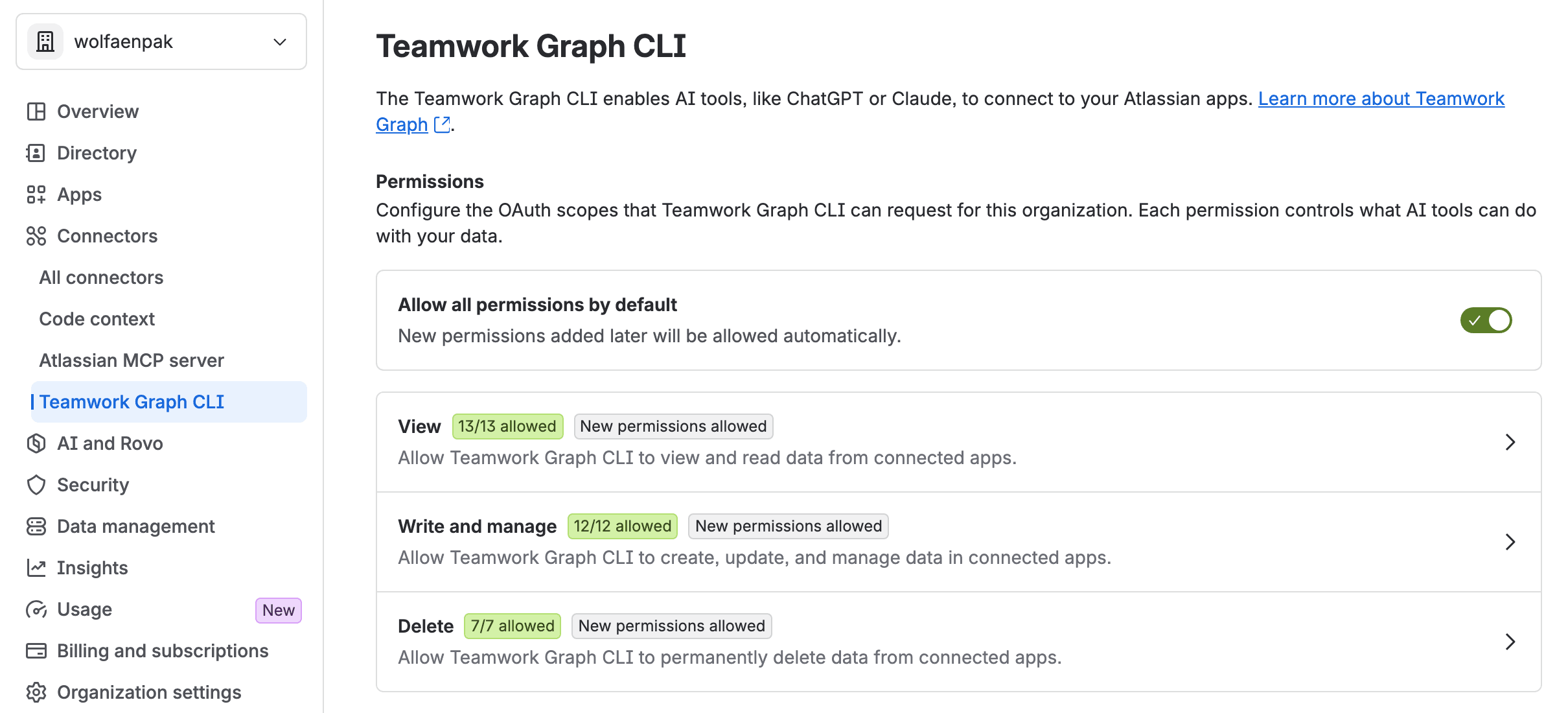
If you're the admin, that's the page to look at before your team installs the CLI. There's no single on/off switch for the organisation. Atlassian's page says that to block it you "turn off Allow all permissions by default, clear the permissions in each category, save your changes, and choose Save and revoke sessions." Each command a user runs shows up in the audit log as "Invoked TWG CLI command", and the actor is always the person, even when an agent ran it. We covered the Delete permissions in our Team '26 Europe write-up if you want to lock those first.
Step 3: Ten first Teamwork Graph CLI queries against Jira and Confluence
These all ran against wolfaenpak, our test site, with the API token from Step 2. Times are the wall clock from time.
1. List your Confluence spaces, team spaces only. Without --type global the list mixes in everyone's personal space, named after the person.
1twg confluence space list --type global --limit 101 KEY Name Type Status URL
2 ----------------------------------------------------------------------------
3 WFH WORK FOR HIRE global current https://wolfaenpak.atlassian.net/wiki/spaces/WFH
4 JT JSM Test global current https://wolfaenpak.atlassian.net/wiki/spaces/JT
5 DEMO Demo service project global current https://wolfaenpak.atlassian.net/wiki/spaces/DEMO
6 ...
7 PAYENG Payments Engineering global current https://wolfaenpak.atlassian.net/wiki/spaces/PAYENG
8 REGREP Regulatory Reporting global current https://wolfaenpak.atlassian.net/wiki/spaces/REGREP
9 OPRES Operational Resilience global current https://wolfaenpak.atlassian.net/wiki/spaces/OPRES2. List your Jira spaces (projects). This one prints Jira's raw REST JSON even in the default text mode (avatar URLs included). You'll mostly pipe it through jq.
1twg jira space list --limit 101{
2 "projects": [
3 {
4 "id": "11330",
5 "key": "AUTOGOV",
6 "name": "Automation Governance",
7 "projectTypeKey": "software",
8 ...3. Run a JQL query. Any JQL you'd type in Jira works. LZPT is one of our test projects, so swap in your own key. (Jira calls them work items now, but the JSON still says issues.)
1twg jira workitem query --jql "project = LZPT ORDER BY updated DESC" --limit 51{
2 "issues": [
3 {
4 "id": "21810",
5 "key": "LZPT-218",
6 ...
7 "url": "https://wolfaenpak.atlassian.net/browse/LZPT-218",
8 "summary": "WIDE-02",
9 "status": {
10 ...
11 "name": "Done",
12 ...
13 "updated": "2026-10-31T11:34:46.047+0200"
14 },
15 ...You get the usual Jira fields for each work item, from key and summary down to assignee and dates. The first one back was LZPT-218 ("WIDE-02"). It's Done and was last updated on 31 October.
4. Ask for JSON and keep only the fields you want. This is the form you'll use in scripts. --select trims the payload, and --output-summary none stops the CLI from wrapping big results in a summary.
1twg jira workitem query "project = LZPT AND statusCategory != Done ORDER BY updated DESC" \
2  --limit 5 -o json --output-summary none \
3 --select data.issues.key,data.issues.summary,data.issues.status.name1{
2 "apiVersion": "v2",
3 "command": "jira.workitem.query",
4 ...
5 "data": {
6 "issues": [
7 { "key": "LZPT-193", "summary": "CHAIN-2 build", "status": { "name": "In Progress" } },
8 { "key": "LZPT-186", "summary": "E1 · Linear Chain", "status": { "name": "To Do" } },
9 ...5. Get one work item. We got this wrong at first: we asked for data.fields.summary, the path in Jira's REST API, and got back only the key. twg flattens the fields, and data is a list because get accepts several keys at once.
1twg jira workitem get LZPT-193 -o json --output-summary none \
2 --select data.key,data.summary,data.duedate,data.parent.key1 "data": [
2 {
3 "key": "LZPT-193",
4 "summary": "CHAIN-2 build",
5 "duedate": "2026-05-15",
6 "parent": { "key": "LZPT-186" }
7 }
8 ]The envelope around it also says where the data came from ("provenance": { "source": "teamwork-graph" }) and whether it's complete ("coverage": { "status": "complete" }).
6. Show a space's page tree.
1twg confluence tree CLOUD1 Cloud Migration Home [page] 323158295 current
2 └── abc [page] 372965393 currentYep, our test space has a page called "abc". Your tree will look more respectable.
7. Search Confluence in plain words. Watch the line it prints back.
1twg confluence search text "migration runbook" --limit 51 Found 0 results for: type in (page, blogpost) AND text ~ "migration runbook" AND lastmodified >= now("-90d") ORDER BY lastmodified DESCsearch text adds lastmodified >= now("-90d") for you. If the page you want hasn't been touched in three months, it won't come back. Want the old pages too? Use number 8.
8. Search Confluence with CQL. This is the search I'd use most, because you write the whole query yourself and nothing gets added.
1twg confluence search query --cql 'type=page AND space in (PAYENG,REGREP,OPRES,IGDEMO) ORDER BY lastmodified DESC' --limit 51 Found 5 results for: type=page AND space in (PAYENG,REGREP,OPRES,IGDEMO) ORDER BY lastmodified DESC
2
3 1. RD004 Detailed Requirements - DEX header test (IGDEMO) [page]
4 ...
5 https://wolfaenpak.atlassian.net/wiki/spaces/IGDEMO/pages/430899266/...9. Search everything at once with Rovo search. This is the cross-product one, and it's [Enriched].
1twg rovo search "payment incident" --limit 51Warning: Rovo search DOWNSTREAM_ERROR: Problem while calling endpoint trello: 400 Bad Request ... (printed twice)
2Warning: Skipped: Trello (HTTP 400). Only this search is affected: every other source was searched, and search-code, bb and other twg commands are unaffected.
3Top 5 results (limit 5; more matches exist; skipped: Trello; partial results)
4
5 1. Payments Engineering Home
6 Source: confluence · Type: page
7 2. CL probe CL-T-fingerprint
8 Source: jira · Type: issue
9 ...It took 5.0 seconds and exited with code 3. Trello failed, and the search still came back with Confluence pages and Jira work items in one list.
10. See who you work with most. Also [Enriched], and the funniest result of the run.
1twg collaborators --limit 51✓ Found 5 collaborator(s).
2
3 1. Sentinel Vault: Document Control & Approvals for Confluence score 0.167
4 2. CogniRunner: AI Workflow Validators & Agents for Jira score 0.042
5 3. LeanZero Management: Gantt Charts & PPM for Jira score 0.006
6 4. Gabriela Perdum score 0.003
7 5. Automation for Jira score 0The account we ran it as is the admin of our test site, where we install and test our own Forge apps all day. So its three closest colleagues are app bots, and I come fourth. On a normal account you'll see people.

Step 4: Run twg from a shell script or a CI job
In a script you have to handle paging and exit codes yourself. The interactive output hides both.
Page past 100 results
Our biggest test project, COGTEST, has 3,046 work items. Ask for 200:
1twg jira workitem query "project = COGTEST" --limit 200 -o json \
2 --output-summary none | jq '(.data.issues|length), .pageInfo.hasNextPage'1100
2trueYou asked for 200. You got 100, and the exit code was 0. You should see the same 100 and true on any project with more than 100 work items. Someone reported the same thing on Atlassian's public twg-cli GitHub tracker (issue #11) against an older version, and it still happens on 1.4.2. The good news is that the JSON tells you there's more: pageInfo.hasNextPage is true, and pageInfo.nextCursor holds the cursor for the next page. Note that pageInfo sits at the top level of the response, next to data, and not inside it.
So a loop does the job. Save this as all-keys.sh:
1#!/usr/bin/env bash
2# Page through a JQL query with twg and print every work item key.
3set -euo pipefail
4jql="$1"; after=""
5while :; do
6  page=$(twg jira workitem query "$jql" --limit 100 ${after:+--after "$after"} \
7         -o json --output-summary none)
8  echo "$page" | jq -r '.data.issues[].key'
9  [ "$(echo "$page" | jq -r '.pageInfo.hasNextPage')" = "true" ] || break
10  after=$(echo "$page" | jq -r '.pageInfo.nextCursor')
11done
Then run it:
1chmod +x all-keys.sh
2./all-keys.sh "project = COGTEST ORDER BY key ASC" | wc -l13046The loop should print the same number Jira's count API returns for that JQL. It took 31 seconds for 31 pages. To check it, we asked Jira's own REST API for the count of the same JQL (POST /rest/api/3/search/approximate-count), which returned {"count":3046}. Every key was unique, from COGTEST-1 to COGTEST-3086 (some keys in between were deleted, so the last number is higher).
Read the exit code
The developer changelog says a search returns exit code 3 when it's incomplete and has 10 or fewer usable results. Rovo search did exactly that in Step 3. Since 1.3.9 (20 October) an incomplete search with more results can exit 0, so don't treat 0 as proof that every source answered. Check the partial flag in the JSON as well:
1twg rovo search "payment incident" --limit 5 -o json --output-summary none > results.json
2case $? in
3  0) echo "complete" ;;
4  3) echo "partial results, check the warnings" ;;
5  *) echo "twg failed" ; exit 1 ;;
6esac
7jq -e ".resultInfo.partial == true" results.json >/dev/null && echo "resultInfo.partial is true"1partial results, check the warnings
2resultInfo.partial is trueOn our site results.json had "resultInfo": {"partial": true, "returned": 5, ...} plus a failures list naming Trello. Keep --output-summary none in there: without it, -o json wrote a YAML summary to the file, which jq can't read.
Two settings for CI and agents
Atlassian's agent notes ask you to set TWG_AGENT_DEFAULTS=1 when an agent or a non-interactive host runs twg. And twg env --exec -- <program> (added in 1.3.8) starts another program with the selected login profile's credentials, which saves you exporting them by hand. If you're upgrading an older script, twg api was removed in 1.3.5 on 1 October, and calling it now fails with error: unknown command 'api' (GitHub issue #29).
Step 5: Add the TWG CLI skill to Claude Code and other coding agents
A skill is a folder of instructions a coding agent reads to learn a tool. The full installer adds twg's skills for the agents it finds on your machine. We wanted them in one project only, so we made an empty folder and ran:
1twg skills install --local --agent claude -yIt printed nothing. It took 0.4 seconds. It created four skills (twg, twg-jira, twg-confluence, twg-setup) as links to the CLI's own copy. They went into .agents/skills/, the shared folder Atlassian's skills page uses for every agent, and into .claude/skills/ for Claude Code. You should see those four folder names if you run ls .claude/skills. Atlassian's support page names two skills (twg and twg-workflows), so expect the list to change between versions.
Then we asked Claude Code a question from that folder, allowing it to run only twg commands:
1export TWG_AGENT_DEFAULTS=1
2claude -p "Using the twg CLI, tell me which work items in the Jira project LZPT are not done yet (just the count and the five most recently updated), and which Confluence page in the PAYENG space is the most recently modified. Keep the answer short." \
3  --model sonnet --max-turns 15 --allowedTools "Bash(twg:*)" "Skill" "Read"
It loaded the twg skill and read twg help-map and twg help describe "jira workitem query" to learn the commands. Then it ran the JQL with statusCategory != Done and read the full JSON from a temporary file. twg had written it there because in agent mode it summarises big outputs and saves the rest to disk. Its answer:
1In LZPT, 81 work items are not done. [...]
21. LZPT-193 "CHAIN-2 build" (updated 2026-10-31)
32. LZPT-186 "E1 · Linear Chain" (2026-10-29)
4[...]
5In PAYENG, "Payments Engineering Home" (id 323190936) is the only page in the space, so it is the most recently modified by default.
Both answers were right. Jira's count API returned 81 for the same JQL, and Confluence's REST API listed exactly one page in PAYENG. Claude Code reported 16 turns, 42 seconds and $0.31 for the run (model claude-sonnet-5-5). Four of its calls went on learning the CLI, which has 567 commands by Atlassian's count in the GA post. Four more were refused: three because we'd only allowed twg, Read and Skill (it tried jq and grep), and one because the file twg saved was outside the project folder, where Claude Code won't search. Allowing Bash(jq:*) too, or naming the exact command in your project's instructions, should save turns.
If you use Claude Code's plugin marketplace instead, Atlassian publishes an Atlassian Teamwork Graph CLI plugin that sets this up with /twg-setup.
TWG CLI vs MCP: when an agent should use which
Atlassian also runs the Atlassian MCP server, which gives agents the same kind of access through the Model Context Protocol. Their comparison page has a clear rule: "Use Atlassian MCP when your agent runs in a browser, on mobile, or as a cloud-hosted agent. Use Teamwork Graph CLI when you're building scripts, CI/CD pipelines, or other repeatable workflows. Use whichever you prefer when your agent runs on your desktop with terminal access". I think that's a fair rule, and for an admin who mostly wants reports, the CLI is probably the easier one to start with.
What I'd add from our own numbers: many MCP clients load every tool definition into the agent's context up front. When we measured that, 145 MCP tool definitions cost 40,784 tokens before the agent did anything. Claude Code is an exception: since January 2026 it holds MCP tool definitions back until it searches for them. The CLI's skills are a few hundred lines. The agent looks up commands as it needs them, so Claude Code spent turns on twg help. Fewer tokens up front, more turns per question. Atlassian claims "44% better answers using 48% fewer tokens" with the CLI, from what it calls "an internal study"; it hasn't published the method, and we haven't reproduced it. For the admin side of the MCP server, our MCP permissions and data security policy guide covers the switches.
Teamwork Graph CLI or the Teamwork Graph API?
If you're building a Forge app, you don't shell out to twg. You call the Teamwork Graph's GraphQL API from your app's code, and we walked through that in our Teamwork Graph API tutorial for Forge and Rovo agents. The CLI is for whatever runs on a computer with a terminal, you included. You'll notice from twg doctor that the CLI talks to the same GraphQL gateway (https://api.atlassian.com/graphql). What each one can see still depends on how it signs in: your user account and the CLI's permissions for twg, and the app's scopes for a Forge app.
What it costs to run
Reading a Jira work item or a Confluence page is free, and Atlassian's FAQ says that stays free: "Requesting single product context, such as looking up a Jira work item or Confluence page's content" is in the always-free list. The [Enriched] commands are different. Atlassian's command catalogue (28 August) marks 52 commands Enriched, including twg rovo search and twg collaborators (both used above), against 620 free ones. The FAQ says that "With 90 days advance notice, certain enriched, value-added commands will be billed with at least 1 Rovo credit per call", and that Rovo credit allowances apply from 3 December 2026. Extra usage isn't billed unless your organisation opts in. If you want to see how far a monthly allowance goes, we measured Rovo credits per action on our own site.
If it didn't work
✖ Access denied — credentials were NOT saved.with "Your TWG CLI EAP access has been revoked or is not enabled." This comes from an early-access build. Atlassian's fix is to update the CLI and runtwg setupagain (the command that installs the skills, signs you in and checks the setup)./dev/fd/11: line 1: syntax error near unexpected token `newline'during install. The install URL served an HTML page instead of the script (GitHub issue #4, since fixed). Download the script to a file first and check it starts with#!/before you run it.error: unknown command 'api'.twg apiwas removed in 1.3.5. Use the product commands (twg jira ...,twg confluence ...) instead.- You asked for 200 results and got 100. Page with
--afterandpageInfo.nextCursor, as in Step 4. - A Confluence search finds nothing you know is there.
search textonly looks at pages modified in the last 90 days. Usetwg confluence search query --cqlwithout a date clause. - Exit code 3. Partial results: one source failed or the result was cut short. Read the warnings, keep the results if they're good enough, and log it. An exit code of 0 can also hide a partial search, so check
resultInfo.partial. twg skills refreshfails with a 404 on 1.4.2. That's open as GitHub issue #32. The skills fromtwg skills installstill worked for us.
What you have now
Key takeaways
- twg installed and checked with twg doctor, and your shell profile checked for the line the installer adds.
- A sign-in for people and one for scripts. OAuth in the browser for you, and an API token in the TWG_* variables for scripts, on an account that sees only what it needs.
- Ten queries you can reuse, including the CQL form that searches all of time and the JSON form with --select.
- A paging loop that got all 3,046 work items where --limit 200 gave 100, and exit-code handling that treats 3 as partial.
- An agent that can read your site, with skills installed in one project and Claude Code answering a real question correctly.
Next, I'd pick one report you rebuild by hand each week (the open bugs per component, say, or the pages nobody has touched in a year) and turn it into a twg script. Did twg do something weird on your site? Tell me and I'll add it to the list above.
Comments
0Add a comment